





 0 Comment
 Customer Reviews

The red email sits there. Has been sitting there since Tuesday.
Not because it's hard to answer. You know what needs doing. But somewhere between seeing it and actually doing it, everything else crowds in. The calendar ping. The Slack thread that spiraled. The thing your manager "just remembered" at 4:47 PM.
Urgent wins. It always wins. Even when important sits there quietly, getting more important.
There's this moment every morning when you open your laptop and see yesterday's half-finished work staring back. The project that matters. The one that moves things forward instead of just putting out fires. You tell yourself today's different. Today you tackle the big stuff first.
Then someone needs something right now. Always right now.
It's not that people can't tell urgent from important. They can. But urgent screams and important whispers, and your brain's wired to respond to noise. So the strategic work waits. The planning waits. The stuff that prevents next month's chaos waits while you handle this month's.
Effective work prioritization through proven frameworks exists because willpower isn't enough. Because good intentions don't survive contact with a full inbox. Because without a system, everything feels equally demanding when it's demanding your attention right now.
SlideTeam's urgent-important matrix templates tackle this exact overwhelm—visual frameworks that make prioritization feel less like guesswork. Pre-designed quadrants that let you sort tasks without starting from scratch every time you're drowning.
Here's what works when everything feels urgent but nothing feels manageable.
Template 1: Priority Matrix For Managing Urgent Versus Important Tasks PPT Information
Project managers need actionable PPT templates that work. This pre-built PowerPoint slide deck delivers customizable priority matrices, comparison charts, and workflow structures designed as essential productivity tools for task prioritization in strategic planning and project reviews. Download now.
[product_image id=1677338]
Template 2: Time Management Matrix for Employee with Urgent Tasks
This pre-built PowerPoint slide delivers the urgent important matrix with proven quadrants featuring actionable bullet points and customizable design elements for managers conducting training sessions or strategic planning meetings. Download this practical PPT template today.

Download this PowerPoint Template
Template 3: Decision Matrix in Prioritization with Urgent and Not Urgent
You need this pre-built Eisenhower matrix PPT template for strategic planning sessions and priority management workshops. The color-coded quadrants (Focus, Manage, Delegate, Limit) with actionable bullet points help project managers and consultants eliminate decision paralysis. Clean design prevents death by PowerPoint syndrome . Customizable elements and comprehensive editing instructions ensure your team focuses on priority matrix implementation and strategic thinking, not slide formatting. Download now.

Template 4: Prioritization Matrix with Most and Least Important
Strategic teams need this pre-designed prioritization matrix PPT template for decisive project planning sessions. The customizable framework delivers actionable quadrants—Focus, Manage, Quick Fix, Limit—enabling managers and consultants to categorize initiatives. This urgent-important matrix, with pre-built axis labels and editable icons, transforms complex strategic decisions into clear visual logic. Download this battle-tested PowerPoint slide now.

Download this PowerPoint Template
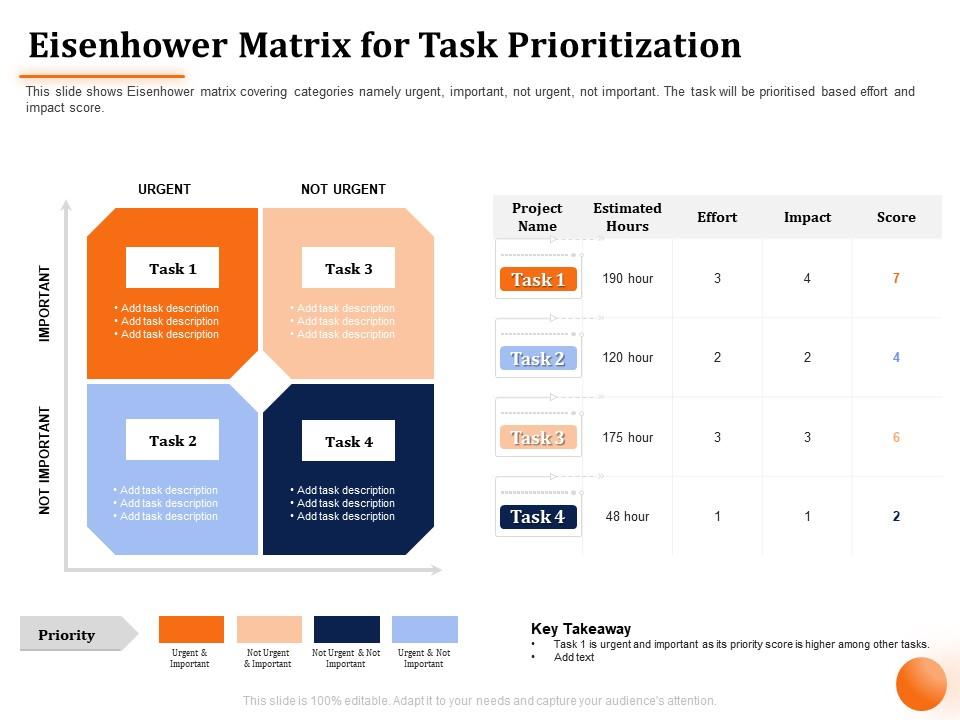
Template 5: Eisenhower Matrix for Task Prioritization Not Urgent
This pre-built PPT template delivers actionable dual panel urgent-important matrix with color-coded quadrants for strategic planning and project tracking. You get 100% customizable elements, comprehensive editing instructions, and professional visual cues that actually work. Perfect for managers, consultants, and project teams conducting performance reviews or client presentations. Download this proven PowerPoint slide preset now.
Download this PowerPoint Template
Internalize Urgent versus Important Matrix
SlideTeam's PowerPoint templates are the best in the industry for creating urgent important matrix presentations. These content-ready slides help you clearly categorize tasks by priority and urgency while maintaining professional quality that impresses stakeholders. Our ready-made templates eliminate the guesswork in designing effective task prioritization frameworks that distinguish urgent vs important activities. Deploy these PowerPoint slides to streamline your decision-making process and boost team productivity.
FAQs on urgent important matrix
What are the key components of the Urgent-Important Matrix?
The Urgent-Important Matrix includes four quadrants: urgent and important tasks, important but not urgent activities, urgent but not important items, and neither urgent nor important tasks. This strategic framework enables organizations to streamline resource allocation. It also leads to enhanced productivity through focused prioritization, and delivers improved operational efficiency. Businesses find that the urgent important matrix transforms task prioritization and decision-making to accelerate competitive advantage.
How can individuals effectively prioritize tasks using the Urgent-Important Matrix?
The Urgent-Important Matrix categorizes activities into four quadrants based on urgency and importance levels, then allocating time strategically to each category. This task prioritization and time management approach enables professionals to focus on high-impact activities first. Thus, there is no crisis management, and enhanced productivity, with many finding that consistent application delivers better work-life balance and strategic outcomes.
What are the common pitfalls when applying the Urgent-Important Matrix in daily routines?
Common pitfalls include misclassifying tasks based on emotions rather than actual priority. There is also the tendency to overload urgent-important quadrant, neglecting long-term strategic activities, and failing to regularly assess the risk. Many professionals find that without consistent practice and honest self-evaluation of the urgent important matrix there is little to do. They default to reactive patterns, ultimately undermining the matrix's effectiveness in delivering sustainable productivity and strategic focus.
How does the Urgent-Important Matrix differ from other time management tools?
The Urgent-Important Matrix differs from other time management tools by categorizing tasks based on urgency and importance simultaneously. It does not focus solely on deadlines or priorities. This priority matrix enables professionals to identify high-impact activities, minimize reactive work, and allocate resources more effectively.
In what ways can the Urgent-Important Matrix enhance team productivity in a workplace setting?
The Urgent-Important Matrix enhances team productivity by clarifying task priorities. This leads to reduced time spent on low-value activities and improved resource allocation. There is also strategic focus on long-term goals. Through systematic categorization, teams streamline decision-making processes. This task prioritization framework and efficiency improvement approach delivers faster project completion and enhanced operational efficiency.
How can technology assist in visualizing and implementing the Urgent-Important Matrix?
Technology assists through digital task management platforms, AI-powered prioritization tools and automated deadline tracking. Smart notification systems and visual dashboard interfaces work as well. These solutions streamline workflow organization by categorizing tasks automatically, using the urgent important matrix. These provide real-time priority updates, and integrate well with calendars and communication tools. Automated matrix implementation reduces decision fatigue while enhancing strategic focus.
What are the long-term benefits of consistently using the Urgent-Important Matrix for personal growth?
Consistently using the Urgent-Important Matrix delivers enhanced time management skills. It also leads to improved decision-making capabilities, reduced stress levels, better work-life balance, and increased focus on strategic goals. This systematic approach to task prioritization enables professionals to minimize reactive behaviors. They can also prioritize high-impact activities, and achieve greater personal productivity.
How can organizations train employees to effectively utilize the Urgent-Important Matrix?
Organizations can train employees to effectively utilize the Urgent-Important Matrix through structured workshops. The other tools are practical case studies, interactive simulations, and ongoing coaching sessions. These training approaches enhance decision-making by teaching prioritization frameworks.
What role does the Urgent-Important Matrix play in decision-making processes?
The Urgent-Important Matrix enhances decision-making by categorizing tasks across four quadrants. It enables leaders to prioritize, allocate resources effectively, and distinguish between reactive firefighting and proactive planning. The task prioritization framework also streamlines organizational focus.
Can the Urgent-Important Matrix be adapted for different industries or fields of work?
The Urgent-Important Matrix adapts seamlessly across industries. It adjusts task categorizations to sector-specific priorities and workflows. Healthcare professionals use it for patient triage and administrative duties. Financial advisors apply it to client emergencies versus strategic planning. Manufacturing teams leverage the urgent important matrix for task prioritization in project management.


