





 0 Comment
 Customer Reviews

The OKR review meeting's on the calendar. The deck isn't done.
Not because nobody tracked anything. The data's there—somewhere in a spreadsheet, somewhere in a shared doc, maybe in three different tools that don't talk to each other. The problem isn't the numbers. It's making them mean something to a room full of people who each have their own version of how the quarter went.
OKR tracking is one of those things that sounds simple until you're actually doing it. Set objectives. Measure key results. Report progress. But between the first check-in and the end-of-quarter review, something always slips. A key result that made sense in January looks weird by March. Two teams think they're aligned and aren't. The dashboard exists but nobody reads it the same way.
And then someone has to present all of this. To leadership. To the whole org. To a cross-functional team that's already skeptical of the process.
That's the part nobody prepares for. The format. How to show that a 0.6 confidence score isn't failure. How to make OKR progress feel like forward motion, not an audit. How to get people to leave the meeting with clarity instead of more questions.
Pre-designed templates exist because this problem is common. Not because people don't understand OKRs—most teams have read the books, done the workshops, picked the software. The gap is between knowing what to track and being able to show it in a way that lands.
SlideTeam's OKR tracking templates handle exactly that gap. Ready-made frameworks for check-ins, dashboards, cycle reviews, software comparisons—structured so you're not building from scratch every quarter.
Here are the templates worth looking at.
Template 1: Measuring Success Effective Tracking of OKR Progress PPT Slides
Measuring OKR progress shouldn't feel like guesswork on a slide. This deck combines creative visual design with adaptable structure for every review format. Color-coded progress indicators deliver instant clarity across all key results. Flexible layouts let you present team-level and org-level data side by side. You can align every element to your brand identity without starting from scratch. Built for quarterly reviews, mid-cycle check-ins, and leadership OKR reporting alike. Transform your OKR progress presentations today. Download this dynamic template now and unlock measurable clarity for every stakeholder in the room.
[product_image id=1466417]
Template 2: Tracking Progress with OKR Dashboards
Tracking OKR progress at scale starts with a dashboard everyone can actually read. This PPT preset gives operations leads and performance managers a clear visual structure for real-time goal monitoring. Use it to walk leadership through OKR tracking metrics across departments, teams, or individual contributors in a single view. It works equally well for weekly check-ins and end-of-cycle reporting. The template is 100% editable and customizable.
[product_image id=1513104]
Template 3: Best Practices for Tracking Progress in OKR Cycles PPT Structure
OKR best practices mean nothing if the cycle review falls flat in the room. This deck gives structure to every stage of the OKR cycle—check-in cadence, progress scoring, and end-of-period retrospectives. Visual layouts translate raw key results data into actionable insights that leadership can act on immediately. Teams can adapt each slide to reflect their specific OKR framework without losing consistency across the organization. Elevate your OKR cycle reviews with a professional structure that drives real accountability. Download this dynamic template now and deliver OKR reporting that actually moves the conversation forward.
[product_image id=1688191]
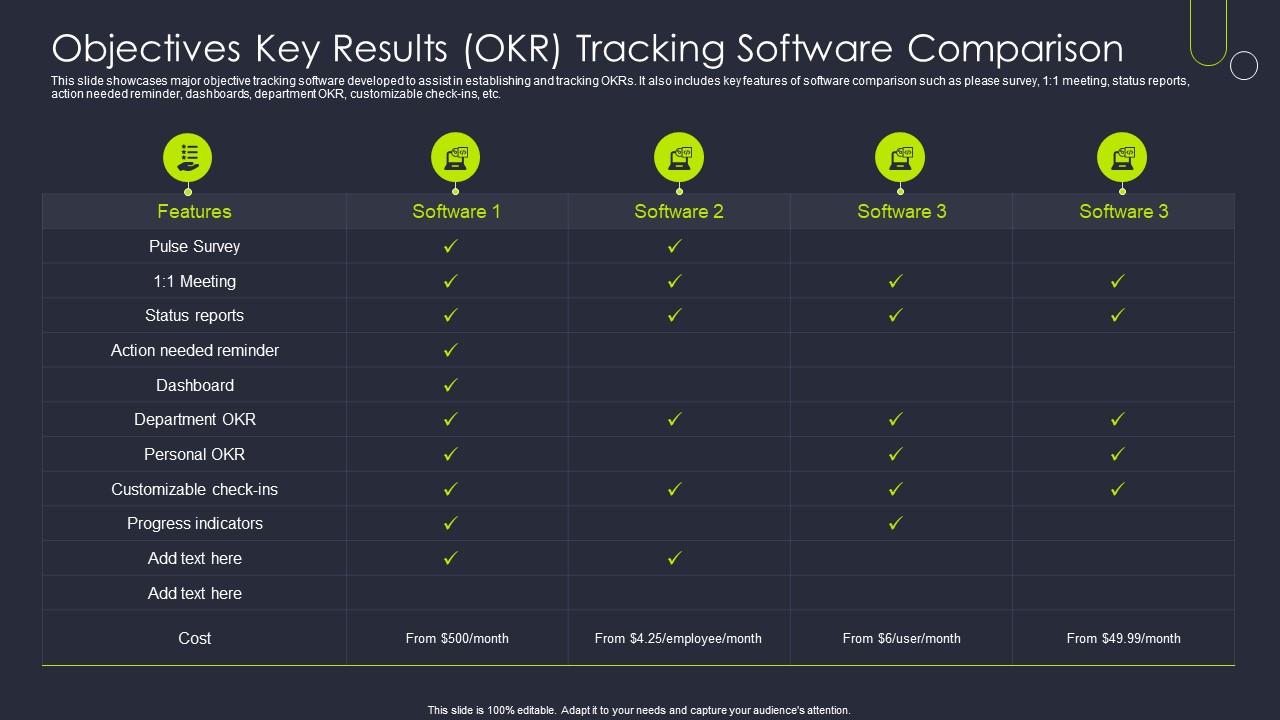
Template 4: Objectives Key Results OKR Tracking Software Comparison
Choosing the right OKR software is a decision most teams make without a clear comparison framework. This slide breaks down major OKR tracking tools across features like status reports, department OKR views, customizable check-ins, and action-needed reminders. Side-by-side comparisons give decision-makers instant clarity on what each platform offers. One-on-one meeting support and pulse survey capabilities are also captured for a complete evaluation. Streamline your OKR software selection with a structured, data-driven comparison. Download this template now and give your leadership team the clarity to choose the right OKR tools confidently.
Download this PowerPoint Template
Template 5: OKR Tracking Report for Corporate Initiatives Icon
Corporate OKR reporting needs a consistent visual language that communicates status at a glance. This icon-forward template captures three key stages of the tracking process in a clean, professional format. Each visual element reinforces the narrative around corporate initiatives and their progress toward defined objectives. Flexible design lets you slot it into any existing OKR reporting deck without disruption. Transform your corporate OKR tracking communications today. Download this template now and give your initiative reporting the visual authority it deserves.
[product_image id=1153589]
Template 6: OKR Dashboard Icon for Tracking Business Productivity
Business productivity is hard to communicate without a clear visual anchor. This PPT slide gives team leads and OKR managers a dashboard icon set built for real-time tracking conversations. Use it in leadership reviews to spotlight business productivity KPIs alongside OKR progress indicators. It fits naturally into any OKR reporting deck without requiring a redesign from scratch. The template is 100% editable and customizable.
[product_image id=1107038]
Template 7: OKR Report for Tracking and Managing Project
Project OKR reporting works best when progress, fulfillment, and team accountability all live on the same slide. This template captures team-level objectives alongside quantified progress data and objective fulfillment rates in one focused layout. Managers can present cross-team performance clearly without cluttering the narrative with unnecessary detail. Built for project leads who need to communicate OKR alignment quickly in stakeholder meetings. Transform your project tracking presentations with a structure that actually tells the story. Download this template now and drive focus across every team's key results.
[product_image id=1153588]
Elevate Every OKR Review with SlideTeam
SlideTeam's PowerPoint templates are the best in the industry for OKR tracking and performance reporting. These content-ready slides save hours of formatting work while delivering the professional clarity that leadership reviews demand. Use these pre-designed frameworks to present OKR progress, software comparisons, and cycle retrospectives with confidence. Deploy these PPT presets to drive OKR alignment across teams and accelerate goal achievement quarter after quarter.
FAQs on OKR Tracking
What are the most effective methods for visualizing OKR progress in team presentations?
Use traffic-light color coding—red, yellow, green—to show progress status at a glance. Bar charts or progress rings work well for quantified key results. Keep one objective per slide where possible. Avoid raw data dumps; translate numbers into a simple progress-versus-target visual. Teams that see their OKR progress visually tend to stay more engaged in review discussions.
How can OKR tracking dashboards be designed to communicate both individual and organizational alignment?
Layer the dashboard: start with company-level objectives at the top, then cascade to team and individual key results below. Use consistent scoring formats—0.0 to 1.0 or percentage-based—across all levels. Color-coded confidence indicators help surface misalignment fast. The goal is one view where a leadership team can spot both strong individual performance and gaps in org-wide OKR alignment without switching slides.
What distinguishes a well-structured OKR tracking template from a generic goal-tracking spreadsheet?
A well-structured OKR tracking template ties each key result to a measurable target and an owner. A generic goal-tracking spreadsheet usually just lists tasks. The OKR template enforces the objective-plus-key-result structure, includes confidence scores, and shows progress over time. It also separates outputs from outcomes—which a spreadsheet rarely does by default.
How frequently should key results be reviewed to maintain meaningful progress tracking without causing reporting fatigue?
Weekly check-ins are too frequent for most teams and create reporting fatigue quickly. Bi-weekly progress reviews hit the right balance—frequent enough to catch drift early, light enough to stay useful. A full scoring review at the mid-cycle point and a final retrospective at cycle end are standard OKR best practices. Four to six structured review touchpoints per quarter is a reasonable target.
What are the common pitfalls in OKR tracking that cause misalignment between team-level and company-level objectives?
The most common pitfall is writing team OKRs that don't connect to any company-level objective. Teams end up optimizing locally while the org drifts. A second issue is setting key results that measure activity rather than outcomes. Both problems surface during reviews when teams show 100% completion but company goals still miss. Alignment requires explicit mapping at the planning stage, not a fix after the fact.
How can color-coded confidence indicators in OKR slides improve real-time decision-making during leadership reviews?
Color-coded confidence indicators—typically green for on track, yellow for at risk, red for off track—let leaders triage in seconds during a review. Instead of reading through each key result, the room can immediately focus discussion on red and yellow items. This cuts meeting time and directs decisions where they matter. It also removes the discomfort of verbal hedging; the color does the signaling.
What role does historical OKR data play in setting more realistic and ambitious key results for future cycles?
Historical OKR data shows two things: how accurately the team scored its own confidence, and what completion rates actually looked like. If a team consistently hit 0.7 on objectives they rated as 1.0 confidence, that's a calibration problem. Past data helps set key results that are ambitious but grounded in real capacity. It also reveals which objective types consistently underperform, which is useful for OKR planning in future cycles.
How should organizations handle key results that become irrelevant mid-cycle without undermining OKR integrity?
Flag the key result as irrelevant in the current cycle's reporting and document the reason briefly. Don't delete it—context matters for retrospectives. Replace it with a revised key result only if the original objective still holds; if the objective itself changed, escalate that conversation first. OKR integrity comes from transparency about changes, not from pretending mid-cycle shifts didn't happen.


