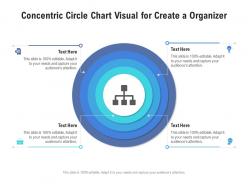
Concentric circle chart visual for create a organizer infographic template
Try Before you Buy Download Free Sample Product
Audience
Editable
of Time
Our Concentric Circle Chart Visual For Create A Organizer Infographic Template are topically designed to provide an attractive backdrop to any subject. Use them to look like a presentation pro.
People who downloaded this PowerPoint presentation also viewed the following :
Concentric circle chart visual for create a organizer infographic template with all 2 slides:
Use our Concentric Circle Chart Visual For Create A Organizer Infographic Template to effectively help you save your valuable time. They are readymade to fit into any presentation structure.
FAQs for Concentric circle chart visual for create a
Concentric circle infographic templates deliver enhanced visual hierarchy, improved data organization, streamlined concept relationships, clearer audience focus, and stronger message retention through layered information design. These templates enable presenters to showcase complex processes, strategic frameworks, and interconnected business concepts more effectively, with many organizations finding that concentric designs significantly improve stakeholder comprehension and engagement during critical presentations.
Concentric circles effectively visualize hierarchical relationships, nested categories, proportional data, core-to-peripheral connections, and multi-layered systems by positioning related elements at corresponding distances from the center. This approach enables organizations to demonstrate market segmentation strategies, organizational structures, and customer journey stages, while enhancing audience comprehension through intuitive visual flow and delivering clearer strategic insights.
Healthcare, education, technology, consulting, and financial services benefit most from concentric circle infographics, as these sectors frequently need to illustrate hierarchical relationships, process flows, and multi-layered strategies. These visual tools streamline complex data presentation by showcasing core concepts surrounded by supporting elements, enabling organizations to enhance stakeholder understanding, improve strategic communications, and deliver clearer insights across diverse audiences.
Color choices in concentric circle infographics significantly influence audience perception by establishing visual hierarchy, conveying emotional tone, and guiding information processing through contrast and harmony principles. Strategic color selection enhances data comprehension, with many organizations finding that complementary palettes improve audience engagement while monochromatic schemes deliver professional credibility, ultimately strengthening message retention and decision-making outcomes.
Best practices for designing informative concentric circle infographics include establishing clear hierarchical relationships, using consistent color schemes, maintaining readable font sizes, ensuring logical data flow from center outward, and balancing visual elements effectively. These design principles streamline complex information presentation by enhancing viewer comprehension, reducing cognitive load, and creating intuitive navigation paths, with many organizations finding that well-structured concentric designs deliver improved audience engagement and information retention.
Concentric circle infographics adapt seamlessly to digital formats through responsive design, scalable vector graphics, interactive elements, and mobile optimization features. These templates enhance social media engagement, website user experience, and digital presentations by delivering clear visual hierarchies, improved information retention, and professional aesthetics that drive audience interaction across platforms.
Concentric circles excel at displaying hierarchical relationships, priority levels, market segmentation data, organizational structures, and multi-layered process flows. This visual format enables businesses to showcase core-to-periphery information architecture, with financial services using them for risk assessment models, healthcare organizations mapping patient care levels, and retail companies illustrating customer journey stages, ultimately delivering clearer strategic communication.
Concentric circle templates excel at showing hierarchical relationships and layered concepts, while bar charts emphasize comparisons and pie charts display proportional data distribution. These circular designs enable organizations to visualize nested processes, strategic frameworks, and multi-level systems more intuitively than linear formats, with many businesses finding that concentric layouts enhance audience understanding of complex interconnected information.
**INPUT**: What software tools are recommended for creating custom concentric circle infographics? **OUTPUT**: Recommended software tools include Adobe Illustrator, Canva, PowerPoint, Lucidchart, and Visme, each offering varying levels of customization and design flexibility. These platforms enable organizations to create professional visualizations by providing pre-built templates, drag-and-drop functionality, and scalable graphics, with many businesses finding that PowerPoint delivers the most accessible solution for quick customizations while Adobe Illustrator offers superior precision for complex designs.
Concentric circle infographics enhance storytelling by creating hierarchical visual narratives that guide audiences from core concepts to supporting details, establishing clear information flow and emotional engagement. These templates enable presenters to build compelling stories through layered data visualization, with marketing teams, educational institutions, and strategic consultants finding that audiences retain complex information more effectively while maintaining focus on central messages.
Common mistakes include overcrowding circles with excessive text, using poor color contrast between layers, misaligning hierarchical information, creating unclear relationships between elements, and ignoring visual balance. These design pitfalls confuse audiences by disrupting information flow, reducing readability, and weakening the template's core purpose of presenting layered concepts clearly, with many presenters finding that simplicity and strategic color choices ultimately enhance comprehension and engagement.
Ensuring accessibility in concentric circle infographics involves implementing high contrast colors, alternative text descriptions, scalable fonts, logical reading sequences, and screen reader compatibility. These design principles streamline information consumption across diverse audiences, with educational institutions and healthcare organizations finding that accessible infographics enhance comprehension rates, reduce communication barriers, and ultimately deliver broader engagement while meeting compliance standards.
Concentric circle infographics enable comparison through layered data visualization, hierarchical analysis, nested categorization, and proportional representation of multiple variables simultaneously. These templates streamline complex comparisons by organizing related datasets from core to periphery, with many organizations finding that this approach delivers clearer insights, faster decision-making, and enhanced stakeholder understanding across strategic presentations.
Legends and annotations serve as critical navigational tools in concentric circle infographics, defining color codes, symbols, data categories, and relationship hierarchies between different circular layers. These elements transform complex visual data into accessible insights by providing context, eliminating ambiguity, and enabling viewers to quickly interpret interconnected information, ultimately delivering clearer communication and enhanced decision-making across organizational presentations.
Concentric circle infographics integrate seamlessly with other visual elements through strategic layering, complementary color schemes, consistent typography, and balanced spacing that creates visual hierarchy. These design combinations enhance storytelling by connecting circular data flows with timeline graphics, process diagrams, and statistical charts, ultimately delivering cohesive presentations that guide audience attention and improve information retention across complex business narratives.
-
Very unique, user-friendly presentation interface.
-
The Designed Graphic are very professional and classic.
-
Visually stunning presentation, love the content.
-
Wonderful templates design to use in business meetings.
-
Content of slide is easy to understand and edit.
-
Very well designed and informative templates.
-
Excellent work done on template design and graphics.
-
Innovative and attractive designs.