

0314 product features comparison chart





Try Before you Buy Download Free Sample Product
 Impress Your
 Audience
 100%
100% Editable
 Save Hours
 of Time


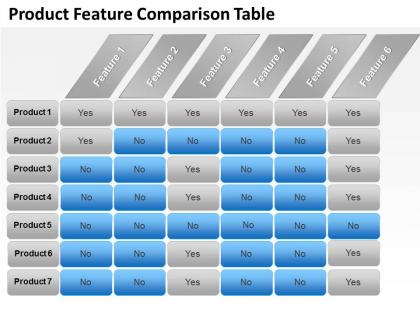
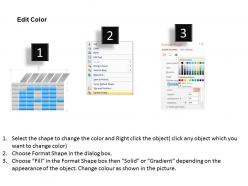
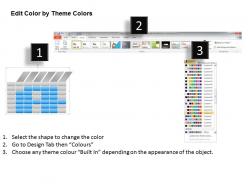
Make a list of all of the options that you want to compare by utilizing our product features comparison chart PowerPoint template slide. This PPT tool provides a framework for comparing each option against all others, and helps to show the difference in importance between factors. Our presentation table consist of seven rows for highlighting seven products and their respective features in a neat and clean table format. All the products can be marked with yes or no depending upon which feature the product has and which not. You can even change the colors of the table cells, their text, add more features and products as the graphic is fully amendable. To meet the consumer requirement, it is always better to make an eye-catching contact with them. So by representing your product features using this table visual your audience finds it easily understandable and they get attracted towards your products. Common and download the slide show now and grow your business. Highlight each and every detail. Every point will shine through on our 0314 Product Features Comparison Chart.
People who downloaded this PowerPoint presentation also viewed the following :
0314 product features comparison chart with all 5 slides:
Test our 0314 Product Features Comparison Chart team with the most stringent of specifications. They will match your every requirement.
FAQs for 0314 product
SlideTeam's presentation templates distinguish themselves through professionally designed layouts, extensive customization options, industry-specific content frameworks, comprehensive data visualization tools, and seamless integration capabilities. These features streamline presentation development by reducing design time, enhancing visual impact, and ensuring brand consistency, with many organizations finding that this strategic combination ultimately delivers faster turnaround times and more compelling stakeholder communications.
Customization options vary significantly across presentation templates, with premium business templates offering extensive color schemes, font flexibility, layout modifications, and element repositioning capabilities, while basic templates provide limited formatting adjustments. Corporate templates typically include advanced data visualization tools, brand integration features, and multi-slide variations, ultimately enabling organizations to maintain consistent branding while adapting content for specific audiences and strategic presentations.
Our templates support videos, audio clips, interactive charts, animations, clickable buttons, embedded links, image galleries, and dynamic infographics for comprehensive multimedia integration. These elements enhance audience engagement by creating immersive experiences, facilitating better information retention, and enabling interactive participation, with many organizations finding that multimedia-rich presentations deliver significantly higher engagement rates and more memorable messaging outcomes.
SlideTeam's templates are designed with intuitive drag-and-drop functionality, pre-formatted layouts, and built-in design guidelines that accommodate both novice and experienced users. Through standardized color schemes, automated alignment tools, and comprehensive style consistency, professionals across skill levels can create polished presentations efficiently, with many organizations finding that even non-designers produce professional-quality results within minutes.
We offer industry-specific templates for healthcare, finance, technology, education, retail, manufacturing, and consulting sectors, each designed with relevant visuals, terminology, and compliance considerations. These templates cater to their audiences by incorporating sector-specific metrics, regulatory requirements, and visual elements that resonate with industry professionals, ultimately streamlining presentation development while ensuring content relevance and credibility.
Yes, SlideTeam's templates seamlessly support collaborative features, enabling teams to work simultaneously on joint presentations through shared access, real-time editing capabilities, version control systems, and integrated feedback mechanisms. These collaborative tools streamline project coordination by reducing revision cycles, eliminating version conflicts, and enhancing team productivity, with many organizations finding that shared template workflows significantly accelerate presentation development timelines.
Best practices for selecting templates include analyzing your audience demographics, defining presentation objectives, considering venue constraints, evaluating content complexity, and matching visual hierarchy to key messages. Financial services presentations benefit from clean, data-focused designs, while creative pitches leverage dynamic layouts, with many organizations finding that purpose-driven template selection enhances audience engagement and message retention significantly.
Mobile compatibility and responsiveness are core features across SlideTeam's template offerings, ensuring presentations display seamlessly on smartphones, tablets, and desktop devices through adaptive design elements and flexible formatting. These features enable professionals to deliver compelling presentations anywhere, while responsive layouts automatically adjust content, images, and text scaling, ultimately providing consistent visual impact and professional credibility across all platforms and devices.
SlideTeam templates incorporate comprehensive analytics through PowerPoint's built-in tracking capabilities, presentation software integrations, and third-party analytics tools that monitor slide engagement, viewing duration, and audience interaction patterns. These features enable businesses to measure presentation effectiveness, identify high-performing content sections, and optimize future presentations, with many sales teams and marketing departments finding that data-driven presentation insights significantly enhance client engagement and conversion rates.
Brand integration options include custom color schemes, logo placement zones, font customization, branded graphics insertion, and company-specific imagery replacement. These features streamline brand consistency across presentations by enabling seamless visual identity application, maintaining professional standards, and delivering cohesive brand experiences, with many organizations finding that integrated brand elements significantly enhance stakeholder recognition and corporate credibility.
SlideTeam templates are updated regularly based on evolving design trends, user feedback, and market demands, with new collections released monthly and existing templates refined quarterly. This continuous improvement process ensures presentations remain visually current and professionally effective, with many businesses finding that updated templates enhance their competitive edge, streamline team productivity, and deliver more engaging stakeholder experiences.
SlideTeam offers comprehensive customer support including live chat assistance, email support with detailed troubleshooting guidance, extensive knowledge base resources, and video tutorials for template customization. These support channels streamline issue resolution by providing immediate assistance, step-by-step solutions, and self-service options, ultimately ensuring seamless template utilization and enhanced user productivity across organizations.
Our templates support multiple file formats including PowerPoint, Google Slides, Keynote, PDF, and various image formats, ensuring seamless compatibility across different presentation software and operating systems. This comprehensive format flexibility enables teams to collaborate effectively regardless of their preferred platforms, while maintaining design integrity and professional quality, ultimately streamlining workflow efficiency and eliminating compatibility barriers in diverse business environments.
Yes, educational templates include interactive lesson plans, student assessment rubrics, curriculum mapping frameworks, learning objective trackers, and course progression charts. These templates enhance learning by streamlining content organization, facilitating visual knowledge retention, and enabling systematic progress tracking, with many schools and universities finding that structured presentation formats significantly improve student engagement and comprehension rates.
Our templates include high-contrast color schemes, scalable fonts, screen reader compatibility, alternative text for images, and keyboard navigation support. These accessibility features streamline content creation while ensuring compliance with WCAG guidelines, with many organizations finding that inclusive design ultimately delivers broader audience reach and enhanced user engagement across diverse stakeholder groups.
-
Really like the color and design of the presentation.
-
Commendable slides with attractive designs. Extremely pleased with the fact that they are easy to modify. Great work!