

0514 workflow diagram template powerpoint presentation





Try Before you Buy Download Free Sample Product
 Impress Your
 Audience
 100%
100% Editable
 Save Hours
 of Time


Charge your talk with our 0514 Workflow Diagram Template Powerpoint Presentation. Fast track yourself on the road to success.
People who downloaded this PowerPoint presentation also viewed the following :
Content of this Powerpoint Presentation
Description:
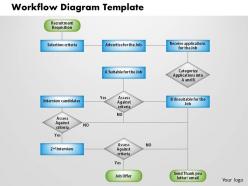
The image is a PowerPoint slide depicting a workflow diagram template for a recruitment process. The workflow starts at the top with "Recruitment Requisition," suggesting the initial need for hiring.
It flows into two initial paths: "Selection criteria," where the qualifications needed for the job are determined, and "Advertise for the Job," leading to "Receive applications for the Job." The applications are then categorized into Group A, "Suitable for the Job," and Group B, "Unsuitable for the Job," using a decision diamond.
Candidates in Group A proceed to "Interview candidates," followed by an assessment against the criteria. If the assessment is positive, they move on to a "2nd Interview"; if negative, they are presumably no longer considered.
The second interview leads to another assessment. A positive result here leads to a "Job Offer," while a negative result does not proceed further in this workflow diagram. For those who are categorized in Group B or are no longer considered after the interviews, there is an end step titled "Send Thank You letter/email," indicating a polite closure to their application process.
The slide also includes a placeholder at the bottom right for "Your logo," allowing for customization to include the branding of the presenting organization.
This workflow diagram is a clear visual tool for explaining the recruitment process within an organization. It helps ensure that the recruitment team follows a structured approach to hiring and provides clarity to stakeholders involved in the hiring process.
Use Cases:
The workflow diagram PowerPoint slide provides a structured approach to recruitment, making it an invaluable tool across various industries for HR professionals.
1. Healthcare:
Use: Standardizing the hiring process for medical staff.
Presenter: HR Manager
Audience: Hospital Administration, Department Heads
2. Information Technology:
Use: Streamlining the recruitment of IT professionals.
Presenter: Talent Acquisition Specialist
Audience: Hiring Managers, Recruitment Teams
3. Education:
Use: Organizing faculty and staff hiring procedures.
Presenter: Dean of Human Resources
Audience: Academic Search Committees, School Board Members
4. Hospitality:
Use: Coordinating the selection process for service-oriented roles.
Presenter: HR Director
Audience: Hotel Managers, Restaurant Owners
5. Construction:
Use: Outlining recruitment workflows for skilled laborers and tradespeople.
Presenter: Construction Manager
Audience: Project Managers, Foremen
6. Retail:
Use: Systematizing the hiring of retail associates.
Presenter: Retail HR Coordinator
Audience: Store Managers, Regional Directors
7. Financial Services:
Use: Detailing the vetting process for financial analysts and advisors.
Presenter: Chief of Staff
Audience: Compliance Officers, Branch Managers
0514 workflow diagram template powerpoint presentation with all 5 slides:
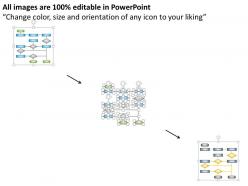
If you need ideas to create the most appealing presentations that could lead to that once in a lifetime opportunity make use of our premade PowerPoint Templates and Slides. You are free to edit it as you wish.
FAQs for 0514 workflow diagram
Key components of an effective workflow diagram template include clear start/end points, decision nodes, process steps, connector arrows, and role assignments. These elements streamline organizational processes by defining responsibilities, eliminating bottlenecks, and ensuring consistency across departments, with many companies finding that standardized templates reduce project completion times while enhancing cross-team collaboration and accountability.
A workflow diagram template improves team communication by providing visual clarity of processes, standardizing task sequences, defining clear responsibilities, and establishing communication touchpoints throughout projects. This structured approach enables teams to identify bottlenecks quickly, reduce miscommunication errors, and streamline handoffs between departments, ultimately delivering faster project completion and enhanced operational efficiency.
Industries with complex, regulated processes benefit most from workflow diagram templates, including healthcare, manufacturing, financial services, software development, and logistics. These sectors leverage templates to standardize operations, ensure compliance, reduce errors, and accelerate onboarding, with many organizations finding that structured workflows enhance operational efficiency and deliver consistent customer experiences.
Yes, workflow diagrams should include standardized symbols like ovals for start/end points, rectangles for process steps, diamonds for decisions, arrows for flow direction, and parallelograms for inputs/outputs. These universal notations enhance clarity and understanding across teams, with many organizations finding that consistent symbolism streamlines communication, reduces training time, and enables faster process optimization.
Customizing workflow diagram templates involves modifying process steps, decision points, stakeholder roles, timelines, and visual elements to match specific project requirements. Organizations across industries, from manufacturing to healthcare, adapt these templates by incorporating unique approval hierarchies, compliance checkpoints, and resource allocation protocols, ultimately streamlining project execution and enhancing team collaboration while maintaining operational consistency.
Popular tools for creating workflow diagram templates include Microsoft Visio, Lucidchart, Draw.io, Creately, and SlideTeam's pre-designed templates. These platforms streamline diagram creation by offering drag-and-drop functionality, collaborative editing, and extensive template libraries, with many organizations finding that cloud-based solutions like Lucidchart and Draw.io enhance team collaboration while reducing design time significantly.
Visual hierarchy in workflow diagrams is achieved through strategic use of size variations, color coding, typography emphasis, directional flow indicators, and spatial positioning. These design elements guide viewers through complex processes by highlighting critical decision points, prioritizing key steps, and distinguishing between primary workflows and secondary branches, ultimately delivering clearer communication and faster process comprehension.
Common workflow diagram mistakes include unclear symbols, overcomplicated processes, missing decision points, inconsistent formatting, and inadequate testing phases. These errors streamline by confusing team members, creating bottlenecks, and reducing operational efficiency, with many organizations finding that simple, well-tested diagrams ultimately deliver better communication and smoother process implementation across departments.
Workflow diagram templates assist in identifying process bottlenecks by providing visual mapping of task sequences, decision points, and resource flows, enabling clear identification of delays and inefficiencies. Through standardized visualization, organizations can quickly spot where processes slow down, resources accumulate, or approval chains create delays, ultimately streamlining operations and enhancing productivity across departments.
Colors enhance workflow diagram effectiveness by improving visual hierarchy, enabling quick process identification, distinguishing between departments or roles, and reducing cognitive load during analysis. Strategic color coding helps teams navigate complex workflows more efficiently, with many organizations finding that consistent color schemes across templates accelerate training and decision-making processes.
Workflow diagram templates adapt to Agile and Scrum by incorporating iterative sprint cycles, daily standups, retrospectives, and continuous feedback loops. These templates streamline project visualization through sprint planning boards, burndown charts, and backlog management systems, with many software development teams finding that visual workflows enhance collaboration, accelerate delivery timelines, and ultimately deliver more responsive project management.
Linear workflow diagrams follow sequential, step-by-step processes with clear start and end points, while non-linear workflows accommodate multiple pathways, decision branches, and simultaneous activities. Linear workflows streamline manufacturing assembly lines and approval processes, whereas non-linear designs enhance project management and customer service scenarios, with many organizations finding that combining both approaches delivers optimal operational efficiency and flexibility.
**INPUT**: How do you ensure that a workflow diagram template is user-friendly for non-technical team members? **OUTPUT**: Ensuring workflow diagram templates are user-friendly involves using clear visual icons, simple language, intuitive layouts, and consistent color coding throughout the design. These approaches streamline understanding by minimizing technical jargon, providing visual cues for decision points, and creating logical flow patterns, with many organizations finding that simplified templates enhance team collaboration and reduce training time significantly.
Digital workflow diagrams offer superior collaboration, real-time editing, automated updates, version control, and seamless integration with other business systems. These capabilities streamline project management by enabling instant sharing, reducing revision cycles, and maintaining consistency across teams, with many organizations finding that digital tools ultimately deliver faster implementation and enhanced operational efficiency compared to static hand-drawn alternatives.
Incorporating feedback improves workflow diagram templates by identifying bottlenecks, clarifying confusing steps, and enhancing visual clarity through stakeholder input and user testing. Through iterative refinement, organizations streamline processes, reduce errors, and increase adoption rates, with many teams finding that collaborative design ultimately delivers more intuitive templates and improved operational efficiency.
-
Professional and unique presentations.
-
Great quality product.