


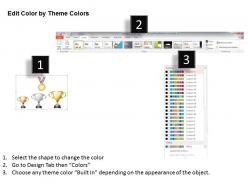
1214 golden silver and bronze trophy for champions and gold medal powerpoint template




Try Before you Buy Download Free Sample Product
 Impress Your
 Audience
 100%
100% Editable
 Save Hours
 of Time


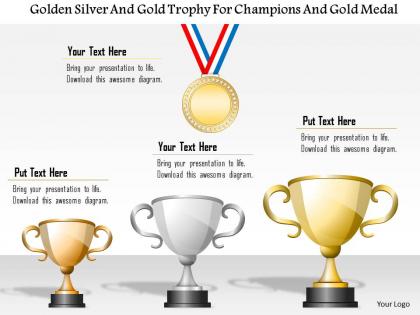
Appreciate the effort of your team members for playing important role in the business success. Our golden silver and bronze trophy for champions and gold medal PowerPoint template assist you to show the concept of victory and success in the organized manner. The presentation design gives you an access to motivate the business professionals to work hard and achieve their own as well as business objectives. The PPT layout has been designed with the graphic of trophies and medal which portrays the winning concept. Besides this, this awesome PowerPoint design can be used to appreciate the students, scholars, athletes, sportsperson who have performed well and excel in their field. Our designing team has created this wonderful presentation design just to give you an access to the innovative design that assist you to make your audience understand the concept of healthy competition in this competitive world. So download it and present the information in the best possible manner. Also, check other similar designs that can be valuable for your next presentation. Make a defining contribution with our 1214 Golden Silver And bronze Trophy For Champions And Gold Medal PowerPoint Template. Your ideas will help determine the future.
People who downloaded this PowerPoint presentation also viewed the following :
1214 golden silver and bronze trophy for champions and gold medal powerpoint template with all 5 slides:
Give employees a chance to enhance ability with our 1214 Golden Silver And bronze Trophy For Champions And Gold Medal PowerPoint Template. They are designed to facilitate empowerment.

FAQs for 1214 golden silver and bronze trophy for champions and gold
A champions trophy PowerPoint template should include hierarchical trophy graphics with gold, silver, and bronze variations, winner podiums, medal imagery, achievement badges, and celebratory design elements like confetti or stars. These visual components work together by creating clear recognition levels, reinforcing competitive excellence, and delivering professional ceremony aesthetics, with many organizations finding that strategic trophy presentations enhance employee motivation and celebration impact.
Trophy-themed presentations convey symbolism through visual hierarchy, color psychology, and strategic placement, with gold representing excellence and achievement, silver signifying outstanding performance, and bronze acknowledging solid accomplishment. These elements enhance corporate recognition ceremonies, sales competitions, and performance reviews by creating emotional resonance, establishing clear performance tiers, and motivating continued excellence across organizations.
**INPUT**: What are the best practices for showcasing a trophy in a presentation slide? **OUTPUT**: Best practices for showcasing trophies in presentations include strategic positioning, high-contrast backgrounds, consistent sizing, clear labeling, and purposeful color schemes that align with your brand identity. These design elements enhance visual impact by creating focal points, improving readability, and reinforcing achievement messaging, with many organizations finding that well-positioned trophy graphics significantly boost audience engagement and recognition ceremony effectiveness.
Animations can enhance trophy-focused PowerPoint templates by creating dynamic medal reveals, trophy rotations, sparkling effects, cascading confetti, and progressive award ceremonies that build excitement. These animated elements transform static presentations into engaging experiences, with corporate recognition events, sports ceremonies, and achievement showcases finding that strategic animations significantly boost audience engagement and emotional impact.
**INPUT**: What storytelling techniques can be applied to engage the audience when presenting championship achievements? **OUTPUT**: Effective storytelling techniques for championship presentations include journey narratives, obstacle-overcome frameworks, milestone progression, personal testimonials, and visual metaphor integration. These approaches engage audiences by transforming achievement data into compelling narratives, with many organizations finding that combining trophy visuals with progression stories significantly enhances stakeholder engagement and inspiration.
**INPUT**: How can one effectively integrate images of trophies into a PowerPoint presentation without overwhelming the slides? **OUTPUT**: Trophy images integrate effectively through strategic placement, consistent sizing, and purposeful color coordination with your presentation's theme. Use trophies as accent elements rather than focal points, positioning them to complement key achievements or milestones, while maintaining adequate white space and ensuring text remains easily readable for maximum audience engagement.
Colors that work best include deep golds, metallic silvers, rich bronze tones, navy blue, and crisp white, paired with bold serif fonts like Times New Roman or modern sans-serif options like Arial Bold. These combinations enhance the prestige and gravitas of achievement presentations, with many organizations finding that metallic accents against dark backgrounds create visual impact while maintaining professional credibility for award ceremonies and recognition events.
Visually appealing trophy templates create emotional engagement through color psychology, hierarchical design, and celebratory imagery that naturally draws audience attention and participation. When presenters use gold, silver, and bronze aesthetics to highlight achievements, rankings, or competitive comparisons, audiences become more invested in the outcomes, with many organizations finding that trophy-themed visuals encourage active discussion and foster a sense of achievement recognition.
Champions trophy presentations can include bar charts comparing team performance metrics, pie charts showing win-loss ratios, line graphs tracking seasonal progress, radar charts displaying multi-dimensional player statistics, and leaderboard tables ranking achievements. These visual elements enhance storytelling by transforming raw data into compelling narratives, with many organizations finding that statistical visualizations significantly boost audience engagement and make championship accomplishments more memorable and impactful.
Trophy PowerPoint templates can be customized through color schemes, iconography, terminology, and visual elements to match championship contexts. Sports championships might feature dynamic action graphics, team colors, and athletic terminology, while academic competitions could incorporate scholarly symbols, institutional branding, and achievement-focused language, with many organizations finding that tailored visual presentations enhance recognition ceremonies and strengthen participant engagement across diverse competitive environments.
Typography significantly enhances trophy-themed PowerPoint templates by establishing visual hierarchy, reinforcing the celebratory tone, and ensuring readability across different slide elements like titles, winner names, and achievement descriptions. Strategic font choices, including bold serif fonts for prestige and clean sans-serif options for clarity, complement metallic trophy graphics while maintaining professional presentation standards, ultimately delivering impactful recognition ceremonies and award presentations.
Trophy presentation templates cater to both formal and informal events through customizable design elements, flexible layouts, adjustable color schemes, varied typography options, and scalable graphics that maintain professional quality. These versatile templates enable organizations to seamlessly adapt recognition ceremonies for corporate awards, sports competitions, academic achievements, and team celebrations, ultimately delivering consistent branding while accommodating different event atmospheres and audience expectations.
Common pitfalls include overusing metallic effects that appear gaudy, cluttering slides with excessive trophy imagery, choosing colors that clash with gold, silver, and bronze themes, using low-resolution graphics, and creating inconsistent formatting across slides. Many organizations find that subtle elegance works better than overwhelming visual elements, with clean layouts and strategic color palettes ultimately delivering more professional presentations that enhance rather than distract from achievement recognition ceremonies.
Ensuring trophy template accessibility involves using high contrast colors, readable fonts, alternative text descriptions, keyboard navigation compatibility, and screen reader optimization. These design considerations enable visually impaired users to understand content through assistive technologies, while clear visual hierarchies and sufficient color contrast help users with various disabilities engage effectively, ultimately delivering inclusive presentations that reach broader audiences and demonstrate organizational commitment to accessibility standards.
**INPUT**: What additional resources or features should accompany a PowerPoint trophy template for enhanced user experience? **OUTPUT**: Additional resources should include customizable text placeholders, color variation options, animation presets, and scalable vector graphics for crisp display across devices. These features streamline personalization by enabling quick text updates, brand alignment, and dynamic presentations, with many organizations finding that comprehensive template packages ultimately deliver professional recognition ceremonies and enhanced audience engagement.
-
Awesome use of colors and designs in product templates.
-
Awesome presentation, really professional and easy to edit.