

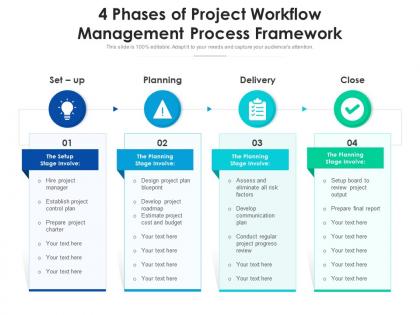
4 phases of project workflow management process framework




Try Before you Buy Download Free Sample Product
 Impress Your
 Audience
 100%
100% Editable
 Save Hours
 of Time


Our 4 Phases Of Project Workflow Management Process Framework are topically designed to provide an attractive backdrop to any subject. Use them to look like a presentation pro.
People who downloaded this PowerPoint presentation also viewed the following :
4 phases of project workflow management process framework with all 2 slides:
Use our 4 Phases Of Project Workflow Management Process Framework to effectively help you save your valuable time. They are readymade to fit into any presentation structure.
FAQs for 4 phases of project workflow
So there's five main stages you gotta hit: project initiation where you figure out what you're actually trying to do, then planning (this takes forever but trust me it's worth it), execution which is the fun part, monitoring to make sure things don't go sideways, and finally closure where you wrap everything up. Most people totally blow off the monitoring step and then act shocked when deadlines get missed. Build in those check-ins from the start! Oh and seriously - nail down your scope first or you'll be changing direction every other week. Everything else just flows from there.
Honestly, workflow management is a game-changer for cutting down on chaos. No more stepping on each other's work or endless "what's happening with X?" messages. Real-time updates show you exactly where things stand. Dependencies become obvious before they bite you in the ass. New team members can actually understand your processes instead of wandering around asking random questions – which is honestly such a relief. Handoffs between people get way less messy too. I'd start by just mapping what you're doing now. You'll probably find communication gaps you didn't realize were there. It's wild how much smoother everything runs once you can see the whole picture.
Honestly, I'd go with something like Asana or ClickUp first - they're great for keeping track of who's doing what and when stuff's due. Slack is a lifesaver for team chat (way better than endless email chains). You'll probably want Toggl for time tracking too, and Calendly makes scheduling so much easier. Oh, and obviously Google Workspace or Dropbox for sharing files. Here's the thing though - don't go overboard with tons of different tools. I learned that the hard way. Stick to maybe 3 or 4 max, otherwise you'll spend more time switching between apps than actually working.
Start by mapping your whole workflow, then watch where stuff consistently gets stuck. Those pile-ups are dead giveaways - like when five tasks sit waiting for one person's sign-off, or team handoffs always drag on forever. I check our project board weekly for this stuff (honestly kind of addictive once you start noticing patterns). Listen to your team too - they'll complain about waiting around or feeling rushed at certain points. The real bottlenecks show up in your data AND when people start getting annoyed. Oh, and tackle the biggest delay first, obviously.
Start with cycle time - tracks how long stuff takes from beginning to end. Throughput's good too (deliverables per sprint). Honestly, I'm weirdly into lead time because it shows what customers actually experience. Look for bottlenecks where work gets stuck. Quality metrics matter - rework rates, defects, that kind of thing. Resource allocation is massive. Are people sitting around bored or juggling five things at once? Both suck for different reasons. Pick maybe 3-4 metrics first though. Data overload is real and you'll just ignore it all if there's too much to process.
Dude, you've gotta try visual stuff like Kanban boards or Gantt charts. Seriously makes everything so much clearer. No more digging through a million emails to figure out what's happening. You'll see right away if something's stuck or if Sarah's drowning in work again. I'm honestly obsessed with them now - probably use way too many boards for random stuff. The best part? Bottlenecks jump out immediately. Like, you can't miss when everything's piling up in one spot. Just start simple with a basic Kanban setup and see how much smoother your next project runs.
So task prioritization is literally what keeps your project from becoming a total mess. Without it, you'll have people working on random stuff while critical deadlines sneak up on you. I always start by looking at what's actually blocking other work - those dependency chains will bite you if you ignore them. Then rank everything by impact and deadlines. This way your team knows what matters most and stakeholders aren't constantly asking "wait, why isn't X done yet?" Honestly, most project chaos comes down to unclear priorities. Also helps when things inevitably change mid-sprint.
Honestly, transparency is everything with remote work. Visual boards like Trello help tons - no more "wait, what's everyone working on?" moments. Write stuff down constantly because people miss things from video calls (I'm guilty of this too). Different time zones are tricky, so build in extra time for deadlines. Oh, and figure out your communication rules early - like what actually needs an urgent Slack vs what can wait. The goal is making things work when people are literally asleep on the other side of the world. I'd start by looking at your current process and seeing what truly needs everyone online at once versus what people can knock out solo.
Honestly, flowcharts are your best friend here - nobody wants to read a novel about workflows. Make sure you nail down who does what and what actually kicks off the process. The handoff points between teammates? Super critical to map out clearly. Document what you're *actually* doing, not what you think you should be doing (learned this the hard way). Short sentences work. Keep it visual. Oh, and don't forget to update the thing when stuff changes - I've seen so many outdated docs that just confuse everyone. You'll be glad you did this right when you're onboarding someone new.
Your workflow structure totally depends on which methodology you pick. Agile's all about those short sprints - daily standups, constant tweaks, super flexible. Waterfall? Complete opposite. You map out each phase step-by-step, can't move forward until the previous part's 100% done. Then there's Kanban which is more about visualizing everything and not taking on too much at once. Most teams I know actually mix these up depending on what they're working on (which honestly makes sense). Just pick whatever fits your team's vibe and stick with it.
Honestly, just bake the engagement stuff right into your process from the start. Kick things off with a proper alignment meeting, then do regular check-ins - weekly or every other week works. People get weird when they don't hear from you for ages, trust me on this one. Set up shared dashboards so they can actually see what's happening instead of wondering. Oh, and don't just blast status updates - ask them stuff! Get their input on the big decisions. Each group needs different info though, so figure out who wants what and when. Makes all the difference.
Honestly, just start with quick 15-minute feedback sessions during your regular standups - way easier than creating whole new meetings. Set up shared docs where people can drop issues as they happen, then do short retrospectives after each sprint. The key is making it feel normal, not like some formal process everyone dreads. I'd also throw in automated reminders for stakeholder check-ins (trust me, people forget). Most important part though? Actually show how their feedback changed things. Otherwise it's just theater. Maybe use a simple project board too - visual stuff works better than endless email chains.
Honestly, scope creep will kill you every time - clients always want "just one more thing." Poor communication is huge too. Teams skip planning because they're excited to start coding or whatever, but trust me, you'll regret it later. What happens is people use like 5 different Slack channels and email threads, then nobody knows what's going on. Classic "wait, I thought Sarah was doing that" situation. My advice? Do a proper kickoff meeting where you actually nail down who's doing what. Set up weekly check-ins - boring but necessary. Oh, and pick ONE place for updates, not scattered everywhere.
So agile basically throws out that old-school waterfall approach where you plan everything upfront and pray it works. You break stuff into short sprints instead - maybe 2-3 weeks each. Your team stops working in silos and actually talks to each other (imagine that). The cool part? You can pivot when something isn't working rather than doubling down on a bad idea. Honestly, the "fail fast" mentality took me a while to embrace, but it's legit. You're constantly shifting priorities based on what's actually valuable. Think of your workflow as something that breathes and changes, not set in stone.
Honestly, workflow management is a game changer for deadlines and budgets. Your team stops wandering around confused about what's next or whose job it is - those delays are the worst. Catching problems early saves you from expensive messes later too. I've watched projects completely implode without decent workflows, and it's brutal. The trick is building something your team will actually use, not some beautiful flowchart that ends up ignored. Speaking of which, why do people always make those overly complicated diagrams that nobody looks at twice?
-
Use of different colors is good. It's simple and attractive.
-
Excellent products for quick understanding.