

5 pieces circle puzzle segmentation powerpoint images




Try Before you Buy Download Free Sample Product
 Impress Your
 Audience
 100%
100% Editable
 Save Hours
 of Time


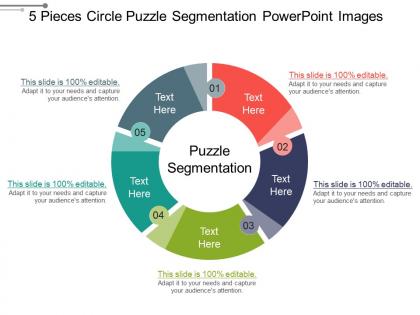
Get ready to make every one of your viewers a fan by using this 5 pieces circle puzzle segmentation Powerpoint images. We assure you that all the audience will be impressed with your work if you use this 5 part circle puzzle slideshow. Our business experts have especially for business professionals like you who do not have time to actually design the slideshow themselves made this circular cycle diagram PPT presentation. This 5 jigsaw puzzle pieces business template have been crafted using high resolution and premium quality slides which will definitely raise the standard of your work. We promise you that you will become a threat for all your competitors by using this five-segment puzzle pieces PowerPoint slideshow. This donut-shaped business slides contain the images of a circle divided into 5 parts with text in it along with text holders both of which are editable in nature. So if you are ready to take advantage of this given set of slides simply hit the download button and make most of this opportunity. Attract folks with interesting challenges through our 5 Pieces Circle Puzzle Segmentation Powerpoint Images. It will induce folks to join.
People who downloaded this PowerPoint presentation also viewed the following :
5 pieces circle puzzle segmentation powerpoint images with all 5 slides:
Be direct and forthright with our 5 Pieces Circle Puzzle Segmentation Powerpoint Images. They discourage dubious activity.
FAQs for 5 pieces circle puzzle
Honestly, five segments just work really well visually. You get this nice balance where each piece has equal weight, so nothing gets buried or takes over the whole thing. Plus your audience can actually compare stuff without their eyes glazing over - unlike those nightmare 8-slice charts that nobody can read. Five feels complete but not messy, you know? The circle format is perfect for showing market share or budget breakdowns since it reinforces that everything adds up to 100%. I'd definitely use different colors for each segment to make the contrasts pop. Works every time.
Dude, that 5-piece circle thing is actually genius for business presentations. Pick your five main elements – like market research, customer pain points, your solution, competitors, and how you'll make money. Each piece gets its own segment. What's cool is people instantly see that if one piece is missing, the whole thing falls apart. Way more engaging than those endless bullet point slides that make everyone's eyes glaze over. The visual just clicks, you know? Makes complicated strategy stuff feel concrete instead of abstract. Honestly works better than I expected when I first tried it.
Marketing and retail companies absolutely crush it with circle puzzle segmentation. Map your customers across five dimensions - demographics, behavior, needs, preferences, value. E-commerce and SaaS see massive results too since they're swimming in customer data. Financial services jump on this hard. Healthcare's starting to get it, which makes sense given how different their users are. Oh, and education sectors are picking up on it. You'll want to identify your five biggest customer characteristics first. See where they overlap - that's honestly where you'll find the gold.
Honestly, simple pie charts just work better. People see a circle divided into 5 pieces and immediately get it - no squinting or trying to decode weird layouts. Circles are basically the first shape we learn as toddlers, so there's automatic recognition happening. Your audience can actually compare the segments and remember what they saw instead of getting lost in visual chaos. Oh, and definitely go bold with contrasting colors for each slice. Makes the differences pop way more. It's wild how removing complexity literally removes barriers between your point and their brain.
Go with pizza slice shapes but make the edges curved and interlocking - way more satisfying than straight cuts. Color gradients are your friend here, either from center outward or flowing around clockwise. I'm old school and always sketch these out first (saves me from redoing stuff digitally). Each piece needs something distinctive - maybe a pattern or color shift - so people aren't just randomly trying pieces everywhere. Oh, and don't make it too hard! You want that sweet spot where it's challenging but not frustrating.
Okay so instead of dumping all 5 pieces at once, make each one clickable so it reveals when you want it to. Builds way more suspense that way! You could even get the audience involved - like assign different people to guess what their piece shows before clicking. Hover effects are cool too, or little sound cues when pieces snap together. I'm probably overthinking this but interactive beats decorative every time. Oh and polling works great if you've got that feature - people love voting on stuff. Just don't reveal everything upfront or you'll lose them halfway through.
Don't make your pieces too similar - users get confused fast. Small, intricate details? Skip them. They're annoying to work with, especially on phones. Color contrast matters too; if everything blends together, nobody can tell where pieces connect. Give each piece clear boundaries and obvious connection points. Complex curved edges are honestly overrated - they don't give good feedback when you're trying to fit things together. I'd avoid anything too fancy there. Test it yourself before releasing it. If you're struggling with your own puzzle, that's a red flag right there.
Yeah, color psychology totally works for this! I'd go with a natural gradient - like red through orange, yellow, green, blue. People just get it instinctively. You could also match colors to whatever categories your content represents. Just make sure adjacent pieces have enough contrast so users can actually see the boundaries. Honestly? I've watched people get super particular about color combos - it's kinda funny how attached we get to certain schemes. Test a few options with real people though. You'll spot which combinations make the puzzle feel natural versus the ones that just confuse everyone.
One message per segment - that's the golden rule. Don't stuff multiple ideas into one piece or people get lost. Clear headers and bullet points are your best friend here. Also, stick to the same fonts and colors throughout (trust me on this one). The biggest mistake? Not enough contrast between sections. Both visually AND content-wise. Here's what I do: grab someone nearby and have them quickly scan each part. If they can't tell you the main point right away, you've got work to do. Sometimes I'll literally squint at mine to see if segments blend together too much.
So for kids, go with big colorful pieces - maybe animals or cartoon stuff they'd actually recognize. Adults usually like more sophisticated images, geometric designs or art prints work great. With seniors, high contrast is your friend since vision can be tricky, plus don't make the pieces too tiny. Honestly? People get weirdly competitive over these things, even the simple ones. I'd probably test a few different designs first - maybe grab some friends to try them out. The whole trick is just matching what you think they'll connect with. Geometric patterns are pretty safe for most adults though.
I'd go with Adobe Illustrator if you've got it, or grab Inkscape since it's free. Both are perfect for making those curved cuts look clean. Canva works okay for basic stuff but honestly gets annoying when you want precise control. There's also puzzle software like Jigsaw Puzzle Maker Pro, though I think the vector programs are way better. Just start with a circle and use the pen tool to draw your five pieces. Oh, and don't forget those little tabs and blanks that make them actually fit together!
Dude, the circle puzzle thing is so much better than regular pie charts! People actually get to click and move stuff around instead of just looking at boring static slices. I love revealing segments one at a time - builds up the drama, you know? Plus it's weirdly satisfying when the pieces snap into place. Your audience will actually remember the data breakdown because they're physically involved. Regular pie charts work fine for quick info dumps, but honestly? Save the puzzle format for when you're presenting to people who get antsy during normal presentations or workshop settings.
Honestly, I'd go with the 5-piece circle puzzle when you want people to see how everything connects - like market share breakdowns, budget splits, or team roles. Regular pie charts are kinda boring tbh. The puzzle thing makes it way more interactive during presentations, plus people actually get how tweaking one section messes with the others. Perfect for strategic planning stuff or resource allocation. Basically use it whenever you need folks thinking about relationships between the pieces, not just looking at random percentages. Makes the whole thing feel less like a math lesson, you know?
Oh that's actually genius! Use each puzzle piece as a chapter - piece one sets up your problem, then each new piece reveals the next part of your story. Works great for customer stories or showing project timelines. Your audience literally watches the picture come together as you go, which beats boring bullet points any day. Just make sure each piece has a clear story moment. Practice those transitions between pieces too so they don't feel clunky. I tried this once and totally botched the second transition, but when it works it's super engaging.
Watch how much people actually participate - are they asking questions or just staring at their phones? Quick polls work great for checking if they're getting it, or have them explain parts back to you. I always time how long we spend on each section too. The circle thing is honestly so much better than those dreadful bullet point slides - you can actually see when people zone out. Get feedback scores after to see if the visual stuff helped or just made things more confusing. Oh, and check later if your main points actually stuck with them better than regular presentations would've.
-
Best Representation of topics, really appreciable.
-
It saves your time and decrease your efforts in half.