

5 vector square blocks




Try Before you Buy Download Free Sample Product
 Impress Your
 Audience
 100%
100% Editable
 Save Hours
 of Time


Adhere to facts that are applicable with our 5 Vector Square Blocks. Avoid being irrelevant.
People who downloaded this PowerPoint presentation also viewed the following :
Content of this Powerpoint Presentation
Description:
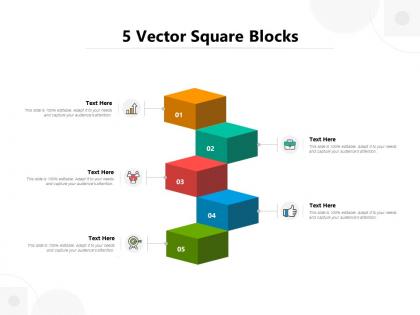
The image features a PowerPoint slide titled "5 Vector Square Blocks," which presents a series of five colored 3D square blocks numbered from 1 to 5, each with a corresponding text placeholder and icon. The slide's design allows for a step-by-step or hierarchical representation of information, processes, or ideas. Each block's color and associated icon can be used to represent different concepts or stages in a process, making the slide versatile for various presentation needs.
Use Cases:
This type of slide is beneficial for presentations that require the visualization of structured information or processes, such as project stages, hierarchical data, or sequential steps, across a wide range of industries.
1. Software Development:
Use: Depicting phases of software lifecycle.
Presenter: Project Manager
Audience: Development Team, Stakeholders
2. Marketing:
Use: Outlining steps in a marketing strategy.
Presenter: Marketing Director
Audience: Marketing Team, Sales Staff
3. Education:
Use: Illustrating stages of curriculum development.
Presenter: Educational Consultant
Audience: Teachers, School Administrators
4. Healthcare:
Use: Demonstrating patient care pathways.
Presenter: Healthcare Administrator
Audience: Medical Professionals, Staff
5. Construction:
Use: Showing construction project milestones.
Presenter: Construction Manager
Audience: Contractors, Clients
6. Finance:
Use: Explaining financial planning steps.
Presenter: Financial Advisor
Audience: Clients, Investment Team
7. Manufacturing:
Use: Detailing product assembly line stages.
Presenter: Operations Manager
Audience: Factory Workers, Quality Assurance Staff
5 vector square blocks with all 5 slides:
Identify the irrelevant with our 5 Vector Square Blocks. Inform folks about applicable facts.
FAQs for 5
Vector graphics use mathematical equations to define shapes, lines, and colors, creating infinitely scalable images without quality loss, while raster graphics consist of fixed pixel grids that become pixelated when enlarged. This fundamental difference makes vector graphics ideal for logos, presentations, and professional designs, with many businesses finding that vector formats deliver crisp visuals across all platforms and sizes.
Vector graphics offer scalability without quality loss, crisp text rendering, smaller file sizes, and easy editing capabilities for presentations. These features streamline professional communication by ensuring visual consistency across different display sizes, faster loading times, and seamless integration with presentation software, ultimately delivering polished presentations that enhance audience engagement and brand credibility.
Yes, vector graphics can be scaled infinitely without quality loss because they're built using mathematical equations rather than fixed pixels, making them resolution-independent. Unlike raster images that pixelate when enlarged, vector graphics maintain crisp edges and smooth curves at any size, with design agencies, printing companies, and corporate branding teams finding this scalability essential for logos, illustrations, and marketing materials across multiple platforms and print sizes.
Popular vector graphics software includes Adobe Illustrator, CorelDRAW, Inkscape, Affinity Designer, and Sketch, each offering specialized features for different design needs. These tools enable designers across industries like marketing, publishing, and web development to create scalable logos, illustrations, and branding materials, ultimately delivering professional-quality graphics that maintain crisp resolution at any size.
Vector graphics enhance presentation design and branding by delivering crisp, scalable visuals that maintain quality across all devices and screen sizes, ensuring consistent brand representation. These graphics streamline the creation of logos, icons, and illustrations that resize seamlessly, with many organizations finding that vector-based presentations deliver more professional, polished brand experiences while reducing file complexity and loading times.
**INPUT**: What are some common file formats for vector graphics, and when should each be used? **OUTPUT**: Common vector formats include SVG for web applications, AI for Adobe workflows, EPS for print production, PDF for document sharing, and CDR for CorelDRAW projects. These formats enable organizations to streamline design workflows, maintain brand consistency across platforms, and deliver scalable graphics for everything from website icons to large-format printing, ultimately enhancing visual communication efficiency. **Word count: 56 words**
Vector graphics enhance data visualization by delivering crisp, scalable charts and infographics that maintain clarity at any size, enabling seamless editing of colors and elements without quality loss. These graphics streamline presentation workflows across marketing teams, financial analysts, and corporate communications, ultimately delivering professional visual impact while reducing file sizes and ensuring consistent branding throughout organizational materials.
Effective integration involves maintaining consistent color palettes, ensuring proper size relationships between vectors and text, and using vectors to complement rather than compete with written content. Strategic placement of vector elements as visual dividers, data visualization tools, and accent graphics enhances readability while creating professional cohesion, with many presenters finding that subtle vectors ultimately strengthen message clarity and audience engagement.
Vector graphics present challenges including larger file sizes for complex artwork, software learning curves, and limited photorealistic detail compared to raster images. While these limitations exist, many designers find that vector graphics' scalability and crisp rendering at any size ultimately deliver significant advantages for logos, illustrations, and print materials across industries.
Converting raster images to vector graphics involves using auto-tracing software like Adobe Illustrator's Image Trace, CorelDRAW's PowerTRACE, or free alternatives like Inkscape's bitmap tracing feature. These tools analyze pixel patterns, convert them to mathematical paths, and enable scalable graphics for logos, illustrations, and print materials, with many designers finding that manual refinement after auto-tracing delivers the most professional results.
Vector graphics serve as the backbone of responsive presentation templates by maintaining crisp quality across all screen sizes, loading faster than rasterized images, and scaling seamlessly from mobile devices to large displays. Through SVG technology, designers create templates that automatically adapt to different resolutions while reducing bandwidth usage, with many web agencies finding that vector-based templates deliver superior user experiences and significantly lower maintenance costs across diverse viewing environments.
Industries that heavily utilize vector graphics for presentations include technology, architecture, automotive, fashion, marketing agencies, and financial services. These sectors leverage vector graphics to create scalable logos, technical diagrams, infographics, and data visualizations that maintain crisp quality across devices, with many organizations finding that vector-based presentations enhance brand consistency and professional impact.
Vector graphics can be optimized for faster loading by minimizing anchor points, reducing complex paths, using simplified shapes, compressing file formats, and removing unnecessary metadata. Through strategic design choices and technical optimization, online presentations achieve significantly faster load times, enhanced user experience across devices, while maintaining crisp visual quality that scales seamlessly for professional business communications.
Designers can access vector graphics through Freepik, Vecteezy, Adobe Stock, Shutterstock, and Unsplash, offering both free and premium collections across diverse categories. These platforms streamline design workflows by providing scalable assets for branding, marketing, and digital projects, with many creative professionals finding that curated libraries significantly reduce production time while enhancing visual consistency.
Designers can create unique vector graphics by analyzing presentation themes, selecting cohesive color palettes, incorporating brand-specific elements, and customizing iconography to match content objectives. Through strategic use of geometric shapes, typography integration, and thematic symbolism, organizations across industries like finance, healthcare, and technology enhance audience engagement, streamline visual communication, and ultimately deliver more impactful presentations.
No Reviews