6 month project timeline with forward moving arrow

6 month project timeline with forward moving arrow
Slide 1 of 5
Favourites Favourites

Try Before you Buy Download Free Sample Product

Audience Impress Your
Audience
Editable 100%
Editable
Time Save Hours
of Time
The Biggest Sale is ending soon in
0
0
:
0
0
:
0
0
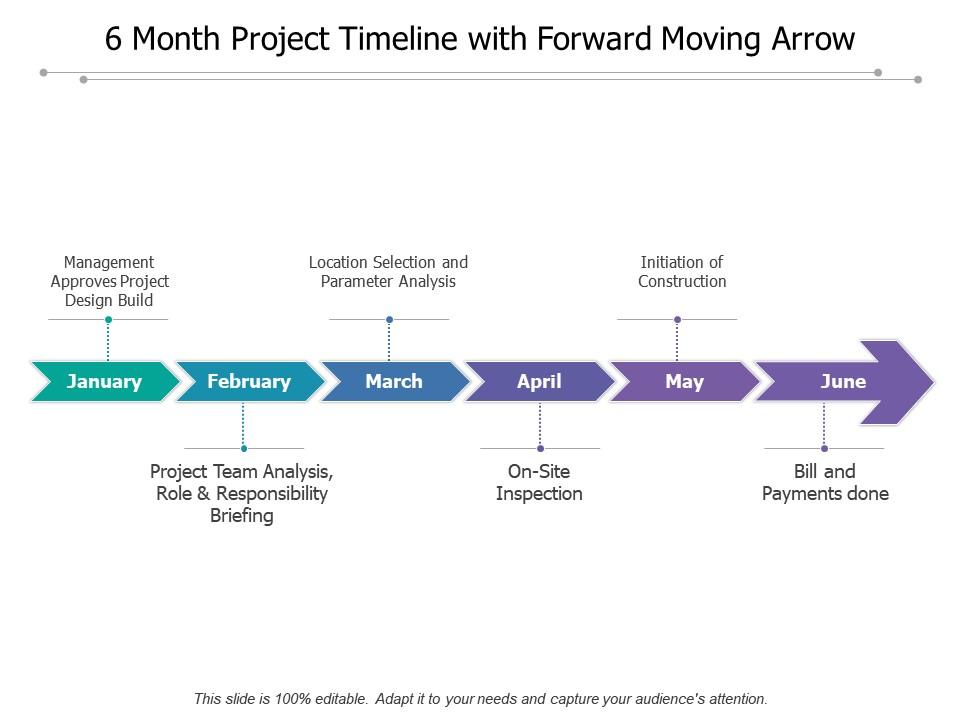
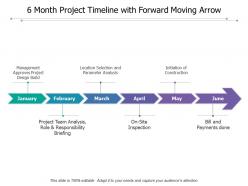
Presenting this set of slides with name - 6 Month Project Timeline With Forward Moving Arrow. This is a six stages process. The stages in this process are 6 Month Project Timeline, 6 Months Project Roadmap, 6 Month Project Linear Process.

FAQs for 6 month project timeline with

So definitely include task descriptions with start/end dates and who's doing what. Milestones are huge - they show the overall progress without getting lost in details. Always add buffer time because seriously, nothing ever goes as planned. Make sure resource allocation and deliverables are super clear so nobody's confused about deadlines. Status indicators help you catch problems early. Oh and put it somewhere accessible to everyone - Google Sheets works great. Just remember to actually update the thing regularly or it'll sit there being completely useless after like two weeks.

Honestly, Gantt charts are perfect for this stuff. You get these horizontal bars that show each task on a timeline, so you can see everything at once instead of trying to piece things together from random notes. What I love about them is spotting where tasks overlap or depend on each other - saves you from those "oh crap" moments later. Your team won't have to dig through messy spreadsheets either. Most project tools like Asana have templates ready to go. Takes like 5 minutes to set up, but the clarity you get is worth it. Trust me on this one.

Honestly, just break everything down into tiny pieces first - way easier to estimate small stuff than massive chunks. Something's gonna go sideways (trust me on this), so build in extra time from the start. I always multiply my gut estimate by 1.5 now because past me was wildly optimistic lol. Dependencies between tasks? They're basically time black holes - plan accordingly. Check what your team actually has bandwidth for before you promise anything. And here's the thing that took me forever to learn: speak up early if you're behind. Nobody likes surprises, but they hate last-minute panic way more.

Look, talking to stakeholders early saves your ass on timelines. They'll spot stuff you missed - like needing legal approval or budget sign-offs. I've watched projects completely tank because someone didn't loop in finance until week 3. Getting everyone on board upfront means way fewer "oh wait, we also need X" moments that wreck your schedule. They help you figure out what's actually realistic too. Just don't make my mistake of setting dates first then asking for input - do those conversations during planning or you're basically asking for trouble.

Honestly, it depends on how complex your project is. Gantt charts in Microsoft Project or Smartsheet work great if you've got lots of moving pieces and dependencies. But if it's pretty straightforward, just stick with Asana, Trello, or Monday.com - they're way less overwhelming. I know it sounds basic, but I've literally seen teams crush deadlines using nothing but Google Sheets. Sometimes the fancy tools just get in the way, you know? For visual stuff, Lucidchart or Miro are solid choices. My take? Don't overthink it. Start with whatever you're already using, then switch later if you need something beefier.

Use arrows or connecting lines to show how your tasks link up - tools like Asana or Monday work great for this, or just make a Gantt chart in Excel. First thing is figuring out which tasks can't start until others are done versus the ones that can run at the same time. I'm obsessed with color-coding the critical path stuff so it's obvious. Pro tip: don't try cramming dependencies into random dates you picked. Map out all your task relationships first, then build your timeline around what actually makes sense. Way less headache that way.

Honestly, I learned this the hard way - always pad your timeline with extra buffer from day one. Like 15-20% minimum on the big stuff. Once things start going sideways (which they will, Murphy's law and all that), immediately figure out what can get pushed or scrapped entirely. Don't try to absorb all the chaos yourself - loop in your stakeholders and make them help with the tough calls. Oh, and keep notes on what's breaking down as it happens. You'll thank yourself later when you're planning the next project and can actually remember why everything went to hell.

Honestly, just ditch those rigid milestone dates and switch to 2-4 week sprints instead. Way less stressful once you get the hang of it - your timeline becomes more of a roadmap than some strict schedule you're panicking about. Build in regular review points so you can actually pivot when things inevitably go sideways. Figure out your MVP for sprint one, then just layer on features as you learn what actually works. You'll still hit your final deadline, but you're planning in shorter chunks with buffer time baked in. Trust me, it's a game changer.

Dude, risk assessment is like your sanity check for project timelines. Look at what could tank your schedule - delays, resource issues, tech problems, dependencies. Most projects fail because someone got way too optimistic about timing (learned this the hard way). List out everything that could realistically blow up. Then add buffer time for the risky stuff and have backup plans for anything on your critical path. I always pad timelines based on how likely something is to go wrong and how bad it'd be if it did. Trust me, you'd rather finish early than explain why you're three weeks behind.

Honestly, timelines are game-changers because nobody can give you those annoying "still working on it" non-answers anymore. Everyone sees what's due when, so people actually step up - it's like peer pressure but in a good way. Your team coordinates way better too since they can see how their stuff affects everyone else down the line. Just don't bury it in some project tool that collects dust. I learned this the hard way on my last big project. Make it visible and realistic, and you'll be shocked how much smoother everything runs.

Honestly, milestones are a lifesaver for catching issues before they blow up. You'll have regular check-ins to see how things are going and shift resources around if needed. Your team gets those little wins too, which... I can't stress enough how much that helps morale. Stakeholders love getting clear updates, and you can spot bottlenecks way earlier. Big projects feel less overwhelming when they're broken into smaller pieces. Everyone stays more focused that way. I'd start with 3-5 major deliverables, then build milestones around the moments where you really need to stop and evaluate everything.

Honestly, scope and timeline don't have to be enemies - think of them more like dance partners. First thing: figure out your absolute must-haves vs the stuff that'd be nice but isn't critical. I've watched so many projects completely implode because people tried to squeeze everything in at once. Break it into phases instead. Ship the core stuff first, then build on it. Oh, and definitely do regular check-ins with stakeholders - you'll catch scope creep way earlier that way. When push comes to shove, I'd rather cut features than rush and deliver garbage. Ask yourself weekly: what actually needs to ship for this to work?

Oh man, the worst thing you can do is guess how long stuff will take - we're all terrible at that. Always tack on extra time because something *will* go wrong. I learned this the hard way when one tiny delay basically broke our entire project timeline. Don't make your schedule super rigid either. People get sick, approvals take forever, holidays happen. The 20% buffer rule has saved me so many times. Figure out your critical path first so you know which delays will actually screw you over vs the ones that don't matter.

Honestly, visual templates are a lifesaver because you're not building everything from zero each time. They come with all the basic stuff already set up - milestones, dependencies, phases. Just drop in your dates and you're good to go. Way easier to catch problems early too, instead of squinting at some boring spreadsheet for hours. Oh, and stakeholders actually get it when you show them a visual timeline - they can see the whole flow without you having to explain every detail. I'd start with a simple Gantt chart template and tweak it as you go.

Ugh, remote project timelines are brutal if you don't plan for the chaos. Buffer time is everything - people respond to Slack at weird hours now. I usually break big tasks into smaller pieces so nobody's waiting around for someone in a different timezone. Weekly goals work way better than daily deadlines, trust me. Map out when your team's actually online at the same time first. Those overlap hours? That's when you tackle the stuff that needs real collaboration. Otherwise you'll be chasing people across three continents trying to get simple approvals.

Ratings and Reviews

0% of 100
Review Form
Write a review
Most Relevant Reviews

No Reviews