

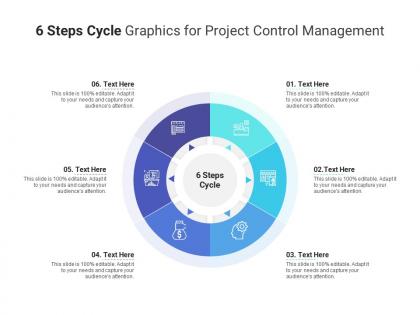
6 steps cycle graphics for project control management infographic template




Try Before you Buy Download Free Sample Product
 Impress Your
 Audience
 100%
100% Editable
 Save Hours
 of Time


Our 6 Steps Cycle Graphics For Project Control Management Infographic Template are topically designed to provide an attractive backdrop to any subject. Use them to look like a presentation pro.
People who downloaded this PowerPoint presentation also viewed the following :
6 steps cycle graphics for project control management infographic template with all 2 slides:
Use our 6 Steps Cycle Graphics For Project Control Management Infographic Template to effectively help you save your valuable time. They are readymade to fit into any presentation structure.
FAQs for 6 steps cycle graphics for project control
So basically, project control management is all about staying on top of things as they happen - you're constantly checking if you're on track and fixing stuff when you're not. Traditional PM? More like making a big plan upfront and then just following it. Control management means you're always comparing actual performance to what you planned, spotting problems early, making quick changes. Way more reactive. Traditional PM assumes everything will go smoothly (which, let's be real, rarely happens). My advice? Set up regular check-ins where you actually look at what's working and what isn't, then pivot when needed.
Hey! So project control techniques are basically your way to see what's really going on vs. what should be happening. Earned value management, milestone tracking, regular check-ins - all that good stuff. You'll catch problems before they blow up your budget or timeline. I'm a big fan of weekly dashboard reviews honestly - helps you build the habit. Short sentences keep your team focused. When you spot issues fast, course-correcting becomes way easier. The whole point is having systems to track scope, schedule, and costs so you're not just winging it and hoping for the best.
Look, risk management is like your project's early warning system. Spot problems before they trash your timeline or budget. I always think of it as checking weather before a road trip - but obviously way messier! Do a quick risk assessment at kickoff. You'll identify threats early so you can build backup plans and maybe adjust scope if needed. Honestly, most people skip this step and then wonder why everything goes sideways. Having that radar helps you make smart decisions instead of scrambling when stuff hits the fan. Trust me, it's worth the upfront time.
Look, these metrics are basically your lifeline for making good calls and keeping everyone happy. Budget variance, schedule stuff, scope creep - tracking all that lets you catch issues before they blow up. Stakeholders eat up real numbers way more than those BS "we're doing great!" updates nobody believes anyway. You can actually show progress or explain why things are taking longer without sounding like you're making excuses. Just pick what matters to your crowd and don't let the data get stale. It's honestly night and day for keeping projects on track.
Honestly, you'll probably end up with Microsoft Project, Asana, or Monday.com like most teams do. If you're dealing with really complex stuff, Microsoft Project has the best Gantt charts and resource tracking. Asana's my go-to recommendation though - good balance of features without being overwhelming. Monday.com looks pretty and teams love the visual aspect, but wow does it get expensive fast. Oh, and if you're doing software dev, Jira's worth considering too. I'd say start with Asana's free version first. See what your team actually needs before paying for fancy features you'll never touch.
Look, baseline management is huge - think of it as your project's anchor point. Too many projects crash because teams keep shifting the target instead of sticking to their original plan. Your baseline shows whether you're hitting scope, schedule, and budget or totally missing the mark. Changes will happen (they always do), but at least you can measure their real impact against something solid. Set it early and guard it like crazy. Only update through proper change control - honestly, I've watched good projects turn into disasters when people get sloppy about this. Short version: nail down your baseline and don't let it drift.
So EVM is pretty cool - it gives you three numbers (planned value, earned value, actual cost) that tell you if you're behind schedule AND over budget at the same time. No more of that "we're like 70% done" nonsense from your team. The math takes a minute to get used to, but once you do? You'll catch problems way earlier than usual. Plus stakeholders eat up the concrete data instead of gut feelings. Honestly, I was skeptical at first but it's legit helpful. Just try tracking the basics on your next project and see what happens.
Honestly, you've gotta lock down a change control process or you're screwed. Make people submit written requests with impact assessments - no more "hey can we just add this real quick?" nonsense. I got burned so bad on my last project when those tiny additions snowballed into a three-month nightmare. Document everything and build in buffer time from day one. Weekly scope check-ins are clutch for catching problems early. Oh, and be super clear about boundaries upfront with stakeholders - they'll test you otherwise.
So data analytics is basically like having a crystal ball for your projects. You can look at old patterns, see how resources were used before, and actually predict what'll happen instead of just crossing your fingers. Honestly, it beats the hell out of guessing timelines and budgets. You'll catch bottlenecks early, figure out which teammates are always late (we all have that one person), and base your forecasts on real data instead of pure optimism. Track maybe 3-4 metrics consistently to start. The patterns show up faster than you'd think.
Ok so first thing - nail down what you're actually trying to accomplish and how you'll measure success. That's your baseline. Then set up reporting that happens regularly, like weekly or every two weeks. Templates sound super tedious but they're honestly a lifesaver for avoiding confusion later. Figure out who your key people are early and get crystal clear on who can actually make decisions. I've seen projects die a slow death because nobody knew who had final say. Oh, and build in some kind of alert system for when things start going sideways with budget or timeline. Keep it simple though - if it's too complicated, people just won't use it.
Honestly, psychological safety is everything - people won't speak up if they think you'll shoot the messenger. I do regular check-ins where we actually talk about what's blocking us, not just those useless "everything's fine" updates. Get your departments talking directly to each other too, skip the middleman thing. I've literally watched projects get saved because someone from QA randomly mentioned something to a dev in the break room. Oh, and shared dashboards help since everyone sees the real numbers. But here's the key part - when someone flags a problem early, don't just thank them... actually celebrate it. Make raising issues feel like winning, not tattling.
Honestly, the biggest pain is getting people to actually do it. Your team will think you're micromanaging and either push back hard or just... not report anything useful. Executive support? Good luck with that unless you can prove immediate ROI. Data quality becomes this nightmare where Sarah gives you a novel about her project while Mike writes "working on stuff." Super helpful, right? Most places won't give you proper tools either. Start tiny - pick like 3 metrics max. Get your team involved in creating the process so they don't hate it. Always explain why you need this info, otherwise they'll assume you're just being annoying.
Oh man, cultural stuff can totally derail your project if you're not careful. Like, some team members won't speak up about problems because direct feedback feels rude in their culture. Others expect way more formal hierarchy than you're used to. And don't get me started on deadlines - "urgent" means completely different things depending on where people are from. Honestly, I learned this the hard way on a project last year. You've got to figure out these patterns early and tweak how you communicate with different groups. Maybe change up your meeting styles or reporting frequency based on what actually works for each team.
Ok so the big three you need are SPI, CPI, and earned value metrics - they'll tell you if you're actually on track or just pretending to be. Budget variance and milestone completion rates are solid too. Resource utilization helps but honestly I sometimes forget to check that one. Quality metrics obviously matter, but those core ones catch most disasters before they get ugly. Oh, and risk tracking if your project's complicated. Just throw them in a simple dashboard that updates weekly. Way better than those endless status meetings where everyone just says "we're good" while everything's on fire.
After big milestones, do quick retrospectives to see what worked and what didn't. Then actually change your processes based on what you learned - sounds obvious but most people skip this part. I'd start tracking your main metrics over time too. Honestly, collecting data is pointless if you're not spotting the patterns. Those trends will show you where to tweak your monitoring and risk stuff. Don't wait for disasters to improve things. Pick one process and start iterating. Small steps work better than overhauling everything at once.
-
Attractive design and informative presentation.
-
Design layout is very impressive.
-
Awesome presentation, really professional and easy to edit.
-
Easily Understandable slides.
-
Helpful product design for delivering presentation.
-
Attractive design and informative presentation.
-
Content of slide is easy to understand and edit.
-
The Designed Graphic are very professional and classic.
-
The content is very helpful from business point of view.