

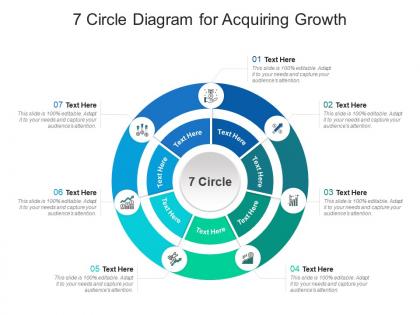
7 circle diagram for acquiring growth infographic template




Try Before you Buy Download Free Sample Product
 Impress Your
 Audience
 100%
100% Editable
 Save Hours
 of Time


This is a 7 Circle Diagram For Acquiring Growth Infographic Template that can be used by professionals belonging to any domain. It is a powerful illustrative tool that can be deployed to showcase consumer behavior, sales reports, progress reports, IT research results, and many more. In short, this PPT layout works for every industry, irrespective of its operations. The combination of compelling information and visual content added in this template makes it a very resourceful layout to grab. Utilize it to present information and insightful details about your business or the finished product that can be visualized from the onset. This PPT design features high quality elements like graphics, icons, etc. that can be used to further enhance the illustrative properties of a presentation. It can also be reproduced as PNG, JPG and PDF, for the users convenience.
People who downloaded this PowerPoint presentation also viewed the following :
7 circle diagram for acquiring growth infographic template with all 2 slides:
Use our 7 Circle Diagram For Acquiring Growth Infographic Template to effectively help you save your valuable time. They are readymade to fit into any presentation structure.
FAQs for 7 circle diagram for acquiring
Three main things matter: solid narrative flow, visual hierarchy that works, and data that actually backs up your point. People should follow it like a story - one idea flowing into the next without confusion. Use size, color, and spacing so they know what's most important first. Honestly? Half the infographics I see just dump random stats together hoping something sticks. Don't do that. Your data needs to connect and build toward whatever you're arguing. Oh, and sketch the whole flow first before opening any design programs - saves you tons of headache later.
Dude, color choice seriously matters more than you'd think! Reds and oranges make everything look urgent or intense - I once used red for normal sales data and my boss thought we were tanking lol. Blues and greens feel way more chill and positive. For showing progression, go light to dark. Different categories? Use contrasting colors so people can actually tell them apart. Honestly, just run it by someone else first because what makes perfect sense to you might be total gibberish to everyone else.
Keep it simple with max 2-3 fonts – I usually do a bold sans-serif for headings and something clean for body text. People go wild with fonts sometimes and it's just chaos. Your hierarchy needs to be obvious so readers can scan fast. Helvetica or Open Sans are solid choices since they stay readable even tiny. 12pt minimum for body text, especially since everyone's scrolling on phones now. Oh, and definitely step back from your screen to check readability – or grab someone nearby for a quick opinion. Font choices can make or break the whole thing.
Honestly, infographics are game-changers for boring presentations. Your audience won't zone out when you're showing them a story instead of just dumping data on them. Good visuals make complex stuff actually make sense - like having a roadmap for your main points. I've watched so many presentations go from total snoozers to actually interesting just by ditching bullet points for decent charts and icons. Oh, and people can follow your logic way easier when it's visual. Next time you're putting slides together, sketch out your story first, then build around that. Trust me on this one.
Honestly, just start with Canva - it's super easy and has a million templates. Sure, half the internet uses the same designs, but whatever. If you want something fancier later, Adobe Illustrator is where the pros go, though it's definitely harder to learn. Piktochart and Venngage are decent middle options too, especially if you're doing charts or data stuff. Oh, and Figma works great if you already know it from other projects. I'd mess around with Canva's free version first. See what you actually need, then maybe upgrade or try something else if it's not cutting it.
Icons are a game-changer - swap out words like "transportation" for a simple car icon. Way cleaner. Just don't mix styles (cartoon with realistic looks terrible, trust me). They're perfect for processes too, especially when you've got walls of text. Size them big enough for mobile since everyone's scrolling on phones these days. Oh, and here's something I learned the hard way - stick to maybe 2-3 colors max. Otherwise your icons start fighting with everything else on the page. It gets messy fast.
Honestly? Most people try cramming way too much stuff into one graphic - like they're writing a novel or something. Pick ONE main point and stick with it. Also, those neon color combos that hurt to look at? Hard pass. Three colors max is plenty. Don't use tiny fonts either because nobody's squinting at your masterpiece. Oh, and those random stock photos that have nothing to do with your data are just weird. Make sure your charts actually tell a story instead of just sitting there looking decorative. I'd start with whatever your big takeaway is, then build everything else around that core message.
Start with your main point, then grab maybe 3-5 data bits that actually back it up. Don't dump everything you found – I swear half the infographics out there look like Excel vomited everywhere. Your audience needs to get it in like 10 seconds max. Here's what I do: show it to someone who knows nothing about the topic and ask what they think the main message is. If they're confused or take forever to answer, you've got too much stuff going on. Less really is more with this kind of thing. Cut until it hurts, then cut a little more.
Each platform needs different sizing - Instagram loves squares, Pinterest wants vertical, and LinkedIn/Twitter work better horizontal. Make your text big enough for mobile or people literally can't read it (learned this one the hard way, looked like ant writing). Breaking complex ones into carousels actually gets more engagement anyway. Your branding should be visible but not obnoxious about it. Honestly, the caption matters just as much as the graphic itself - summarize your main point there. Oh, and test different posting times because your audience might be night owls or early birds.
Dude, infographics are seriously amazing for presentations. Your brain processes visuals like 60,000 times faster than text - which honestly blew my mind when I first heard that. People remember 65% of visual stuff but only 10% of text after three days, so you're basically setting your audience up to actually retain what you're teaching. Complex topics become way more digestible when you break them into visual chunks instead of boring bullet points. Different learning styles in your classroom will thank you too. Just pick one concept from your next presentation and turn it into a simple flow chart. Trust me, you'll notice the difference right away.
So there's basically three things to nail down: visual stuff, how easy it is to understand, and tech accessibility. High contrast colors are your friend, and pick fonts that don't strain people's eyes - Comic Sans actually sucks for readability despite what some people think. Alt text is super important for screen readers. Don't use fancy jargon that'll confuse people, and here's the thing - colorblind folks need more than just color coding to get your point. Like, use shapes or patterns too. Honestly though, the best move is testing it with real people first. They'll spot problems you totally missed.
Okay so brand consistency in infographics is honestly a game-changer. People will instantly recognize your stuff when you stick to the same colors, fonts, and logo placement every time. It builds trust too - like when you see that familiar look, you know it's legit content from that company. Professional polish is another bonus. I've watched some brands absolutely crush this while others are all over the place (you probably know which ones I mean). Here's what I'd do: make a quick brand guide with your key visual elements and just reference it each time. Saves you from reinventing the wheel every single project.
Honestly, you gotta track both sides of this - engagement stuff AND whether it actually moves the needle for your business. Views, shares, time on page, downloads - that tells you if people are digging it. Social shares are probably the biggest win since that's where infographics can really take off. But here's the thing: don't get so caught up in vanity metrics that you forget the real goal. Are you getting more leads? Traffic spikes to your site? People actually doing what you want them to do? Set up those UTM parameters from the start (trust me on this one) so you can trace everything back and see what's really working.
So everyone's doing interactive stuff now - clickable charts, animations that trigger when you scroll, that kind of thing. Most people are on mobile anyway, so design for phones first. The storytelling aspect has gotten crazy good (some feel like watching a Netflix doc honestly). Oh and accessibility is becoming a bigger deal - better colors for contrast, making sure screen readers work. I'd say focus less on making things just look pretty and more on how people will actually interact with your data. Short sentences work. But mixing in longer ones keeps it from feeling robotic when people are scrolling through your stuff.
Yeah, privacy stuff is such a headache when you're making infographics. You can't just throw any data in there - gotta strip out names and personal details first. Customer data? Need consent forms. Sometimes you'll have to clump everything together so nobody can pick out individuals. Oh, and certain datasets are totally off-limits depending on your company rules or GDPR nonsense. I'd definitely run it by legal before you get too far into the design. Trust me, better to ask now than redo everything later.
-
Really like the color and design of the presentation.