

8 Level Pyramid Powerpoint Ppt Template Bundles




Try Before you Buy Download Free Sample Product
 Impress Your
 Audience
 100%
100% Editable
 Save Hours
 of Time


Our 8 Level Pyramid Powerpoint Ppt Template Bundles are topically designed to provide an attractive backdrop to any subject. Use them to look like a presentation pro.
People who downloaded this PowerPoint presentation also viewed the following :
8 Level Pyramid Powerpoint Ppt Template Bundles with all 17 slides:
Use our 8 Level Pyramid Powerpoint Ppt Template Bundles to effectively help you save your valuable time. They are readymade to fit into any presentation structure.






FAQs for 8 Level Pyramid Powerpoint
So pyramid diagrams are basically triangular charts with horizontal layers. Each level shows different categories or ranks in your data. The wider a section is, the bigger the value it represents. They're really good for showing hierarchies or when you need people to quickly see what's most/least important. Like, your brain just gets it immediately without having to crunch numbers. Perfect for org charts, market breakdowns, stuff like that. Oh and always put your biggest data at the bottom - otherwise it'll look weird and top-heavy. They work best when size actually matters for what you're showing.
Honestly, pyramid diagrams are clutch for showing hierarchy stuff - like org charts or breaking down complex ideas into levels. They're great when you need to show what builds on what, or rank things by importance. I use them way too much in my decks lol. But seriously, they work because people instantly get that the bottom stuff is the foundation for everything above. Perfect for processes that build on each other or clear ranking systems. The visual just clicks, you know? Your audience immediately understands the dependencies without having to think too hard about it.
Oh yeah, super easy to customize those! Change up the colors to match your brand palette, swap fonts, add icons - whatever works. I always throw in some gradients or textures because why not make it look cool, right? You can mess with the spacing and even flip the pyramid orientation if your layout's weird. One thing though - don't get so caught up making it pretty that you forget about text contrast. I've totally done that before and ended up with unreadable text on a gorgeous background. Kind of defeats the purpose lol.
So pyramid diagrams are for showing hierarchy - like org charts or those psychology pyramid things. Bar charts? That's when you want to compare numbers side by side. Flowcharts map out processes step by step. Pyramids stack info from broad at bottom to specific at top. They're kinda old school looking but work great for levels of data. Bar charts are perfect for "this vs that" comparisons with actual numbers. Flowcharts walk people through workflows. Quick rule: need to show hierarchy? Go pyramid. Comparing data? Bars all the way. Mapping a process? Flowchart's your friend.
Honestly, just think about your data's natural hierarchy first. Map out all the levels you've got - like CEO, then VPs, directors, managers, whatever. I'd stick with 3-5 layers max because anything more looks like a hot mess (learned this the hard way). Each layer should actually mean something different in terms of importance or authority. Short version: make sure people can actually read it without getting a headache from squinting at microscopic text boxes. You want them to get the relationships quickly, not spend forever decoding your masterpiece.
Oh man, color choice is so underrated for pyramid diagrams! I used to just pick whatever looked nice and wonder why my presentations felt off. Turns out people actually read meaning into colors - who knew? Warm colors like reds work great for your top priority stuff, while blues and greens feel more foundational at the bottom. Honestly, a simple gradient usually beats trying to get fancy with multiple random colors. Each level should flow logically from most to least important. It's one of those things that seems obvious after someone tells you, but I definitely had to learn it the hard way.
Yeah, definitely! Throw in some flowcharts or timelines alongside your pyramid - it actually makes everything click better. Icons work great too if they match your hierarchy points. Color coding is clutch for connecting everything on the slide. I've totally seen presentations where people went nuts with visuals though, so don't let your pyramid get buried. Keep it as the main focus. Oh, and start basic first - you can always add more fancy stuff later once you nail the simple version.
Honestly, just start with PowerPoint or Google Slides if you want something quick. Canva's got really nice pyramid templates too - way easier than starting from scratch. Lucidchart is amazing for complex stuff, though it might be more than you need (I got obsessed with it last month). Draw.io works well too. If you're doing serious design work, Illustrator gives you total control but there's definitely a learning curve. I'd just use whatever you already have first, then see if you need to upgrade later.
First thing - get your data from solid sources and double-check everything. I made this mistake once where I didn't verify if my data actually worked in a pyramid format (spoiler: it didn't). Each level should flow logically from the one above it. Test it out with a coworker to see if the connections make sense to them - sometimes you're too close to spot the gaps. Oh, and definitely keep track of where you got your numbers from. You'll thank yourself later when someone questions your sources or you need to update things.
Don't cram too much text in there - it looks messy and defeats the whole point. Stick to 3-5 levels tops. I've seen so many people use similar colors or fonts between sections and honestly, it just confuses everyone. Make sure your base is actually wider than the top (sounds obvious but you'd be surprised). Also, check that your info actually fits a pyramid structure first. If the hierarchy doesn't make sense, just use a different chart type instead. Oh, and keep each section short - nobody wants to read paragraphs in a pyramid diagram.
Honestly, pyramid diagrams just make sense for org charts. Most companies already work that way - bosses at the top, everyone else below. You'll instantly see who reports to who and where the real power sits. Way cleaner than those tangled mess charts that hurt your brain to look at. Different colors for each department helps too. The whole hierarchy thing becomes super obvious, and you can actually spot if there are weird gaps or too many people doing the same job. I mean, it's not rocket science - the shape literally shows how decisions flow down through the company.
Make your labels short and match the format - like all nouns or all action words. Don't cram text into tight spaces (seriously, nobody can read tiny fonts during presentations). Put labels right on each section if you can, or use clean lines to callout boxes. Good contrast between text and background is key. Here's what I always do - test it at the actual viewing size first. Stuff that looks great on your laptop screen turns into an eye test when projected. Oh, and throw in a quick legend if you're using different colors or symbols. Short sentences work better than long ones for this kind of thing.
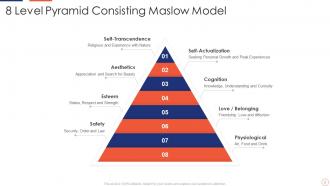
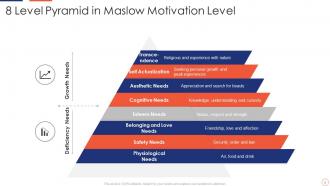
Pyramid diagrams work great for breaking complex stuff down into chunks that build on each other. Maslow's hierarchy, Bloom's taxonomy - that kind of thing. Students can see how basic skills support higher-level thinking, which is super helpful for visual learners. I actually love using them to organize curriculum from simple to advanced concepts. Oh, and here's a cool trick - flip them upside down and have students fill in the missing levels. Really shows if they get how the concepts connect to each other. Honestly should've seen more of these in my own classes back in the day!
Honestly, building them layer by layer from bottom up works really well - keeps people hooked. The morphing thing where one pyramid transforms into another is *chef's kiss* - PowerPoint actually handles it better than you'd think. 3D rotation is cool too, like showing different data on each face. Oh, and those particle effects where pieces fly in to build each level? Pretty slick. Just don't go overboard if your audience gets bored easily. Sometimes I get carried away with the fancy stuff when simple would've worked better. Match whatever style fits your content's vibe.
Dude, pyramid diagrams work because they literally show people where to look first. Your audience follows the flow from top to bottom without thinking about it. Way more engaging than boring bullet points - those just make people zone out. You can build drama by revealing each level one at a time, or show the whole thing upfront as a roadmap. Just don't cram too much text into each section (learned that the hard way). Put your main idea at the peak and let everything else flow down naturally. Makes each tier pop visually too.
-
I've been looking for a good template source for some time. I'm happy that I discovered SlideTeam. Excellent presentations must try!
-
“Superb. What a great finding. Thankful for SlideTeam. We were paying people to make slides which went all in vain. We are so happy to have found you.”