


A comparison of the various raid levels raid storage it ppt powerpoint model pictures




Try Before you Buy Download Free Sample Product
 Impress Your
Audience
 100%
Editable
 Save Hours
of Time


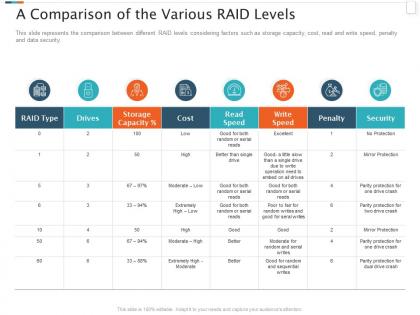
This slide represents the comparison between different RAID levels considering factors such as storage capacity, cost, read and write speed, penalty and data security.
People who downloaded this PowerPoint presentation also viewed the following :
A comparison of the various raid levels raid storage it ppt powerpoint model pictures with all 2 slides:
Use our A Comparison Of The Various Raid Levels Raid Storage It Ppt Powerpoint Model Pictures to effectively help you save your valuable time. They are readymade to fit into any presentation structure.


FAQs for A comparison of the various raid levels raid storage it ppt
So RAID 0 is pure speed - strips data across drives but zero backup if one dies. RAID 1 just mirrors everything, so you're covered if a drive fails but writes are actually a bit slower. Most people go with RAID 5 since you get decent performance plus it can handle losing one drive. But honestly? Those rebuild times are getting pretty nuts with how big drives are now. Really depends what you need - if your data's critical, go RAID 1. Need the performance and you've got solid backups anyway, RAID 0's fine.
Oh RAID 10? That's the striped mirror setup - you mirror drives in pairs for redundancy, then stripe across those pairs for speed. One drive dies and you're fine since its twin has everything backed up. Performance is pretty sweet too because you're hitting multiple drives at once. I actually prefer it over RAID 5 for stuff that really can't go down. You'll need 4 drives minimum though, and yeah, you lose half your storage space to mirroring. Worth it if uptime matters more than capacity.
RAID 0 is perfect for when you need crazy fast speeds but don't care if you lose the data. Video editing rigs love it - those 4K renders fly when you're striping across multiple drives. Gaming setups too. But here's the thing, one drive dies and everything's toast. I'd only use it for temp files or stuff you can recreate easily. Like, don't put your family photos on there! It's great for processing large datasets where speed matters more than safety. Just make sure you've got backups of anything important stored somewhere else.
So RAID 6 lets you lose two drives at once without losing your data - way better than RAID 5's single drive protection. Writes are slower since it's calculating two parity blocks every time, but honestly? That extra safety is totally worth it for important stuff. Your array keeps running while you swap out dead drives, which is clutch when you're dealing with those massive drives that take like 12 hours to rebuild. I've seen too many people get burned by RAID 5 failures during rebuilds. Go with RAID 6 if your data matters.
Honestly, it's all about which RAID you're running. RAID 1 is super quick since it just mirrors everything - basically instant switchover when one drive dies. But RAID 5 and 6? Ugh, you'll be staring at that rebuild bar forever because of all the parity math it has to do. RAID 10 sits in the middle somewhere. Here's the thing though - bigger arrays are absolute torture. We're talking hours or days for multi-TB RAID 5/6 rebuilds. I learned this the hard way last year. Just pick your RAID based on how long you can actually afford to be down.
Yeah, RAID changes usually mean kissing your data goodbye. Most setups require a full rebuild - backup everything, nuke the array, recreate it how you want, then restore. Sure, some fancy enterprise controllers claim they can migrate online, but I'd never trust that without a backup anyway (learned that lesson once). Your safest move? Always backup first, no exceptions. If you're setting this up fresh though, maybe look at RAID 6 or 10 - they're solid for performance and don't need constant tweaking. Just assume any RAID change will destroy everything and plan accordingly.
Yeah, RAID 0 is way cheaper upfront - you get all the storage space you pay for. RAID 1 though? Ouch, double the cost since you're mirroring everything. I learned that the hard way when I was budgeting my last build. Here's the catch: RAID 0 has zero backup if a drive dies. You lose it all. RAID 1 keeps you covered with that mirror copy. Really comes down to what you need more - tons of cheap storage or sleeping well at night knowing your data won't vanish.
RAID 5 is honestly a solid choice - you get protection if one drive dies plus faster reads since multiple drives work together. Data and parity get spread across all drives, so losing one isn't catastrophic. Writes are slower though because of all that parity math happening. The real advantage? You only lose one drive's worth of storage space for redundancy, not half like with RAID 1. Two drives failing before you rebuild though - that's game over. I learned that the hard way with a client's setup once. Just keep an eye on your array status and you'll be fine.
Dude, hot spares are lifesavers - they're backup drives that kick in automatically when your main drives crap out. With RAID 5, you definitely need them because if two drives die before rebuilding finishes, you're totally screwed. Been there, not fun. RAID 6 handles dual failures better thanks to double parity, but hot spares still make recovery way faster. The moment a drive fails, boom - spare starts rebuilding without you lifting a finger. I'd say one spare per array minimum, though honestly I sometimes go overboard and add two if it's critical stuff. Trust me, you'll be so grateful when failure hits.
So RAID 0 is crazy fast since it spreads data across drives, but if one dies you lose everything. RAID 1 mirrors your stuff which is great for reads but writes get slower. Most people go with RAID 5 - decent speed plus protection, though parity calculations bog down writes a bit. RAID 10 is honestly my favorite because you get killer performance AND redundancy, just costs more drives. Oh, and definitely test whatever setup you're considering with your actual workload first since databases behave totally different than file servers.
RAID's not really backup - more like having spare keys all in the same house. House burns down? You're screwed either way. Real backups live somewhere else entirely, which saves you from ransomware, accidentally nuking files, or your whole system dying. RAID keeps things running when drives crap out, which is nice. But I've seen too many people think they're covered when they're really not. You still need actual offsite backups or cloud storage on top of whatever RAID you're running. Don't let it fool you into thinking you're protected.
Your RAID controller is probably slowing you down more than you think. Hardware ones with their own processors and cache absolutely destroy software controllers, especially if you're doing RAID 5/6 stuff where all those parity calculations hammer your CPU. RAID 0 and 1 aren't as picky since they're way simpler. Honestly, if you're doing anything fancier than basic mirroring, spend the money on a decent hardware controller with good cache. The speed difference will blow your mind - learned that one the hard way.
For high-transaction databases, RAID 10 is definitely what I'd go with. You get the mirroring from RAID 1 plus the striping from RAID 0 - so performance is great and you won't lose data if a drive dies. The catch is you'll need double the storage since everything gets mirrored. Yeah, it's pricey. But honestly, if your database is constantly busy (which sounds like your situation), the speed difference is huge. My old boss always said storage is cheap compared to downtime, and he wasn't wrong. Just budget for twice as many drives.
RAID basically turns multiple drives into one big logical unit, which makes everything way simpler to manage. Built-in redundancy is clutch - no more worrying about manual backups all the time. Hot-swapping drives means you won't have crazy downtime when stuff breaks. The trade-off is capacity vs protection though. RAID 10 only gives you half your storage space but can handle multiple failures, which honestly might be overkill depending on what you're doing. I'd figure out your performance requirements first, then pick a RAID level that'll actually grow with you.
Dude, the biggest trap is thinking RAID = backup. It's not! RAID just protects against drives dying, but you'll still lose everything to ransomware or if you accidentally delete stuff. RAID 5 used to be solid, but with these huge drives nowadays? Rebuilds take forever and you might get hit with another failure mid-rebuild. People also think higher numbers mean better protection, which isn't always true - like RAID 10 vs RAID 6 depends on what you need. Oh, and definitely do the 3-2-1 backup rule alongside whatever RAID setup you pick.
-
Graphics are very appealing to eyes.
-
Easily Understandable slides.
-
Visually stunning presentation, love the content.
-
Graphics are very appealing to eyes.