

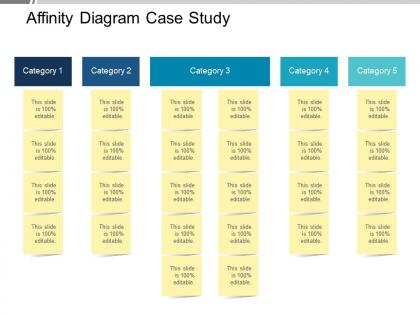
Affinity diagram case study ppt background designs




Try Before you Buy Download Free Sample Product
 Impress Your
 Audience
 100%
100% Editable
 Save Hours
 of Time


Are you worried about how to create affinity diagram for presentations to meet your business requirements? If yes, then don’t worry, use our pre designed, one of the most amazing affinity diagram case study PPT background designs presentation template. You can use this PPT diagram to organize and display business data in a well structured manner. This affinity diagram process PPT works as an effective tool for data management and planning. You can combine a large number of business operational ideas and sort them into groups based upon their characteristics and natural relationships for review and analysis. This affinity diagram PowerPoint template is very much useful for managing complex business operations as you can easily get people to work on creative level to address these complex issues. Using the affinity diagram may encourage your team members to adopt a new pattern of thinking. So, don’t wait, download this example of affinity diagram PowerPoint template and use it to design impressive slideshows for your business. Our Affinity Diagram Case Study Ppt Background Designs are eager to help out. They enjoy giving any assistance.
People who downloaded this PowerPoint presentation also viewed the following :
Affinity diagram case study ppt background designs with all 5 slides:
Enable folks to aspire for better jobs with our Affinity Diagram Case Study Ppt Background Designs. It helps improve employability.
FAQs for Affinity diagram case study
So you take all your messy brainstorming stuff - sticky notes, feedback, whatever - and just group similar things together. That's basically an Affinity Diagram. Sounds fancy, right? But it's dead simple once you get going. Spread everything out first, then start making piles of related items. Label each pile with a theme. Super helpful when you're drowning in stakeholder comments or trying to figure out what's causing problems in your project. I use it all the time - way better than staring at random data hoping it'll magically make sense.
So affinity diagrams basically get everyone moving around and organizing ideas together, which totally eliminates that weird silence when nobody wants to talk first. People just silently stick up their thoughts, then you all group them by themes - honestly feels more like doing a puzzle than having a meeting. Your quiet teammates finally get equal say since they're not fighting for speaking time. The cool part? You spot patterns that would've gotten buried in normal discussion. Oh, and try different colored sticky notes for each person - makes it way easier to see who contributed what during the sorting. You'll end up with this visual roadmap that everyone actually helped build.
Honestly, these work great when you're drowning in messy data or random ideas. Like after brainstorming sessions where everyone's just throwing stuff at the wall. I use them all the time for customer feedback - you know how that gets chaotic fast. Different team perspectives cluster in ways you wouldn't expect, which is actually pretty cool. Post-mortem meetings are perfect for this too. When I finish user interviews, I'll have pages of notes that feel overwhelming. But once you start grouping similar ideas together, patterns just emerge from the chaos. Worth trying next time you're staring at sticky notes feeling totally lost.
So grab all your stuff first - sticky notes, quotes, whatever you collected. Sort them silently into piles that seem related (seriously, no talking makes this way better). After you've got rough groups, look for patterns and move things around. Each pile needs a header that captures what it's about. Honestly, the coolest part is stepping back and watching the big picture just appear from all that chaos. Keep everyone involved but don't overthink it. Your gut reaction is usually right the first time.
So basically, when you group stuff together in those diagrams, patterns just pop out that you'd never notice otherwise. Like, suddenly you can see which topics keep coming up most. Short cuts through all the chaos, honestly. You'll spot weird connections between ideas too - sometimes the random ones are the best insights. Instead of drowning in 50 random sticky notes, boom, you've got maybe 6 solid themes to work with. Oh and definitely name each group once you're done clustering. Those names usually end up being your main talking points anyway. Way less overwhelming than trying to process everything individually.
For affinity diagrams, I'd go with Miro or Mural first - they're honestly amazing for moving sticky notes around and everyone can jump in at once. Figma works too if you're already using it for design stuff. Physical sticky notes are still clutch for smaller teams though, way less friction than learning new software. Oh and Google Jamboard is decent if you need something free (though it's getting discontinued I think?). Lucidchart and Microsoft Whiteboard are fine backup options. Just use whatever won't make your team groan about having to learn another tool.
Oh man, affinity diagrams are everywhere once you start noticing them! Software teams use them for user research and sprint retros all the time. Healthcare does patient journey mapping with them. Manufacturing uses them for root cause stuff. Marketing teams - they're constantly drowning in customer feedback, so these diagrams are a lifesaver. Really though, any field with messy qualitative data benefits. Product design, education, consulting, retail for customer insights. I actually used one last week for organizing interview notes - total game changer. When you've got sticky notes scattered everywhere and feel totally overwhelmed? Just start grouping them by themes. That's literally an affinity diagram.
Mix up who's in the room - different departments, experience levels, the whole deal. Don't just grab the usual people who always speak up. Tell everyone upfront that their ideas actually matter and there's no such thing as a dumb suggestion. Have people write down ideas silently first before anyone talks. Game changer, honestly - suddenly your quiet team members and newer folks get heard instead of being steamrolled by whoever talks fastest. Oh, and switch up who runs the grouping part. Different facilitators will spot different themes.
Two big things trip people up: forcing stuff into boxes you've already decided on, and getting stuck debating where each thing goes. Teams waste SO much time arguing if something belongs in category A or B - it's honestly painful to watch. Set a timer for grouping and stick to it. Let categories form naturally from what you're seeing. If something fits multiple spots? Just pick one and keep moving. You're looking for patterns, not some perfect system. Oh, and tackle the obvious groups first - builds momentum when people see progress happening.
Honestly, affinity diagrams are a game-changer for retros and backlog grooming. When you're doing retrospectives, get everyone to cluster their feedback into themes - suddenly you'll spot patterns in what's actually blocking the team. Same goes for backlog sessions - group user stories by features or personas and prioritization becomes so much clearer. We started doing quick 15-minute affinity exercises during our retros (takes forever sometimes but whatever). The visual grouping thing really works though. People catch connections they'd totally miss if everything's just floating around randomly. Super helpful when brainstorming gets chaotic and ideas are all over the place.
Honestly, affinity diagrams are a lifesaver when you're drowning in research data. Grab all those user quotes and observations from your interviews, then start clustering them into themes with your team. It's like organizing chaos, but actually fun? The visual grouping helps you catch patterns that would totally slip by otherwise. Short sentences work great here. Plus stakeholders love seeing everything laid out visually instead of wading through dense reports. I swear by this method - you'll turn that pile of sticky notes into real insights people can actually use. Works every time.
Check if your team actually gets it first - do the themes make sense to everyone? If people are just nodding and then never bringing it up again, that's your answer right there. Try having new team members look at it cold. Can they spot the key patterns quickly? Also test whether stakeholders can identify priorities without you explaining everything. The honest truth? If it's just sitting there looking nice but nobody references it during actual decisions, then it's not working. A good affinity diagram becomes something people keep coming back to, not just another deliverable that gets forgotten after the meeting.
Oh there's tons of ways to mix it up! I'm obsessed with digital versions on Miro or Figma - way less messy than sticky notes everywhere. Silent mapping is pretty smart too - everyone groups stuff solo first, then you compare. Some people do it backwards and start with categories already set. Walking sessions are a thing apparently? Never tried those but sounds kinda nice. The reverse method works well if you've got a good sense of themes already. Really just depends on your team and what feels right. Digital's my go-to though.
Colors are huge for grouping stuff - I always use red for urgent things, green for opportunities. Bigger sticky note clusters catch people's eyes first, so that placement really matters. One thing I've noticed? Messy handwriting kills the whole thing. Nobody wants to squint at your notes. Font size and spacing make or break whether people actually engage with it. Oh, and using consistent shapes for different data types helps people scan faster. Honestly, people read meaning into every visual choice you make, so keep it clean but don't overthink it.
Honestly, affinity diagrams are solid for solo work - I use them when I'm buried in research and need to make sense of everything. But they're way better with teams. Different people spot patterns you'd totally miss working alone. The whole process of clustering ideas together usually sparks those lightbulb moments that actually matter. Solo practice helps you get the hang of it first though. Then you can bring it to group brainstorms without looking clueless. Trust me, the collaborative part is where things get interesting - that's when you stumble onto insights that wouldn't happen otherwise.
-
Unique and attractive product design.
-
Innovative and attractive designs.