

Affinity diagram in project management ppt example file





Try Before you Buy Download Free Sample Product
 Impress Your
 Audience
 100%
100% Editable
 Save Hours
 of Time


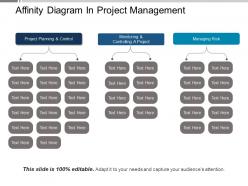
Affinity diagram in project management PPT example file is a great productivity tool that can be used either for business or educational purposes. The application of PowerPoint also helps in organizing large amounts of data into their natural relationships thereby helping people to make decisions. Although there are numerous ways of creating affinity diagrams for presentations, this pre-designed PPT template if adopted, saves a lot of your time and efforts. In the given affinity diagram chart PowerPoint model, there are three drop down flowchart presentation, with one quoting project planning and control, 2nd quoting monitoring and controlling a project and third quoting managing risk. Affinity diagram for project planning PPT presentation graphic is applicable across all kinds of industries to come up with strategized solutions to the related problems. Discredit insinuations with our Affinity Diagram In Project Management Ppt Example File. Clearly expose attempts at creating doubt.
People who downloaded this PowerPoint presentation also viewed the following :
Affinity diagram in project management ppt example file with all 5 slides:
Get the controls in your hand with our Affinity Diagram In Project Management Ppt Example File. They will choose you as a guide.

FAQs for Affinity diagram in project management
So an affinity diagram is just grouping your brainstorm ideas by theme. Take all those random sticky notes and cluster the similar ones together—like sorting your closet but for thoughts, I guess. Use it right after brainstorming when you're drowning in Post-its and don't know what's actually useful. The clusters show you patterns and help prioritize which ideas are worth chasing. Honestly, most teams skip this step and wonder why nothing gets done afterward. Just block out 15 minutes at the end of your next session for this. Way better than everyone leaving confused about next steps.
Dude, affinity diagrams are perfect for when your team's drowning in ideas and nobody can make sense of anything. You basically dump everything on sticky notes and start grouping related stuff together. It's weirdly satisfying, honestly - like organizing your closet but actually productive. The magic happens when patterns start jumping out that nobody noticed before. Plus everyone's moving notes around and arguing about where things go, which gets people talking naturally. My old boss was obsessed with these things, but she wasn't wrong. Try it next time you're stuck with a million scattered thoughts.
First, dump all your sticky notes out - like, literally everything. Sort them silently into piles that feel related (seriously, no talking makes this way more effective for some reason). Step back and see what themes pop up naturally. Label each pile with whatever captures the main idea. Here's where it gets interesting - look for how the different groups connect to each other. That's usually where the good insights are hiding. Don't stress about perfect categories. They'll shift around as you work through it anyway. The whole thing's pretty iterative.
Perfect timing for affinity diagrams - when you've got a million scattered ideas after brainstorming or user interviews and can't make sense of it all. Basically you group similar stuff together until patterns pop out. Works way better with a few people doing it together instead of solo. I've seen teams waste so much time making useless bullet lists when they could just do this instead. You need enough data points though - like at least 20-30 sticky notes or whatever. Otherwise you won't see real clusters. Next time your team's like "we have tons of feedback but what does it mean?" - boom, affinity diagram time.
So basically, affinity diagrams aren't about brainstorming new stuff - you take all the ideas you already have and group the similar ones together. Way different from mind mapping where you start with structure. Here you just let patterns show up naturally, which is honestly pretty satisfying when it works. I always forget how messy regular brainstorming gets until I'm staring at like 50 random sticky notes. But that's the point! You collect all that chaos first, then physically move related pieces together until themes emerge. It's perfect when you're buried in feedback or research and can't see the forest for the trees.
Miro's probably your best bet - their sticky note setup is perfect for affinity diagrams and the free version should cover what you need. Mural's solid too, just a bit pricier. If your team's already using Figma for design work, that could save you from learning another tool. Google Jamboard exists but honestly it's kinda janky compared to the others. I'd mess around with Miro first since it won't cost you anything, then see if you actually need the paid features. Most teams don't unless they're doing massive projects.
Just throw similar stuff together first - no need to be perfect right away. I always aim for like 5-7 main groups since anything more turns into a nightmare to manage. Look for patterns around themes or user types, whatever feels natural. Give each group a header that actually means something, not boring labels like "feedback." Honestly, the best categories kind of tell a story when you read them all together. Once you're done, check if any group got too chunky - might need to split those up. Oh, and definitely run your headers by someone else to make sure they're not confusing.
Don't force stuff into groups right away - let the patterns show up naturally instead of jamming things together. Also avoid making your categories super vague or weirdly specific (both are useless). I've watched teams waste like 20 minutes arguing over where ONE sticky note goes, which is honestly ridiculous. Move fast through your initial sorting. Keep category names descriptive too, not lazy labels like "issues" or "problems." The whole point is finding real themes, so don't overthink every placement. Just trust it'll work out.
You know how you end up with a million interview notes and survey responses that feel totally overwhelming? Affinity diagrams are basically your best friend for this. Grab all those quotes and observations, then start clustering them into themes - it's honestly like doing a puzzle but for user insights. Once you group everything, patterns jump out at you that you'd never notice otherwise. Pain points become super obvious. I'd definitely use Miro or Figma if you're working with a remote team (way better than trying to manage physical sticky notes over Zoom). The visual groupings also make stakeholder presentations so much cleaner.
Oh man, affinity diagrams are a lifesaver when you're drowning in project info. Basically you take all that messy stuff - brainstorming notes, stakeholder comments, risk lists - and group similar ideas together. Super helpful after those marathon workshop sessions (you know the ones). What happens is you start seeing patterns you totally missed before. Like suddenly all those scattered requirements make sense. I'm honestly obsessed with them because they turn complete chaos into something you can actually work with. Next time you're staring at a wall of sticky notes thinking "what now?" - try grouping them. You'll figure out what's actually important way faster.
Yeah, affinity diagrams work great for this stuff! Get everyone to brain-dump problems or solutions onto sticky notes, then stick 'em all on a wall. Start grouping similar ones together - honestly it's weirdly therapeutic watching everything click into place. You'll spot patterns you totally missed before, like how three different "issues" are actually the same root problem. Plus it makes prioritizing way easier since you can see what's connected. The visual thing really helps your brain process it all. We did this last month and solved something we'd been stuck on for weeks.
Take photos of your sticky note clusters first - seriously, stakeholders eat up that "behind the scenes" collaboration stuff. Then make a clean visual summary showing your 3-5 main themes with quotes or data backing each one up. Walk them through specific examples of how you grouped things together. Don't skip explaining your process either, because otherwise they'll just stare at you blankly. The whole point is turning those messy notes into something they can actually make decisions with, not just pretty insights that sit in a drawer.
Mind mapping starts with one big idea in the center, then branches out like a tree. Pretty straightforward. Affinity diagrams are totally different - you dump all your random ideas out first, then group stuff that feels related. I honestly think mind maps work best when you already know what you're focusing on. Affinity diagrams? Those are lifesavers when you've got a mess of brainstorming notes and zero clue how they connect. If you're staring at a wall of sticky notes right now, definitely start with the affinity approach.
Start by mixing up who you actually invite - different departments, experience levels, the whole deal. Don't just grab the people who always volunteer for this stuff. Have everyone brainstorm silently first before jumping into discussion, otherwise you'll get the same loud voices dominating. Get input beforehand from folks who can't make it. Create that safe space vibe so the quiet people actually speak up. Oh, and here's something that works - literally ask for opposing views right at the beginning. People need permission to disagree sometimes. The diversity thing only works if everyone's comfortable being real about their perspectives.
Look, companies like Netflix have been doing this forever - they took thousands of user complaints and sorted them into buckets like "can't find anything" and "interface is confusing." Toyota does it too for quality issues. Airbnb grouped customer complaints to figure out why people kept getting stuck during booking (honestly, their old flow was a mess). You don't need special tools though. Grab sticky notes, cluster similar ideas together, and boom - patterns jump out that your team would miss otherwise. It's weirdly satisfying once you get going.
-
Awesome use of colors and designs in product templates.
-
I discovered this website through a google search, the services matched my needs perfectly and the pricing was very reasonable. I was thrilled with the product and the customer service. I will definitely use their slides again for my presentations and recommend them to other colleagues.