

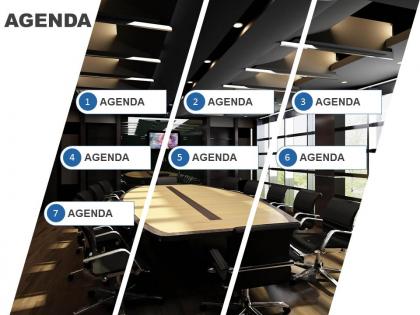
Agenda slide template with cut image and icons in a list powerpoint slide




Try Before you Buy Download Free Sample Product
 Impress Your
 Audience
 100%
100% Editable
 Save Hours
 of Time


Be artful, be stylish and be edgy with this unique PowerPoint slide with cut image and icons in a list when you set the agenda in the beginning of a meeting for the benefit of your audience so that every stakeholder is attentive about getting any points of concern addressed during the course of discussion and every topic that will come up is anticipated well in advance. Make your interaction a treat for the invitees by clearly delineating on various business processes, innovation challenges, target timelines, project plans and performance parameters after having laid down the agenda with this PPT slide template in a comprehensive manner. You will be able to get palpable results out of meetings with business partners, technology suppliers, clients, investors and shareholders, workforce, teammates and management after you have set out with a streamlined pace guided by the parameters laid down in the beginning through this unique and methodically crafted PowerPoint presentation design. Give a boost to employee education with our PT&s. They help cut the cost of attrition.
People who downloaded this PowerPoint presentation also viewed the following :
Agenda slide template with cut image and icons in a list powerpoint slide with all 4 slides:
Erase debts with our Agenda Slide Template With Cut Image And Icons In A List Powerpoint Slide. Your thoughts will gain more credits.
FAQs for Agenda slide template with cut image and icons in a
An effective agenda slide template should include clear section headings, estimated timeframes, speaker assignments, interactive elements, and visual hierarchy markers. These components streamline presentation flow by setting expectations, managing time allocation, and guiding audience attention, with many organizations finding that well-structured agendas enhance meeting productivity and participant engagement.
Visual design choices significantly impact agenda slide effectiveness through strategic use of color coding, clear typography, logical layout hierarchy, and engaging visual elements like icons or graphics. These design elements enhance audience comprehension, maintain attention throughout presentations, and create professional credibility, with many presenters finding that well-designed agenda slides set positive expectations and improve overall audience engagement rates.
**INPUT**: What are the best practices for structuring the agenda slide to maintain audience attention throughout the presentation? **OUTPUT**: Best practices include using clear, action-oriented headings, limiting agenda items to 5-7 key points, incorporating time estimates, and highlighting anticipated outcomes for each section. Strategic agenda structuring enhances audience engagement by creating anticipation, enabling better information retention, and establishing credibility, with many presenters finding that well-crafted agendas significantly improve meeting effectiveness and participant focus.
Color psychology significantly influences agenda perception by conveying urgency through reds, trust through blues, growth through greens, and energy through oranges, while neutral tones suggest stability and professionalism. Strategic color choices help presenters guide audience attention, set emotional expectations for each topic, and create visual hierarchy that enhances comprehension, with many organizations finding that thoughtful color application improves meeting engagement and information retention.
Agenda slide templates can be customized through industry-specific terminology, visual elements, color schemes, relevant icons, and contextual frameworks that align with sector requirements. Financial services presentations might emphasize compliance milestones and regulatory checkpoints, while healthcare agendas focus on patient outcomes and clinical protocols, ultimately delivering more targeted communication that resonates with specific audiences and enhances presentation effectiveness.
Common mistakes include overcrowding the agenda with excessive detail, failing to reference it throughout the presentation, using generic templates that don't match brand identity, and presenting it too quickly without proper explanation. Many presenters also make agendas too text-heavy rather than visual, skip timing estimates, and forget to highlight current sections during transitions, ultimately reducing audience engagement and comprehension.
Animated elements enhance agenda slides by drawing attention to key points, creating visual hierarchy, and maintaining audience engagement, while excessive animations can distract from content and appear unprofessional. Strategic animations like subtle reveals or emphasis effects help guide viewers through agenda items sequentially, with many presenters finding that purposeful motion graphics strengthen message delivery while overly complex animations detract from clarity.
Font choice significantly impacts agenda slide readability through clear hierarchy, appropriate sizing, consistent styling, and optimal contrast ratios. Professional fonts like Arial, Calibri, or Helvetica enhance credibility while ensuring accessibility across different viewing distances and devices, with many organizations finding that strategic typography choices ultimately deliver clearer communication and stronger audience engagement during presentations.
Innovative agenda slide designs include interactive timelines with clickable elements, visual roadmaps using infographics, modular card layouts, circular or spiral formats, and gamified progression bars. These approaches enhance audience engagement by transforming static lists into dynamic visual journeys, with many presenters finding that creative formats improve information retention and meeting participation rates.
An agenda slide template facilitates time management by providing clear structure, allocating specific timeframes for each topic, and keeping presenters focused on key objectives throughout the session. This strategic approach enables speakers to maintain pacing, prioritize essential content, and manage audience expectations, while helping meeting organizers streamline discussions and ultimately deliver more efficient, productive presentations.
PowerPoint, Google Slides, Keynote, Canva, and Prezi offer robust features for creating professional agenda templates. These platforms streamline presentation design through customizable layouts, brand integration capabilities, and collaborative editing functions, with many organizations finding that template libraries and design consistency tools ultimately enhance meeting efficiency and professional credibility.
Presenters can use agenda slides to recap key points by highlighting completed sections, summarizing main takeaways from each agenda item, and reinforcing the presentation's logical flow. This approach transforms the original roadmap into a comprehensive review tool, with many organizations finding that revisiting the agenda structure helps audiences retain critical information, connect related concepts, and understand how individual points support the overall strategic message.
Including a timeline in project-based agenda slides enhances stakeholder understanding, improves resource allocation, sets realistic expectations, facilitates progress tracking, and enables better coordination across teams. These visual frameworks streamline project communication by clearly mapping deliverables to deadlines, identifying critical dependencies, and providing immediate context, with many organizations finding that timeline-integrated agendas significantly reduce miscommunication and accelerate decision-making processes.
Virtual agenda slides require larger fonts, simplified layouts, and enhanced visual hierarchy to accommodate smaller screens and potential connectivity issues. They should include estimated timing for each section, interactive elements like clickable navigation, and buffer time for technical transitions, with many presenters finding that condensed agendas with fewer detailed subsections work better for maintaining audience engagement online.
**INPUT**: What trends are emerging in agenda slide design, and how can presenters stay updated? **OUTPUT**: Emerging agenda slide trends include minimalist layouts, interactive navigation elements, visual timeline formats, color-coded categorization, and mobile-responsive designs that enhance audience engagement across devices. Presenters can stay updated by following design platforms, attending presentation workshops, analyzing successful corporate presentations from tech and consulting firms, and leveraging template libraries that regularly refresh their offerings with contemporary styles. [Word count: 58 words]
-
It saves your time and decrease your efforts in half.
-
Use of different colors is good. It's simple and attractive.