

Agile unified process aup it powerpoint presentation slides





Try Before you Buy Download Free Sample Product
 Impress Your
Audience
 100%
Editable
 Save Hours
of Time


Agile Unified Process caters essentials to deliver easy-to-use practices that can be utilized and compatible with agile values and thinking. Each practice captures the small number of cards that render helpful, structured advice on how efficiently each method can be deployed. AUP essential practices are segregated into five technical and cross-cutting approaches. Check out our professionally designed template on AUP IT that covers crucial characteristics in developing software along with salient features. The module covers slides related to eight essential practices of AUP in terms of iterative essentials, model essentials, use case 2.0 essentials, architecture essentials, team essentials, product essentials, unified process lifecycle essentials, component essentials. It covers slides about critical elements involved and the role of AUP in software development. Book a free demo with our research team and customize this 100 percent editable template on AUP IT based on your needs. Get access and download the template now.
People who downloaded this PowerPoint presentation also viewed the following :
Content of this Powerpoint Presentation
Slide 1: This slide introduces Agile Unified Process (IT). State Your Company Name and begin.
Slide 2: This is an Agenda slide. State your agendas here.
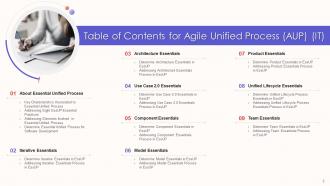
Slide 3: This slide shows Table of Content for the presentation.
Slide 4: This slide presents Table of Content for the presentation.
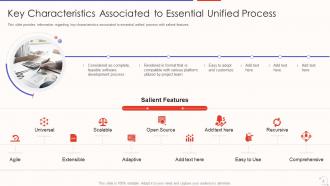
Slide 5: This slide provides information regarding key characteristics associated to essential unified process with salient features.
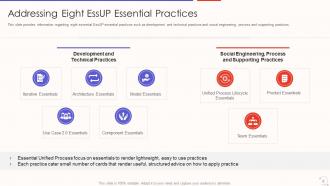
Slide 6: This slide displays eight EssUP essential practices such as development and technical practices, social engineering, etc.
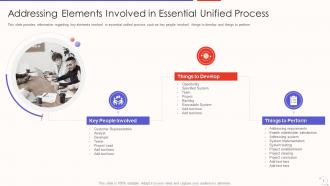
Slide 7: This slide represents Addressing Elements Involved in Essential Unified Process.
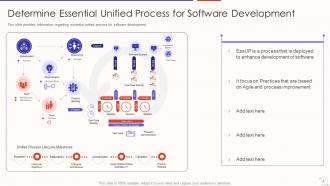
Slide 8: This slide shows Determine Essential Unified Process for Software Development.
Slide 9: This slide presents Table of Content for the presentation.
Slide 10: This slide shows iterative essential in essential unified process in terms of objective, key considerations and key competencies.
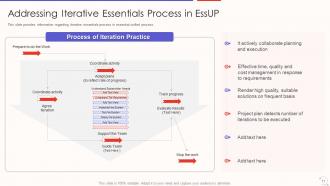
Slide 11: This slide displays information regarding iterative essentials process in essential unified process.
Slide 12: This slide represents Table of Content for the presentation.
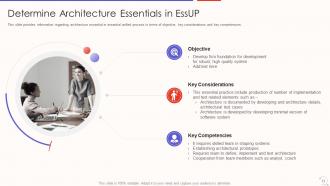
Slide 13: This slide shows architecture essential in essential unified process in terms of objective, key considerations and key competencies.
Slide 14: This slide presents information regarding architecture essentials process in essential unified process.
Slide 15: This slide shows Table of Content for the presentation.
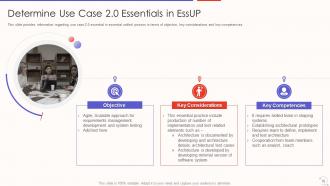
Slide 16: This slide displays use case 2.0 essential in essential unified process in terms of objective, key considerations and key competencies.
Slide 17: This slide represents information regarding use case 2.0 essentials process in essential unified process.
Slide 18: This slide shows Table of Content for the presentation.
Slide 19: This slide presents component essential in essential unified process in terms of objective, key considerations and key competencies.
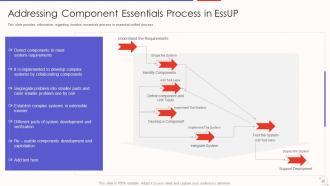
Slide 20: This slide shows Addressing Component Essentials Process in EssUP.
Slide 21: This slide displays Table of Content for the presentation.
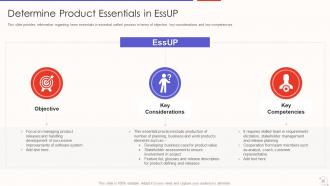
Slide 22: This slide represents Determine Model Essentials in EssUP.
Slide 23: This slide provides information regarding model essentials process in essential unified process.
Slide 24: This slide presents Table of Content for the presentation.
Slide 25: This slide shows team essentials in essential unified process in terms of objective, key considerations and key competencies.
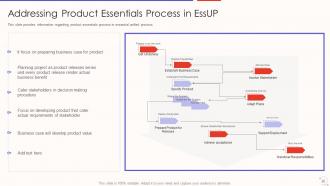
Slide 26: This slide displays information regarding product essentials process in essential unified process.
Slide 27: This slide represents Table of Content for the presentation.
Slide 28: This slide shows Determine Unified Lifecycle Process Essentials in EssUP.
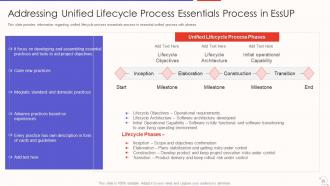
Slide 29: This slide presents Addressing Unified Lifecycle Process Essentials Process in EssUP.
Slide 30: This slide shows Table of Content for the presentation.
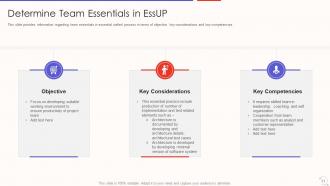
Slide 31: This slide displays team essentials in essential unified process in terms of objective, key considerations and key competencies.
Slide 32: This slide represents Addressing Team Essentials Process in EssUP.
Slide 33: This slide shows Agile Unified Process (IT) Icons.
Slide 34: This slide is titled as Additional Slides for moving forward.
Slide 35: This slide shows 30 60 90 Days Plan with text boxes.
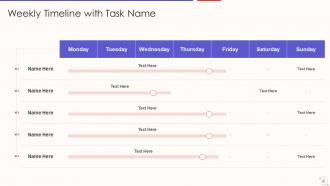
Slide 36: This slide displays Weekly Timeline with Task Name.
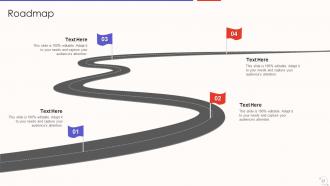
Slide 37: This slide represents Roadmap with additional textboxes.
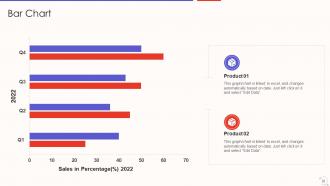
Slide 38: This slide shows Bar Chart with two products comparison.
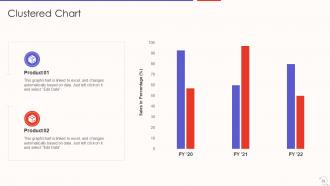
Slide 39: This slide presents Clustered Chart with two products comparison.
Slide 40: This is About Us slide to show company specifications etc.
Slide 41: This is Our Team slide with names and designation.
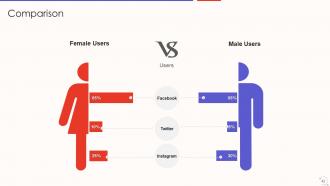
Slide 42: This is a Comparison slide to state comparison between commodities, entities etc.
Slide 43: This slide shows Post It Notes. Post your important notes here.
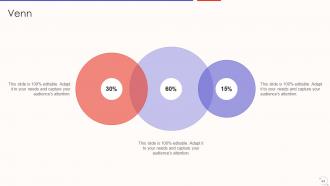
Slide 44: This slide presents Venn diagram with text boxes.
Slide 45: This is a Thank You slide with address, contact numbers and email address.
Agile unified process aup it powerpoint presentation slides with all 45 slides:
Use our Agile Unified Process AUP IT Powerpoint Presentation Slides to effectively help you save your valuable time. They are readymade to fit into any presentation structure.















FAQs for Agile unified process aup it
So AUP breaks down into four main things. You'll follow traditional phases but work iteratively inside each one - serial in the big picture, agile in the details. Risk-value driven means tackling the scary high-stakes stuff first (which honestly makes way more sense than procrastinating on it). Architecture comes early too - solid foundation before you build up. Oh, and constant collaboration with your team and stakeholders throughout everything. The whole thing starts lightweight and you adapt it to whatever your project actually needs. Pretty straightforward approach really.
Dude, AUP is so much better than waterfall - you work in short sprints instead of those brutal sequential phases. Traditional methods make you finish ALL requirements, then ALL design, then coding. AUP lets you cycle through everything repeatedly in like 2-4 week chunks. It's honestly the sweet spot between heavy RUP and pure agile (though some people hate that it's not "pure" enough, whatever that means). You still get documentation and architecture thinking, but you're shipping working software fast and can pivot when things change. Just try breaking your next project into iterations first and see what happens.
So AUP breaks down into four phases: Inception, Elaboration, Construction, and Transition. Inception is where you figure out what you're actually building and whether it makes sense. Then Elaboration - honestly this part can drag a bit, but you're nailing down your architecture and main requirements. Construction is where the magic happens and you build most of your stuff through iterations. Transition handles getting everything ready for users and rolling it out. The cool thing about AUP vs traditional UP? These phases are way shorter and more iterative, so you won't get stuck overthinking everything forever.
Don't jump into all four AUP phases right away - ease into it. The disciplined agile thing works well, basically RUP structure but with quick iterations and tons of feedback. Getting your team on board with the documentation is honestly the biggest pain. It's this weird middle ground between Agile (more docs) and old school RUP (way fewer docs). Your team can tweak practices for whatever project they're working on though. I'd start with just one small pilot project first. Once you've figured out what works and people feel confident, then scale it up from there.
So iterative development is like AUP's main thing - you work in these short cycles where you build, test, and improve stuff bit by bit. Rather than mapping out everything upfront (which honestly never goes to plan anyway), you ship working software every couple weeks and adjust as you go. Each cycle has all the usual stuff - requirements, design, coding, testing - just condensed down. You catch issues fast this way. Plus you get user feedback quickly and can change direction when something's not working. Oh, and tackle your scariest features first in those early cycles - that's where the real learning happens and you'll dodge major headaches down the road.
So with AUP, you're basically showing stakeholders working software every 2-4 weeks instead of vanishing for months with their requirements. They get to see demos, give feedback during planning sessions, and actually feel like they're part of building the thing. Honestly, this saves you from those nightmare moments where you deliver something and they're like "uh, this is completely wrong." The whole point is making them partners, not just people who dump requirements on you. Schedule those demo sessions early though - seriously, their feedback will save you so much headache later. Way better than the old waterfall approach.
So AUP basically forces you to integrate code constantly during those short iterations instead of leaving everything till the end. Testing and integration happen every cycle, which catches problems way earlier. The automated testing stuff is honestly a game-changer - I can't stress that enough. Stakeholders actually see working software regularly and can give feedback that matters. This naturally sets you up for smooth CI/CD since you're always deployment-ready. Oh, and start with just automating your builds first - even that basic step will boost your confidence like crazy when it's time to ship.
So you're mainly dealing with the project vision document, use case models, architecture notebook, and working software iterations. Pretty standard stuff really - design models, test cases, deployment docs. Honestly, AUP isn't wildly different from other agile methods. The cool part? Everything stays lightweight and you only create what actually helps your project. Don't waste time cranking out every possible document (learned that the hard way). Start with your vision doc to get everyone aligned, then use cases should drive your iterations. Oh, and keep that architecture notebook fresh as you go - it's super helpful later.
So AUP scales pretty well depending on what you're dealing with. Small projects? Just hit the basics - requirements, implementation, maybe skip the heavy docs nobody reads anyway. Bigger stuff needs more structure though. You'll want formal architecture modeling, proper testing phases, all that. What's nice is you don't have to follow every single practice like it's gospel. Pick what actually helps your situation. I'd start by looking at team size and timeline first. Then figure out which disciplines make sense. Way better than methodologies that force you into some rigid box, honestly.
So basically teams get stuck between wanting flexibility but also needing actual structure - which makes sense, right? Most groups either go overboard with all the ceremonies or just skip everything because nobody's sure what they actually have to do. Your stakeholders will probably hate the iterative thing since they want detailed plans upfront. Oh, and the documentation part is super confusing - they tell you to write "sufficient" docs but never explain what that means for your situation. I'd say just pick one or two practices first. Get those working, then slowly add more once everyone finds their groove.
So AUP is basically about tackling your scariest problems first - which honestly makes way more sense than most people realize. Instead of putting off the risky stuff, you dive into technical challenges and fuzzy requirements right in those early iterations. That way when something breaks (and it will), you're not scrambling at the end when fixes cost a fortune. Each cycle lets you test assumptions and get feedback before you're in too deep. The trick is resisting the urge to start with easy wins just because they feel good. Go ugly early, trust me.
Honestly, start with delivery speed - are you actually shipping working stuff faster than before? Customer satisfaction scores are huge too since AUP is all about that constant feedback loop. I'd also watch defect rates and maybe story points per sprint (but don't get weird about velocity numbers, trust me). The adaptation thing is key though - how fast does your team pivot when requirements change? That's where you really see AUP working. Shorter feedback cycles plus better quality output = you're winning. Pick like 2-3 metrics that actually matter for your specific situation and track those.
Yeah, AUP works great with other Agile stuff - it's designed to be flexible anyway. I'd throw Scrum's sprints right over AUP's four phases. Use the usual Scrum meetings for daily work, but keep AUP's solid documentation approach. Pair programming and TDD from XP? They drop right into AUP's construction phase like they belong there. Honestly, I think AUP gives you the bones while Scrum handles your weekly rhythm. Oh, and start by just mapping what you're already doing in Scrum to AUP's disciplines - you'll probably find more overlap than you expect.
Daily standups are your best friend here - seriously, they catch issues before they spiral. Get everyone involved in planning sessions and use shared repos so nobody's working in isolation. That whole self-organizing team concept? It's not just buzzword nonsense, it works when people actually have control over their tasks. Pair programming helps spread knowledge around, and retrospectives are clutch for fixing team problems. Keep iterations short. Code reviews are obvious but worth mentioning. Start with solid communication habits first, then add other practices. Trust me, short cycles make problems way more manageable.
AUP hits a sweet spot with documentation. You're not drowning in paperwork like traditional methods, but you're also not flying blind like some Agile teams do. Create what actually matters - stuff that'll help your team understand the system later. I've seen too many projects with massive requirement docs that just collect dust on a server somewhere. Keep things concise and useful. Short question before writing anything: "Will this genuinely help someone six months from now?" Don't waste time on docs nobody will read. Focus on the pieces that add real value to your project.
-
Great product with highly impressive and engaging designs.
-
Use of icon with content is very relateable, informative and appealing.
-
Use of icon with content is very relateable, informative and appealing.
-
Easily Editable.