

Api management solution powerpoint presentation slides





Try Before you Buy Download Free Sample Product
 Impress Your
 Audience
 100%
100% Editable
 Save Hours
 of Time


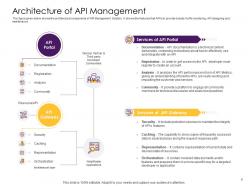
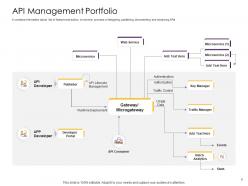
Select this API Management Solution PowerPoint Presentation Slides and study the needs of app developers. Display your company’s objectives like the expansion of the market base, building a platform ecosystem, and improving the digital outreach company through this application gateway PPT templates. Highlight the structure of architectural components of API with the help of this computing interface management PPT slide. You can easily introduce your services of API portal like documentation, registration, and analysis in a well-organized manner by taking the aid of our invigorating software management PPT designs. Take advantage of our professionally designed network administration PPT themes to exhibit various components like API design, deployment, security, analytics, and monetization in an appropriate color-coded fashion. You can take the assistance of this API solution PPT presentation to provide a report on API management in a well-organized format. Click the download button and make this open-source management PowerPoint presentation your source to educate prospective clients about attractive opportunities in the API management market.
People who downloaded this PowerPoint presentation also viewed the following :
Api management solution powerpoint presentation slides with all 53 slides:
Use our API Management Solution Powerpoint Presentation Slides to effectively help you save your valuable time. They are readymade to fit into any presentation structure.










































FAQs for Api management solution
Start with security stuff - authentication, rate limiting, all that protection against sketchy traffic. Analytics are huge too since you'll be blind otherwise about performance. The developer portal thing is honestly make-or-break; if devs hate using it, you're screwed. Versioning and deployment features matter for the lifecycle stuff. Oh, and decent documentation tools obviously. Honestly though, just write down what you actually need first. Then see which platforms check those boxes instead of getting distracted by fancy features you won't use.
Think of API management as a bouncer for your backend - it handles authentication, authorization, rate limiting, all that security stuff so you don't have to build it yourself. Honestly saves so much headache. You get centralized monitoring too, which beats digging through a million different service logs when something's acting weird. The best part? You can update security policies in one place instead of touching every single microservice. I'd start with API keys and rate limiting - super basic but they'll stop most of the script kiddie attacks right away.
Honestly, API analytics is a game changer for catching problems before they blow up. You'll see exactly which endpoints are getting slammed and when your response times start sucking. Error rates and slow queries become super obvious too - no more guessing what's broken. Peak usage patterns are probably the most eye-opening thing though, like realizing everyone hits your API at 9am sharp. Focus on response times and error rates first, that's where the pain usually shows up. Then you can get smarter about caching and rate limits before users start freaking out.
Honestly, API management platforms are game-changers for this exact problem. Both your dev and ops teams get access to the same real-time monitoring and dashboards - no more guessing games about what's actually happening. Developers can push updates through proper release pipelines while ops tracks performance and security stuff. The documentation stays centralized too, which is clutch. I'd start with getting everyone looking at the same API analytics first. It's wild how fast teams stop fighting when they're seeing identical data. Plus you get unified views of usage patterns, error rates, all that good stuff. Way better than the whole "works on my machine" circus.
Security teams will lose their minds over exposed APIs without proper auth and rate limiting - trust me on this one. Governance gets messy fast when different teams build stuff with zero consistency. Documentation becomes a total disaster. Getting devs to actually use your new API portal instead of their usual shortcuts? Yeah, good luck with that. Performance monitoring gets weird too since you're now sitting in the middle of everything. Honestly, just pick one critical API first and get the basics rock solid before going crazy company-wide.
Think of rate limiting like a bouncer at a busy restaurant - it controls how many requests hit your API at once. One rogue app can totally tank your servers if you don't have limits in place. I learned this the hard way once, actually. Short bursts are fine, but sustained hammering will kill your response times for everyone else. You want to be generous at first, then dial it down based on real usage data. Most legit users won't even notice good rate limits. It's honestly one of those boring features that saves your ass when traffic spikes.
API gateway is your best bet here - it'll handle all the protocol conversions and auth between your old stuff and new APIs. Wrap those legacy endpoints with REST first. Caching is crucial for performance issues, and message queues help when your ancient systems just can't keep up. Oh, and version absolutely everything from the start or you'll hate yourself later. I learned that one the hard way. Test it all in staging because this integration stuff breaks in the weirdest ways. Trust me, plan it out properly upfront.
Dude, you can totally make money off your APIs! Charge developers per usage or set up subscription tiers - some companies are pulling in serious cash this way. Netflix makes bank from their API partnerships, which is wild when you think about it. You could do revenue sharing with partners too. The cool part is it opens doors to business models you probably haven't even thought of yet. Analytics show you which APIs are goldmines so you know where to focus. I'd start by looking at what you've already built - bet there's something monetizable in there.
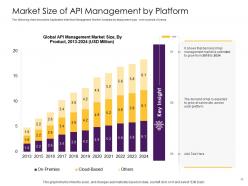
Honestly, it comes down to how much control you want versus convenience. On-premises gives you total control over everything - security, customization, all of it. But yeah, you're basically signing up to babysit servers forever. Cloud's the opposite - super scalable, way cheaper upfront, and someone else deals with the boring maintenance stuff. Though compliance can get tricky depending on your industry. Hybrid's nice if you want both worlds - keep the sensitive stuff in-house, put everything else in the cloud. I'd probably start by figuring out your budget and what regulations you're dealing with first.
Look, you definitely need API versioning or you'll break everyone's stuff when you make changes. New fields, updated responses, bug fixes - all that will mess up existing integrations if you don't version properly. Trust me, it's a lifesaver when dealing with different client teams who move at their own pace. You can slowly deprecate old versions instead of forcing everyone to scramble and update at once. I'd say start with semantic versioning early on (honestly wish more people did this). Just make sure you give consumers plenty of heads up about deprecation timelines. Nobody likes surprises with this stuff.
Think of API gateways as your microservices' personal assistant. Instead of services constantly pinging each other directly, everything routes through the gateway first. It handles the boring stuff - authentication, load balancing, rate limiting. Honestly, the centralized logging alone is worth it when you're trying to debug at 2am. Your services don't need to know where everyone else lives or what weird formats they use. The gateway translates between them. I'd start with whatever services are already talking to each other the most - that's where you'll see the biggest wins right away.
Definitely set up monitoring for both the technical stuff (response times, errors, throughput) and business metrics like adoption rates. Get real-time alerts working - trust me, you don't want users telling you about outages first. Health checks should cover everything: endpoints, dependencies, data quality. Version your APIs and keep backward compatibility when you update. Load testing is huge for catching issues early. Oh, and actually create SLAs that mean something and monitor against them. Your API users will appreciate knowing what to expect. Regular load tests have saved my butt more times than I can count.
So most platforms use these adapter things that work like translators between REST, SOAP, GraphQL - whatever you're throwing at them. The gateway parses different request types and applies the same auth and rate limiting rules across everything. Then it converts responses back to what the client expects. Pretty neat, right? Some platforms are definitely better at this protocol switching than others though. I'd double-check if yours actually supports protocol mediation before you go all-in on mixing different APIs. Don't want to find out the hard way that it can't handle what you need.
Dude, UX can make or break your API completely. Developers will ditch it in like 5 minutes if it's confusing to use. I've watched solid APIs tank because their dev portal was absolute garbage to navigate. Clear docs are everything - plus you need intuitive endpoints and responses that actually make sense. When developers can integrate smoothly on their first try, that's when you win them over. They'll even recommend it to others if the experience doesn't suck. Honestly, most APIs fail at that crucial first impression moment. Make it effortless and usage will grow naturally.
Figure out who'd actually pay for your API first - that's the hard part honestly. Tiered pricing usually works best: free tier gets devs hooked, then charge for higher limits or fancy features. For data APIs, usage-based billing is pretty much expected now. You could also do revenue sharing with partners if that makes sense. Just make sure your pricing is super clear so developers can actually budget for it (nobody likes surprise bills). I'd start with maybe two tiers max, then adjust based on what people actually use. Don't overthink it at first.
-
Great quality product.
-
Commendable slides with attractive designs. Extremely pleased with the fact that they are easy to modify. Great work!
-
Good research work and creative work done on every template.
-
Awesome presentation, really professional and easy to edit.