Application Dependency Mapping Flow Diagram

Rating:
80%
Application Dependency Mapping Flow Diagram Application Dependency Mapping Flow Diagram
Slide 1 of 6

or

Favourites Favourites

Try Before you Buy Download Free Sample Product

Audience Impress Your
Audience
Editable 100%
Editable
Time Save Hours
of Time
The Biggest Sale is ending soon in
0
0
:
0
0
:
0
0
Rating:
80%
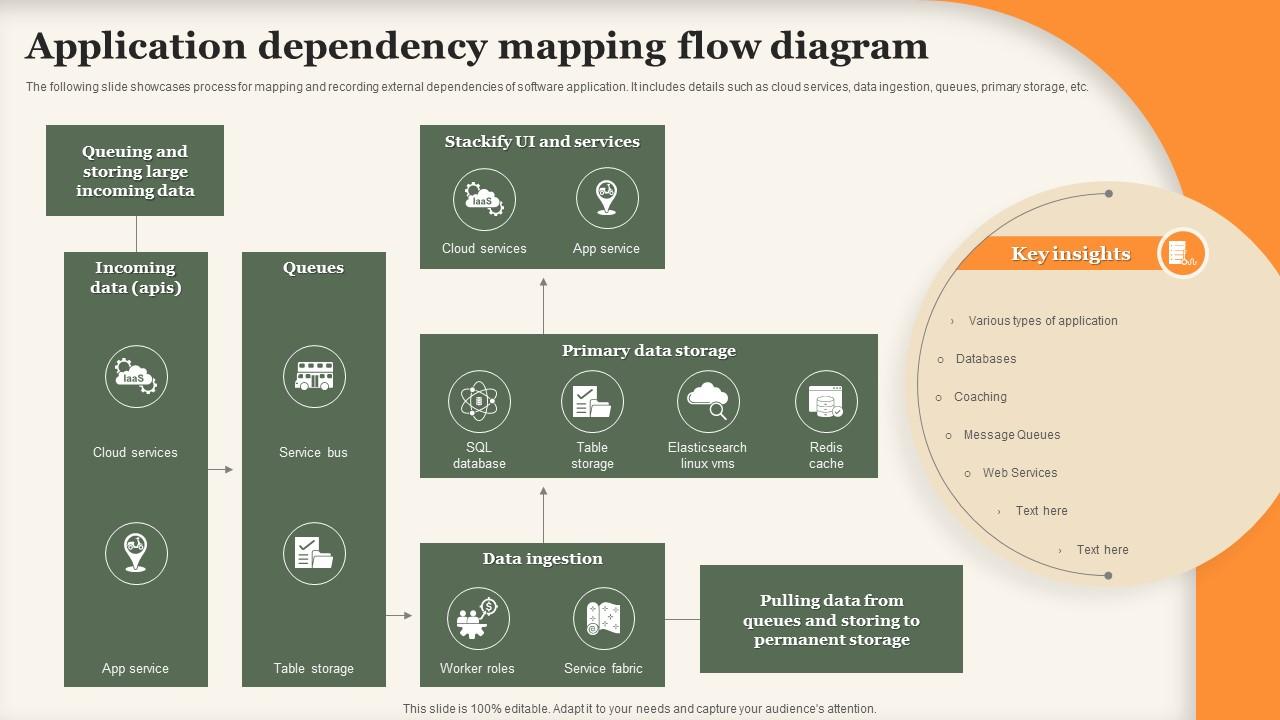
The following slide showcases process for mapping and recording external dependencies of software application. It includes details such as cloud services, data ingestion, queues, primary storage, etc. Introducing our Application Dependency Mapping Flow Diagram set of slides. The topics discussed in these slides are Primary Data Storage, Data Ingestion, Permanent Storage. This is an immediately available PowerPoint presentation that can be conveniently customized. Download it and convince your audience.

FAQs for Application Dependency

So dependency mapping is basically drawing out how all your apps and services talk to each other - like a family tree but for tech stuff. When things break (and they will), you'll know exactly what else might go down with it. Without this map, you're just guessing during outages and every change feels sketchy. I learned this the hard way once during a 3am incident that could've been way less painful. It also helps with planning capacity and figuring out security gaps. Start with your most critical apps first, then branch out from there. Way less overwhelming that way.

So dependency mapping is basically your lifeline when systems start breaking. You can see exactly what's affected instead of running around like a headless chicken trying to figure it out. Super helpful for knowing which teams to ping and what to fix first. Plus you can actually warn users before they start complaining - which honestly feels pretty good. I'd say build these maps when things are calm though, not during some 3am nightmare scenario. It's like having a cheat sheet for outages. Way better than the alternative of just... hoping for the best.

Dynatrace, AppDynamics, and New Relic are your best bet - they'll auto-discover everything through agents and show you those cool visual maps. ServiceNow does CMDB stuff but requires more manual work. For microservices, Jaeger's solid for distributed tracing (open source too). Lansweeper handles network discovery if that's what you need. The auto-discovery tools are game changers honestly - way better than mapping by hand, which is a nightmare. I'd probably start with Dynatrace or AppDynamics free trials. You'll be shocked at the dependencies floating around that you had no clue about.

Dude, dependency mapping is a total lifesaver. It shows you exactly what's connected to what before you touch anything. So when you're updating that database or switching services, you'll know beforehand which systems get affected - no more 2am disasters. Honestly, I learned this the hard way after one too many emergency calls. Think of it like having GPS instead of driving blind. Map your most critical apps first, then branch out. You'll catch problems during planning instead of scrambling to fix them later.

Look, you absolutely need to map out your app dependencies before moving to the cloud - learned this the hard way on a project last year. Think of it as figuring out which apps talk to each other through databases, APIs, all that stuff. Without mapping first, you'll break things and have users breathing down your neck. It shows you the right order to migrate stuff and which pieces can move together. Plus you'll catch security problems early. Start with your biggest business-critical apps and trace backwards through everything they connect to. Saves so much headache later.

Honestly, mapping dependencies is a game changer for capacity planning. You'll actually see which systems talk to each other instead of flying blind. So when your web app needs more juice, you'll know the database and cache need love too - not just find out when everything's on fire. I learned this the hard way last year lol. But seriously, start with your critical path stuff first since that's where you're most likely to get burned. Short story: you can finally plan changes as actual packages instead of random one-offs that break mysteriously later.

Automation is your best friend here - get tools that scan your setup regularly and catch changes automatically. Trust me, manual updates will drive you insane and you'll never stay on top of it. Make each team do quarterly check-ins on their app dependencies, plus build mapping updates right into your deployment flow so new stuff gets captured right away. Oh, and assign actual people to own different chunks - like Sarah handles the payment apps, Mike covers the data pipeline, whatever. I've watched so many of these mapping projects just collect dust because nobody's job was to maintain them. The trick is making it feel routine instead of some dreaded side project.

So dependency mapping shows what's connected to what in your system. When stuff breaks, you'll know right away what else might go down too. No more playing detective during outages (trust me, that sucks). You can spot the blast radius fast and stop problems from snowballing. Planning maintenance gets way easier since you'll see which services rely on whatever you're updating. The best part? You can set alerts on critical dependencies and catch issues early. Oh, and definitely start with your most important business apps first - don't try mapping everything at once.

Honestly, scale is your biggest nightmare here. Dependencies are scattered everywhere - APIs, databases, third-party stuff, microservices - and tracking them manually? Good luck with that mess. Everything changes so damn fast too. Teams deploy new versions, add random integrations, kill off services. Your perfect map becomes useless in like a week. Discovery's brutal since you're stuck with undocumented legacy connections that only Bob from 2019 understood. Get automated discovery tools first. Make dependency updates part of deployments or you'll just be chasing your tail forever.

Honestly, dependency mapping is a lifesaver for audits. It shows auditors exactly how your data flows through systems - which is what they're looking for with SOX, GDPR, all that stuff. Way better than frantically documenting everything when they show up! You'll see security boundaries and access points clearly mapped out. The vulnerability visibility is pretty solid too. I'd start with your most critical apps since that's where compliance issues really bite you. It basically proves you've got proper controls without the usual audit panic. Trust me on this one.

Honestly, dependency mapping is a game changer for getting dev and ops on the same page. Your developers finally see how their code changes mess with infrastructure. Ops gets why certain dependencies even exist. No more of that frustrating back-and-forth where nobody understands what the other team is talking about. During incidents, everyone's literally looking at the same visual instead of trying to explain complex stuff over Slack - which never works well anyway. Handoffs become so much smoother. I'd start by mapping your most critical apps together as a team thing first.

So dependency mapping is basically useless unless you can actually see what's going on. Those interactive network diagrams? Game changer - you get the whole picture instantly. Color coding saves your sanity too, makes spotting bottlenecks or critical paths super obvious. Trust me, staring at spreadsheets trying to figure out dependencies is torture (learned that the hard way). You'll want something that lets you zoom from the big picture down to specific components. Definitely grab a tool with multiple view modes so you can flip between overview and detail views.

Dude, you're gonna be screwed when things go sideways without those dependency maps. That "quick fix" you push? It'll randomly kill three other systems you forgot were even talking to each other. Your team will waste hours just figuring out what broke instead of actually fixing stuff. Security audits become impossible too since you can't see your real attack surface. Honestly, even a janky spreadsheet beats having nothing - I learned this the hard way last year. Capacity planning? Good luck with that mess.

So there's some pretty cool stuff happening with AI for dependency mapping. It can automatically scan your network traffic and logs to figure out what's talking to what. The ML side is where it gets interesting - it'll spot weird patterns and actually predict when things might break before they do. Plus it keeps updating the maps as your setup changes, which honestly saves a ton of manual work. You can even get it to classify services and flag security issues in your dependency chains. I'd start with tools that have built-in ML discovery features. Way better than drawing diagrams by hand like we used to do.

Start with coverage percentage - basically how much of your app portfolio you've actually mapped out. Accuracy matters too, like when shit hits the fan during incidents, does your dependency data actually match what's happening? I'd also track mean time to resolution since good mapping should help you troubleshoot faster. Usage stats are key - if teams aren't touching the maps, your approach probably sucks. Oh, and measure how many surprise outages you're preventing by catching those sneaky dependencies nobody knew about. Coverage and accuracy first though. Get those solid before worrying about the fancy stuff.

Ratings and Reviews

80% of 100
Review Form
Write a review
Most Relevant Reviews
  1. 80%

    by Evans Mitchell

    Graphics are very appealing to eyes.
  2. 80%

    by Dusty Hoffman

    Enough space for editing and adding your own content.

2 Item(s)