

Application Performance Dashboard Mobile App Development Play Store Launch




Try Before you Buy Download Free Sample Product
 Impress Your
 Audience
 100%
100% Editable
 Save Hours
 of Time


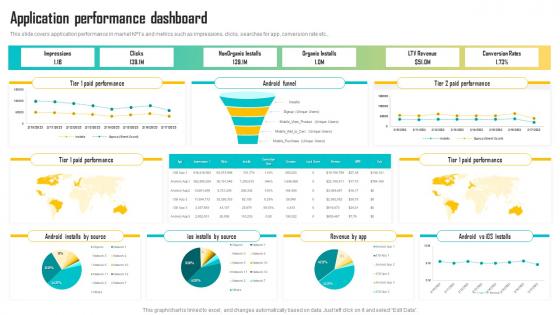
This slide covers application performance in market KPIs and metrics such as impressions, clicks, searches for app, conversion rate etc.
People who downloaded this PowerPoint presentation also viewed the following :
Application Performance Dashboard Mobile App Development Play Store Launch with all 7 slides:
Use our Application Performance Dashboard Mobile App Development Play Store Launch to effectively help you save your valuable time. They are readymade to fit into any presentation structure.





FAQs for Application Performance Dashboard Mobile App Development
A comprehensive application performance dashboard should include response time, throughput, error rates, CPU and memory utilization, database performance metrics, and user experience indicators. These metrics work together by providing real-time visibility into system health, enabling proactive issue resolution, and supporting capacity planning, with many organizations finding that this strategic combination ultimately delivers faster incident response and enhanced user satisfaction.
Real-time data visualization enhances decision-making in application performance by providing immediate insights into system bottlenecks, user experience metrics, and resource utilization patterns through interactive dashboards and alerts. This enables IT teams to proactively identify issues, optimize resource allocation, and maintain service quality, with many organizations finding that visual performance analytics reduce downtime significantly while improving operational efficiency.
Best practices for designing an intuitive application performance dashboard include using clear visual hierarchies, implementing real-time data visualization, establishing consistent color coding for status indicators, and organizing metrics by business impact rather than technical complexity. These approaches streamline monitoring by enabling faster problem identification, reducing mean time to resolution, and enhancing team collaboration, with many organizations finding that user-centric dashboard design ultimately delivers improved operational efficiency and proactive performance management.
Application KPIs should align with business objectives and user expectations, including response time, throughput, error rates, resource utilization, and user satisfaction metrics. Financial services prioritize transaction processing speed and security, while e-commerce focuses on page load times and conversion rates, with many organizations finding that industry-specific metrics deliver more actionable insights.
User experience can be integrated into application performance metrics through real user monitoring (RUM), synthetic transaction testing, error rate tracking, page load time analysis, and customer satisfaction scoring. These approaches enable organizations to correlate technical performance with actual user behavior, with many financial services and e-commerce companies finding that this integration delivers faster issue resolution and significantly improved customer retention rates.
Data aggregation consolidates performance metrics from multiple sources, applications, and infrastructure components into unified views that reveal system-wide patterns and interdependencies. Through strategic aggregation techniques, organizations streamline monitoring workflows, minimize data noise, and enhance decision-making capabilities, with many IT teams finding that consolidated dashboards ultimately deliver faster issue resolution and improved operational efficiency.
Historical performance data influences future application development strategies by identifying bottlenecks, usage patterns, resource consumption trends, and user behavior insights that guide architectural decisions. Through predictive analytics and performance metrics analysis, development teams can prioritize optimizations, allocate resources more effectively, and design scalable solutions, ultimately delivering faster applications and enhanced user experiences while minimizing costly post-deployment fixes.
Common tools for building application performance dashboards include Grafana, Tableau, Power BI, New Relic, and Datadog, along with monitoring technologies like Prometheus and Elasticsearch. These platforms streamline performance visualization by integrating real-time metrics, customizable alerts, and automated reporting capabilities, with many organizations finding that strategic dashboard implementation delivers faster incident response and enhanced operational efficiency.
Data accuracy and reliability are ensured through automated data validation, real-time monitoring systems, error detection protocols, and regular data source verification processes. These quality control mechanisms streamline data integrity by identifying inconsistencies, flagging anomalies, and maintaining continuous synchronization across multiple sources, ultimately delivering trustworthy insights that enable confident decision-making for operational teams.
Common implementation challenges include data integration complexity, selecting relevant metrics, ensuring real-time accuracy, managing dashboard performance under load, and achieving stakeholder alignment on priorities. These obstacles often overwhelm teams initially, but organizations in finance, healthcare, and retail find that phased rollouts, automated data pipelines, and user-focused design ultimately deliver streamlined monitoring and faster issue resolution.
Alerts and notifications enhance performance monitoring by providing real-time issue detection, automated escalation protocols, and threshold-based warnings that prevent system degradations. Through intelligent alerting systems, IT teams streamline incident response, minimize downtime, and maintain optimal user experiences, with many organizations finding that strategic notification frameworks ultimately deliver faster resolution times and improved operational efficiency.
User segmentation enables organizations to analyze application performance across different user groups, demographics, geographic locations, and usage patterns, revealing critical insights into varying experience quality. This approach helps development teams identify specific performance bottlenecks affecting particular segments, optimize resources for high-value users, and deliver targeted improvements, ultimately enhancing overall user satisfaction and competitive positioning.
Mobile application performance tracking differs from web application monitoring through device-specific metrics, network variability considerations, and offline functionality assessment, while web monitoring focuses on server response times, browser compatibility, and load balancing. Mobile tracking emphasizes battery usage, memory consumption, and crash analytics across diverse operating systems, whereas web monitoring prioritizes page load speeds and user session flows, with many organizations finding that mobile requires more granular resource optimization.
Dashboard performance optimization methods include caching strategies, data aggregation, lazy loading, query optimization, and CDN implementation. These techniques streamline data processing by reducing server requests, pre-computing metrics, and loading content progressively, with many organizations finding that strategic caching and optimized queries deliver significantly faster loading times and enhanced user experiences.
Stakeholder feedback drives dashboard evolution through user experience insights, feature prioritization requests, metric relevance assessments, and visualization preference changes. Through regular feedback cycles, organizations can enhance dashboard functionality, streamline data presentation, and customize performance indicators, with many IT teams finding that stakeholder-driven improvements ultimately deliver more actionable insights and better decision-making capabilities.
-
The PPT layout is great and it has an effective design that helps in presenting corporate presentations. It's easy to edit and the stunning visuals make it an absolute steal!
-
Topic best represented with attractive design.