

Bar graph powerpoint images




Try Before you Buy Download Free Sample Product
 Impress Your
 Audience
 100%
100% Editable
 Save Hours
 of Time


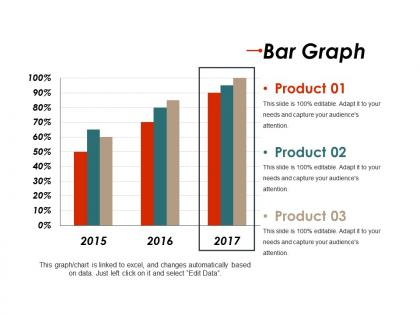
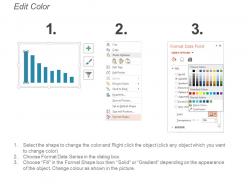
Deliver quality rich PPT presentations with the assistance of this Bar Graph PowerPoint Images PowerPoint template. You can employ the template to analyze the data and the profits from the different market segments. Complex data can be presented in an organized way through this ready-made bar chart PPT slide design. It can be used for various concepts like growth, sales report, stats, comparison, etc. This predesigned bar chart template can be used for a wide range of topics like marketing, sales, etc. Also, you can analyze the performance of the products over the past years and can take corrective actions to eliminate the deviations. One can incorporate this impactful vertical bar graph PowerPoint graphics to display the profits pertaining to the past few years. Our designers have made this PPT diagram after a lot of research for your convenience. Therefore, download this bar graph PPT image now and present your data in a synchronized way.
People who downloaded this PowerPoint presentation also viewed the following :
Bar graph powerpoint images with all 5 slides:
Our Bar Graph Powerpoint Images cherish your company. They are delighted to be by your side.
FAQs for Bar
Okay so first thing - label everything clearly! Titles, axes, the whole deal. Nobody should be playing guessing games with your chart. Also please don't go crazy with colors - those rainbow bar charts make my eyes hurt honestly. Keep it simple. Oh and always start your data at zero unless there's actually a good reason not to (people get super misleading impressions otherwise). Long category names? Flip those bars horizontal so they're readable. Remove all the extra junk - gridlines, borders, weird effects. Less is more here. Your data's the star, not fancy design stuff.
Oh man, colors mess with people's heads way more than you'd think! Red automatically screams "danger" or "bad news" while green feels positive. I learned this the hard way in a presentation once. Anyway, if your colors are too similar, nobody can tell the bars apart. Bright colors grab attention, so they'll make certain data points look more important. For stuff in sequence, just use different shades of the same color. But for categories? Pick distinct colors that are equally bold - you don't want one bar stealing the show.
So bar graphs are perfect when you're comparing different categories - like sales across regions or survey results by age group. Monthly revenue works great too. Honestly, they're my go-to for most basic comparisons! Just don't use them for continuous data (temperature trends get weird as bars). Also, if you've got like 15+ categories, it'll look super cramped and nobody can read it properly. I usually stick to 10 categories max, but 5-7 looks cleanest. Oh and they're solid for time periods too, just not continuous time if that makes sense.
Don't just write "bar graph showing sales data" - that tells people nothing useful. Actually describe what's happening: the key trends, specific numbers, what story the data's telling. I always throw the raw data in a table somewhere nearby too, maybe in the caption or a link. Screen readers handle tables way better than images anyway. High contrast colors help a ton. Different patterns or textures for each data series work great too. Honestly, the whole point is making sure someone who can't see it gets exactly the same insights as everyone else.
Honestly, just start with whatever you already have - Excel or Google Sheets work great for most stuff. Excel's gotten way better at making charts look decent lately. Need something fancier for a presentation? Canva's super easy, or Illustrator if you're feeling ambitious. Tableau and Power BI are amazing but kinda overkill unless you're dealing with tons of data (plus there's definitely a learning curve there). Python people love matplotlib and seaborn, though I always mess up the syntax. Really depends what you're going for!
So basically, animated bar charts are way better than static ones because people can actually follow what's happening. Instead of throwing all the data at someone at once, you let the bars grow up from zero - it's weirdly satisfying to watch, trust me. When you're comparing different time periods, smooth transitions help people catch trends they'd totally miss otherwise. Just don't go overboard with fancy effects. Simple grow-in animations work great. Oh, and definitely test it out with a few people first to see if it actually makes sense!
Don't start your y-axis at some random number - it makes tiny differences look massive. Also, keep your bar widths consistent and don't cram too many categories together. Skip the 3D effects too, they're honestly just annoying and make everything harder to read. Colors should actually make sense - avoid anything that hurts people's eyes or makes bars impossible to tell apart. Labels need to be readable without doing neck gymnastics. Pro tip: if someone can't get your main point in 5 seconds, you've overcomplicated it.
Honestly, layout is everything when it comes to bar charts. Order your bars logically - highest to lowest or chronologically works best. I once randomly ordered mine and the client meeting was... awkward. Your axis labels and colors matter way more than you'd think - they control what people notice first. Oh, and if you've got long category names, go horizontal instead of vertical so they don't get all squished together. Quick tip: show it to someone else first. If they have to squint or seem confused, you'll know to fix it before presenting.
Honestly, labels make or break your bar graph. Without them, people are just staring at random rectangles trying to figure out what's going on. You need axis labels so they know what you're actually measuring, plus a decent title for context. I always throw data labels right on the bars too when the exact numbers matter. Make your text big enough to read - sounds obvious but you'd be surprised how many people mess this up. Oh, and don't forget units! Is that dollars? Pounds? Bananas? Your audience shouldn't have to guess. If they can't get it in like 5 seconds, add more labels.
Bar graphs are way more fun than just work stuff! Track your reading goals or gym progress. I've made ones comparing local coffee shops - honestly turned out better than expected. People use them in resumes now to show skills visually, which is pretty smart. You could create interactive ones for websites or even turn data into Instagram posts that actually get engagement. Pizza topping rankings, game scores, whatever. The trick is realizing any comparison can become interesting content. Even random personal data looks legit when you graph it properly.
Honestly, it's mostly about readability - the data shows the same thing either way. Vertical bars are great for time trends and when your labels are short. But if you've got long category names? Go horizontal - nobody wants to crane their neck reading sideways text (learned that the hard way). Horizontal also works better for rankings, like top 10 lists. The relationships between your values stay the same regardless. I'd just pick whatever makes it easiest for people to quickly scan and actually read your labels without squinting.
3D bar graphs look pretty cool, I'll give them that. Great for presentations when you want that visual punch. But here's the thing - they're actually harder to read because the perspective messes with your ability to compare values accurately. The 3D depth doesn't really tell you anything useful either, it's just there for show. I mean, if you're prioritizing style over substance, go for it. But honestly? Stick with 2D when people need to actually understand the numbers quickly. Way more practical.
Honestly, mobile presentations are tricky - you gotta strip everything down. Fewer data points, way bigger fonts, and make those colors really pop because phone screens are brutal. I'd go horizontal with your bars instead of vertical, trust me on this one. People scrolling through won't squint as much. Oh, and test it on your own phone first! For digital stuff, bump up that resolution to at least 300 DPI or it'll look terrible projected. Interactive elements are cool if you can swing it, but don't stress if you can't.
Ugh, bar graphs are sneaky! First thing - check if the y-axis starts at zero. When it doesn't, tiny differences look huge. Scale compression does the opposite and hides real gaps. Also watch for weird bar widths or cherry-picked dates that tell only part of the story. Don't even get me started on those awful 3D effects that make everything look warped. People love showing just the data that supports their point while conveniently leaving out context like sample sizes. Honestly, I've seen some pretty creative manipulation out there. Always peek at those axis labels first!
Dude, bar graphs are getting crazy interactive now. Hover effects, clickable stuff, real-time updates - way cooler than static images. AI tools are popping up that'll actually suggest colors and layouts based on your data (pretty wild). There's also this big accessibility push happening, so better contrast and screen reader support are becoming must-haves. Basic Excel charts feel so 2020 at this point lol. You should definitely check out Observable or D3.js if you want to get ahead of this stuff. Trust me, it's worth learning now before everyone else catches on.
-
Unique and attractive product design.
-
The content is very helpful from business point of view.