





 0 Comment
 Customer Reviews

From presentations to video editing, Instagram stories to LinkedIn posts, resumes to newsletters, Canva has become a one-stop destination to create all of them, with hundreds of free template choices available. Canva has outgrown all the editing apps with its easy-to-use interface and colourful and professional templates that go well with both street parties as well as board meetings in big corporate companies. It takes just one to two hours for anyone, including a non-designer, to learn the editing process in Canva.
Looking for Podcast Pitch Deck Templates? You are at the right place. Get access to hand-picked templates with a click here.
Canva solved the real and pressing problem of completely depending on a designer even for a small creative project for social media. It was able to unlock a huge audience by making editing and design easy for anyone - teachers, small business owners, students, etc. Canva is known for its simplicity, and its free tier in its early days. Although the company saw its ups and downs, implemented several trial-and-error strategies and failed, the company never lost its shine. The companies that have just begun have a lot to learn from Canva's journey.
Starting its journey humbly, Canva saw a lot of early fundraising difficulties as it struggled with credibility in its early days. The company also focused on “reimagine publishing” in a broad way, which confused investors and mentors. They had to narrow down their focus to design only, later. The company was also hacked in 2019, exposing data of 137 million users. However, all these hiccups taught the company how to thrive. If you are a startup and are witnessing hardships, this blog is for you.
Learn how Canva approached its investors, changed its narrative, set up its marketing message, and grew to this day.
Are you stuck on how to use Team Canvas templates? Well, we got you covered with this blog to help you navigate through templates that provide practical insights.
Let’s explore!
Template 1: Canva Investor Funding Elevator Pitch Deck
If you ever wondered how to approach your investors seeking funding for your startup project and are stuck on how to proceed, this deck is for you. It helps you understand how Canva approached its investors, the company’s investment plan, its approach, etc. It includes details on the company’s problem statement, solution to financial performance, company milestones, market potential, business model, and revenue streams. It also includes the client testimonials, financial projections, client details, etc, giving investors a clear idea of how the company will strive hard to give them their returns. The good thing is you can create your investor pitch deck in Canva by using the Canva pitch deck creator. Download now!
[product_image id=1130552]
Template 2: Canvas Investor Funding Elevator Pitch Deck
Use this Canva presentation for business investor funding, which offers you a complete story of how the company approached its investors by going far beyond just the design. It talks about the company’s services, pricing models, and how it transformed from analog to digital workflows. It is a clear manifestation of how Canva solves its day-to-day frustrations with paper-based processes. It also explains why companies resort to Canva instead of other applications by illustrating what makes the company’s content powerful. If you are an entrepreneur or a SaaS founder and still in a growing stage, this Canva startup presentation template deck is very useful to you. This Canva pitch deck for fundraising helps translate vision into numbers with data-backed case studies that investors can’t ignore.
[product_image id=515338]
Template 3: Problem Statement
Why does your product even need to exist is the first question any startup owner must ask themselves. That’s what any Problem Statement slide would talk about. In this case, Canva solves the problem of hiring designers for every small design company that may need. It also provides an easy interface for even a non-designer to use without any training. Generally, the designers are expensive to hire, and it takes hours to learn design skills that most people cannot afford. By laying out these pain points clearly, the slide sets up the story: Canva isn’t just nice-to-have, it is a better solution. Use Canva pitch deck design to prepare your next problem statement slide.

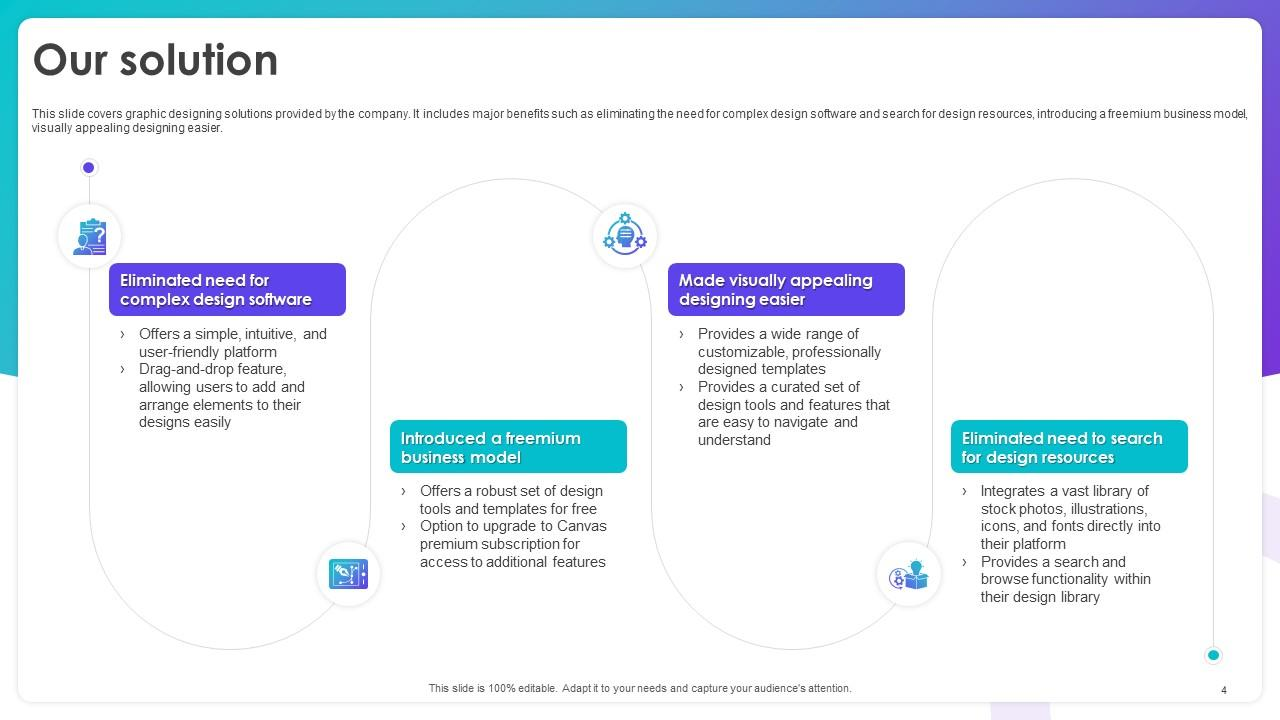
Template 4: Our Solution
So, after you specify the problem, the next slide must talk about the solution. Use our solution template below and understand how Canva specified its solution. Canva asks users not to wrestle with the difficult design software or spend hours scrolling through stock photo sites anymore. Instead, it gives you this simple, drag-and-drop tool that works. Canva provides free models for basic designs and templates. And if you want more advanced designs, you must pay. It also includes a library, fonts, icons, stock photos, etc. Use the company’s solution statement to draft yours and include every minute solution aspect of your product without fail. And the best part is you can use the Startup pitch deck Canva template to create your solution slide.
Template 5: Company Introduction
Before talking about the problem you want to solve and the solution you provide, it is important to talk about yourself and tell the audience who you are. That’s exactly what the Company Introduction slide does. When investors or partners look at it, they immediately know the basics: Canva started in 2012, it’s private, it has a team of 500–1000 people, and it’s based in Sydney, Australia. The industry is Graphic design, etc. For founders or businesses building their own decks, this slide is useful as it acts as credibility in a slide. It implies that the company is real, established, and it knows what it is doing. Download now!

Template 6: Biggest Problem with Paper Based Processes
Most companies spend way too much time digging through tons of documents and papers to find one file. That’s the pain point this slide covers. It talks about the real headaches of paper-based processes, high time spent searching, high storage costs, lost documents, slow workflow tracking, and the constant worry about compliance or audits. For businesses, this slide resonates because it’s not just about inconvenience but about real costs and wasted hours. Investors also know this as a problem that is begging for a solution. And that’s where Canva comes in. It streamlines operations by turning all that mess into smooth workflows. Download now!

Template 7: Canvas Transform How Work Should Be Done
Canva turns the old paper-heavy workflows into something that is easy and makes sense. For the digitalizing business landscape today, Canva acts as a catalyst for the process. How? It helps companies to design their marketing and sales assets online and store them in the cloud. Besides, it offers standardised templates for reports, proposals, and documents that reduce repetitive printing and manual formatting. Understand how Canva puts across its solution in transforming workflows into paperless operations. Use the powerful messaging technique as used by Canva to draft your messaging while preparing your next presentation.

Template 8: Paper Product Market and Digital Technology Opportunity
This slide emphasizes the fact that businesses spend a lot of money just dealing with paper. It is about spending $35–$40 billion a year on storing, filing, and digging through documents. That is a lot of money wasted. The slide points out that companies across industries are collecting tons of data, and that’s where digital solutions like Canva come in. Instead of drowning in paper, teams can go digital, save money, and speed up workflows. For businesses, investors, or startups, this slide is useful as it shows a massive, addressable market ready for a smart, scalable solution.

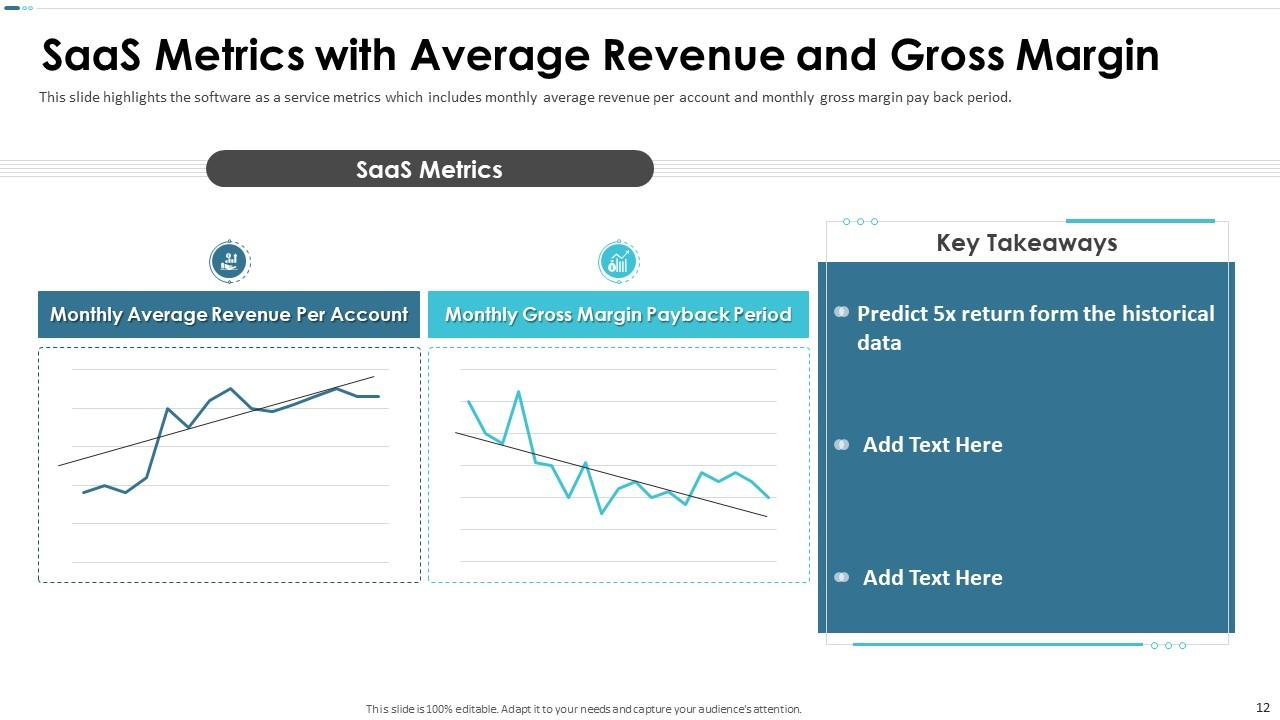
Template 9: SaaS Metrics with Average Revenue and Gross Margin
If you want to impress your potential investors with numbers, then this slide is very useful. It shows your SaaS metrics that generally include monthly revenue per account, gross margin, payback periods, etc. Downloading this template saves time, helps you tell a story with your numbers, and makes your pitch way more convincing. Startups, SaaS companies, or any growing business can use it to show investors that your business is not just surviving, but scaling smartly. It’s basically a shortcut to putting together a professional, investor-ready deck without spending hours trying to design charts that actually mean something.
Template 10: Canvas Application Paid Accounts by Industry
If you’ve ever struggled with showing your market reach in a pitch deck, this slide will help you. It breaks down paid accounts by industry like banking, healthcare, education, retail, energy, and more. The pie chart shows which sectors are leading and which have room to grow. Downloading this template is about saving time and telling a smarter story. Any startup, SaaS company, or growing business can plug in their own numbers and instantly have a professional, investor-ready slide. It helps you show market penetration, highlight target sectors, and make your presentation more impactful. Download now!

Over to you!
While preparing a presentation seeking investors for your start-up project, use our templates to impress them with the numbers woven into a story, a problem clearly stated, and a solution clearly mentioned. With our templates, you not only get to tweak the content to your needs, but also find fresh perspectives and inspiration from other successful companies like Canva. Use our 100% editable and customizable templates and tailor them to your needs.
Check out our templates on top 10 lean canvas templates with samples and examples.
FAQs on Canva Pitch Deck:
What are the key slides to include in a startup pitch deck?
Problem statement, solution slide, about information of the company, market analysis, competitor analysis, client profiles and testimonials, etc.
Is Canva good for making investor pitch decks?
Yes, Canva is absolutely helpful in making the investor pitch decks
What are the advantages of using Canva over PowerPoint for pitch decks?
Canva provides an easy-user-interface with a drag and drop option that even a non-designer can use to make a creative. Canva offers free templates but if you need advanced designs, you must subscribe.


