





 0 Comment
 Customer Reviews

Running a coffee shop might look super fun. You see cozy chairs, people smiling, and the yummy smell of coffee everywhere. But for the owner of the shop, it is not always easy. They have to keep tabs on the supplies, menu, employees, management, sales, revenue, etc. That is a lot to handle, especially when things get busy. This is where a coffee shop dashboard comes in.
A dashboard gives you details related to your shop so that you have every detail with you. A dashboard can show sales trends, what items sell the most, which times of the day are busiest, and even if you are running low on coffee beans or milk.
To learn more about Restaurant Dashboard, click here.
For staff, it helps managers track performance and labour costs without digging through endless reports. And for owners, it helps them to see if the shop is working smoothly.
A coffee shop dashboard saves time, reduces stress, and makes a running business more efficient. Instead of looking through numbers and spreadsheets, the owner can focus on serving great coffee and giving customers a better experience.
To explore more about the business dashboard, click here.
With this, let us explore the top 10 coffee shop dashboard templates with samples and examples. These content-ready slides are 100% editable, customizable, and embedded with high-quality infographics. With the help of these slides, you can allow your staff to function smoothly.
Template 1: Editable Coffee Shop Dashboard Template
This ready-made PowerPoint deck provides you with a café dashboard template that you can use if you are planning to open a coffee shop. This deck focuses on providing the importance of strategy in a coffee shop, providing a café KPI dashboard. If you are already running a coffee shop, and you are willing to improve your sales, then you can use this PPT deck. You can understand customer demographics and also educate your team about the same. Download it now!
[product_image id=1456701]
Template 2: Professional Coffee Shop Dashboard Template for Business Insights
This pre-designed PPT deck highlights business insights through a coffee business dashboard. The deck provides information such as sales metrics and revenue analysis, customer demographics, menu performance evaluation, and inventory management. If you have a plan to start your coffee shop management dashboard, then this is the perfect deck for you. It can help you analyze the costing and Employee performance as well. Download this PPT deck now!
[product_image id=1460892]
Template 3: Comprehensive Coffee Shop Dashboard PowerPoint Template for Analysis
Here is another ready-to-use PowerPoint deck that provides coffee shop analytics. You can learn about the importance of data in Coffee shops, key metrics required for analysis, and understand how the coffee sales tracker works on a daily, weekly, and monthly basis. You can leverage this content-ready deck to help your staff record daily sales and profit margins. Download this deck now!
[product_image id=1464170]
Template 4: Coffee Shop Business Dashboard for Sales
Here is another pre-built PPT deck, which highlights the beverage sales dashboard in detail. The slides cover the introduction to the dashboard, the importance of sales tracking in cafes, and daily reporting of Coffee customer insights. This deck can help you understand the daily preferences of customers and what areas require improvement from your side. Download this PPT deck now!
[product_image id=1469974]
Template 5: Coffee Shop Business Dashboard
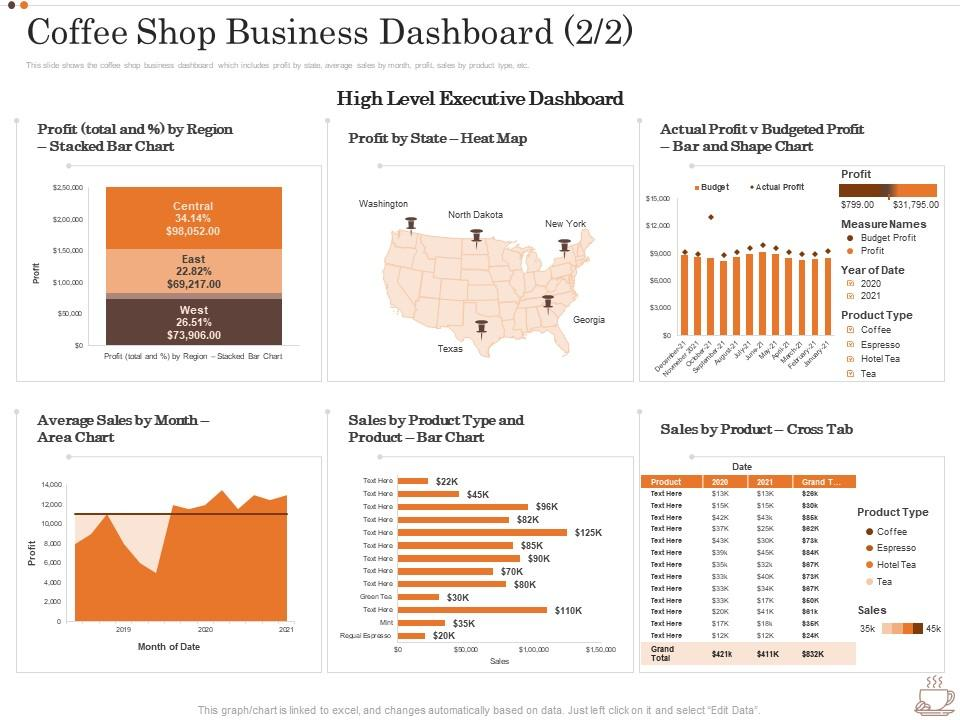
This top-notch PPT slide highlights a coffee shop business dashboard. The Café performance tracker covers information such as profit as per state, actual profit, and budgeted profit analysis, sales as per product type. With the help of this beverage inventory dashboard, you can keep track of your weekly and monthly sales, which can help you estimate your profit margin. Download this slide now!
Template 6: Coffee Shop Business Dashboard
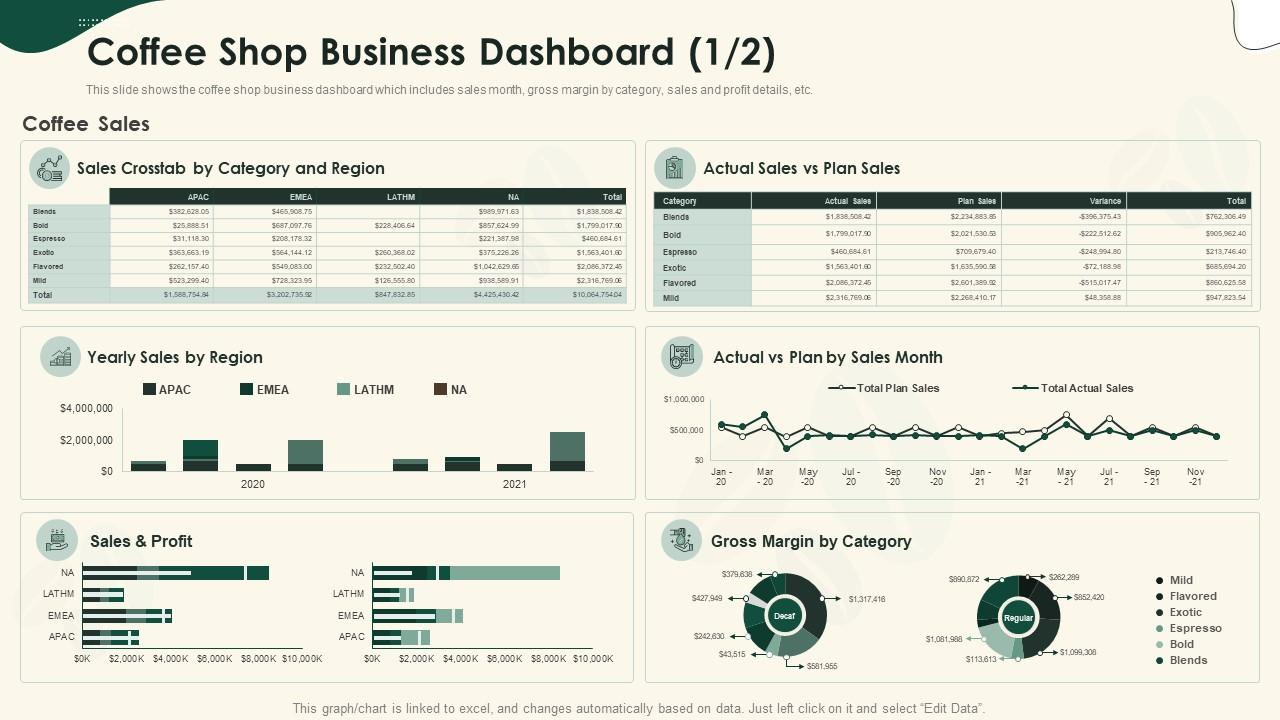
The following PPT layout highlights a coffee retail dashboard, which includes components such as sales per month, actual sales, planned sales, and profit details. This template can help you record all the details associated with your daily sales. If you have your cafe in multiple regions, then you can also record sales for each region. Download this PPT template now!
Template 7: Dashboard Showcasing Financial Metrics to Plan Coffee Shop Business
This PPT layout represents a coffee operations dashboard that can help you develop your business plan. By leveraging this content-ready slide, you can cover revenue breakdown, profitability, and cash flow for the upcoming years. If you want to develop your coffee shop business, then this is the right slide for you. Download it today!

Template 8: Customer Behaviour Dashboard for Coffee Shop
Here is another PowerPoint framework that provides an overview of a customer behaviour dashboard. The purpose of this slide is to help me understand how the rating system and customer loyalty system work. This template can help you understand the percentage of regular customers and the new ones. You can also uncover the frequency of their visits. Download this PPT template now!

Template 9: Editable Coffee Shop Dashboard Introduction
If you have your coffee shop established, it is important to understand how a coffee shop dashboard works. It can help you monitor daily sales figures and identify trends to make informed decisions on inventory and staffing. You can also use customer data collected through the dashboard to understand customer behaviours and their preferences. Download this PPT template now!

Template 10: Importance of Business Insights in Coffee Shops
If you want to learn about the importance of business insights in coffee shops, then this is the perfect slide for you. Understanding customer preferences can allow you to optimise your menu and increase customer satisfaction. You can also analyze sales trends to identify popular products. A perfect dashboard can help you achieve your sales target as well. Download this PPT template now!

The End Note
To wrap it up, a coffee shop dashboard can be a very important tool for owners and managers. Instead of traditional methods, a dashboard makes it easier to spot problems easily, and if sales are dropping, immediate action can be taken.
Another big advantage is that it supports growth. If a coffee shop wants to open a second location or add new menu items, the dashboard gives data that shows what is working and where improvement can be made.
Learn more about the retail dashboard by clicking here.
If you are running a coffee shop and you need to create a coffee shop dashboard, then you can use our ready-to-use PowerPoint slides. These slides are designed by a group of professionals and can help you with the perfect dashboard for your cafe. Download these slides today!
FAQs on Coffee Shop Dashboard
-
How does a coffee shop dashboard improve daily operational efficiency?
A coffee shop dashboard makes running the shop easier because it shows all the important stuff in one place. The owner or manager can see sales, inventory, and staff schedules easily. It can also tell them which drinks are selling the most, when the shop is busiest, and when they are running low on milk or beans. This can help them plan better, avoid wastage, and keep their customers happy.
-
What sales data should be included in a coffee shop dashboard?
A coffee shop dashboard should show the kind of sales data that makes it easy to see how the shop is doing every day. This covers things like total sales, drinks, and food items that have the highest sales. You can also see the total money earned for the day. It is also helpful to track repeat customers, average spend per person, and daily or weekly sales trends. Having data on discounts or special offers can show if promotions are working.
-
How do dashboards monitor staff productivity and labor costs effectively?
Dashboard can help owners see how the staff is working and how much money is being spent on labor. They show things like hours worked, tasks completed, and how much each shift costs the company. Instead of reading lots of long reports, managers can just look at one screen and see everything. If too much time or money is being wasted, the dashboard will alarm the manager. This can help the coffee shop run better and make sure workers are working properly.


