





 0 Comment
 Customer Reviews

Have you ever noticed how industries feel like they have life in them? Some days they are fueled by new ideas and trends while on other days, they slow down, juggling through global shifts or sudden disruptions. And between all of that are businesses like yours that are trying to keep pace.
The real challenge that most businesses face is just surviving, rather it’s knowing where the industry is heading before everyone else does. A streamlined way to do so is with the help of an Industry Dashboard.
Instead of staring at multiple reports or waiting for quarterly updates, wouldn't it be great to have a single panel that highlights the pulse of your market in real time.
A Sector Performance Dashboard showcases how your industry is doing right now, while a Market Insights Dashboard reveals shifts in consumer behavior.
Career decisions and business moves can at times feel heavy and impactful, especially if you are a young professional in your 30s’. Here dashboards provide a kind of clarity that’s priceless. These dashboards are like Google Maps for your industry. It allows you to see where you stand, figure out the fastest way to your goals, and even the roadblocks ahead.
Whether you wish to track trends with the help of an Industry Metrics Dashboard, or understand patterns, or even plan strategy with an Industry Analysis Board, these pre-designed templates by Slideteam are the perfect tools to cut through noise and provide actionable insights.
At the end of the day, dashboards are not just for tracking data, rather they’re designed for helping you stay ahead, make better decisions, and grab every opportunity.
Let's explore the completely editable and customisable slides now!
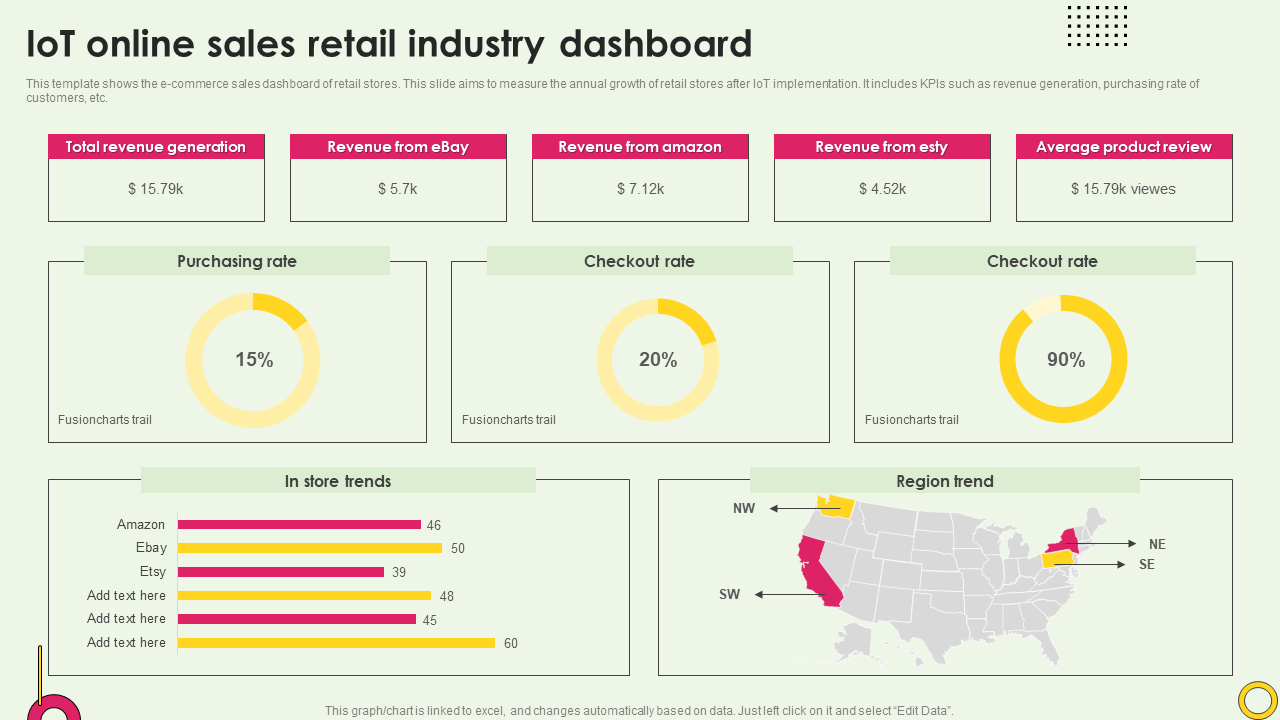
Template 1: IoT Online Sales Retail Industry Dashboard
Do you want to know how a firm may check how well IoT-powered e-commerce is doing on more than one platform at the same time? This PowerPoint template displays how much money popular internet stores make. Circle charts and bar graphs indicate buying rates and trends for key performance measures. Use this template to show the whole story about how sales are performing and what will happen in the future. Get it now!
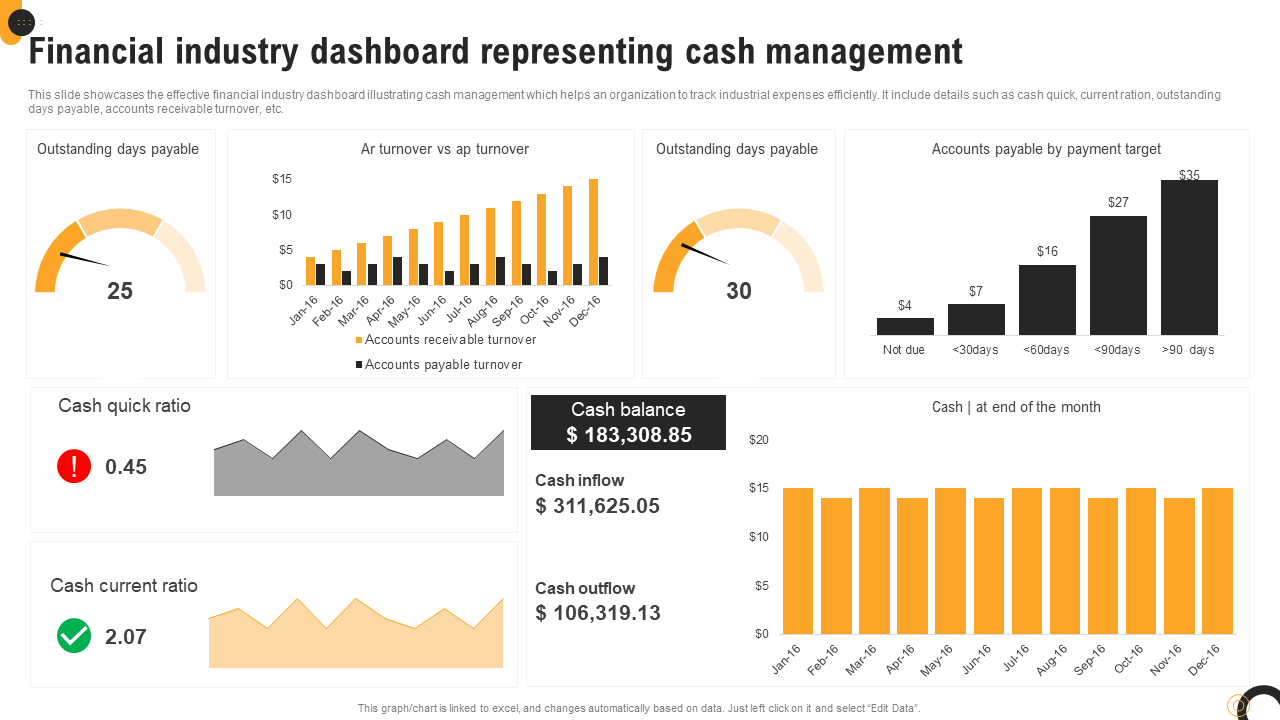
Template 2: Financial Industry Dashboard Representing Cash Management
This PowerPoint Slide presents cash management KPIs by utilizing different types of graphics that are made for financial companies. It has charts to show the number of days bills are due, bar graphs to compare turnover, and more. When these elements are combined, they include important information on accounts receivable, payment targets, and operational cash flows, making a complete sector performance dashboard. The design blends numerical data with visual trend analysis flawlessly. Grab now!
Template 3: Industrial Waste Management and Recycle Dashboard
How can businesses keep track of their efforts to recycle and cut down on trash? This PowerPoint Template depicts a well-organized dashboard that indicates how much was recycled, what materials were submitted for recycling, and what waste can't be recycled. It illustrates the money saved and a clear pie chart that compares trash that has been recycled to rubbish that has been collected. In each group, there are numbers for oil, plastic, metal, paper, and cardboard. The design also has a trend graph that demonstrates how CO2 emissions have gone down over time. Get it now!

Template 4: Worldwide Femtech Industry Big Data Analytics Dashboard
How quickly is the femtech sector booming throughout the world? This PowerPoint Template showcases a clear dashboard which displays company progress, investors, fundraising rounds, and data points. It has a line graph showing investments in women's health, a globe map of firms by nation, and a bar graph showing the number of companies by year. A donut chart illustrates the percentage of businesses in different fields, such as mental health, reproductive health, and pregnancy. This template is great for use by company analysts, advisors, and investors that want to make decisions based on facts. Download today!

Template 5: Data Analytics Dashboard in Telecom Industry to Measure Customer Satisfaction
This PowerPoint Slide exhibits a full set of customer satisfaction metrics using telecom-specific analytics visualization. The template offers six different measuring elements, such as tracking client lifetime value, repurchasing rates, and complaint status. It also includes information on retention metrics, net promoter ratings, and monthly retention trends. Each section uses a different type of visual, such as gauge meters, donut charts, and bar graphs, to provide a strong framework for the sector analytics dashboard. Use this template to show how happy customers are and to start smart customer retention programs for your organization. Download today!

Template 6: Importance of KPIs in the Food Industry
What makes the food sector grow in a way that it lasts in today's competitive market? This PowerPoint Template uses a nice circular shape to show five KPI categories important for the food industry. Some of the most essential elements include making decisions based on data, keeping track of performance, measuring client happiness, controlling costs, and examining market trends. The design seamlessly connects operational insights with actionable outcomes. Each section has full explanations with a primary professional picture, which makes up a complete sector analytics dashboard framework. Grab it now!

Template 7: Importance of Project Dashboards
Project dashboards convert scattered data into strategic clarity in seconds. This PPT Slide has an engaging circular layout with numbered advantages originating from a single professional picture. It highlights five important benefits such as real-time monitoring, better decision-making, resource management, risk detection, and more accountability. The design creates an effective sector performance dashboard structure for compelling presentations. This template may be used by project managers, business analysts, team leaders, and consultants. It gives them the tools they need to explain how important dashboards are and get stakeholders on board with implementation plans. Download today!

Template 8: Importance of Data Visualization in F&B
This PowerPoint Slide demonstrates seven important benefits of using data visualization in food and beverage businesses. The template has a central circular picture that is connected to numbered advantage locations by clean, straight lines. The main benefits are that you may get more information and analyze it more quickly. It also lets you keep an eye on how customers act, which makes your business run more efficiently and helps you identify market trends. It also helps keep track of performance and encourages people to work together to make decisions. This template may be used by food and beverage analysts, hospitality technology managers, and culinary business strategists for creating impactful presentations. Download now!

Template 9: Understanding the Food Supply Chain
What are the six important steps in which food takes to go from the farm to your plate? This PowerPoint Template answers that question by presenting the whole supply chain trip using a linear flow design with directional arrows. Each step, which is numbered, consists of farming, harvesting, getting the goods to the right places, processing, distribution, and finally using the goods. The layout mixes images of professional meetings with process visualization to provide a market insights dashboard that works well for stakeholder presentations. Use this template to teach teams and improve the efficiency of their supply networks. Grab today!

Template 10: Scope of the Hospitality Industry
The hospitality business is far bigger than just hotels; it includes six interrelated areas that are important to the world economy. This PowerPoint Template illustrates how to set up hotels, travel services, and food and drink companies. It also addresses places to have fun and relax, convention management, and private clubs. Each section has detailed subcategories with eye-catching images that convert complex industry data into consumable information. The layout includes service breakdowns resulting in an appealing market insights dashboard for presentations. Use this template to showcase sector diversification and prospective markets to stakeholders. Grab now!

FINAL THOUGHTS
The competitive business world doesn’t wait for anyone then why should you? With these above mentioned Templates, you no longer need to struggle to stay informed. They work at their finest to keep you ahead and updated. They transform raw numbers into actionable insights that drive strategy. Whether you are looking for growth, wish to analyze competitors, or monitor KPIs, using a dashboard brings the clarity you need.
PS: Also explore our manufacturing dashboard templates by following this link.
FAQs on Industry Dashboard
1. What is the main objective of the dashboard — monitoring, analysis, or forecasting?
The main objective of a dashboard depends on how it is designed, but most often it combines monitoring, analysis, and sometimes forecasting. A monitoring dashboard shows real-time updates, like sales numbers or energy use, so people can track performance. An analysis dashboard helps study past data, spot patterns, and understand why something happened. A forecasting dashboard uses trends and data to predict future outcomes.
2. Which industry does the dashboard cater to, and what are its specific KPIs?
A dashboard is usually made to serve a specific industry, and its KPIs depend on that field. For example, in healthcare, the dashboard may track patient wait times, recovery rates, and staff efficiency. In retail, it may show sales growth, customer satisfaction, and stock levels. In finance, it could measure revenue, risks, and fraud alerts. Each industry uses KPIs that match its goals and challenges.
3. What data sources will feed into the dashboard (internal, external, or both)?
A dashboard can use data from internal sources, external sources, or both, depending on its purpose. Internal data comes from inside the organization, like sales numbers, employee records, or customer feedback. External data comes from outside, like market trends, social media activity, or competitor information. When both are combined, the dashboard gives a more complete picture. For example, a business can track its own sales alongside market demand. Using both sources helps leaders see what’s happening inside and outside at the same time.


