





 0 Comment
 Customer Reviews

Ever wondered how tech titans like Flipkart, Netflix, or YouTube wrangle and fortify the huge amount of data they juggle every second? These platforms deal with millions of users, transactions, and content streams. So how do they keep all that data secure, organized, and private?
As we all know, where there is information, there is always a risk.
A study reveals 79% of people feel they have little to no control over how companies use their data.
Information leakage, abuse, and monitoring are more prevalent than you might imagine. Whether you're browsing social media, making online purchases, or sharing files to the cloud, your private information is being monitored, stored, and quite often revealed. This should make you more aware and alert about your online activities.
You may be using strong passwords, two-factor authentication, or private modes within apps.
But here's the question that really matters: What's the assurance that your data is really secure?
Ready to identify potential threats quickly? Click here to read the blog on Top 5 Information Security Dashboard Templates now!
Let's Take a Moment to Reflect
Suppose you've just uploaded a vacation photo of your family online. You've set your profile to private. You've limited tagging. You even altered your name by a small margin to keep it low-profile. But weeks afterward, you begin to notice ads from the place you'd been to. Your friend receives a spam call mentioning your name.
Coincidence? Not quite.
Your trail of data is more transparent than you realize, and it gets bigger each time you access the internet.
This is where privacy dashboards become critical. They empower you to take control of your data and manage its usage.
They don’t just sit quietly in your system. They function as your digital guardian in tracking which apps touch your data, when, and under what permissions. A privacy dashboard is a tool that provides the ability to see, comprehend, and manage how your data is being utilized, all from one clear, centralized interface. It's like a control center for your digital life, allowing you to monitor and control who has access to your personal information.
What Does a Privacy Dashboard Do?
A privacy dashboard is user-centered and provides an overview of how your data is being evaluated. It enables them to track and manage their privacy settings and yet provide more transparency and control over the data. By making users able to monitor data access, permissions management, and informed decisions, a privacy dashboard improves data security in general.
Its fundamental operations are, of course, to track who is accessing information, allowing consent settings to be modified, enhancing data use transparency, and providing centralized control to enhance privacy and user trust.
Check out some of our best Privacy Dashboard templates below!
Template 1: Enterprise or Business Project Security Dashboard
Every business wants their data and protecting privacy is at the top of their concerns. This privacy management dashboard, with its comprehensive coverage, is perfect for keeping the project's data secure. This slide depicts information in eight sections, including compliance, security projects, sustainability, services, steering projects, risk by category, penetration tests, and incidents.
Moreover, the presentation includes a valuable compliance summary at the bottom. Download today to enhance the performance of your projects!

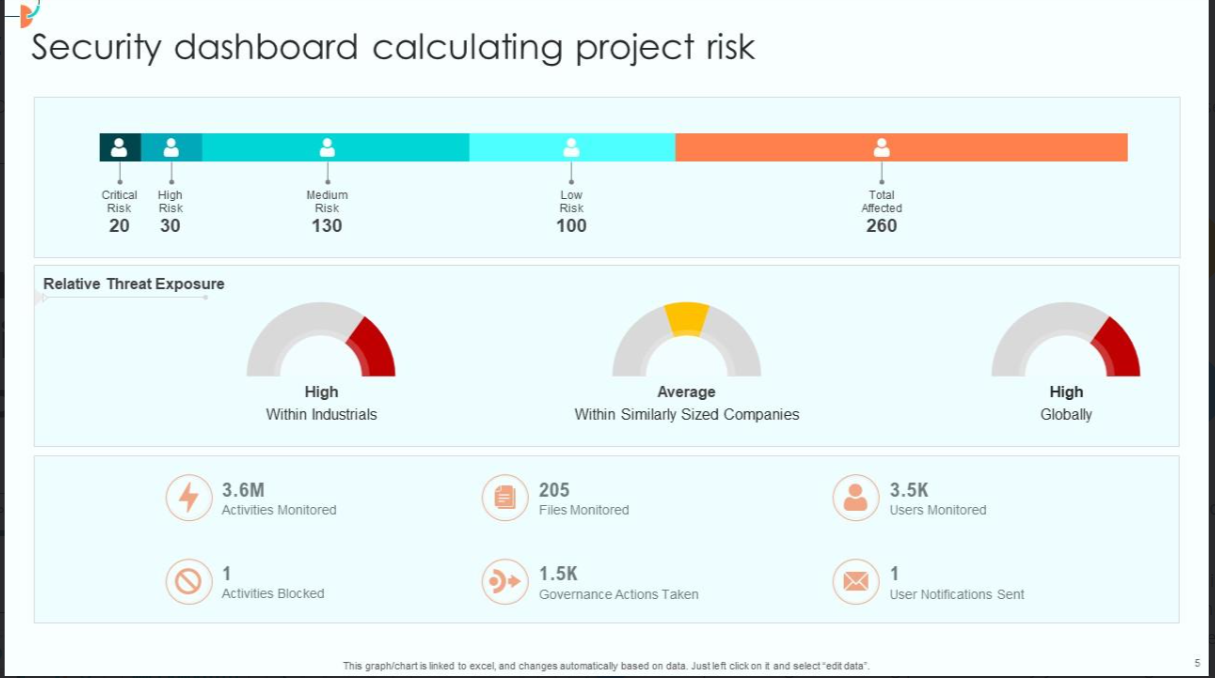
Template 2: Security Dashboard Calculating Project Risk
This security and privacy panel, a comprehensive tool, is a must-have to calculate project risk. The PPT template represents the level of risks (critical risk, high risk, medium risk, low risk, and total affected) on a given scale. Moreover, it also highlights the relative threat exposure, indicating high and average, helping stakeholders quickly identify areas of concern. It also offers additional information about the activities, files, users being monitored, and more. Get access today to enhance visibility and control!
Template 3: KPI Metrics of Cyber Security for Attacks Dashboard
Our data protection dashboard is not just about monitoring threats; it's about predicting and preventing them. It helps you in monitoring threats, phishing attacks, and total attacks. This PPT slide depicts a bar graph representing the threats, top threats, and threats predicted. Also, the presentation walks you through a frequency polygon showcasing the number of attacks by month. Download today!

Template 4: Security Dashboard with Various Key Performance Indicators
This dashboard, our Privacy Compliance Tracker, is designed exquisitely and offers key performance indicators for the last six months, including the total number of threats by risk status and the number of devices monitored, presented in a clear and easy-to-understand bar graph. It also provides information about the time taken to detect threats, resolution time, and the number of analysts assigned. On the right-hand side, the slide offers a snapshot of our monitored devices, threats identified last month, and false positive alerts. This dashboard is a user-friendly tool that is accessible to all team members. Download today!

Template 5: Information Dashboard Indicating Breakdown of Security Breach events
This data privacy panel offers a graphical segmentation of breach data by different control categories such as access to network, data leak, endpoint, and email. Each donut chart illustrates the number of detected, missed, prevented, or stopped threats in each segment, with green representing secure or detected events. The overall status chart shows that 90% of threats were identified, whereas the time-based graph indicates the fluctuation of security events across particular dates. A bar chart further categorizes breaches across attack stages such as infiltration or exfiltration, depicting how each was dealt with effectively. Grab it now!

Template 6: Information Security Compliance and Risk Management Dashboard
This privacy governance dashboard gives a comprehensive view of the company's present threat landscape, such as the severity, origin, and frequency of security threats, in a single interface. It depicts intrusion attacks from the outside or within. This slide helps stakeholders identify priority and high-priority alerts that need to be acted upon right away, comprehend attack patterns and origins, and make informed decisions about fortifying cybersecurity stances. Get access now!

Template 7: Risk Evaluation Dashboard for Data Privacy
How do we measure risk for data privacy? The answer lies in this data access dashboard!
This measuring instrument has everything, with a particular emphasis on deviations detected via audits, total maturity of controls, and data protection impact assessment (DPIA) status. It provides core metrics such as average response time to privacy issues, numbers of data subjects, and percentage of completion of data risk assessments. also, it tracks audit findings, incidence trends, control implementations, and territorial GDPR processing effectiveness, ensuring a proper and credible data privacy assessment. Go for it today!

Template 8: Data Privacy Training Analysis Dashboard
The Data Privacy Training Analysis Dashboard is an asset in knowing and enhancing data protection policy and has information regarding an organization's training activity. It tracks important indicators like monthly participant rates, training hours, and achievement of training targets.
The Digital Privacy Tracker assists stakeholders to track the effect of training, budget limitation, and focus on topics so that data privacy awareness is strategic and effective. Download now!

Template 9: Cyber Security Incident and Privacy Analysis with KPI Dashboard
This privacy risk monitor slide displays kinds of cybersecurity incidents to evaluate and monitor for potential threats. The slide has a vast array of items like open incidents, warnings by reason for examinations and by level, average response rate, new incidents by priority, etc. Additionally, the template also displays acknowledgment status on the lower part of the panel to ensure there is nothing missed. Grab it today!

Template 10: Business KPI Dashboard Slide for Data Privacy for Employees
This PPT template displays an update of an employee's data privacy dashboard, demonstrating improvement over time and today's performance relative to goals. It utilizes a mix of bar charts, gauges, and numeric goals in communicating achievement of privacy goals. The dashboard is Excel-linked and provides real-time updates that keep everybody interested and engaged with the privacy performance. Go for it!

Privacy Is Power, Take It Back
A Privacy Dashboard is not an information screen; it's your virtual control room. It tells you who's observing, what they're monitoring, and how to prevent it. In a world where information equals money, protecting your privacy is no longer a choice; it's a necessity.
See your data before it sees you. Begin your privacy dashboard today with SlideTeam.
PS: Display your business data with ease. Access our Information Dashboard Templates now!
FAQs on Privacy Dashboard
What key information should a privacy dashboard display clearly?
A Privacy Dashboard is a concise image of how your data is being accessed. Handled and collected. It presents clearly
- Real-Time Activity Log
- Data Access Overview
- Alerts or Suspicious Activity
- Permission Settings
- Review & Reminder Tools
- Smart Recommendations
How can settings be easily reviewed and updated from the dashboard?
A privacy dashboard makes it easy to see and control your data settings at a single glance. It's easy to see which apps can access things like your location, camera, or contacts. You have real-time activity reports, so you are always up to date and aware of how your data is being utilized. Moreover, you can turn on/off permissions in one click. Also, it gives you intelligent suggestions depending on what you're doing and allows you to remind yourself to check your settings from time to time, always in control of your privacy.
Which alerts or notifications are essential in a privacy dashboard?
Permission changes, sensitive data, security threats, and data usage patterns are the important alerts or notifications in a privacy dashboard.


