





 0 Comment
 Customer Reviews

The report's been run. The numbers are there. But somehow, nobody in the room agrees on what they mean.
That's the data warehouse problem, and it's not really a technology problem. It's a communication problem. The architecture is sound, the ETL pipelines are clean, the OLAP cubes are built—but the moment someone has to explain how all of it works to a CFO or a department head, things get quiet. Fast.
Most teams know what their data warehouse does. They understand the source systems, the transformation layers, the fact tables. What they don't know is how to make that intelligible to someone who wasn't in the room when the schema was designed. And that gap—between what the system does and what stakeholders understand—is where good BI projects quietly fail.
There's also the pressure of getting it right the first time. A presentation on business intelligence data warehouse architecture isn't just informational. It's justification. For budget. For headcount. For the whole data integration platform you've spent months building. The wrong slide makes mature architecture look like guesswork.
And building that slide from scratch? That's its own project. Most analysts and data engineers aren't designers. They shouldn't have to be. The structure of a good BI deck—source systems, staging layers, dimensional modeling, KPI reporting—that structure exists because this problem is common. Every organization eventually has to show its work.
That's exactly where SlideTeam's pre-designed business intelligence data warehouse templates come in. Ready-made frameworks built around the actual concepts—data flows, warehouse architecture, BI dashboards, ETL processes—so you're not starting from a blank canvas when the meeting's in two days.
Here are the templates worth using.
Template 1: Business Intelligence and Data Warehouse PPT Presentation
Clear BI communication starts with a structure that holds up across audiences. This PPT preset is built for data architects and BI leads who need to present end-to-end warehouse concepts credibly. It works equally well for a technical deep-dive or a boardroom overview of your data integration platform. Explore more business intelligence data warehouse PPT templates with examples and samples to find the right fit for your next presentation. The template is 100% editable and customizable.
[product_image id=1394032]
Template 2: Business Intelligence Data Warehouse PPT Summary
Summarizing a complex BI program without losing nuance is harder than it sounds. This PPT template gives analysts and BI managers a clean, focused structure to present warehouse concepts concisely. It suits quarterly business reviews and data governance framework updates alike. The layout keeps stakeholder attention on outcomes, not infrastructure details. The template is 100% editable and customizable.
[product_image id=1380782]
Template 3: Business Intelligence Data Warehouse PPT Graphics
Visual clarity matters when your audience isn't familiar with data warehouse architecture. This deck helps BI practitioners translate technical concepts into graphics that non-technical stakeholders can follow. It's a practical fit for data literacy sessions or enterprise data management briefings. The structure guides viewers from raw data inputs to actionable BI insights. The template is 100% editable and customizable.
[product_image id=1394035]
Template 4: Data Warehouse and OLAP Cubes Business Intelligence Architecture HR Analytics Implementation
OLAP technology sits at the heart of most enterprise analytics, but explaining it clearly is rarely simple. This PowerPoint slide covers data warehouse and OLAP cube architecture, distinguishing structured, semi-structured, and unstructured data sources. HR analytics teams and data engineers alike use this PPT to walk leadership through dimensional data modeling decisions. It grounds abstract architecture in real organizational context. The template is 100% editable and customizable.

Download this PowerPoint Template
Template 5: Cloud Data Warehouse for Business Intelligence PPT Outline
Cloud data warehouse adoption is accelerating, and the business case needs a clear visual argument. This PPT template is built for IT leads and data architects presenting cloud migration plans to executive audiences. It covers the move from on-premise to cloud data warehouse solutions, with enough structure for both technical and business stakeholders. See related BI dashboard PowerPoint templates to complement your cloud BI narrative. The template is 100% editable and customizable.
[product_image id=1792844]
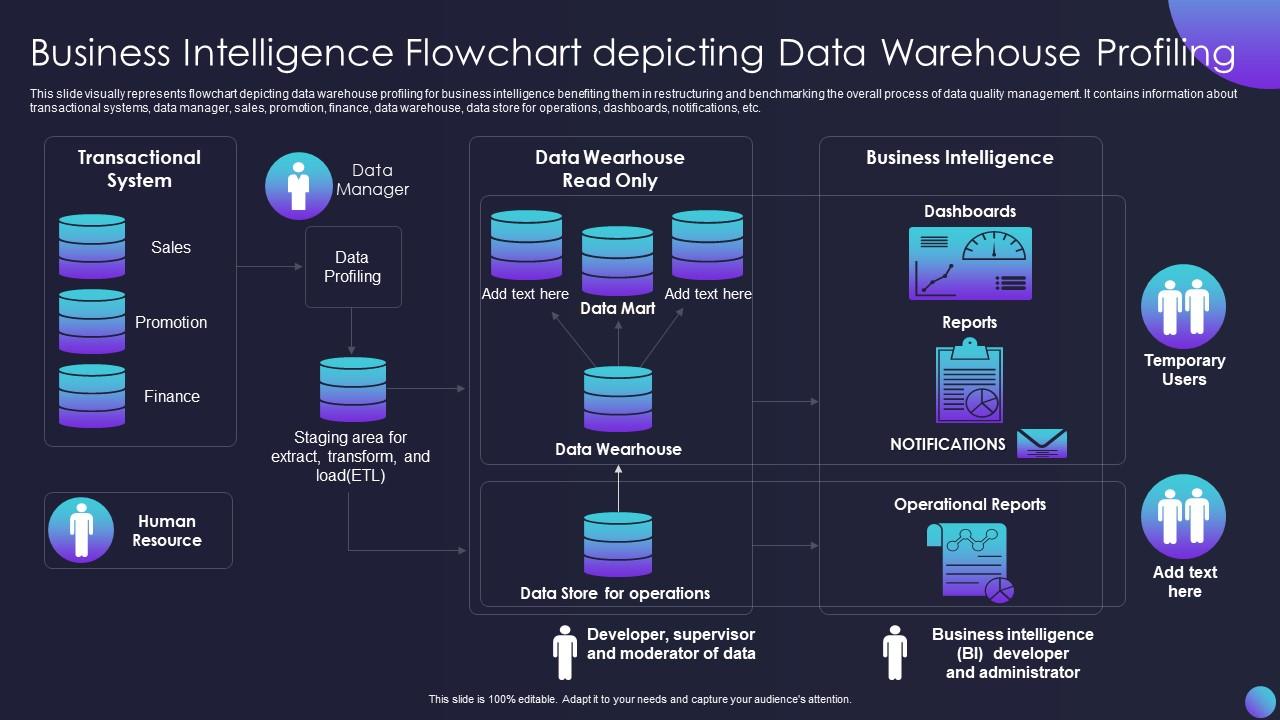
Template 6: Business Intelligence Flowchart Depicting Data Warehouse Profiling
Data quality management rarely gets the visual structure it deserves in presentations. This flowchart-based slide maps the full data warehouse profiling process, from transactional systems through to dashboards and notifications. It covers key nodes—sales, finance, promotion, and HR data flows—within a single coherent view. Visualizing the full data pipeline drives instant clarity on where quality controls live in your BI architecture. Use this to anchor discussions on benchmarking and restructuring data quality workflows. Transform your BI reporting conversations today. Download this dynamic template now and unlock sharper data quality communication.
Download this PowerPoint Template
Template 7: Data Driven Warehouse Performance and Analytics Insights PPT Guidelines
Warehouse performance reviews need more than raw numbers—they need a narrative. This slide deck is built for analytics managers presenting data-driven performance insights to operations or finance teams. It pairs warehouse metrics with visual analytics, making KPI reporting tools easier to contextualize for decision-makers. The structure keeps the focus on actionable findings, not methodology. The template is 100% editable and customizable.
[product_image id=1805522]
Template 8: Business Intelligence Tools Leveraging Data Warehouse Insights PPT Structure
BI tools only create value when stakeholders understand what the warehouse is telling them. This PPT preset is designed for BI leads who need to connect warehouse outputs to real business decisions. It's well-suited for presenting how business intelligence tools translate data warehouse insights into action. Data teams presenting to commercial or operations leaders will find the structure immediately useful. The template is 100% editable and customizable.
[product_image id=1734118]
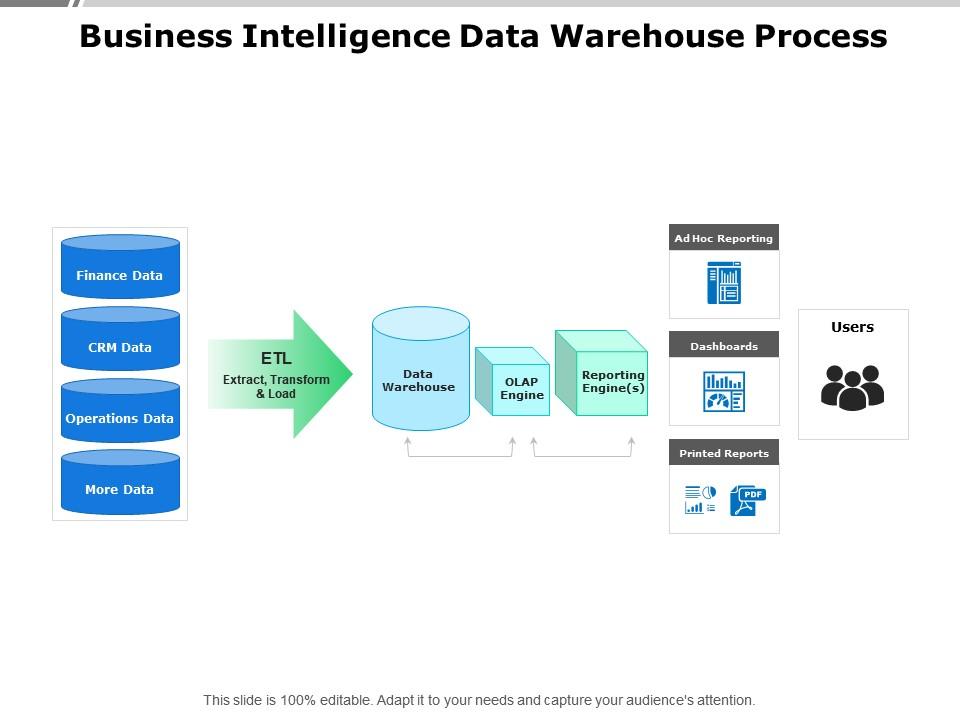
Template 9: Business Intelligence Data Warehouse Process
Process clarity is what separates a BI initiative that lands from one that confuses. This five-stage slide captures the complete business intelligence data warehouse process in a clean, sequential layout. Each stage maps directly to a recognizable phase—from data sourcing through to BI output—making it ideal for onboarding new stakeholders. This structured framework drives confident communication of your BI procedures. Transform your data workflow presentations today. Download this dynamic template now and unlock clear process storytelling.
Download this PowerPoint Template
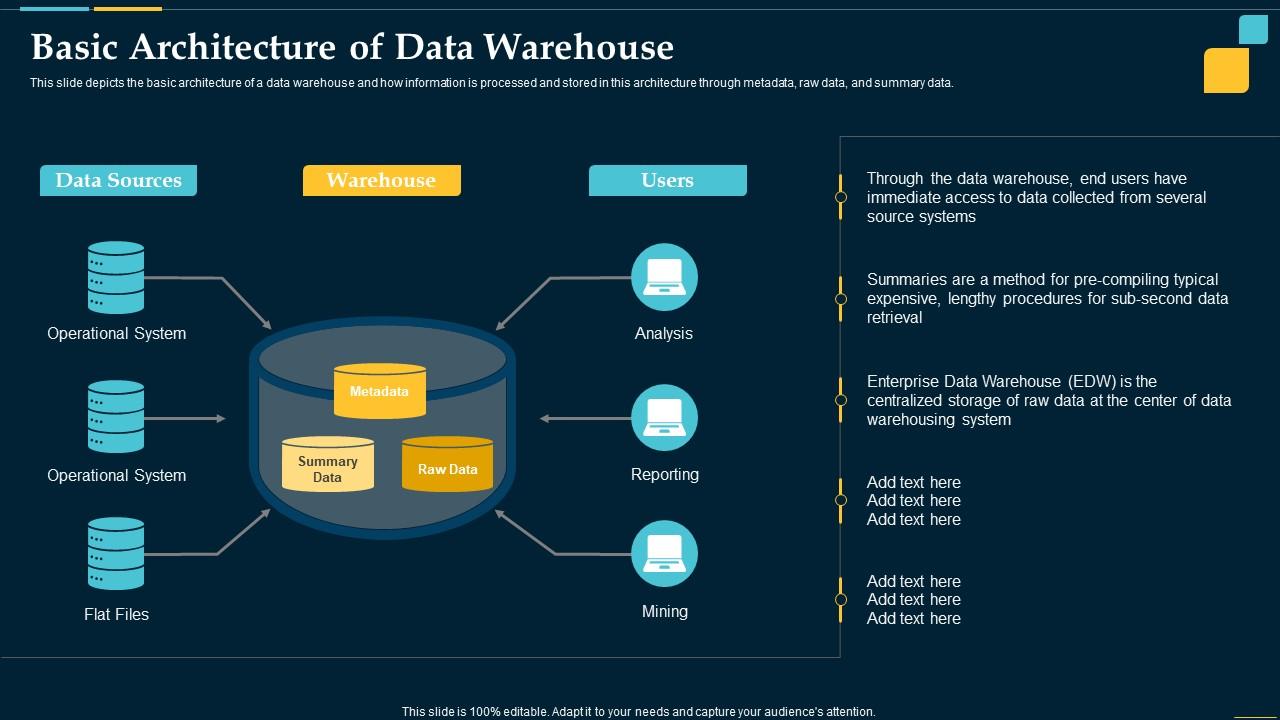
Template 10: Basic Architecture of Data Warehouse Business Intelligence Solution
Architecture diagrams are only useful when the audience can actually follow them. This six-stage slide covers the basic architecture of a data warehouse, showing how metadata, raw data, and summary data move through an enterprise centralized system. Data architects and solution designers use this PPT to ground technical proposals in accessible visual logic. It's a strong anchor for any enterprise data management briefing. Elevate your architecture presentations today. Download this dynamic template now and unlock audience comprehension from the first slide.
Download this PowerPoint Template
Template 11: Data Warehouse Architecture for Business Intelligence Success PPT Structure
Getting buy-in for a new warehouse architecture requires a presentation that builds confidence. This PowerPoint slide is built for data engineers and solution architects presenting warehouse design decisions to leadership. It covers the structural components that drive business intelligence success, from data modeling to query performance. So yeah, this deck bridges the gap between technical build and business understanding. The template is 100% editable and customizable.
[product_image id=1611274]
Template 12: Business Intelligence KPI Dashboard PPT Summary
KPI dashboards are only as useful as the conversations they enable. This PPT preset is built for BI analysts who need to present KPI reporting tools and dashboard summaries to executive audiences. It brings together performance metrics and warehouse-sourced data in a format that drives decisions, not debates. For context, the layout is clean enough for a weekly ops review and detailed enough for a board briefing. The template is 100% editable and customizable.
[product_image id=1841840]
Template 13: Data Warehouse Architecture Explained PPT Summary
Explaining data warehouse architecture to mixed audiences is a skill most teams underestimate. This complete deck provides a structured walk-through of warehouse components, from ingestion layers to reporting outputs. Data engineers presenting to business analysts—or BI managers briefing executives—will find the flow intuitive. The layout aligns with real data modeling strategies, keeping the explanation grounded in practice. Elevate your architecture presentations today. Download this dynamic template now and unlock consistent audience engagement from start to finish.
[product_image id=1858677]
Template 14: Data Visualization Techniques Business Intelligence PPT
Data visualization tools are only as persuasive as the structure behind them. This deck is built for BI analysts and data scientists presenting visualization techniques to business stakeholders. It covers key approaches to turning warehouse outputs into charts, graphs, and dashboards that actually inform decisions. The presentation format suits both internal BI reviews and client-facing analytics briefings. The template is 100% editable and customizable.
[product_image id=1574492]
Template 15: Data Warehouse Implementation Steps from Source to Reporting PPT Mockup
Implementation presentations fail when they skip the logic between source and reporting. This complete deck maps each step of the data warehouse implementation process, from source system extraction through to final BI reports. Project managers and data leads use this PPT to walk stakeholders through the full pipeline—ETL stages, staging layers, and delivery outputs. It keeps every milestone visible and accountable. Transform your implementation presentations today. Download this dynamic template now and unlock stakeholder confidence at every project phase.
[product_image id=1837830]
Template 16: Business Intelligence Solution Data Warehouse Architecture PPT Mockup
Presenting a BI solution architecture requires a visual language that everyone in the room can follow. This PPT mockup is built for solution architects and data leads pitching warehouse designs to business and IT stakeholders. It covers the structural layers of a business intelligence data warehouse solution clearly and credibly. The deck suits both proposal-stage presentations and post-implementation reviews. The template is 100% editable and customizable.
[product_image id=1841841]
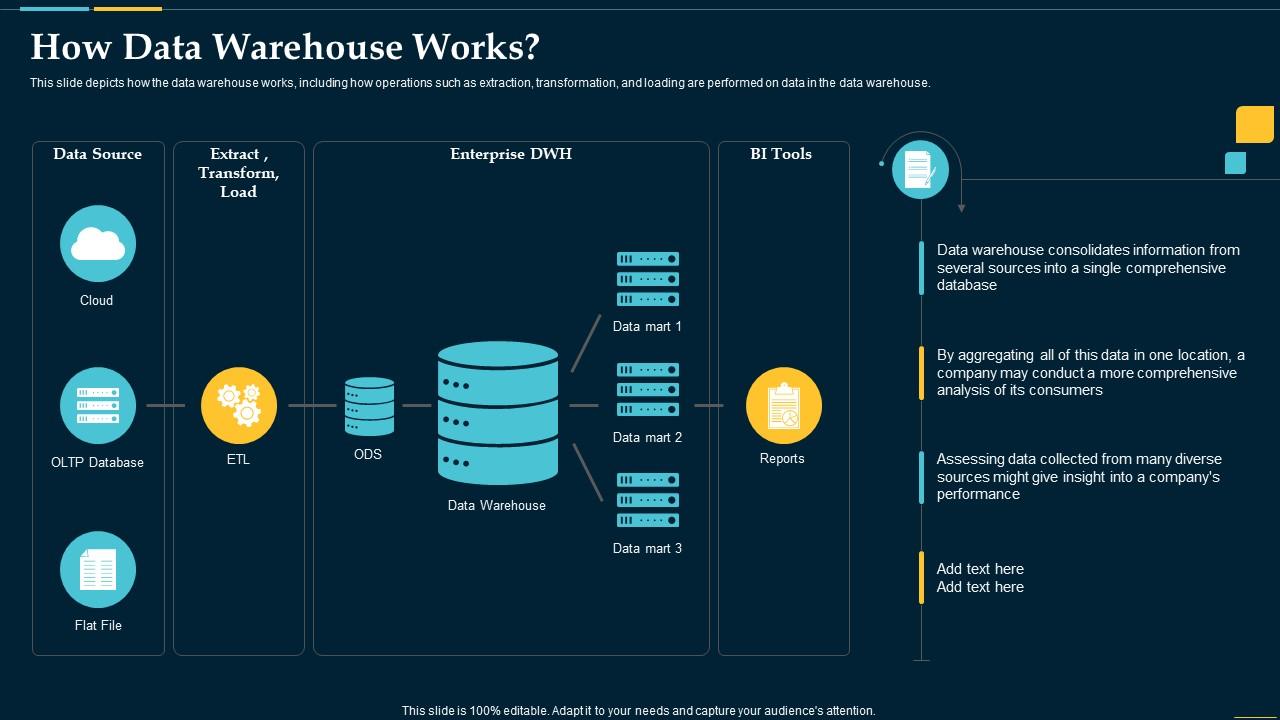
Template 17: How Data Warehouse Works Business Intelligence Solution
Most stakeholders don't need to know how a data warehouse is built—they need to know how it works. This slide focuses on the operational mechanics: extraction, transformation, and loading, explained in a way that connects to business outcomes. BI managers and data engineers use this PPT to answer the question every executive eventually asks. It covers performance, comprehensive data flow, and end-consumer access in one coherent view. The template is 100% editable and customizable.
Download this PowerPoint Template
Template 18: Data Warehouse for Business Intelligence
A focused, well-structured deck can make the difference between a BI proposal that gets funded and one that gets tabled. This PPT is built for data leaders presenting the case for a warehouse investment to finance or operations teams. It covers the core value of a data warehouse for business intelligence, without overloading the audience with technical detail. The structure keeps the business case front and center. The template is 100% editable and customizable.
[product_image id=1858678]
Template 19: Designing Efficient Data Warehouses for Business Intelligence PPT
Efficient warehouse design isn't just a technical goal—it's a business one. This deck is built for data architects and BI leads presenting design principles to stakeholders who care about speed, cost, and reliability. It covers the decisions that make a warehouse genuinely efficient, from schema choices to data modeling strategies. The layout supports both design-phase discussions and post-deployment reviews. The template is 100% editable and customizable.
[product_image id=1494733]
Template 20: Data Warehouse Best Practices Staging and User Layers PPT Designs
Staging and user layers are where most warehouse implementations get complicated—and where most presentations lose the room. This deck is built for data engineers and BI practitioners presenting best practices across the full warehouse layer stack. It covers staging zones, transformation logic, and user-facing data layers in a format that technical and business audiences can follow. The structure suits both internal architecture reviews and vendor briefings. The template is 100% editable and customizable.
[product_image id=1574494]
Elevate Your BI Presentations with SlideTeam
SlideTeam's PowerPoint templates are the best in the industry for business intelligence data warehouse communication. These content-ready slides save hours of design work while delivering professional-grade clarity for every audience—from data engineers to C-suite stakeholders. Use these ready-made PowerPoint slides to present warehouse architecture, ETL processes, and KPI dashboards with confidence. Deploy these pre-designed frameworks to drive faster decisions and stronger buy-in across your organization.
FAQs on Business Intelligence Data Warehouse
How does a data warehouse differ from a traditional relational database in the context of business intelligence?
A traditional relational database handles day-to-day transactions—one record at a time. A data warehouse is built for analysis across large volumes of historical data. It consolidates data from multiple source systems into a single, query-optimized store. The key difference: relational databases support operations; data warehouses support decisions. BI tools query the warehouse, not the operational database, to avoid performance conflicts.
What are the key architectural components of a modern business intelligence data warehouse?
A modern BI data warehouse typically has four layers: source systems, an ETL or data integration layer, a central warehouse or data mart, and a reporting layer. The ETL layer cleans and transforms data before it lands in the warehouse. The reporting layer connects to BI dashboard software like Microsoft Power BI or Tableau. Each layer has a distinct job—don't conflate them.
How do ETL processes ensure data quality and consistency in a data warehouse environment?
ETL processes enforce data quality through three actions: validation at extraction, transformation rules that standardize formats, and rejection of records that fail checks. Consistency comes from applying the same transformation logic every time data is loaded. Scheduling regular loads and logging errors lets teams catch issues before they reach reporting. Automation is what keeps quality repeatable, not manual review.
What role does dimensional modeling play in optimizing data warehouse performance for BI reporting?
Dimensional modeling organizes data into facts and dimensions—sales figures as facts, time and product as dimensions. This structure lets BI reporting tools run fast aggregation queries without scanning every row. Star schemas are the most common form. The result: reports load faster and analysts spend less time waiting. It directly determines how quickly your KPI reporting tools can deliver answers.
How can organizations choose between a star schema and a snowflake schema for their data warehouse design?
Choose a star schema when query speed is the priority—it uses fewer joins and is simpler to maintain. Use a snowflake schema when data integrity and storage efficiency matter more, since it normalizes dimension tables further. Most BI teams default to star schema for its performance benefits. Snowflake schemas suit environments with complex hierarchies and strict data governance framework requirements.
What are the primary differences between OLAP and OLTP systems, and how do they support BI initiatives?
OLTP systems handle real-time transactions—one insert or update at a time. OLAP systems, including OLAP technology built on data warehouses, handle analytical queries across large historical datasets. BI initiatives rely on OLAP because it supports aggregation, slicing, and drilling into data. Running BI queries on an OLTP system would degrade operational performance. Keep them separate.
How does a data mart differ from a data warehouse, and when should businesses implement each?
A data mart is a focused subset of the warehouse, scoped to one department—finance, HR, or sales. A data warehouse holds all enterprise data in one central store. Build the warehouse first if your goal is organization-wide analytics. Implement a data mart when one team needs fast, domain-specific access without touching the full warehouse. Both can coexist.
What strategies can companies use to handle slowly changing dimensions in a data warehouse?
Slowly changing dimensions (SCDs) track how reference data—like a customer's address or job title—changes over time. Type 1 overwrites the old value; Type 2 adds a new row and preserves history; Type 3 adds a column for the previous value. Most BI teams use Type 2 for historical accuracy. Choose based on whether your reporting needs current state only or full history.


