





 0 Comment
 Customer Reviews

The offer letter's signed. Start date's confirmed. And now someone has to build the training.
Not the philosophy of training—the actual deck. The schedule. The slides that explain how things work here, what tools to use, who to call, what's expected in week one versus week four. The thing that every new hire gets handed and every manager dreads building from scratch.
There's a specific kind of procrastination that happens here. You know what needs to go in. You've done this before, maybe dozens of times. But somehow the blank slide still sits there. Because structuring a new employee training program isn't just about information—it's about sequence. What comes first? What overwhelms? What do people forget by Friday if you front-load it on Monday?
HR teams often spend more time arguing about the format than filling it in. Should it be a roadmap? A timeline? A checklist? A phase-by-phase framework? All of the above, probably, depending on the role. And that's before anyone's added the compliance module or the CRM walkthrough or the manager-specific onboarding content.
The wrong training deck doesn't just confuse new hires. It signals something—that the company hasn't thought this through, that nobody's going to be around to help you figure it out, that "we'll get to that" is the actual answer. First impressions compound. A messy onboarding tends to predict a messy first quarter.
So people built templates. Not because new hire onboarding is simple—it isn't—but because the structure is mostly universal. Assess, plan, implement. Set goals, determine gaps, build curriculum. Map the first week by module. That skeleton doesn't change much job to job, and spending six hours reinventing it every time someone new joins is just waste.
SlideTeam's new employee training templates exist for exactly this reason. Pre-designed frameworks that let you drop in your content—your tools, your culture, your timelines—without starting from a white rectangle. Ready-made slides for everything from one-week training plans to full corporate onboarding roadmaps.
Here's what's in the collection.
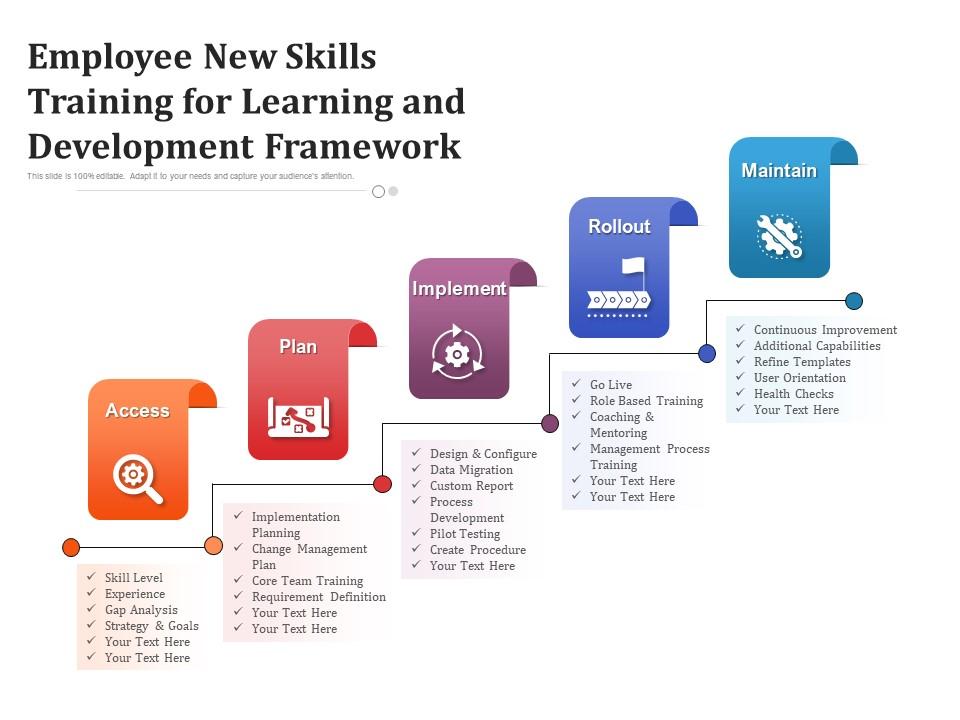
Template 1: Employee New Skills Training for Learning and Development Framework
A structured learning framework drives faster skill adoption across your workforce. This five-stage design moves teams through Access, Plan, and Implement phases with clarity. Each stage gives managers a defined checkpoint for tracking real progress. Fully editable PowerPoint shapes let you match every element to your brand identity. Use it to present employee skills training initiatives with confidence and precision. The clean layout keeps complex learning journeys visually digestible for any audience. Transform your staff development training presentations with this ready-made framework. Download now and deliver a learning roadmap that actually sticks.
Download this PowerPoint Template
Template 2: Employee Skill Development Training System
Continuous growth needs a system, not a suggestion. This template maps technical upskilling, leadership development, and professional development into one cohesive visual structure. Each pillar—Enhanced Technical Competencies, Improved Leadership Skills, and Increased Job Satisfaction—gets its own dedicated section. Instantly customizable layouts mean you spend less time formatting and more time coaching. The slide structure makes organizational objectives tangible and easy to communicate. Transform your corporate training program presentations today. Download this dynamic template now and build a workforce development story that resonates.
[product_image id=1202766]
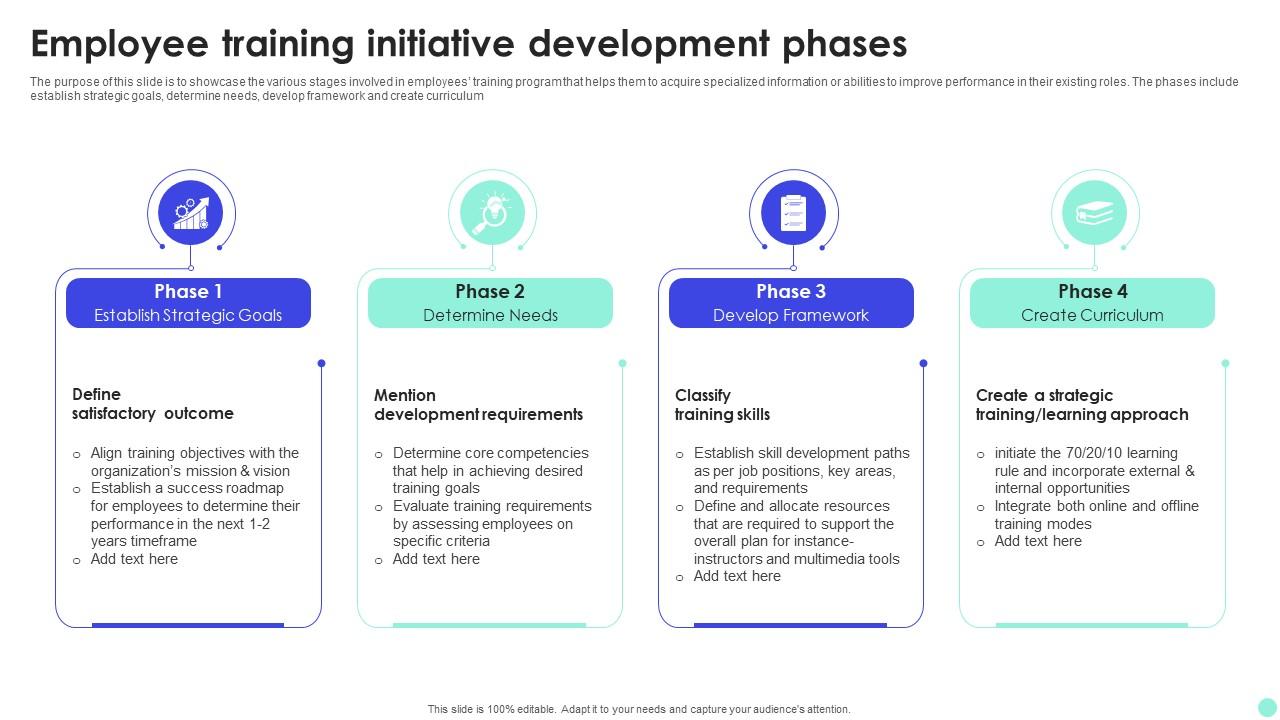
Template 3: Employee Training Initiative Development Phases
Great training doesn't happen by accident—it follows a deliberate sequence. This template maps four critical phases: Establish Strategic Goals, Determine Needs, Develop Framework, and Create Curriculum. Each phase is visually distinct, making it easy to walk stakeholders through your planning logic. Fully adaptable PowerPoint design means you can tailor every label and visual to your organization. Use it to present your new hire training plan with the structure it deserves. Ideal for HR teams building a workplace training program from the ground up. Transform your training initiative presentations today. Download now and turn your curriculum planning into a boardroom-ready narrative.
Download this PowerPoint Template
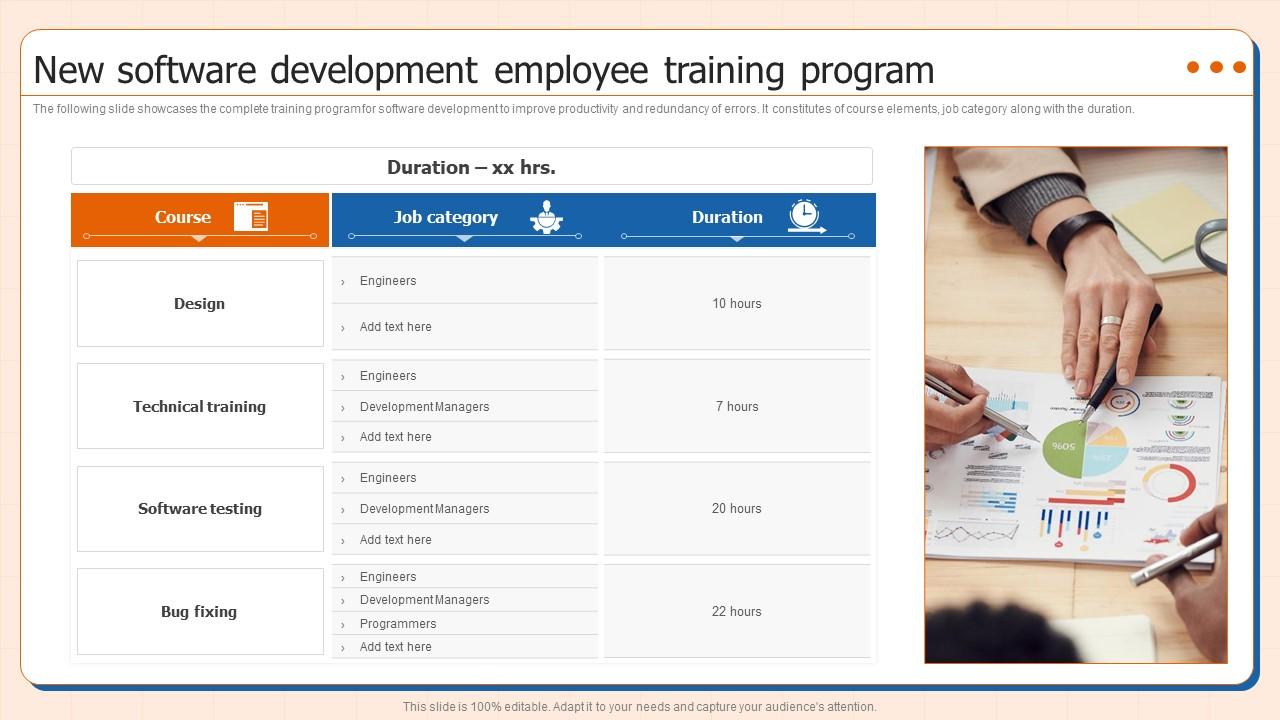
Template 4: New Software Development Employee Training Program
Software teams need training that matches their technical reality. This template covers the full new software development employee training program—course elements, job categories, and durations in one view. Technical Training, Design, Software Testing, and Bug Fixing each get clear visual treatment. The adaptable layout lets you slot in your tools, timelines, and team structure. Productivity gains and error reduction become easy to communicate with this structured approach. Present job training for new employees in tech roles with authority and specificity. Transform your software training presentations today. Download instantly and give your dev onboarding the clarity it needs.
Download this PowerPoint Template
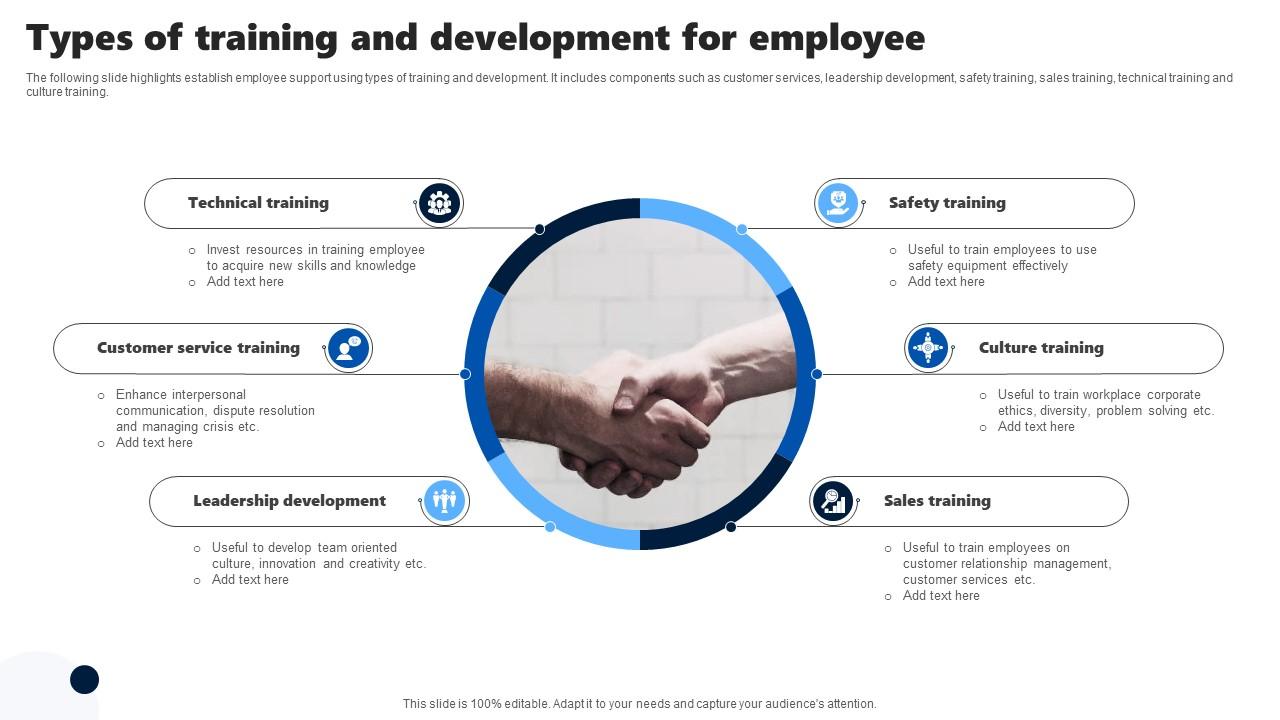
Template 5: Types of Training and Development for Employee
Not every employee needs the same training, but every organization needs a map of what's available. This template covers six types: Customer Services, Leadership Development, Safety Training, Sales Training, Technical Training, and Culture Training. Each type is visually separated for fast comprehension during team briefings. The innovatively designed PowerPoint layout keeps complex program overviews from feeling overwhelming. Use it to anchor your training and development program discussions with real clarity. Managers can identify which track applies to which team. Transform your employee training program presentations today. Download immediately and give your workforce a visible development structure.
Download this PowerPoint Template
Template 6: New Employees Training Strategy Action Plan
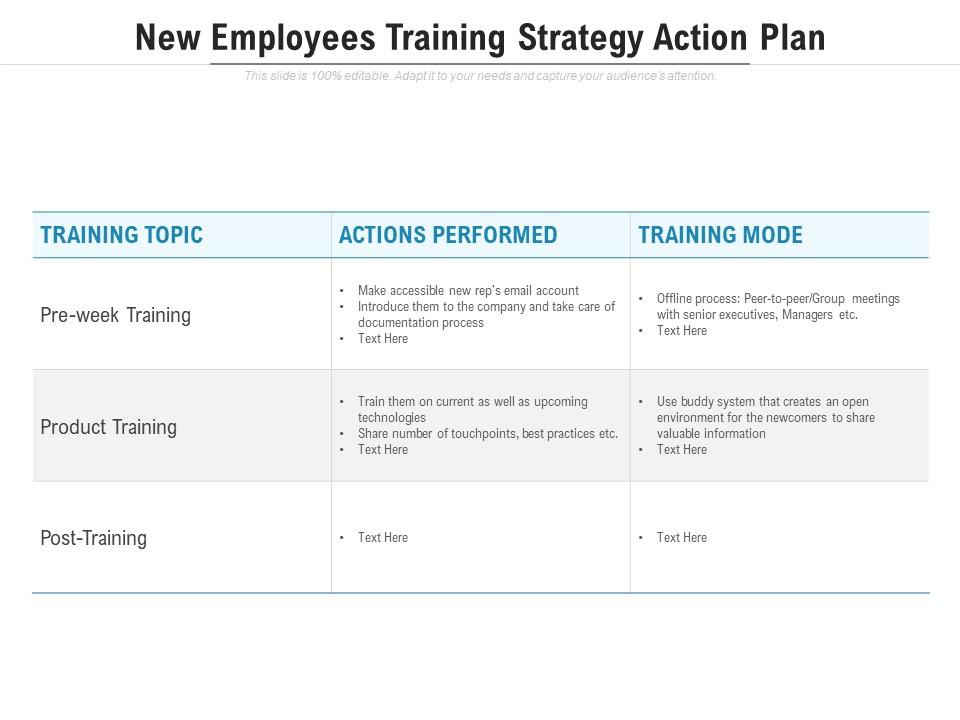
An action plan without clear columns is just a list of intentions. This template structures your new employee training strategy around Training Topic, Actions Performed, and Training Mode—three columns that actually drive accountability. Each row maps a training commitment to a delivery method and responsible action. Fully editable slides mean your specific programs, tools, and timelines drop in with no friction. Ideal for HR managers presenting onboarding best practices to senior leadership. The clean table format makes it easy to track progress at a glance. Transform your training strategy presentations today. Download now and turn your onboarding plan into an executable roadmap.
Download this PowerPoint Template
Template 7: Employee Training Program Implementation Roadmap
Implementation fails when steps are skipped or sequenced wrong. This roadmap template walks through six defined stages—from Identify Training Needs and Set Clear Objectives to Design Training Program and beyond. Each stage is visually connected, showing the logical flow of your onboarding process steps. The fully adaptable design lets you rename, recolor, and restructure without design expertise. Use this to present your employee training program rollout to department heads or the executive team. It anchors accountability to each phase of the workplace onboarding process. Transform your implementation presentations today. Download instantly and show exactly how your training plan gets executed.
[product_image id=1216093]
Template 8: New Employee Training Strategy Schedule
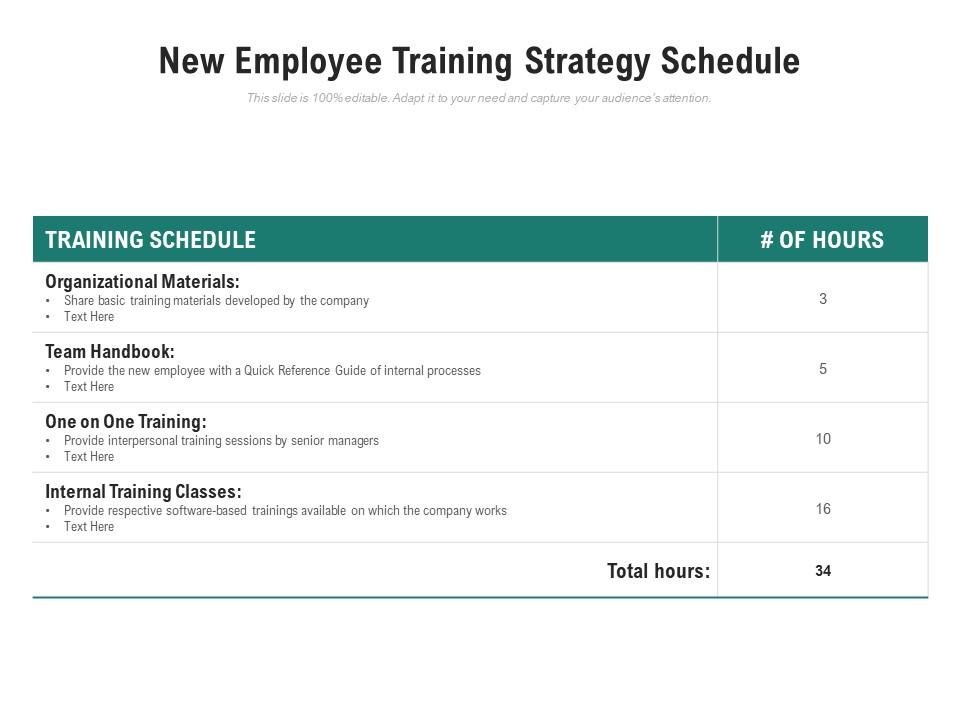
A training schedule without structure breeds confusion in the first week. This template organizes Organizational Materials, Team Handbook, One On One Training, and Internal Training Classes into a clear, scannable layout. New hires know exactly what's coming—and managers know what to prepare. Fully editable slides mean you adapt the schedule to any department or role type. Use it to present your new hire training schedule with precision and professionalism. The format works equally well for HR presentations and direct new hire handoffs. Transform your employee training schedule planning today. Download now and give every new joiner a confident, organized start.
Download this PowerPoint Template
Template 9: One Week Training Plan of New Employee
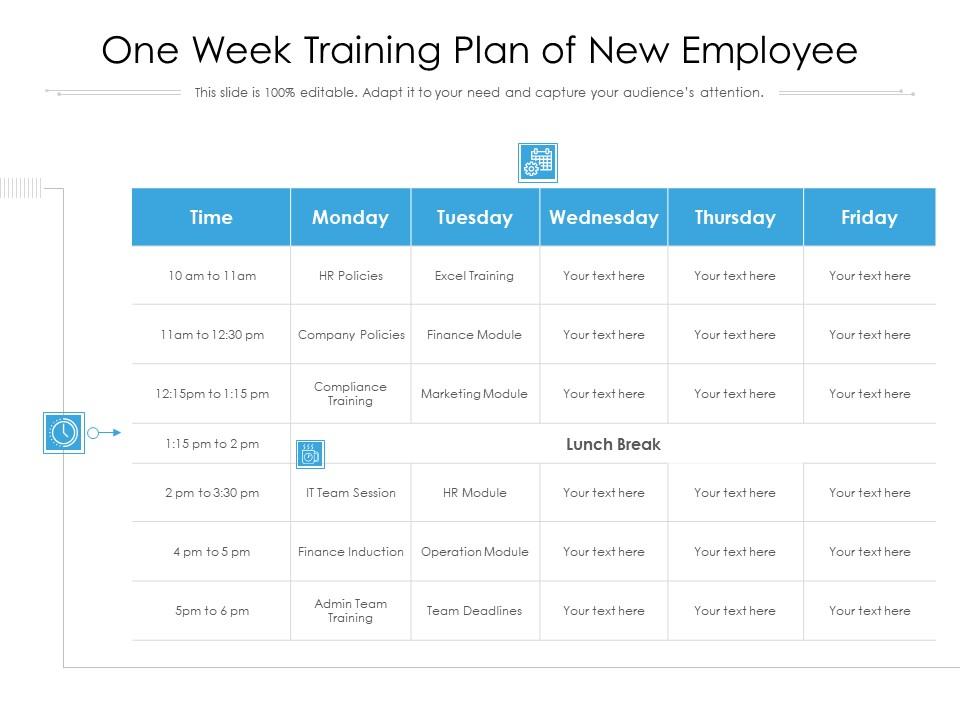
The first week shapes everything—and this template makes it count. Covering Finance Module, Finance Induction, Marketing Module, Operation Module, Admin Team Training, and Compliance Training, it maps a full five-day learning journey. Each module sits in its own section, so new hires absorb one area before moving to the next. Conveniently customizable slides let you reorder, relabel, or add modules specific to your business. Ideal for HR teams building a structured new employee orientation that doesn't overwhelm. The layout communicates both breadth and sequencing at a single glance. Transform your week-one onboarding presentations today. Download it now and eliminate the first-week guesswork.
Download this PowerPoint Template
Template 10: Team Manager Creating Training Plan for New Employee
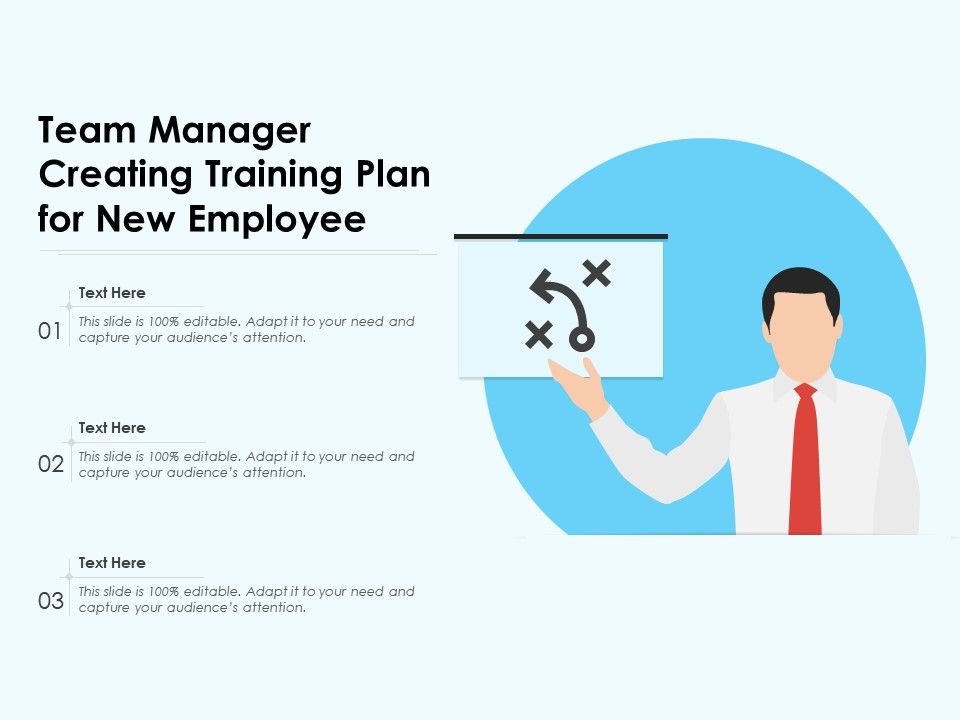
Managers don't always know what a good training plan looks like—this template shows them. A three-stage visual framework guides team leaders through the logic of building a new employee training plan step by step. Each stage is editable, so it adapts to the specific role, team, or department. The clean layout removes ambiguity from a process that often relies on memory and improvisation. Use it in manager enablement sessions or HR onboarding checklist reviews. It makes the handoff between HR planning and manager execution visible and repeatable. Transform your manager training presentations today. Download now and standardize how your team leads build onboarding plans.
Download this PowerPoint Template
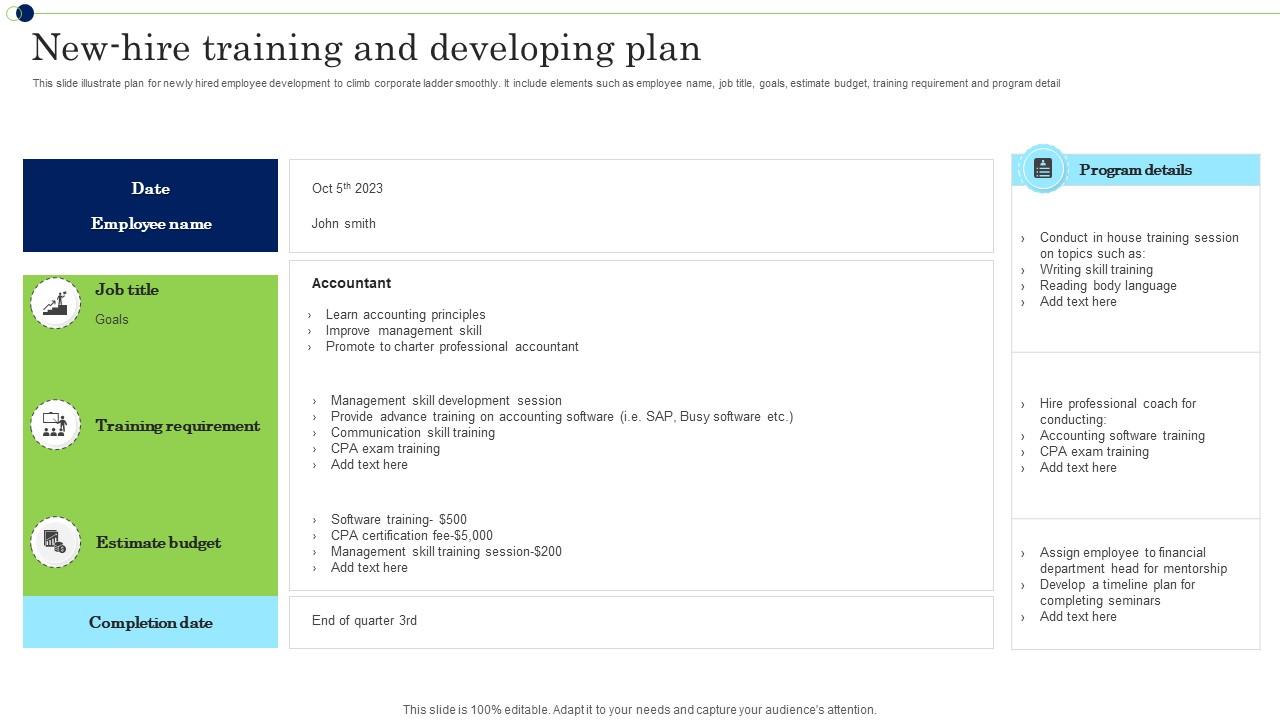
Template 11: New Hire Training and Developing Plan
New hire development works better when goals, budget, and timelines are visible together. This template captures Employee Name, Job Title, Goals, Estimated Budget, Training Requirement, and Program Details in one structured layout. Each element has a dedicated field, making the plan easy to populate and even easier to present. Instantly available and conveniently editable slides mean HR teams spend time planning, not formatting. Use it to track and communicate new hire development progress with leadership. The structured format transforms scattered onboarding notes into a professional training and development program document. Transform your new hire development presentations today. Download it right away and bring structure to every new employee's growth path.
Download this PowerPoint Template
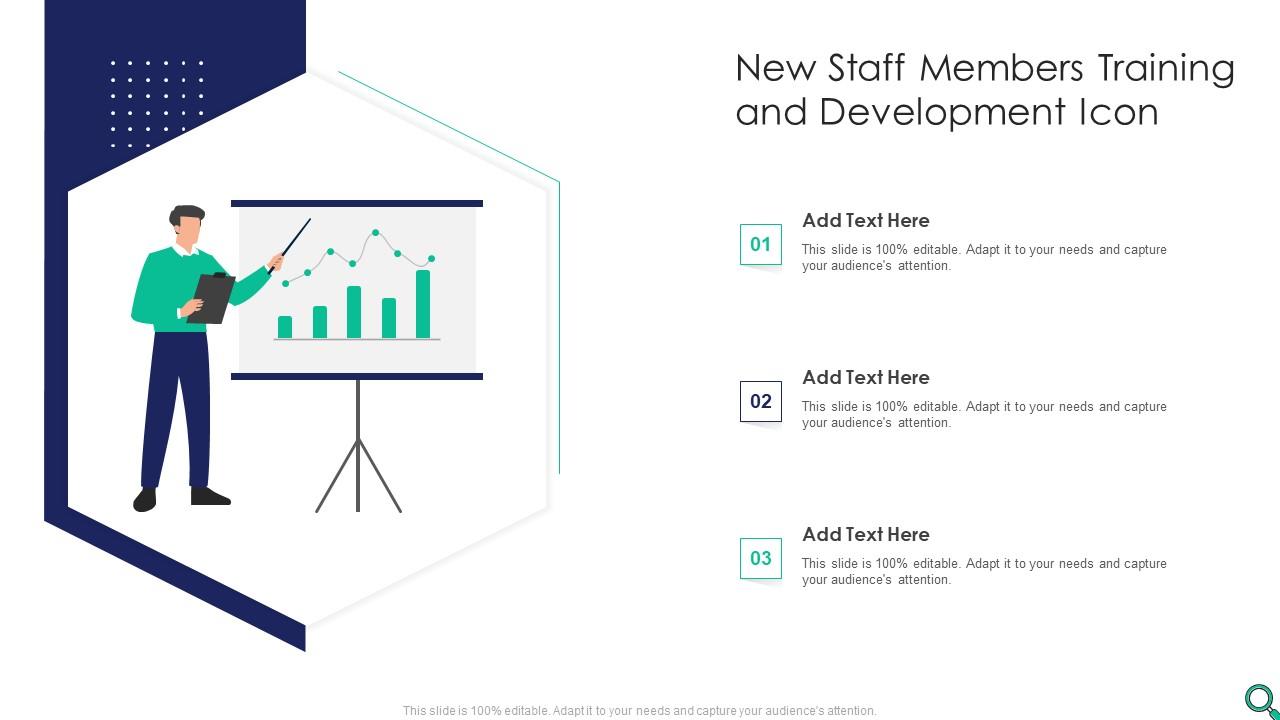
Template 12: New Staff Members Training and Development Icon
Visual icons anchor complex concepts in memory—this template uses them to represent new staff training stages clearly. Three distinct visual stages communicate your staff onboarding program at a glance. Fully adaptable design means you control which icons, colors, and labels represent your organization. The layout works across HR briefings, department orientation decks, and executive summaries. Use it when you need to communicate your new employee orientation program without walls of text. Simple visuals reduce cognitive load for audiences unfamiliar with training frameworks. Transform your staff training presentations today. Download instantly and give your onboarding materials a visual identity that people actually remember.
Download this PowerPoint Template
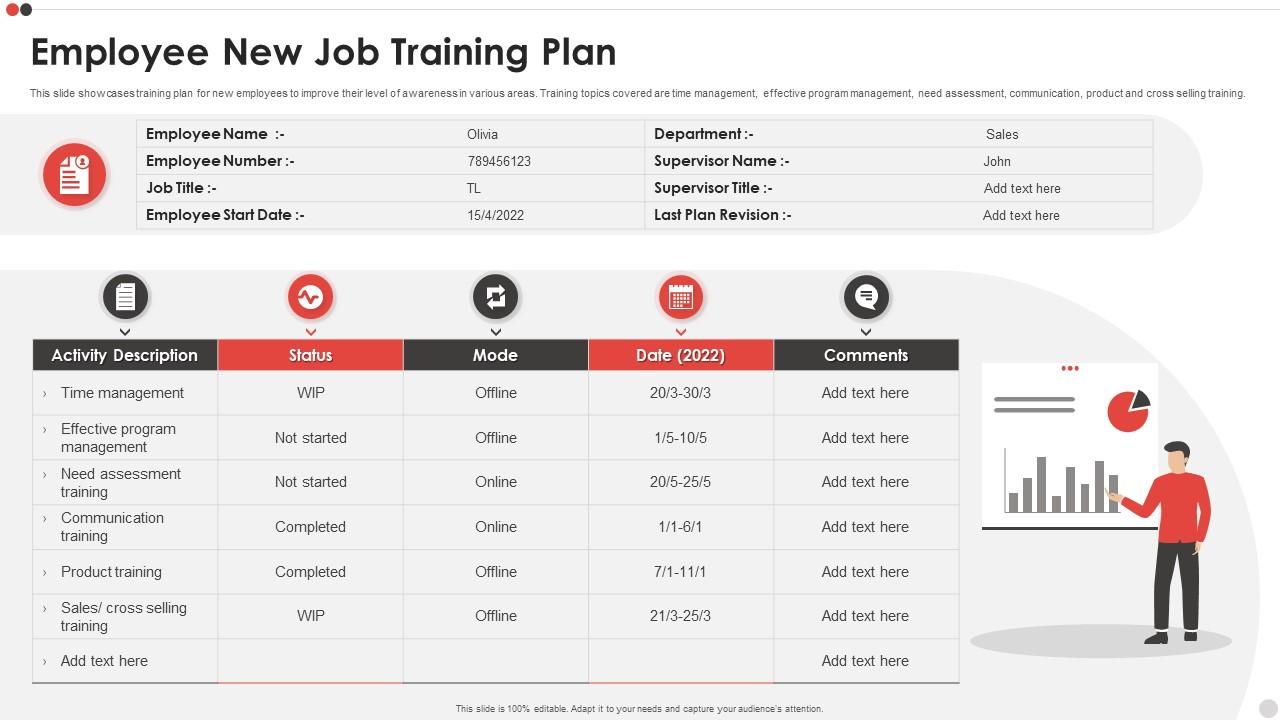
Template 13: Employee New Job Training Plan
New employees need more than technical knowledge—they need a learning structure. This template covers Time Management, Effective Program Management, Need Assessment, Communication, Product Training, and Cross Selling Training in a clean, role-ready layout. Each topic area maps to a real skill gap most new hires experience in their first 90 days. Instantly editable slides let you swap training topics to match your specific product or function. Ideal for building a job training plan that goes beyond tools and systems. The layout helps new hires see exactly what they're working toward. Transform your employee new job training presentations today. Download now and give your team members a skill-building plan built for performance.
Download this PowerPoint Template
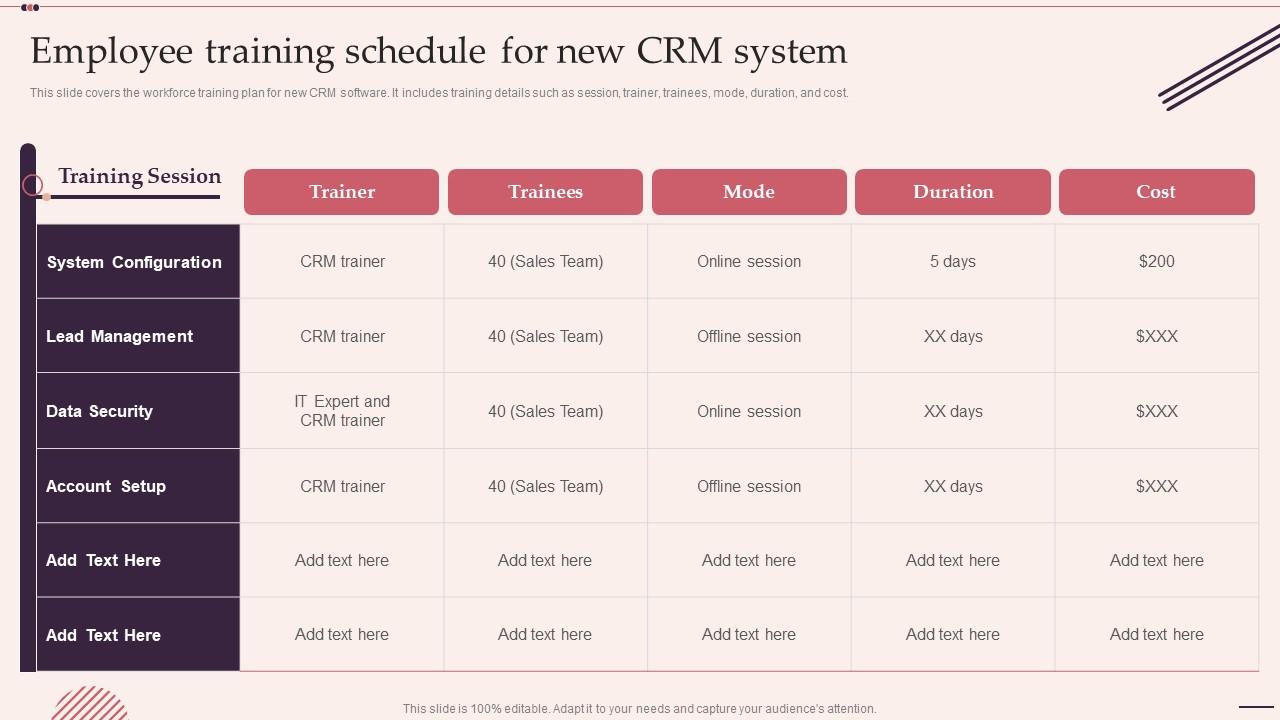
Template 14: Employee Training Schedule for New CRM System
Rolling out a new CRM means every team member needs a clear training path. This template covers Session, Trainer, Trainees, Mode, Duration, and Cost—all in one workforce training plan layout. System Configuration, Lead Management, and Data Security each get dedicated rows for easy tracking. Fully customizable slides let you plug in your CRM vendor, internal trainers, and delivery format. Use it to communicate your CRM implementation training schedule to department leads and IT. The structured format removes the ambiguity that derails software rollout timelines. Transform your CRM training schedule presentations today. Download now and make your system adoption plan impossible to misread.
Download this PowerPoint Template
Template 15: Employee Training Schedule for New CRM System
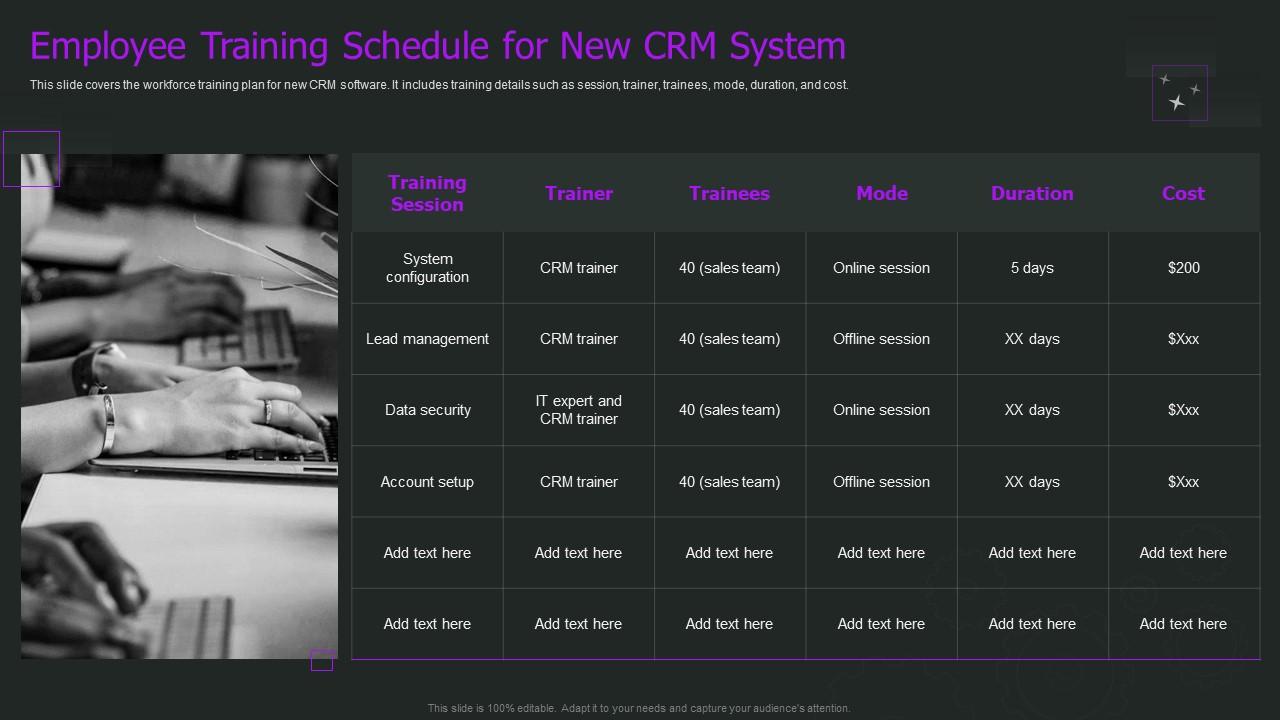
Adoption stalls when teams don't know what training looks like or when it happens. This CRM implementation training template maps Lead Management, Account Setup, and Data Security sessions against trainer, trainees, mode, duration, and cost. Each session is clearly delineated, so nobody's asking who's responsible or what comes next. Personalize every field to reflect your actual rollout timeline and delivery format. Perfect for HR or IT teams presenting workforce readiness plans during a CRM transition. The layout creates accountability before a single training session begins. Transform your CRM implementation presentations today. Download this template now and turn a complex rollout into a structured, trackable plan.
Download this PowerPoint Template
Template 16: Onboarding Roadmap of New Employee Training Program
New joiners perform better when their onboarding roadmap is visible from Day 1. This template covers five stages, including Risk Assessment, Problem Solving, Decision Making, Negotiation Skills, and Software and Presentation Training. Each stage is sequenced, giving new hires a clear path from orientation to contribution. The designed layout makes dense program schedules feel organized, not overwhelming. Use it for presenting your new employee onboarding program to leadership or directly to new staff. It doubles as both a planning tool and a communication asset. Transform your onboarding roadmap presentations today. Download and give every new joiner a training schedule they can actually follow.

Download this PowerPoint Template
Template 17: On Job Training Strategies for New Employees
The best on-the-job training strategies are visible, not assumed. This template highlights four approaches—Tech Tools, Clear Procedures, Clear Expectations, and Provide Assistance—in a structured four-stage layout. Each strategy gets space to explain how it works and who owns it. The easy-to-edit design lets you customize each section to match your team's actual workflows. Use it in manager enablement sessions or as part of a wider corporate training program briefing. The structure makes informal mentoring and formal training feel equally planned. Transform your on-the-job training strategy presentations today. Download and stop leaving new hire support up to individual manager instincts.

Download this PowerPoint Template
Template 18: New Employees Training Strategy with Completion Status
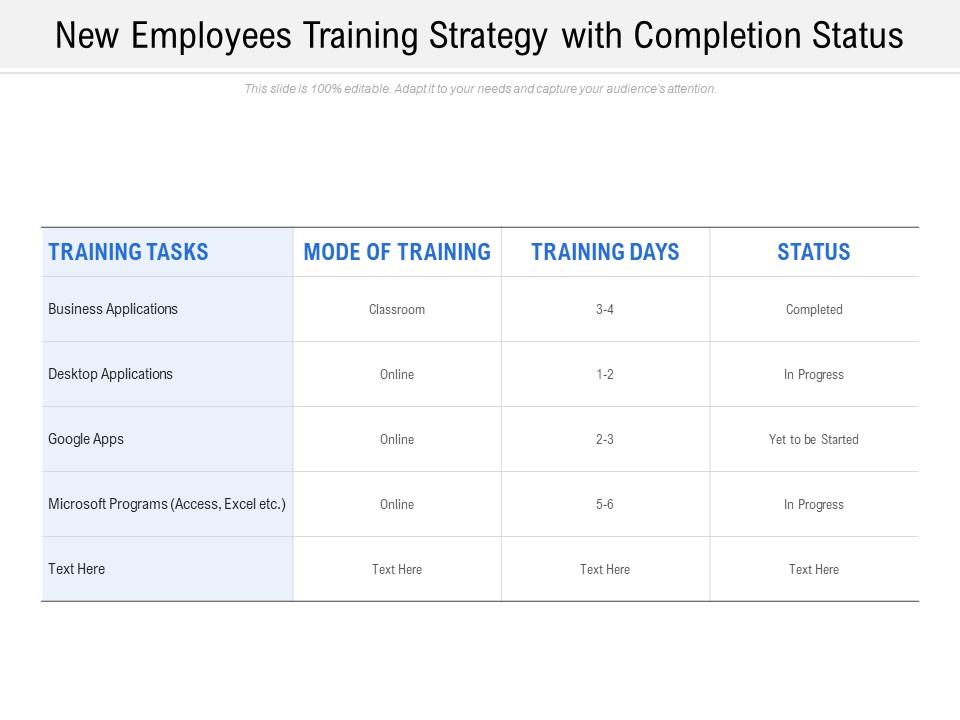
Completion tracking separates a training plan from a training result. This template maps training strategy across Business Applications, Desktop Applications, Google Apps, and Microsoft Programs—each with visible completion status fields. Managers and HR leads can track progress at the individual or team level with a single look. Fully editable slides adapt to any tool stack your organization actually uses. Use it in HR training program reviews or weekly team check-ins to keep onboarding accountable. The layout turns a training checklist into a living progress document. Transform your training completion presentations today. Download and ensure your new hire onboarding process creates a long-term, loyal team member.
Download this PowerPoint Template
Template 19: Tips to Create Employee Training and Development Plan
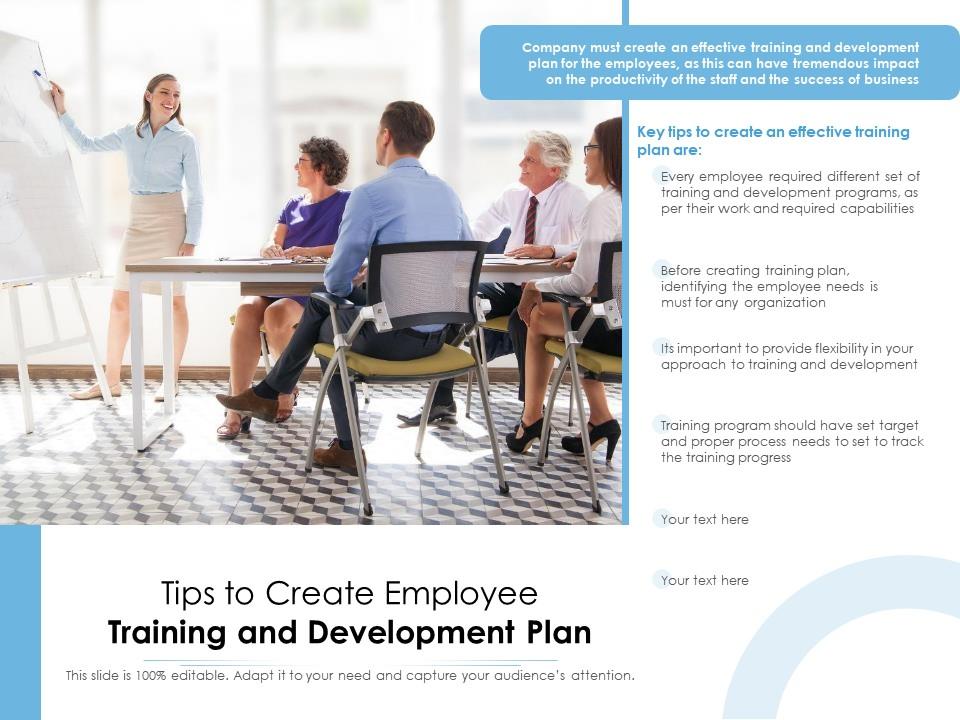
Building an effective employee training plan starts with knowing where to begin. This template covers the key tips across Training, Programs, Development, Organization, Identifying, Approach, Proper planning, and Set Target stages. Each tip is visually anchored, making the guidance easy to reference during planning sessions or leadership reviews. Fully adaptable design means you restructure the content to match your organization's training philosophy. Use it when introducing new managers to the logic behind employee development programs. The layout bridges strategy and execution without academic overhead. Transform your training plan development presentations today. Download instantly and give your planning process a clear, structured starting point.
Download this PowerPoint Template
Template 20: Employee Training and Development Initiative with Visual Cohesion Plan Icon
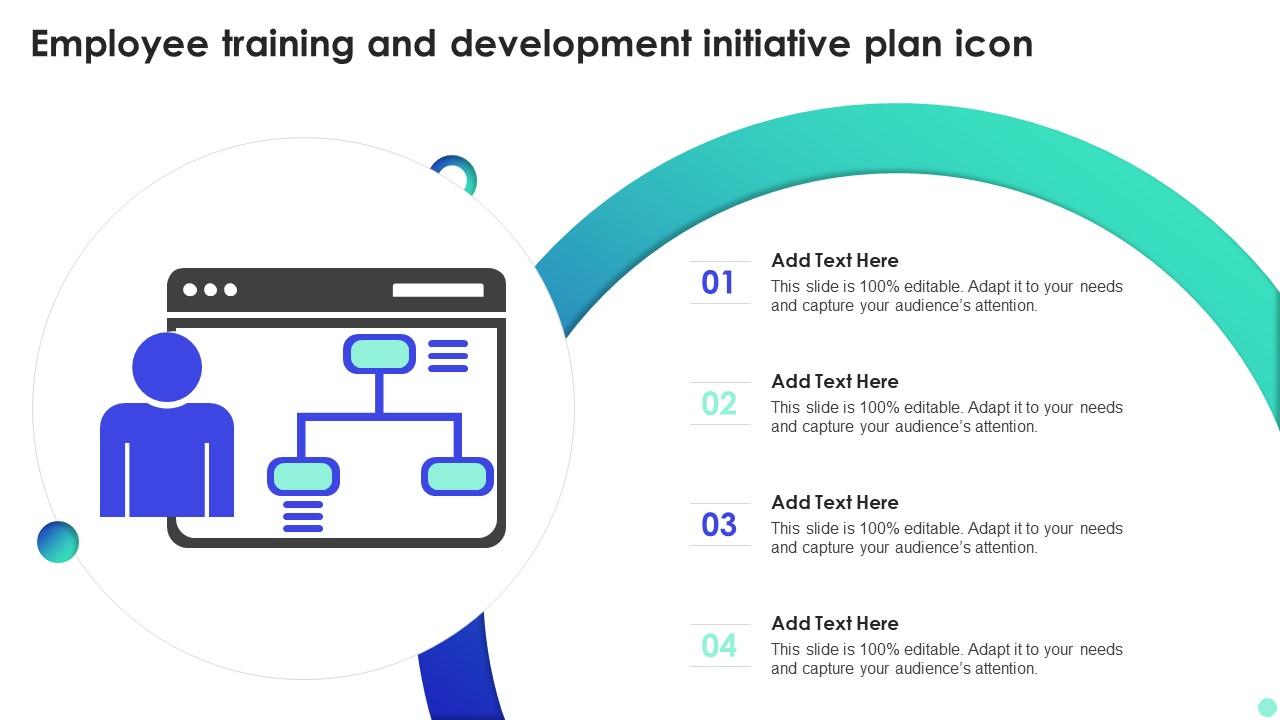
A strong visual identity makes training initiatives feel intentional, not improvised. This icon-led template represents Employee Training, Development Initiative, and Plan Icon concepts with clean, memorable visuals. Use it to anchor section dividers, chapter headings, or title slides within a larger training deck. Conveniently customizable slides let you swap icons and colors to match your brand guidelines. Ideal for adding professional polish to any new employee training program presentation. The visual cohesion signals to new hires that the organization takes their development seriously. Transform your training initiative presentations today. Download now and give your onboarding materials the professional finish they deserve.
Download this PowerPoint Template
Elevate Every New Hire's First Day with SlideTeam
SlideTeam's PowerPoint templates are the best in the industry for new employee training programs. These content-ready slides save HR teams hours of formatting work while delivering professional, structured onboarding materials every time. From new hire training plans and onboarding roadmaps to CRM rollout schedules and skill development frameworks, these ready-made templates cover the full training lifecycle. Deploy these PowerPoint slides to accelerate new hire readiness and build a workplace training program that drives real retention.
FAQs on New Employee Training
What are the most effective methods for structuring a new employee onboarding program to ensure long-term retention?
Start with a structured 30-60-90 day plan. Assign a dedicated buddy or mentor from day one. Combine role-specific training with company culture sessions in the first two weeks. Check in formally at 30 days to catch early confusion. Research consistently shows that structured onboarding in the first 90 days is the single biggest driver of long-term retention.
How can visual presentation tools enhance the delivery of compliance and policy training for new hires?
Visual tools like PowerPoint slides turn dense policy text into scannable, memorable content. Use one slide per policy topic — avoid crowding. Add progress trackers so new hires know where they are in the compliance module. For legal or safety content, visuals reduce misinterpretation and create a clear audit trail that HR can reference later.
What key performance indicators should organizations track to measure the success of their new employee training programs?
Track four KPIs: time-to-productivity, 90-day retention rate, training completion rate, and new hire performance scores at the 30 and 60-day marks. These four metrics tell you whether training is landing or just being sat through. Avoid tracking attendance alone — it measures presence, not learning.
How can managers balance standardized training protocols with personalized learning paths for different roles?
Build a core training module that all roles complete, then add role-specific tracks on top. The core covers culture, compliance, and tools. The custom layer covers job-specific skills. Keep the personalized path flexible enough for managers to adjust without rebuilding the whole program from scratch.
What role does microlearning play in improving knowledge retention during the onboarding process?
Microlearning—short five-to-ten minute learning bursts—works because it matches how attention functions. New hires retain more from three focused sessions than one three-hour block. Use it specifically for compliance, product knowledge, and tool training. Space the modules out over the first 30 days rather than front-loading everything on day one.
How can organizations use pre-boarding strategies to accelerate a new employee's readiness from Day 1?
Send the employee handbook, tool access credentials, and a first-week schedule before day one. Introduce the team via a short welcome video or LinkedIn message. Pre-boarding removes the administrative noise from week one, so new hires can focus on learning rather than paperwork. It cuts time-to-productivity by an average of one to two weeks.
What are the common pitfalls companies face when transitioning from in-person to virtual new employee training?
The three most common pitfalls are: no live interaction (replacing all sessions with recorded videos), unclear expectations around when and how to participate, and technology access delays that block learning from starting. Fix these by scheduling at least two live sessions per week, sending tech setup instructions during pre-boarding, and assigning a virtual buddy for real-time questions.
How can cross-departmental collaboration be incorporated into early training to foster company culture alignment?
Schedule short cross-departmental intro sessions in Weeks 2 and 3 —not week 1. Let new hires observe one meeting per department before month one ends. Assign a brief collaborative task involving two teams. This approach builds relationships before cultural alignment becomes an abstract HR goal, and it works faster than culture decks alone.


