





 0 Comment
 Customer Reviews

The project status report's been sitting in the shared drive since Tuesday. Nobody's touched it.
Not because the data's wrong. The numbers are there—schedule variance, budget burn, milestone completion. But somewhere between pulling the figures and actually presenting them, something gets lost. The story doesn't hold. The slide looks like a spreadsheet with a background color.
There's a specific kind of frustration that happens mid-project. You know what's happening. You know which KPIs are drifting. You know the cost performance index is trending the wrong way. But when someone asks "how's the project going?"—the honest answer doesn't fit a three-minute update. And the polished answer doesn't feel honest.
Project managers don't struggle with measuring things. They struggle with showing what the measurements mean. There's a gap between tracking project performance metrics and communicating them in a way that lands with stakeholders, sponsors, or clients who weren't in the room when the data was collected.
And that gap gets wider when the audience changes. An executive wants one number. A PMO wants a dashboard. A client wants confidence. The same project, three different framings—none of which can be built from scratch every time a review meeting hits the calendar.
That's why these templates exist. Not because project managers don't know their numbers. Because knowing them and presenting them clearly are two completely different skills, and not everyone has time to design a new slide deck every reporting cycle.
SlideTeam's project performance metrics templates handle the part that takes the longest—the structure. Pre-designed layouts that already account for KPI tracking, project milestone tracking, earned value reporting, and team performance visibility. You bring the data; the framework is already there.
What follows are 20 ready-made templates worth keeping in your toolkit.
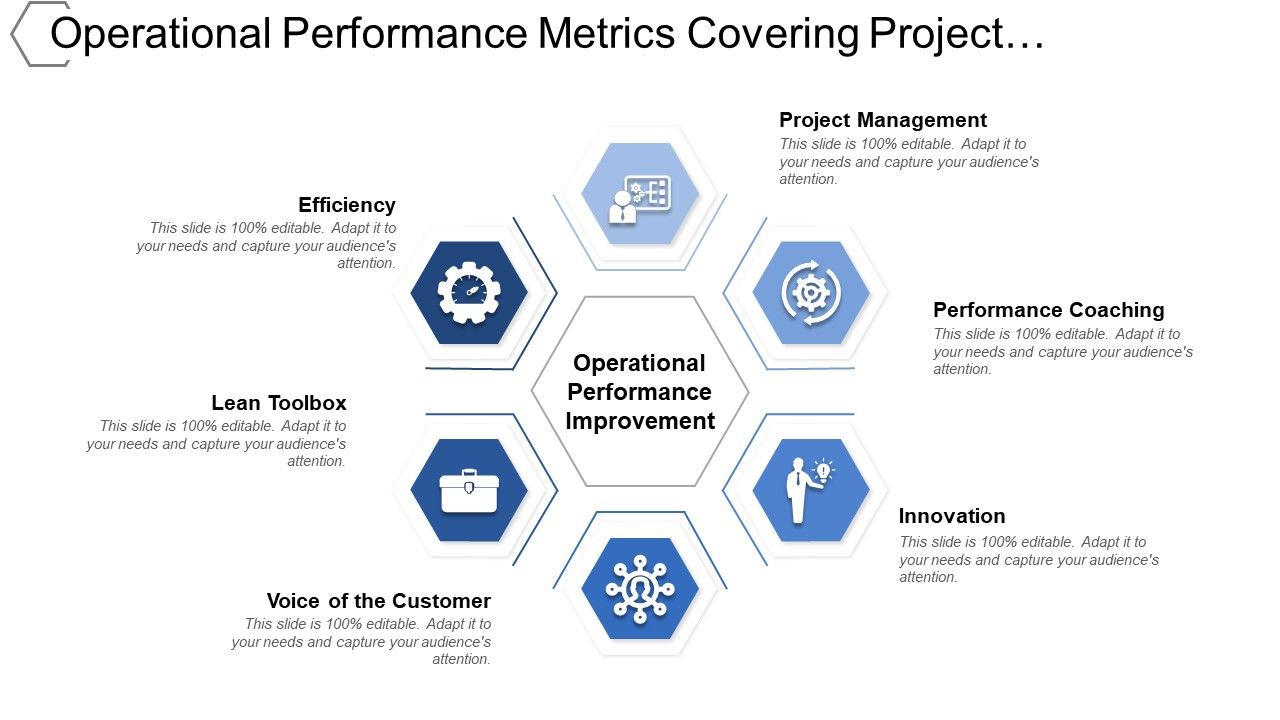
Template 1: Operational Performance Metrics Covering Project Management Innovation
Accelerate your operational reporting with a six-stage framework built for clarity. This deck covers operational performance metrics, KPI tracking, and dashboard visualization in one cohesive flow. Each stage drives a distinct layer of project management insight. The structured design moves stakeholders from raw data to actionable conclusions fast. Color-coded layouts deliver instant visual clarity on performance status. Fully editable shapes let you align every slide with your brand identity. Use it for boardroom reviews, PMO updates, or cross-functional performance briefings. Transform your operational performance presentations today. Download this powerful template now and unlock structured KPI reporting your audience will actually understand.
Download this PowerPoint Template
Template 2: Analyzing Project Performance Metrics PPT Outline
Capture your audience's attention from the first slide with this performance analysis deck. Every layout balances analytical depth with visual impact, keeping stakeholders engaged throughout. Effortless customization lets you adjust elements, fonts, and color themes in minutes. Works across Microsoft PowerPoint and Google Slides without compatibility friction. Export-ready in JPG, JPEG, PNG, and PDF formats for seamless sharing across teams. The top project performance metrics templates share this same commitment to clarity and structure. Transform your project performance analysis presentations today. Download this dynamic deck now and deliver insights that command the room.
[product_image id=1528788]
Template 3: Key Metrics for Project Performance Evaluation PPT Example
Project performance metrics only hold weight when the structure behind them is clear and credible. This PPT template is built for project managers and PMO leads who need to present KPI tracking, earned value management, and project health metrics in one coherent view. It works well for stakeholder reviews where schedule performance index, cost performance index, and resource utilization metrics all need to sit on the same performance measurement framework. For context, a project scorecard rarely lands without the right visual logic underneath it. The template is 100% editable and customizable.
[product_image id=1514967]
Template 4: Project Management Metrics and Performance Evaluation PPT Outline
Project performance metrics only matter if the right people can read them clearly in a meeting. This PPT template gives project managers and PMO leads a structured outline to present KPI tracking, earned value management, and a performance measurement framework in one coherent flow. For context, it works equally well for a project management dashboard review or a stakeholder performance metrics briefing. The slide keeps project progress tracking and team performance metrics visually clean and easy to follow. The template is 100% editable and customizable.
[product_image id=1481465]
Template 5: Essential Metrics to Measure Project Performance PPT Designs
Measure and communicate project performance with a deck built for maximum visual impact. Striking layouts balance creativity and function, ensuring your metrics never get lost in the noise. Pre-designed slides reduce preparation time while preserving full customization of fonts and colors. Compatible with both Microsoft PowerPoint and Google Slides for versatile deployment. Downloadable in JPG, JPEG, and PNG formats, making sharing across stakeholders effortless. Use this deck to present project efficiency metrics that resonate from the first slide to the last. Transform your performance measurement presentations today. Download this engaging deck now and make every essential metric count.
[product_image id=1619874]
Template 6: Key Metrics to Measure Project Performance PPT Structure
Outshine competitors by presenting key project performance metrics with polished, structured slides. A refined balance of simplicity and innovation gives your reporting an authoritative edge. Adjust color themes to match your organization's brand in just a few clicks. Project progress tracking has never looked this clear or felt this straightforward to build. Transform your performance reporting presentations today. Download this fully editable deck now and show stakeholders exactly where every project stands.
[product_image id=1496731]
Template 7: Project Performance Metrics PPT Sample
Elevate your project performance reporting with a deck designed to make data speak. Balanced simplicity and visual innovation ensure your KPIs land clearly with any audience. Full color theme customization lets you adapt each slide to your organization's identity. Ready-to-use layouts load directly into Microsoft PowerPoint and Google Slides without adjustments. Available in JPG, JPEG, and PNG formats for seamless multi-platform sharing. This deck supports everything from weekly status updates to comprehensive project health reviews. Transform your project performance presentations today. Download this ready-made deck now and give every metric the visual weight it deserves.
[product_image id=1485907]
Template 8: Measuring Project Performance Key Metrics and Reports PPT Sample
Engage your audience with a deck that pairs top-notch content with visual precision. Seamless creativity and versatility make this the go-to for measuring project performance and reporting results. Customize color schemes and elements to align tightly with your brand identity. Pre-designed slides cut preparation time while maintaining 100% editability throughout. Compatible with Microsoft PowerPoint and Google Slides, downloadable in JPG, JPEG, and PNG. For teams tracking both team performance metrics and project delivery KPIs, this deck bridges both needs. Transform your performance reporting today. Download this visually stunning deck now and outshine every competitor in the room.
[product_image id=1574339]
Template 9: Monitoring and Evaluating Project Performance Metrics PPT Guidelines
Tracking project performance metrics without a clear framework wastes everyone's time in reviews. This PPT template gives project managers a structured way to present KPI tracking, earned value management, and project health metrics in one coherent view. A PMO lead can walk stakeholders through a project management dashboard covering schedule performance, cost performance, and resource utilization metrics without rebuilding slides from scratch. It fits naturally into weekly project reporting cycles or milestone reviews. The template is 100% editable and customizable.
[product_image id=1652725]
Template 10: Monitoring Project Performance Metrics PPT Guidelines
Set a new standard for project performance monitoring with this polished, adaptable deck. Innovation and simplicity work together to give your reporting slides an immediate professional edge. Tweak color themes to reflect your company's brand in seconds. Ready-made layouts integrate instantly with Microsoft PowerPoint and Google Slides. Export in JPG, JPEG, and PNG formats for sharing across any platform or team. Use this deck to keep project milestone tracking visible and actionable for every stakeholder. Transform your project monitoring presentations today. Download this enchanting deck now and make performance visibility your competitive advantage.
[product_image id=1673938]
Template 11: Key Metrics for Measuring Project Portfolio Performance PPT Outline
Manage and present project portfolio performance with a deck built for multi-project clarity. Thoughtfully designed slides capture portfolio-wide KPIs without sacrificing depth or precision. Effortless customization lets you adjust elements and color themes to match each audience's expectations. Works seamlessly with Microsoft PowerPoint and Google Slides for consistent workflow integration. Available in JPG, JPEG, PNG, and PDF formats for easy collaboration and sharing. Portfolio-level project baseline metrics become clear, actionable narratives with the right structure behind them. Transform your portfolio performance presentations today. Download this content-ready deck now and drive smarter decisions across every project in your pipeline.
[product_image id=1802930]
Template 12: Measuring and Reporting Project Implementation Performance Metrics PPT Outline
Communicate project implementation performance with a deck that combines rigor and visual appeal. Bold, functional design ensures your reporting metrics capture attention from the first slide. Customize fonts, colors, and layouts to suit any stakeholder or organizational context. Full Microsoft PowerPoint and Google Slides compatibility keeps your team's workflow smooth. Downloadable in JPG, JPEG, and PNG for seamless cross-team distribution and sharing. For teams looking to improve project management quality metrics reporting, this deck is the structured starting point. Transform your project implementation presentations today. Download this engaging deck now and give your reporting the visual credibility it demands.
[product_image id=1635372]
Template 13: Project Management Metrics with Performance Report PPT Presentation
Project performance metrics only matter when the right people can read them at a glance. This PPT template is built for project managers and PMO leads who need to present KPI tracking, earned value management, and project health metrics in one coherent view. It works well for a project management dashboard review or a stakeholder performance update. The structure supports cost performance index and schedule performance index conversations without cluttering the slide. The template is 100% editable and customizable.
[product_image id=1659478]
Template 14: Measuring Project Performance Key Metrics and Reports PPT Demonstration
Demonstrate measurable project outcomes with a deck built for persuasive, data-rich presentations. The seamless blend of creativity and versatility ensures your performance reports command full attention. Customize color schemes and elements to align with your brand without extra design effort. Pre-designed, 100% editable layouts save precious time while preserving full creative flexibility. Compatible with Microsoft PowerPoint and Google Slides, downloadable in JPG, JPEG, and PNG. Use this deck to present earned value management data and project delivery metrics with confidence. Transform your performance demonstration presentations today. Download this visually dynamic deck now and leave stakeholders fully informed and fully convinced.
[product_image id=1763594]
Template 15: Using Metrics to Measure Project Quality Performance PPT Example
Quality performance is hard to communicate without a clear measurement structure behind it. This PPT template gives project managers and PMO leads a ready framework for presenting project performance metrics — KPIs, earned value management, and schedule or cost performance index — in one coherent view. It works well for project health reviews or stakeholder reporting where a project management dashboard needs to tell the full story fast. The slide keeps KPI tracking and project milestone tracking grounded in real data, not decoration. The template is 100% editable and customizable.
[product_image id=1577775]
Template 16: Project Management Metrics and Performance Indicators PPT Information
Present project management metrics and performance indicators with a deck built to inform and impress. Visually striking layouts ensure your KPIs and indicators register clearly with every audience. Freely customize fonts, colors, and content to match your organization's reporting style. Seamless integration with Microsoft PowerPoint and Google Slides makes workflow adoption instant. Download in JPG, JPEG, and PNG formats for boardroom meetings or external client briefings alike. For a deeper look at how performance evaluation metrics templates support reporting, this deck is the perfect companion. Transform your KPI reporting presentations today. Download this engaging deck now and make every performance indicator impossible to overlook.
[product_image id=1497197]
Template 17: Project Performance Metrics Overview PPT Presentation
Project performance metrics fall apart when they live in scattered spreadsheets nobody trusts. This PowerPoint slide deck gives project managers a clean, structured framework to surface KPI tracking, earned value management, and resource utilization metrics in one coherent view. A PMO lead preparing a project management dashboard for a steering committee will find the layout handles both schedule performance and cost performance index conversations without extra rebuilding. It fits naturally into regular project health and milestone tracking reviews. The template is 100% editable and customizable.
[product_image id=1699396]
Template 18: Top Quality Metrics for Project Performance Evaluation PPT Information
Set the quality bar high with a deck purpose-built for rigorous project performance evaluation. Top-quality slide design ensures your evaluation metrics communicate professionalism and precision instantly. Customize elements and color schemes to align with your brand and audience preferences. Works seamlessly across Microsoft PowerPoint and Google Slides for consistent, reliable delivery. Exportable in JPG, JPEG, PNG, and PDF for straightforward sharing and collaborative editing. For teams managing HR performance management metrics alongside project evaluation, this deck bridges both worlds. Transform your quality evaluation presentations today. Download this content-ready deck now and demonstrate the performance standards your projects are built on.
[product_image id=1721636]
Template 19: Project Performance Metrics and Reporting PPT Example
Report on project performance metrics with a deck that turns data into clear, actionable stories. Dynamic design merges visual appeal with structured reporting, keeping every audience engaged. Customize fonts, colors, and layouts freely to suit any stakeholder group or reporting format. Compatible with Microsoft PowerPoint and Google Slides, with downloads available in JPG, JPEG, and PNG. Pre-designed slides cut build time dramatically without sacrificing flexibility or professional quality. Use this deck to present project completion rate data and reporting insights that drive decisions. Transform your project reporting presentations today. Download this striking deck now and ensure every performance update hits with the clarity it deserves.
[product_image id=1521275]
Template 20: Project Performance Metrics and Analysis PPT Designs
Tracking project performance metrics without a clear visual structure wastes stakeholder time and buries the signal in noise. This PPT template gives project managers and PMO leads a ready framework for presenting KPI tracking, earned value management, and project health metrics in one coherent view. It works equally well for a project management dashboard review or a cost performance index debrief with a steering committee. Concise, structured, and built for real reporting cycles. The template is 100% editable and customizable.
[product_image id=1532600]
Elevate Your Project Performance Reporting with SlideTeam
SlideTeam's PowerPoint templates are the best in the industry for presenting project performance metrics with precision and impact. These ready-made slides save hours of preparation while delivering the professional structure your KPI tracking and stakeholder reporting demand. Use these content-ready PowerPoint slides to turn raw project data into clear, persuasive narratives that drive decisions. Deploy these pre-designed frameworks today and ensure every performance update lands with the authority and clarity your projects deserve.
FAQs on Project Performance Metrics
What distinguishes a lagging indicator from a leading indicator in project performance measurement?
A lagging indicator measures what already happened—budget spent, milestones completed, defects found. A leading indicator signals what is likely to happen next—team velocity, risk count, open issues. In project performance, lagging indicators confirm outcomes. Leading indicators give you time to act before a problem becomes a miss. Track both, but act on the leading ones.
How do you determine the right number of KPIs to track without creating metric overload for your team?
Start with three to five KPIs per project phase. Each KPI must map directly to a decision someone needs to make. If no one changes behavior based on a metric, cut it. A practical rule: if you can't explain why a KPI matters in one sentence, it probably doesn't. Fewer, sharper metrics drive better focus than long dashboards nobody reads.
Which project performance metrics matter most during the initiation phase versus the closing phase?
During initiation, track scope definition completeness, stakeholder alignment, and budget approval status. These confirm the project is set up correctly before work begins. During closing, shift to schedule adherence, budget variance, deliverable acceptance rate, and lessons-learned completion. Initiation metrics prevent bad starts. Closing metrics confirm the project actually delivered what was promised.
How does Earned Value Management integrate cost, schedule, and scope into a single performance framework?
Earned Value Management (EVM) uses three numbers: Planned Value, Earned Value, and Actual Cost. From these, it calculates Schedule Performance Index and Cost Performance Index simultaneously. A single EVM report shows whether a project is ahead or behind on both time and money at once. It replaces three separate status reports with one integrated performance snapshot.
What is the relationship between Schedule Performance Index and Cost Performance Index in predicting project outcomes?
Schedule Performance Index (SPI) measures time efficiency; Cost Performance Index (CPI) measures budget efficiency. When both fall below 1.0 together, the project is in serious trouble—behind schedule and over budget simultaneously. CPI tends to be a more stable predictor of final cost than SPI. Reviewing both together gives project managers an early warning before problems become unrecoverable.
How can a project manager use milestone trend analysis to forecast delivery risks before they escalate?
Milestone trend analysis plots planned versus actual completion dates over time. If a milestone's projected date keeps shifting right across reporting periods, delivery risk is growing—even if the team reports progress. Spot three consecutive rightward shifts on any milestone and treat it as a red flag. Act on the trend, not just the current date.
What role does velocity play as a performance metric in Agile versus traditional waterfall projects?
In Agile, velocity measures story points completed per sprint—it predicts how much work a team can finish in future sprints. In traditional waterfall projects, there is no equivalent rolling metric; progress is measured against a fixed baseline schedule. Velocity is forward-looking and team-specific. Waterfall schedule metrics are backward-looking and plan-dependent. Neither is universally better—match the metric to the method.
How do you translate qualitative stakeholder satisfaction data into quantifiable project performance indicators?
Convert qualitative feedback into numbers using scored surveys—Net Promoter Score or a simple 1-to-5 satisfaction scale. Group responses by stakeholder type and report the average per group per reporting period. Track changes over time, not just point-in-time scores. A drop of more than 10% between reporting periods is a measurable signal worth investigating, regardless of the original scale.


