





 0 Comment
 Customer Reviews

The post's been scheduled. The graphic's uploaded. And then someone in the comments asks why your brand still looks like it's running a 2019 feed.
It's not that the content is bad. It's that social media doesn't stay still. Platforms update their algorithms. Feed layouts shift. What worked six months ago—the image ratios, the caption length, the hashtag count—might not work now. And figuring out which changes actually matter versus which ones are just noise is its own full-time job.
Most teams don't lose engagement because they stopped trying. They lose it because they're still trying with the same playbook. Someone approved it two years ago and nobody's had the bandwidth to revisit it. The content keeps going out. The numbers quietly drop. Then the quarterly review happens and everyone's confused.
What makes it harder: the updates keep coming. A LinkedIn feature update here, a Facebook algorithm tweak there. Instagram changes how it weights Reels. Twitter—or whatever it's called now—revises its policy structure. Each one requires someone to sit down and explain what changed, what it means, and what the team should do differently. That meeting keeps getting deprioritized.
So people make templates. Not because social media is complicated to understand, but because explaining it—to clients, to stakeholders, to a marketing team that's already stretched—is complicated. You need a structure that makes the "what changed and why it matters" conversation feel organized instead of reactive.
That's exactly what SlideTeam's pre-designed social media update templates are built for. They give you a framework for communicating change—whether that's a platform policy shift, a brand content calendar refresh, or an organic reach decline your team needs to address. Content-ready slides that handle the structure so you can focus on what's actually different this cycle.
Here's what's available.
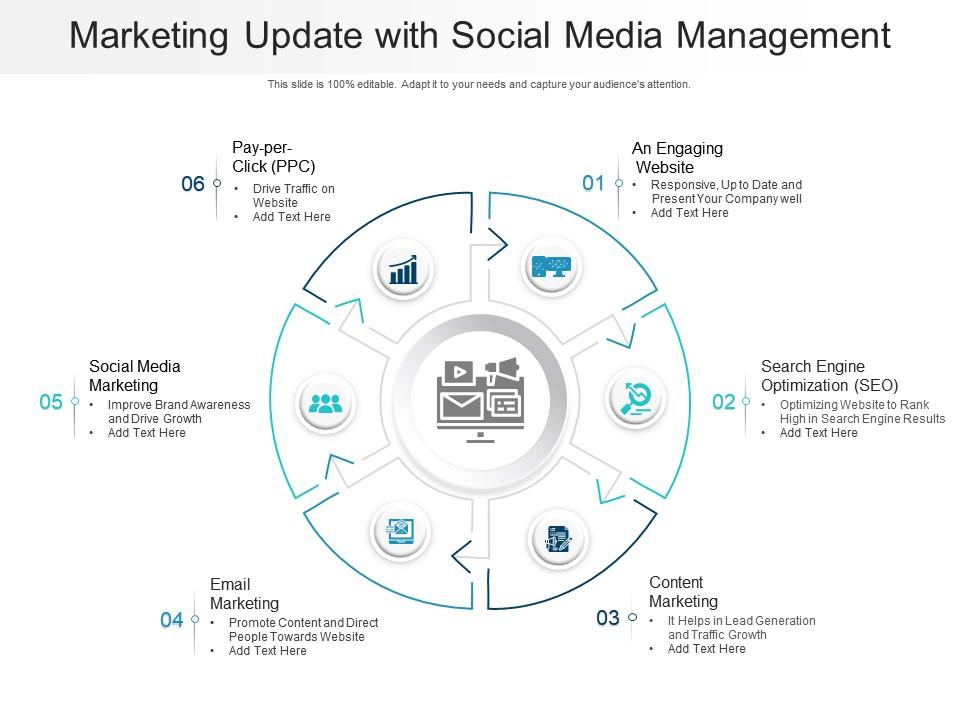
Template 1: Marketing Update with Social Media Management
Managing multiple marketing channels is harder when nothing talks to each other. This PowerPoint slide is built for marketing leads who need to show how content marketing, email, SEO, social media marketing, and pay-per-click connect as one system. It maps six distinct stages, giving stakeholders a clear view of how each channel contributes. Useful for internal reviews or agency-client briefings where organic reach decline needs to be addressed alongside paid efforts. The template is 100% editable and customizable.
Download this PowerPoint Template
Template 2: Social Media Update Verification Checklist
A social media update gets announced. Someone needs to verify what's been implemented and what hasn't. This checklist-driven template captures every stage—not started, in progress, completed, and error—across all active platforms. It delivers instant visual clarity on implementation gaps, so nothing slips through. The structured tracking layout means your team can run platform update announcements without chasing status over email. It's the accountability layer your content rollout process actually needs. Transform your social media update reviews today. Download this dynamic template now and unlock complete implementation visibility.

Download this PowerPoint Template
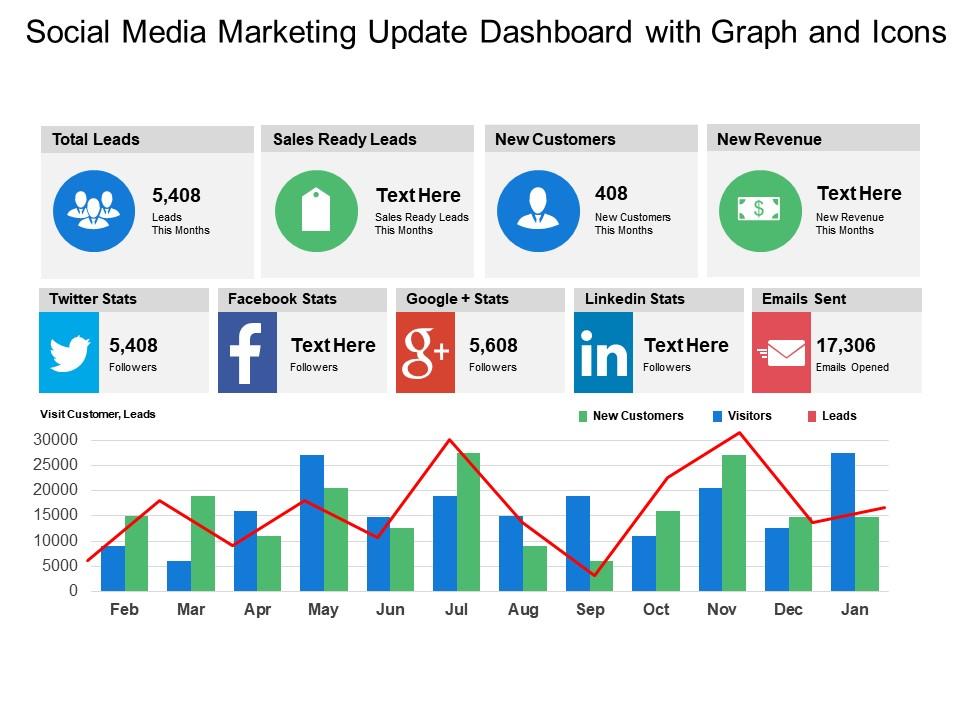
Template 3: Social Media Marketing Update Dashboard with Graph and Icons
Data without context is just noise on a screen. This dashboard template merges social media analytics and marketing performance into one commanding visual report. Color-coded graphs and platform icons create instant clarity across campaigns, helping you identify what's driving results and what isn't. You can anchor your marketing strategy update presentations with compelling data visualisations that make complex metrics persuasive. Ideal for weekly standups, client reporting, or quarterly marketing reviews. Transform your social media update reporting presentations today. Download this dynamic template now and unlock data-driven marketing clarity.
Download this PowerPoint Template
Template 4: Social Media Update PowerPoint PPT Bundles
Cross-functional teams often struggle to align on social media best practices across thirteen different conversations. This PPT deck bundles every key update topic into one cohesive package. It suits expert discussion meetings where brand awareness, platform changes, or content planning need structured presentation. The thematic consistency across slides means your deck looks deliberate, not assembled. Whether presenting digital marketing trends or internal policy updates, this PPT template holds the room. The template is 100% editable and customizable.
[product_image id=796245]
Template 5: Social Media Update Icon to Increase Market Reach
Reaching more of the right audience starts with clarity about what you're offering. This icon-led slide drives instant visual recognition of three core market reach concepts, letting your message land before anyone reads a word. The bold graphic elements capture attention immediately and hold it through your key points. You can build sharp social media growth and brand awareness presentations without starting from blank slides. Ideal for marketing pitches, strategy reviews, or campaign kick-offs. Transform your market reach presentations today. Download this dynamic template now and unlock sharper audience engagement.

Download this PowerPoint Template
Template 6: Social Media Market Share Update for 2023
Platform choices aren't obvious without data behind them. This PPT slide breaks down company market share across Facebook, Instagram, YouTube, WhatsApp, and other major channels—giving marketers a clear basis for budget and channel decisions. Social media marketing trends shift fast; this deck anchors those conversations in real comparative data. It works well for quarterly planning sessions or agency-client briefings where channel prioritization needs justification. The template is 100% editable and customizable.

Download this PowerPoint Template
Template 7: Social Media Sites Update Icon to Improve Customer Engagement Rate
Customer engagement rate sits at the center of every platform's ranking logic. This icon-based PPT slide is built for practitioners who need to communicate improvement levers quickly. Three clearly structured stages let you map what's changing, what needs attention, and what success looks like. For community managers or social media leads presenting social media engagement tips to leadership, this slide makes the argument visual and hard to ignore. The template is 100% editable and customizable.

Download this PowerPoint Template
Elevate Every Social Media Update with SlideTeam
SlideTeam's PowerPoint templates are the best in the industry for communicating social media updates with clarity and speed. These content-ready slides help you structure platform changes, track implementation progress, and present analytics—without building from scratch every time. Use these ready-made PowerPoint slides to turn complex updates into clean, credible presentations your team and stakeholders actually act on. Deploy these templates to stay ahead of every algorithm change and drive consistent social media marketing results.
FAQs on Social Media Update
How can presentation templates be optimized to reflect the latest social media visual trends?
Use larger text, bold contrast ratios, and minimal background clutter—these match current feed aesthetics. Swap static charts for icon-based visuals where possible. Check platform-specific safe zones before finalizing any template layout. Prioritize mobile-first viewing, since most social content is consumed on phones, not desktops.
What role does short-form video content play in reshaping how brands present information on social platforms?
Short-form video has shifted audience expectations toward faster information delivery. Brands now compress key messages into 15–60 second formats instead of long slide decks. This means presentation content must be punchy, visual, and structured for quick scanning. Slides repurposed for Reels or TikTok perform best when each frame carries one clear idea.
How are algorithm changes on major platforms affecting content visibility for businesses using templated designs?
Algorithm changes increasingly favor original, native content over repurposed formats. Templated designs can underperform if they look generic or don't match a platform's current content preferences. The fix is simple: customize templates with platform-specific copy, current visual trends, and relevant hashtags. Consistency and posting cadence still matter more than any single format change.
Which social media platforms are currently offering the most engagement opportunities for presentation-based content?
LinkedIn currently offers the strongest engagement for professional presentation-style content, particularly carousels and document posts. Instagram remains effective for visually rich slide formats. YouTube rewards longer structured content with sustained watch time. The right platform depends on your audience—B2B audiences respond best to LinkedIn, while B2C engagement skews toward Instagram and YouTube.
How can PowerPoint or Canva templates be adapted for direct use in social media carousels?
Export each slide as a square or 4:5 image to match carousel dimensions. Keep one key idea per slide—remove dense text blocks. Use high-contrast fonts legible on mobile screens. Add a clear first slide as a hook and a final slide with a call to action. Most platforms support up to ten carousel frames, so trim accordingly.
What design elements are dominating social media feeds in the current update cycle?
Bold typography, muted or earthy color palettes, and minimal layouts are currently leading feeds. Short text overlays on video or static images perform consistently. Authenticity markers—raw photos, handwritten-style fonts—are gaining ground over polished corporate aesthetics. Gradient backgrounds and 3D icon elements are also seeing increased use across platform-native content formats.
How has the rise of AI-generated content influenced the authenticity standards expected on social platforms?
AI-generated content has raised audience skepticism around polish and perfection. Platforms are seeing stronger engagement from content that feels human—real photos, direct language, visible imperfections. Brands using templated content must add genuine voice and context. Transparency about process or behind-the-scenes framing now builds more trust than a perfectly designed post does.
What metrics should businesses track after sharing presentation-style content on social media?
Track reach, saves, and shares first—these indicate content resonance beyond just views. Monitor click-through rate if your post links to an external resource. Watch follower growth in the 48 hours post-publish. For carousel or slide-based content specifically, swipe-through rate tells you whether audiences are reading the full story or dropping off after frame one.


