

Build and deploy android application design powerpoint presentation slides




Try Before you Buy Download Free Sample Product
 Impress Your
 Audience
 100%
100% Editable
 Save Hours
 of Time


Introducing Build And Deploy Android Application Design Powerpoint Presentation Slides. The content-ready android app development slide deck contains slides explaining the health application development process, major challenges faced by healthcare applications, healthcare application components, healthcare application testing with expenses, deployment architectures, and so on. The PPT slides also provide an industry overview with advantages of healthcare applications, key statistics, available market for healthcare application development. Take the assistance of android application deployment PPT slideshow, to showcase the reasons to invest in healthcare applications by the company. Organizations can represent cost structure and factors influencing healthcare development application costs with these readily available PPT visuals. Also perform a competitive analysis of various factors like the low price, superior quality, installation, data security, etc. with the help of visually appealing themes. Forecast the total number of healthcare application downloads of the company with the help of deploying an android app PowerPoint slide deck.
People who downloaded this PowerPoint presentation also viewed the following :
Content of this Powerpoint Presentation
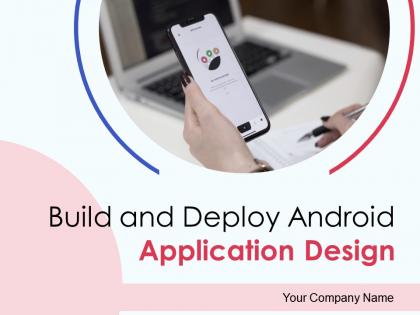
Slide 1: This slide introduces Build and Deploy Android Application Design. State your Company name.
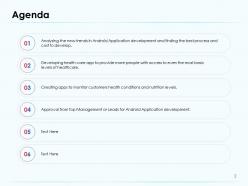
Slide 2: This slide highlights the Agenda
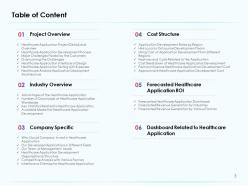
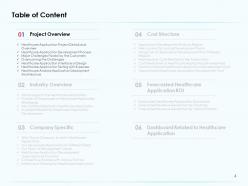
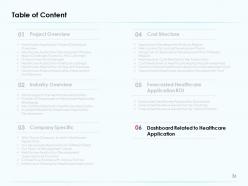
Slide 3: This slide displays Table of Content of the presentation.
Slide 4: This slide shows Table of Content.
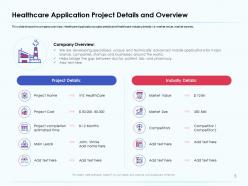
Slide 5: This slide shows the company overview, Healthcare Application project details and Healthcare industry details i.e. market value, market size etc.
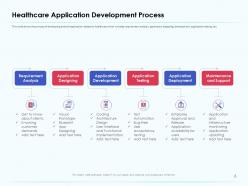
Slide 6: This slide shows the process of developing android application related to healthcare which includes requirement analysis, application designing, development, application testing, etc.
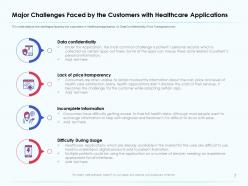
Slide 7: This slide depicts the challenges faced by the customers in Healthcare application i.e. Data Confidentiality, Price Transparency etc
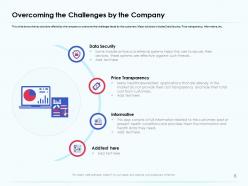
Slide 8: This slide shows the key solutions offered by the company to overcome the challenges faced by the customers. Major solutions includes Data Security, Price transparency, Informative, etc.
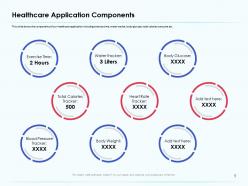
Slide 9: This slide shows the components of our healthcare application including exercise time, water tracker, body glucose, total calories consume etc.
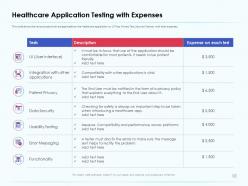
Slide 10: This slide shows the various tests which are applicable on the Healthcare application i.e. UI Test, Privacy Test, Security Test etc. with their expenses.
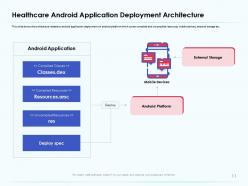
Slide 11: This slide shows the architecture related to android application deployment on android platform which covers compiled and uncompiled resources, mobile devices, external storage etc.
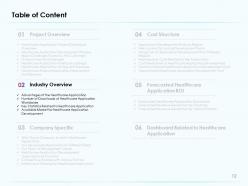
Slide 12: This slide displays Table of Content.
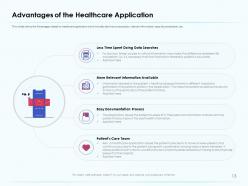
Slide 13: This slides shows the Advantages related to healthcare application which includes les time consumption, relevant information, easy documentation, etc.
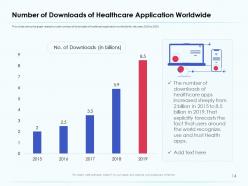
Slide 14: This slides shows the graph related to total numbers of downloads of healthcare application worldwide for the years 2016 to 2020.
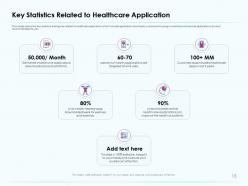
Slide 15: This slides depicts the Key statistics and figures related to healthcare application which includes application downloads, customers focusing on wellness and exercise applications, doctors' recommendations, etc.
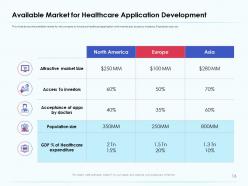
Slide 16: This slide shows the available market for the company to introduce healthcare application with market size, access to investors, Population size, etc.
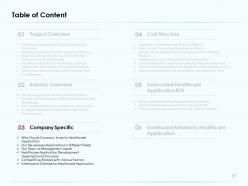
Slide 17: This slide displays Table of Content
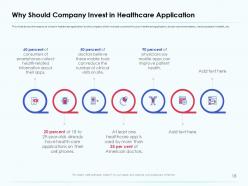
Slide 18: This slide shows the reasons to invest in healthcare application by the company which includes consumer focus on healthcare application, doctor recommendation, improve patient’s health, etc.
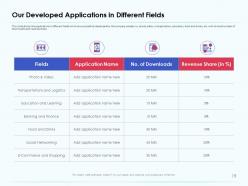
Slide 19: This slide shows the applications in different fields which are successfully developed by the company already i.e. photo editor, transportation, education, food and drinks, etc. with its total number of downloads and revenue share.
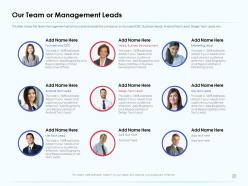
Slide 20: This slide presents the team management which successfully leads the company i.e. Founder/CEO, Business Heads, Android Tech Lead, Design Tech Lead, etc.
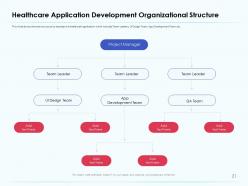
Slide 21: This slide shows the team structure to develop the healthcare application which includes Team Leaders, UI Design Team, App Development Team, etc.
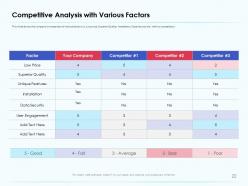
Slide 22: This slide shows the company’s comparison of various factors i.e. Low price, Superior Quality, Installation, Data Security etc. with its competitors.
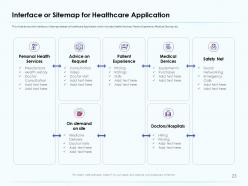
Slide 23: This slide shows the Interface or Sitemap related to Healthcare Application which includes Health Services, Patient Experience, Medical Devices, etc.
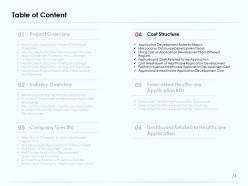
Slide 24: This slide showcases Table of Content
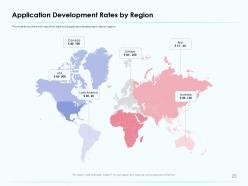
Slide 25: This slide shows the world map which depicts the application development rates by regions.
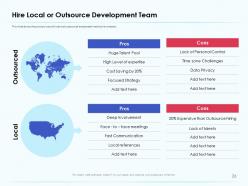
Slide 26: This slide depicts the pros and cons of local and outsourced employees hired by the company.
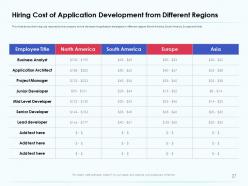
Slide 27: This slide shows the hiring cost required by the company to hire the team of application developers in different regions (North America, South America, Europe and Asia).
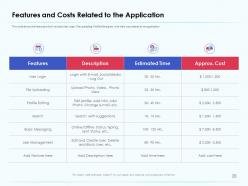
Slide 28: This slide shows the Features which includes User Login, File uploading, Profile Editing etc. with their cost related to the application.
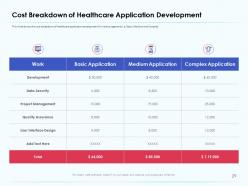
Slide 29: This slide highlights the cost breakdown of healthcare application development for various segments i.e. Basic, Medium and Complex.
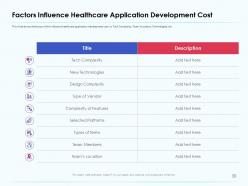
Slide 30: This slide shows the factors which influence healthcare application development cost i.e. Tech Complexity, Team’s Location, Technologies, etc.
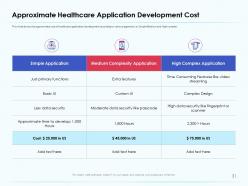
Slide 31: This slide shows the approximate cost of healthcare application development according to various segments i.e. Simple Medium and High complex
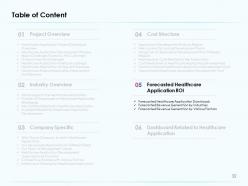
Slide 32: This slide displays Table of Content.
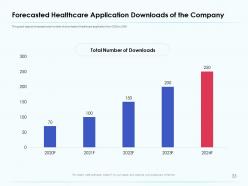
Slide 33: This graph depicts forecasted total number of downloads of healthcare application from 2020 to 2024
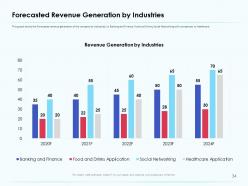
Slide 34: This graph in the slide the Forecasted revenue generation of the company by industries i.e. Banking and Finance, Food and Drinks, Social Networking with comparison to Healthcare.
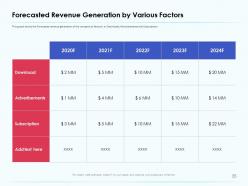
Slide 35: This graph shows the Forecasted revenue generation of the company by factors i.e. Downloads, Advertisements and Subscription.
Slide 36: This slide shows Table of Content
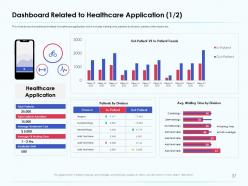
Slide 37: This slide shows the dashboard related to healthcare application which includes waiting time, patients by division, patients information etc.
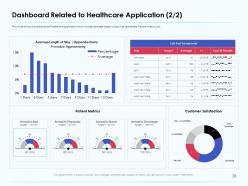
Slide 38: This slide shows the dashboard of healthcare application which includes average length to stay, Lab test details, Patient metrics, etc.
Slide 39: This is Build and Deploy Android Application Design Icons Slide.
Slide 40: This slide is titled as Additional slides for moving forward.
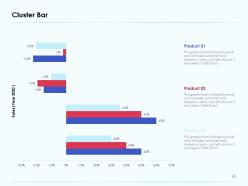
Slide 41: This slide displays cluster bar chart for products comparison.
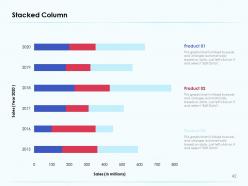
Slide 42: This slide shows Stacked Column for products comparison.
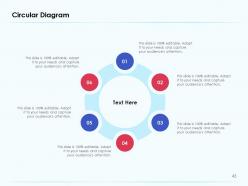
Slide 43: This slide represents Circular Diagram.
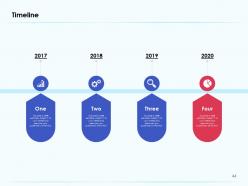
Slide 44: This slide shows Timeline process.
Slide 45: This slide displays Goals of the company.
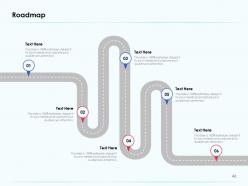
Slide 46: This slide shows Roadmap process.
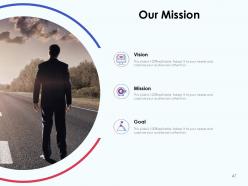
Slide 47: This slide displays Mission, Vision and Goals.
Slide 48: This is Idea Generation slide to highlight important message, beliefs.
Slide 49: This slide displays Venn
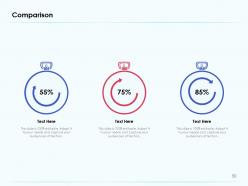
Slide 50: This slide depicts Comparison in percentage.
Slide 51: This is Thank You slide with Contact details.
Build and deploy android application design powerpoint presentation slides with all 51 slides:
Use our Build And Deploy Android Application Design Powerpoint Presentation Slides to effectively help you save your valuable time. They are readymade to fit into any presentation structure.
FAQs for Build and deploy android application design
Essential programming languages for Android development include Java, Kotlin, C++, Dart, and JavaScript, with Kotlin now being Google's preferred choice for native applications. These languages enable developers to create robust, scalable mobile solutions by leveraging native Android frameworks, cross-platform capabilities, and web technologies, with many enterprises finding that Kotlin's modern syntax significantly streamlines development processes while delivering enhanced performance and user experiences.
Android architecture influences development through its layered structure, including the Linux kernel, application framework, runtime environment, and application layer, which guides how developers design, build, and optimize apps. This hierarchical approach enables developers to leverage system services, manage memory efficiently, and create scalable applications, with many development teams finding that understanding these architectural components ultimately streamlines coding processes and enhances app performance.
APIs serve as crucial bridges that connect Android apps to external services, databases, cloud platforms, payment systems, and third-party functionalities like social media integration. Through strategic API implementation, developers streamline app capabilities by enabling real-time data synchronization, automated payment processing, and seamless user authentication, ultimately delivering enhanced user experiences and operational efficiency across diverse industry applications.
Best practices for designing user-friendly Android interfaces include following Material Design guidelines, implementing intuitive navigation patterns, optimizing touch targets for accessibility, ensuring responsive layouts across devices, and maintaining consistent visual hierarchy. These approaches streamline user experiences by reducing cognitive load, improving accessibility, and enhancing engagement, with many retail and banking applications finding that intuitive design significantly increases user retention and conversion rates.
Developers manage different screen sizes and resolutions through responsive design principles, flexible layouts, vector graphics, density-independent pixels, and comprehensive testing across devices. These approaches streamline development by ensuring consistent user experiences, reducing maintenance overhead, and maximizing market reach, with many mobile development teams finding that strategic screen adaptation ultimately delivers broader audience engagement and competitive advantage in an increasingly diverse Android ecosystem.
Android Jetpack components offer lifecycle management, navigation handling, data binding, room database integration, and work manager capabilities. These architectural components streamline development by reducing boilerplate code, ensuring backward compatibility, and providing consistent UI experiences, with many developers finding that they accelerate project timelines while delivering more robust, maintainable applications.
Kotlin improves Android development by offering concise syntax, null safety features, and seamless Java interoperability, reducing code complexity and development time significantly. Through enhanced readability and built-in safety mechanisms, development teams experience fewer runtime crashes, faster compilation, and streamlined maintenance processes, with many enterprises finding that Kotlin accelerates project delivery while improving code quality.
Common security challenges in Android app development include data leakage, insecure authentication, code tampering, improper session management, and vulnerable third-party integrations. These risks can be mitigated through encrypted data storage, robust authentication protocols, code obfuscation, and regular security audits, with many financial services and healthcare organizations finding that proactive security measures ultimately enhance user trust and regulatory compliance.
Testing in Android development ensures app reliability, performance, and user satisfaction by identifying bugs, compatibility issues, and security vulnerabilities before release. Through unit testing, UI testing, and device compatibility testing, developers streamline quality assurance, minimize post-launch crashes, and enhance user experiences across diverse Android devices, ultimately delivering competitive advantage in an increasingly crowded marketplace.
Android application performance optimization strategies include code profiling, memory management, efficient database queries, image compression, background task optimization, and UI rendering improvements. These techniques enhance user experience by reducing load times, minimizing battery consumption, and preventing crashes, with many mobile-first businesses finding that optimized apps deliver higher user retention, improved app store ratings, and ultimately stronger competitive advantage in increasingly crowded digital marketplaces.
Android data storage options include SharedPreferences for simple key-value pairs, SQLite databases for complex relational data, Room database for modern ORM functionality, and cloud solutions like Firebase Firestore. These technologies streamline data management by enabling offline capabilities, seamless synchronization, and scalable architecture, with many mobile-first businesses finding that strategic storage implementation delivers faster app performance and enhanced user experiences.
Latest Android app development trends include Jetpack Compose for UI development, Kotlin Multiplatform Mobile for cross-platform solutions, AI and machine learning integration, enhanced security protocols, and progressive web app capabilities. These technologies streamline development processes by reducing code complexity, accelerating deployment timelines, and improving user experiences, with many developers finding that adopting these approaches delivers significant competitive advantages in an increasingly mobile-first marketplace.
Developers can monetize Android applications through freemium models, in-app purchases, subscription services, targeted advertising, and premium app sales. These strategies work best when combined strategically, with gaming and productivity apps finding success through in-app purchases, while media and content platforms leverage subscriptions, ultimately delivering sustainable revenue streams and enhanced user engagement.
**INPUT**: What tools and resources are recommended for debugging Android applications? **OUTPUT**: Essential Android debugging tools include Android Studio's integrated debugger, Logcat for real-time logging, ADB commands, memory profilers, and network inspectors. These tools streamline development by enabling breakpoint analysis, performance monitoring, and crash detection, with many development teams finding that systematic debugging ultimately delivers faster app releases and enhanced user experiences. **Word count: 54 words**
Native Android development uses Java or Kotlin specifically for Android devices, delivering optimal performance and full access to platform features, while cross-platform development uses frameworks like React Native or Flutter to create apps for multiple operating systems simultaneously. Cross-platform approaches streamline development timelines and reduce costs, though native development often provides superior user experiences, with many enterprises finding that the choice depends on budget constraints, timeline requirements, and performance expectations.
-
Illustrative design with editable content. Exceptional value for money. Highly pleased with the product.
-
Innovative and attractive designs.
-
Designs have enough space to add content.
-
Really like the color and design of the presentation.
-
Visually stunning presentation, love the content.
-
It saves your time and decrease your efforts in half.
-
Unique design & color.
-
Awesome presentation, really professional and easy to edit.
-
Great experience, I would definitely use your services further.
-
Excellent design and quick turnaround.
-
Page:
- You're currently reading page 1
- Page 2
-
