

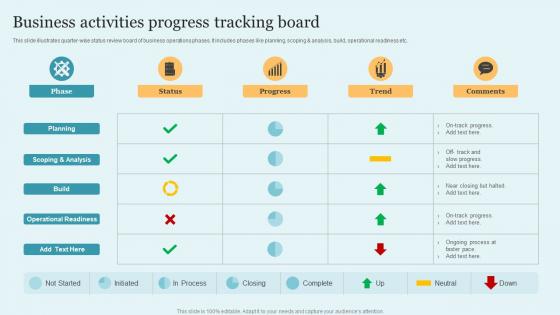
Business Activities Progress Tracking Board




Try Before you Buy Download Free Sample Product
 Impress Your
 Audience
 100%
100% Editable
 Save Hours
 of Time


This slide illustrates quarter wise status review board of business operations phases. It includes phases like planning, scoping and analysis, build, operational readiness etc.
People who downloaded this PowerPoint presentation also viewed the following :
Business Activities Progress Tracking Board with all 6 slides:
Use our Business Activities Progress Tracking Board to effectively help you save your valuable time. They are readymade to fit into any presentation structure.





FAQs for Business Activities
You'll want clear metrics first - pick 3-5 key ones like revenue or customer numbers, not everything under the sun. Visual stuff works best - charts, graphs, those red/yellow/green dots that make sense at a glance. Honestly, I've watched teams build these crazy elaborate dashboards that just collect dust. Keep it simple and where everyone can see it. Someone needs to own the weekly updates (or it becomes pointless wall decoration, trust me). Most important thing? Actually use it in meetings. Otherwise you're just wasting time and money on something pretty.
Honestly, visuals are a game changer for tracking boards. Color code your project statuses - red for overdue stuff, yellow when things get sketchy, green for smooth sailing. Progress bars and charts beat staring at plain numbers any day. Icons help too since people can spot task types without reading every single line. Oh and don't jam everything together - white space actually makes things way less overwhelming. I'd pick just one visual thing to try this week and watch how much quicker your team gets what's happening.
Trello and Asana are solid picks for basic project tracking - really visual and simple to jump into. Monday.com handles more complex stuff if you need multiple KPIs and metrics. Notion's pretty versatile too. Google Sheets is honestly underrated for this - I've seen some crazy good dashboards people built for basically free. Power BI or Tableau are killer for real-time visuals, but they cost more. My advice? Start with whatever your team already uses. Getting people to actually adopt it matters way more than having the fanciest features. You can always upgrade later once everyone's comfortable.
Figure out what actually matters for your business first - revenue, customer happiness, efficiency stuff. Don't track everything like I did when I started (what a mess that was). Pick maybe 5-7 metrics tops or you'll drown in data. I always think about whether a metric would actually change what I do. If not, why bother tracking it? Mix some leading indicators like pipeline stuff with lagging ones like revenue. Honestly, half the metrics people obsess over are just for show. Your board meetings will thank you for keeping it simple and focused on things that actually drive decisions.
Dude, you gotta get feedback from everyone using your tracking board or it'll be useless. Ask team members and managers what's confusing them - they always spot stuff you'd never notice. Their input shows you which metrics actually matter and when your visuals suck. I'd do monthly check-ins, but honestly? Just grab people when you see them squinting at the screen looking lost. People love complaining about dashboards, so you'll get plenty of material to work with. Oh, and don't take it personally when they roast your color choices.
Honestly, tracking boards are game-changers for this stuff. When everyone can see who's doing what and how far along they are, people actually step up. No more of that "wait, I thought you were handling it" nonsense. There's this weird psychology where nobody wants to be the person holding everyone else up - works like a charm. You'll catch issues way earlier too when someone keeps missing their stuff. I'd start simple though, maybe your top 3-5 most critical things and just update it weekly in meetings. Don't overthink it at first.
Honestly, the worst thing you can do is cram everything onto one dashboard - it just becomes visual noise and people ignore it. Skip the vanity metrics too. Like, who cares about page views if they don't convert? I learned this the hard way lol. Make sure your data actually updates regularly because stale numbers are useless. Charts beat spreadsheets every time. Here's my test: for each metric, ask "what would we actually DO with this info?" No clear answer? Delete it. Keep it simple and actionable.
Honestly, daily updates are where it's at if you can swing it. Weekly works too, but here's the thing - stale data leads to crappy decisions. I'd rather spend 10 minutes every morning updating numbers than make calls based on week-old info. For longer-term stuff, weekly's fine. But anything customer-related? Daily wins every time. That said, consistency beats frequency. Better to nail weekly updates than half-ass daily ones. Just pick whatever rhythm actually works for your team and don't overthink it.
Yeah, most tracking boards totally work with whatever PM tools you're already using. Trello, Asana, Monday.com, Jira - they've all got integrations or APIs to sync everything up. Thank god, right? Nobody wants to deal with retraining the whole team on something new. I'd actually start by checking your current tool's integration page first - see what they officially support. That'll save you some headache down the road. The trick is just finding one that doesn't fight with your existing setup.
Digital boards are clutch for remote teams - you get instant updates and never lose your data when someone spills coffee on stuff. Plus the reporting features are actually useful. Physical boards though? There's something about moving actual sticky notes around that just hits different for brainstorming. Honestly depends on your setup - if anyone works from home even part-time, go digital. Otherwise you'll constantly be taking photos of the board to share with people. I'd test both for like a week and see what doesn't annoy you.
Honestly, just talk to each department head first - they all care about completely different stuff. Sales wants pipeline numbers and conversion rates. Marketing's obsessed with lead gen and how much they're spending per lead. HR tracks hiring and whether people actually want to stay at the company (retention is huge right now). Operations focuses on efficiency and inventory - you know, keeping things running smoothly. The trick is understanding what data they're already checking every day, then build dashboards around that. Don't make the mistake of using the same template everywhere because people just won't touch it.
Honestly, you gotta make it visual and fun - color-coded bars, team photos, maybe even some competition with leaderboards. Sounds cheesy but it works! Weekly stand-ups right at the board help too. People can move their tasks around physically. Let them customize their sections though - that's huge. When someone hits a milestone, celebrate it publicly. The whole thing is really about ownership. If it feels like management forced it on them, they'll ignore it. Start small and don't overthink it. Oh and the gamification thing? I was skeptical at first but honestly it gets people weirdly competitive in a good way.
Honestly, having a tracking board is huge for spotting what's actually working in your business. You'll catch trends way faster - like noticing which revenue streams are tanking before it's too late. Real-time data beats guessing every time. The visual format makes team meetings so much smoother too, everyone gets it instantly. I'd stick to maybe 5-7 key metrics, don't go overboard. Once you start checking it regularly (which becomes addictive tbh), you'll wonder how you ran things blind before. It's one of those things that sounds boring but actually changes everything.
I've seen some really cool tracking boards that use fun visuals - subway maps for sales pipelines, car dashboards with actual gauges, that kind of thing. The subway one's pretty clever, though I always end up thinking about my morning commute lol. Gamified leaderboards work well too. Kanban cards are solid if your team likes moving stuff around. Oh, and those thermometer visuals for goals hit different - there's something satisfying about watching them fill up. Just pick whatever clicks with how your team's brain works. You want people to glance at it and instantly get what's happening.
Yeah, cultural stuff totally affects how teams use those tracking boards. Some cultures love detailed written updates, others want visual stuff or just prefer talking face-to-face. Time zones are honestly such a pain - you wake up to outdated info everywhere. Plus communication styles vary a ton. Like, some people feel awkward marking things as "blocked" where everyone can see it, but others will call out problems immediately. Oh and asking your international teammates upfront what works for them is clutch. Build in flexibility from day one.
-
They saved me a lot of time because they had exactly what I was looking for. Couldn’t be happier!
-
Top Quality presentations that are easily editable.