

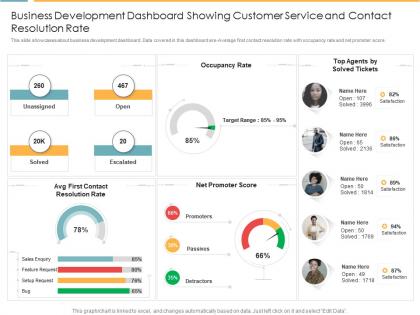
Business development dashboard showing customer service and contact resolution rate




Try Before you Buy Download Free Sample Product
 Impress Your
 Audience
 100%
100% Editable
 Save Hours
 of Time


Our Business Development Dashboard Showing Customer Service And Contact Resolution Rate are topically designed to provide an attractive backdrop to any subject. Use them to look like a presentation pro.
People who downloaded this PowerPoint presentation also viewed the following :
Business development dashboard showing customer service and contact resolution rate with all 2 slides:
Use our Business Development Dashboard Showing Customer Service And Contact Resolution Rate to effectively help you save your valuable time. They are readymade to fit into any presentation structure.
FAQs for Business development dashboard showing customer service and
Pipeline stuff is crucial - track deal volume, conversion rates, and average deal size. Sales cycle length matters too, plus lead quality scores and revenue forecasts. Customer acquisition cost vs lifetime value is honestly where most people get surprised by what they find. Activity metrics help - calls, meetings, proposals sent. Don't go crazy though, maybe 6-8 KPIs tops or you'll just stare at spreadsheets all day. Start with these basics then add whatever's specific to your business goals.
Honestly, it's a game changer for seeing your sales pipeline and revenue stuff in real time. No more waiting around for those monthly reports that are already outdated by the time you get them. You'll actually know which deals are stuck and what markets are performing well - way better than just going with your gut or digging through old spreadsheets (ugh, been there). The trick is tracking metrics that actually move the needle for your business. Don't get sucked into vanity numbers that look impressive but don't tell you anything useful. You can pivot way faster when you see problems coming.
KPI cards are your best friend - revenue, pipeline value, conversion rates right up top where you can't miss them. Bar charts work well when you're comparing territories or different time periods. Line charts are perfect for spotting trends. Oh, and definitely add pipeline funnel visuals because your sales team will actually use those to see where deals are dying. Heat maps are solid for regional stuff if that matters to you. Stick with consistent colors throughout (pie charts are overrated anyway - way harder to read). Start with your top 3-4 metrics prominently displayed and build from there.
Okay so basically you gotta show different stuff to different people depending on what they actually care about. Your executives want the big picture - growth trends, major KPIs, that kind of thing. Sales teams need their pipeline data and conversion rates obviously. Marketing will ask for like every metric under the sun (they always do lol) but focus on lead gen and campaign stuff. Set up role-based permissions so people see their relevant data first. Don't make your CFO dig through social media stats to find revenue numbers - that's just annoying. Automated reports work great too. Just send each person exactly what they need to make decisions.
Tableau and Power BI are your best bets - most companies use them and they're pretty straightforward. Google Data Studio is free and honestly way better than it used to be. Salesforce Analytics is solid too if you're already in their ecosystem. Looker and Sisense are more advanced but they'll cost you. Even Excel works for basic stuff if that's where your data lives anyway. Oh, and pick something that plays nice with whatever systems you're already using. Nothing worse than fighting with data connections every time you need to update something.
So we've got checks running at a few different stages - automated stuff kicks in when data flows from your CRM, plus we do weekly spot-checks against the original systems. The dashboard will actually flag weird stuff or missing data automatically, so you'll get warnings if things look sketchy. Honestly? Sales reps updating opportunities all willy-nilly is usually where things go sideways, but we built validation rules to catch most of that mess. Your move is running that monthly reconciliation report and jumping on any weird discrepancies right away. Bad data just snowballs if you ignore it.
Dude, real-time data is a game changer for your dashboard. Instead of looking at last week's crusty numbers, you're seeing what's actually happening right now. Catch problems early, spot trends as they unfold - way better than making decisions off old reports. I'm honestly obsessed with it now that I've gotten used to the instant pipeline visibility. Just make sure your data sources update frequently enough or what's the point? Oh and set up alerts for metrics that actually matter to your goals. Otherwise you'll just become one of those people refreshing dashboards all day like it's Instagram.
Dude, dashboards are game-changers for sales pipelines. You get instant visibility into what's moving vs what's dead in the water. Bottlenecks become obvious super quick - like when everything's jamming up at the proposal stage. I'd definitely set up alerts for deals that haven't budged in however many days makes sense for your cycle. That way you're not constantly checking manually (because who has time?). The conversion tracking between stages is clutch too. Shows you which lead sources actually convert instead of just wasting your time. Way better than those spreadsheet deep-dives every morning.
Keep your dashboard super clean - put the most important stuff right at the top. Users should find what they need in like 10 seconds max. Group related data together and ditch the jargon for clear labels. Your color coding needs to make actual sense too. Interactive filters are cool but don't get carried away with fancy bells and whistles that'll just confuse everyone. Honestly, I've seen too many dashboards that look impressive but are impossible to use. Test it with real users first - they'll spot problems you'd totally miss. Start basic, then build up based on what people actually tell you.
Honestly, dashboards are game-changers for getting teams to actually work together instead of doing their own thing. Your sales, marketing, and product people all see the same real-time data, so they can't ignore how their decisions affect everyone else. It's like having a scoreboard that forces everyone to play for the same team - which sounds cheesy but really works. Set up alerts so when one department makes a move, others know immediately. I'd start small though, maybe pick 3-5 metrics that multiple teams actually care about and build from there.
Track pipeline growth and how fast deals actually move through your funnel - that velocity stuff matters more than people think. Conversion rates at each stage are huge, plus you'll want to see which campaigns are driving real revenue. Lead quality scores will save you from burning cash on garbage leads (learned that one the hard way). Meeting-to-proposal ratios tell you if your sales process is working. Month-over-month trends help you spot what's actually changing. Honestly though? Pick 3-4 metrics that match your goals first. Don't try tracking everything or you'll just get overwhelmed with data you won't use.
Honestly, pick the metrics that actually matter first - don't get tempted to throw everything in just because it looks impressive. Lead conversion rates, pipeline velocity, customer lifetime value are solid starting points. Most dashboard tools these days connect directly to your CRM anyway, so that part's not too painful. But here's the thing - automated syncing is where you'll save your sanity later. Nobody wants to manually update dashboards every week. I'd stick with maybe 3-5 key metrics at first. Your team needs time to actually use this stuff before you go crazy adding more. Oh, and definitely test it with real scenarios before rolling it out to everyone.
Honestly, the biggest pain points are messy data and getting people on board. Your info is probably spread across like 5 different systems and half of it's incomplete - makes the whole dashboard pointless if nobody trusts it. People hate change too, especially when they're married to their Excel sheets (I swear some folks would choose spreadsheets over actual efficiency). Then there's figuring out what metrics genuinely matter instead of just looking cool. Start small though - find some clean data you can actually rely on and get a couple key people excited about it first. Way easier to expand from there.
Honestly, dashboards are game-changers because they pull everything together instead of you hunting through tons of separate reports. I used to waste so much time in Excel trying to piece things together - now I can see patterns instantly. Watch for stuff like which lead sources are suddenly performing better, or if customer behavior's shifting in certain regions. The visual setup makes connections super obvious. Oh, and definitely set up alerts for when key numbers hit certain thresholds. That way you'll catch opportunities way before your competitors even realize something's happening in the market.
Look, the main thing that kills dashboards? Cramming way too much stuff on one screen. Users just shut down when they see 20 different charts staring at them. Stick to maybe 5-7 metrics that actually matter for decisions - not the vanity ones that just look pretty. Like, who cares about total page views if your conversion rate is tanking? Make sure everything connects to real business goals too. Oh and don't make everything update every second unless it needs to. Most stuff works fine with weekly updates. Test it with real people before you launch - I learned that one the hard way.
-
Perfect template with attractive color combination.
-
Thanks for all your great templates they have saved me lots of time and accelerate my presentations. Great product, keep them up!
-
Easy to edit slides with easy to understand instructions.
-
Great product with highly impressive and engaging designs.
-
Amazing product with appealing content and design.