


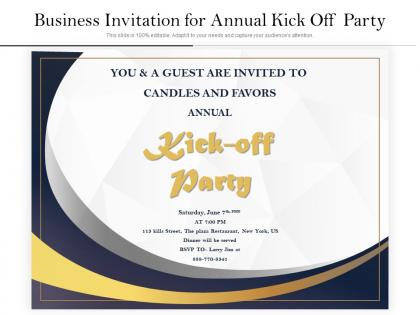
Business invitation for annual kick off party




Try Before you Buy Download Free Sample Product
 Impress Your
 Audience
 100%
100% Editable
 Save Hours
 of Time


Our Business Invitation For Annual Kick Off Party are explicit and effective. They combine clarity and concise expression.
People who downloaded this PowerPoint presentation also viewed the following :
Business invitation for annual kick off party with all 2 slides:
Give your audience a fulfilling experience. They will find our Business Invitation For Annual Kick Off Party elevating.
FAQs for Business invitation for annual
Okay so for business invites that actually work, you need five things. Clear subject line first - don't make people guess what it is. All the basic stuff: date, time, location (or Zoom link), how long it'll run. Here's what most people miss though - explain WHY they should come. What's in it for them? I used to skip this and wonder why nobody showed up lol. RSVP deadline with your contact info is obvious but necessary. Oh, and mention any big name speakers if you have them. Send it a week out minimum, then bug people again right before. Trust me on the follow-up.
Honestly, templates are a lifesaver for business invites. You'll get that polished, professional look without spending forever tweaking fonts and spacing. Most of us suck at design anyway - I know I do - so why reinvent the wheel? Templates use layouts that actually convert people to show up. Your brand stays consistent across events too, which makes you look way more legit. Oh, and pick something that fits your industry's style first. Then just swap in your colors and info. Takes like 10 minutes instead of 3 hours of "does this text look centered to you?"
Honestly, the tone you use makes a huge difference in whether people actually show up. Too casual and everyone thinks it's optional. Go too formal? Nobody wants to sit through what sounds like torture. Match your company vibe but be super clear about what's happening and why it matters. Active voice works way better than passive - like "we'll cover Q3 results" instead of "results will be discussed" or whatever. Make it sound interesting enough that saying yes feels easy. People decide if they want to attend based on your invitation, so don't blow it on boring language.
Oh yeah, cultural stuff totally matters for business invites! Japan wants super formal language with all the proper titles - hierarchy is everything there. Meanwhile Nordic countries? Keep it simple and direct. Some places expect you to ask about family first, but that can seem unprofessional elsewhere. Germans need weeks of notice (they plan everything), while other cultures are way more spontaneous about timing. I actually know someone who almost lost a client over invitation wording - sounds crazy but it happens! Best move is researching beforehand or getting a local colleague to check your draft.
Okay so for business invites, definitely go with formal titles and full names - "Dear Mr./Ms. [Last Name]" or just "Dear [Full Name]" if you're not sure about gender. Groups? "Dear Team" or "Dear Colleagues" totally works. I cringe every time I see someone open with "Hey everyone!" for like, a board meeting invite. So awkward. You can dial it back a bit if you know them well, but honestly? Better to be too formal than too casual. Oh and triple-check those names - misspelling someone's name is brutal.
Just replace the location stuff with your meeting link and any passwords they'll need. Make sure to mention if they need to download Zoom first or test their setup beforehand - trust me, someone always shows up scrambling with their camera. I'd put the timezone right up top since people could be anywhere. Also throw in a backup phone number or something in case the tech craps out (it will). End with "hit reply to confirm" so you actually know who's coming. Way better than wondering if you're talking to an empty room.
Okay so the two big ones - don't be vague and don't wait until the last minute. Like, put the actual date, time, and location right at the top so people aren't digging around for basics. Give them at least a week's heads up, maybe more if it's something important. I swear half the "urgent" meeting requests I get could've been avoided with better planning lol. Write normal too - none of that weird corporate speak. Always throw in your contact info. Oh and here's what really helps: send a calendar invite with the email. Makes it super easy for them to just click and add it to their schedule instead of manually typing everything in.
Go with navy, dark green, or gray - those colors scream "we know what we're doing." Bright stuff looks amateur, especially neon (learned that one the hard way). You can throw in one accent color from your brand but don't go crazy. Dark blue with white text looks super clean. Or flip it - light gray background with dark text works too. Just make sure there's enough contrast so people can actually read it. The whole point is looking polished without trying too hard, you know?
Oh definitely get your branding right on those invites! Your logo, colors, fonts - make sure they all match what your company actually looks like. I've literally seen gorgeous invitations that made no sense because they looked nothing like the business hosting. Honestly, your marketing team will probably have opinions about this stuff anyway, so loop them in early. The invite is basically setting people's expectations before they walk in the door. Think of it as a little preview of what your company's about. Short version: it should feel like it came from YOU, not some random design template.
Honestly, visuals are a game changer for invites. People's eyes just gravitate toward images way more than boring text blocks. You'll want your graphics to actually match the vibe though - like don't use Comic Sans for a board meeting, you know? High-quality images make a huge difference too. Your logo should definitely be on there for brand recognition. One thing I always forget is checking how it looks on phones since everyone opens emails there now. Oh, and minimalist works better than cramming in a bunch of random graphics just because you can.
Oh man, RSVPs are seriously a lifesaver for work events. You get real headcounts instead of guessing - no more ordering food for 50 when only half show up (learned that one the hard way). Following up with people who haven't responded yet becomes way easier too. The numbers help you figure out seating and split people into groups that actually make sense. Honestly, I think tracking who comes to what also gives you good intel for planning future stuff. Just make sure to cut off RSVPs like a week before so you're not scrambling last-minute with catering changes.
Okay, so mobile invites are tricky but not impossible. First thing - use one column and bump your font to 14pt minimum. Short subject lines too (under 50 characters or they get chopped off). Make those buttons big enough that people don't need a stylus to hit them - seriously, nothing's more annoying than trying to RSVP on a tiny link. Put your key info (date, time, where) right up top. Keep paragraphs super short, like 2-3 lines max. Oh, and definitely send yourself a test first. I learned that one the hard way when half my text got cut off last time.
Dude, timing is everything with business invites. Send it too late and people already booked other stuff or think you don't value them. Too early? They'll forget or their plans change. For most events, give 2-3 weeks notice. Bigger stuff like conferences need 4-6 weeks minimum. I once sent conference invites with only 10 days notice - total disaster. Check what else is happening too. Don't compete with holidays or major industry events. Quick tip: peek at your recipients' typical busy seasons before sending. Trust me on this one.
Honestly, just tweak the language and format to fit what your industry expects. Finance folks want formal language and compliance stuff mentioned. Tech companies? Way more casual with innovation talk. Healthcare needs those privacy disclaimers - you know how they are about that stuff. Grab your base template and mess with the tone first. Then add sections that make sense for your field and change up the call-to-action. What really matters is figuring out what your industry peers actually want to see. Make sure it hits those boxes but still sounds like your brand, not some cookie-cutter thing everyone's using.
Canva's where I'd start honestly - their free version has tons of business invitation templates and it's super easy to use. Adobe Express works great too if you want another option. Microsoft PowerPoint actually has some decent templates built in, which is kinda surprising but whatever works! PicMonkey's another solid choice. If you're feeling fancy and do this stuff regularly, Adobe InDesign is more advanced but probably overkill for most people. I'd just mess around with Canva first and upgrade later if you need more features.
No Reviews