

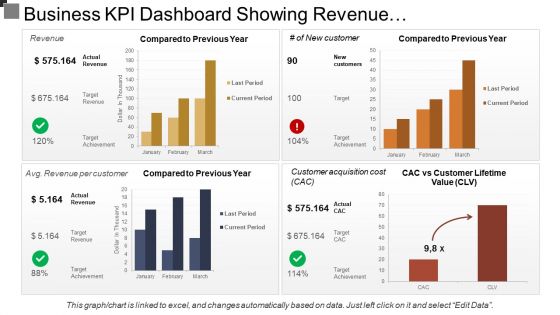
Business kpi dashboard showing revenue and customer lifetime value




Try Before you Buy Download Free Sample Product
 Impress Your
 Audience
 100%
100% Editable
 Save Hours
 of Time


Control instability with our Business Kpi Dashboard Showing Revenue And Customer Lifetime Value. Handle frequent changes in a calm fashion.
People who downloaded this PowerPoint presentation also viewed the following :
Business kpi dashboard showing revenue and customer lifetime value with all 6 slides:
Fix their gazes with our Business Kpi Dashboard Showing Revenue And Customer Lifetime Value. Their eyes will be fastened on you.
FAQs for Business kpi dashboard showing revenue and
Ok so for a KPI dashboard that people will actually use, grab 5-7 metrics that matter to your goals. Don't stuff everything in - trust me on this one. Clean visuals are key so you can scan them quickly. Set clear targets so everyone knows what good looks like. Time comparisons help too (month over month works great). Oh and make sure the right people can access it without jumping through hoops. Honestly, starting simple beats going crazy with fancy features. You can always add more once you see what clicks with your team.
Honestly, just pick 3-5 KPIs that actually matter to your business goals. Like if you want more revenue, track conversion rates and order values - not how many people visited your homepage (who cares?). I've seen way too many dashboards that are basically data graveyards. Each metric should be something you can actually fix when it tanks. Run with your chosen ones for a month, then ditch anything that doesn't help you make real decisions. Oh, and make sure they map back to what you're trying to accomplish - sounds obvious but you'd be surprised how often people miss this.
Honestly? Tableau and Power BI are probably your best bet if you want something that looks really professional. Yeah, there's a learning curve, but the charts are gorgeous. Looker Studio is free and pretty decent too - I've used it for quick dashboards. Google Sheets can actually look surprisingly good if you're not trying to impress the C-suite or anything. Klipfolio's another option, though I haven't played around with it as much. Just keep things clean and don't cram every metric you can think of onto one screen. Maybe start simple with whatever tool feels right and add the fancy stuff later?
Honestly? Most KPIs work best with daily or weekly updates, but it totally depends on your business pace. Sales numbers and website traffic change fast, so check those daily if you want to catch trends early. Customer lifetime value though? That stuff moves slowly - monthly or quarterly is plenty. Weekly reviews are usually the sweet spot for most dashboards. You get useful insights without getting buried in meaningless fluctuations. I'd start there and then tweak it based on whether your numbers actually shift enough to matter. No point refreshing data that barely budges, you know?
Honestly, data visualization is what makes KPI dashboards actually useful instead of just overwhelming spreadsheets. Your brain processes visual stuff way faster than rows of numbers. Color-coded alerts show problems instantly. Trend lines reveal patterns you'd miss otherwise. Progress bars make targets obvious at a glance. Pick the right chart though - bar charts work great for comparisons, line graphs for tracking changes over time, gauges when you're hitting specific targets. I always start with my most critical metrics first and choose visuals that make the insights jump out immediately.
Honestly, automated validation checks are your best friend here. Connect dashboards straight to source systems - manual entry is where everything goes wrong. Trust me, our sales numbers were messed up for THREE months because of this. Set alerts for weird spikes or dips in data. Also, regular check-ins with whoever owns the data helps catch issues early. Oh and document what each metric actually means - sounds boring but you'll thank yourself later when Steve from marketing swears he's calculating ROI differently than you. Single source of truth for everything, basically.
Don't cram everything onto one screen - I learned this the hard way! Pick maybe 5-7 metrics that actually matter to your business, not just stuff that looks cool. Vanity metrics are the worst - like who cares about total page views if nobody's converting? Your data needs to be fresh and trustworthy or people won't use it. Clean design helps too. Test it with whoever's gonna stare at this thing every morning because they'll catch issues you missed. Oh and make sure your KPIs connect to real goals, not random numbers.
Honestly, dashboards are game-changers because they make everything visible. Your team sees their numbers in real-time and starts fixing stuff themselves instead of waiting for you to call it out. Think of it like a scoreboard - people suddenly care way more about their performance. You'll spot your top performers easily and can have them share what's working. Problems get caught early too, which saves your ass later. Oh, and set up alerts so people get pinged when they're slipping. Makes the whole accountability thing way less awkward.
Honestly, it depends where you're at. Startups should obsess over customer acquisition cost, monthly recurring revenue, and runway - basically proving you won't die tomorrow. Mature companies? They need profit margins, customer lifetime value, that stuff. I swear, I've watched so many early-stage founders get distracted by vanity metrics when their burn rate is insane. Track what actually matters for your stage. Start simple with 3-5 core KPIs, then add more as things get complicated. You'll drive yourself crazy otherwise.
Ask each team what three metrics they actually check first thing Monday - that's your starting point. Sales wants conversion rates and pipeline stuff. Marketing cares about traffic and lead gen. Operations? They're all about efficiency and cost per unit (which honestly would put sales to sleep). Most dashboard tools let you create user groups so people only see what matters to them when they log in. Don't make everyone wade through irrelevant data. Set up different views or tabs for each department with role-based permissions. Way cleaner that way.
Okay so KPI benchmarks totally depend on your industry, but here's what I've seen work. Retail usually hits 2-3% conversion rates with 20-30% gross margins. For SaaS, you're looking at 5-7% monthly churn and that 3:1 LTV to CAC ratio everyone talks about. Manufacturing? They go for 85%+ equipment efficiency and keep defects under 2%. Healthcare aims for 80%+ patient satisfaction - though honestly that bar feels pretty low to me. Your best bet is digging into industry reports from trade associations. They publish this stuff regularly. Then just tweak based on where you're at competitively and what stage your company's in.
So dashboards are honestly like having a heads-up on what's actually happening with your goals. You'll see trends in real-time instead of finding out about problems way too late. Map your KPIs straight to what you're trying to achieve long-term - not just the flashy metrics that look good in meetings. Monthly reviews during planning sessions work best. The funny thing is, the stuff that's actually moving the needle usually isn't what leadership gets most pumped about. Bottom line: pick metrics that matter and you'll make way better decisions than just winging it.
Look, having real-time data means you'll actually catch problems while you can still do something about them. No more finding out your conversion rate tanked three weeks after it happened. Your team won't be arguing over different numbers anymore since everyone's seeing the same current info. I mean, the peace of mind alone is worth it – no more second-guessing whether your dashboard is showing last month's disaster. You can jump on opportunities fast and beat competitors to trends. Just focus on your most critical metrics first though. Don't try to make everything real-time at once or you'll go crazy.
Start with the basics - clean visuals and simple charts. Bar graphs, line charts, that stuff. Red for bad, green for good. Pretty standard but it works. Put your most important metrics right at the top where people actually look. Skip the fancy jargon in labels - nobody has time for that. If something's confusing, just add a quick explanation underneath. Oh, and definitely ask your users what they want to see first. Trust me, it'll save you from rebuilding everything later when they hate it. Also make sure it loads fast and doesn't break on phones.
Look, nobody wants to stare at a wall of numbers trying to figure out what's going on. Your dashboard needs to tell the actual story behind those metrics. So instead of just throwing "sales dropped 15%" at people, walk them through it - was it seasonal? Did a competitor mess with your market? Context is everything here. I always think of it like being a detective explaining your case. Give people the main story upfront, then let your data back it up. Way better than leaving stakeholders wondering what they're supposed to do with all those charts. Trust me, when you frame data as a narrative with clear implications, decisions become so much easier to make.
-
Easily Understandable slides.
-
Innovative and Colorful designs.