

Business Model Canvas Tata Motors Company Profile Ppt Slides Guide CP SS




Try Before you Buy Download Free Sample Product
 Impress Your
 Audience
 100%
100% Editable
 Save Hours
 of Time


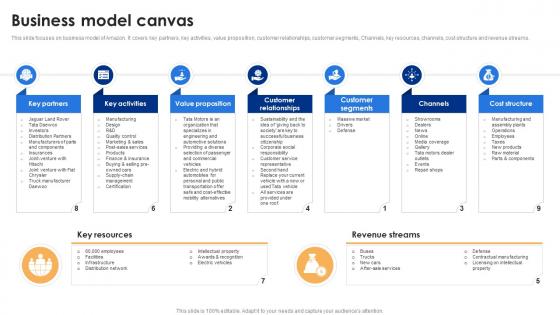
This slide focuses on business model of Amazon. It covers key partners, key activities, value proposition, customer relationships, customer segments, Channels, key resources, channels, cost structure and revenue streams.
People who downloaded this PowerPoint presentation also viewed the following :
Business Model Canvas Tata Motors Company Profile Ppt Slides Guide CP SS with all 9 slides:
Use our Business Model Canvas Tata Motors Company Profile Ppt Slides Guide CP SS to effectively help you save your valuable time. They are readymade to fit into any presentation structure.








FAQs for Business Model Canvas Tata Motors Company Profile Ppt Slides
So the Business Model Canvas breaks down into nine sections that show how your business actually works. Right side covers your customers - who they are, what you're offering them, plus how you'll reach them through different channels. Left side gets into the nuts and bolts: partners, key activities, resources you need. Money stuff lives at the bottom - costs and revenue streams (obviously super important). Customer relationships sits in the middle connecting everything. Honestly, the coolest part is watching how each section feeds into the others. Like your value proposition should totally align with your customer segments. Just pick one box to start with and you'll see how it naturally flows to fill out the rest.
Definitely map out your value prop with all the other canvas pieces - that's where you'll catch the gaps. I've watched so many startups build incredible value propositions that customers just... won't pay for. It's painful to see honestly. Fill out the whole canvas first, then really dig into how your customer segments connect to your channels and revenue streams. Sometimes they don't line up at all! Test your assumptions as you go, especially around what you're promising versus how people actually want to buy it. Challenge every connection between those blocks.
The canvas basically makes you stop and actually figure out who your customers are - there's literally a whole box for it. You'll map out different groups based on what they need and how they behave. Honestly, it's kinda crazy how wrong your initial assumptions usually are! Then it connects those segments to your value props, so you can see which groups actually care about what you're offering. Channels and relationships get tied in too, showing how each group wants to interact with you. Oh and definitely validate with real data after - don't just guess. Start by listing who you think they are first though.
Yeah, totally works! Just swap "Customer Segments" for your beneficiaries and donors - treat them as two different groups. Your value prop becomes the social impact you're making plus what donors get from supporting you. Revenue streams are basically your funding - grants, donations, events, whatever. That part actually gets pretty fun to brainstorm. Cost structure stays similar, just program and operational stuff. Oh, and map out both journeys separately first - like how beneficiaries experience your work vs. how donors do. Then see where they overlap. Really helps you figure out if your mission actually makes financial sense long-term.
Think of cost structure as your reality check - it's where you map out everything you'll spend to actually run this thing. Start with your biggest expenses first: rent, salaries, major materials. Then work down to shipping, utilities, whatever. Fixed costs stay the same no matter what, variable ones change based on how much you're selling. Honestly, this part can be kind of depressing when you see it all laid out, but you need those numbers to figure out realistic pricing. Don't skip the small stuff either - it adds up fast and will mess with your margins if you're not careful.
Map out your partnerships in that section and really dig into what each one does for you. Some cut costs, others give you stuff you can't get anywhere else, or open up new markets. Here's what's wild - most companies don't realize how much they actually depend on certain partners until something goes wrong. Rate each partnership by how critical it is to your business. What would happen if your biggest partner bailed tomorrow? That's the scary question you need to answer. Don't keep partnerships just because they've always been there. Ask yourself which ones actually move the needle versus the ones you're doing out of habit.
The channels section is super revealing - it shows exactly how your customers actually want to reach you vs. how you think they do. You'll discover which touchpoints are crushing it and which ones are total duds. Honestly, this part can be brutal because you might realize you're pouring money into channels your customers don't even use. Different customer segments often prefer completely different channels too, which is wild when you map it out. Short version: your favorite marketing channel probably isn't theirs. The real gold is spotting where you can connect your channels better to make the whole customer experience flow smoother.
Dude, you should totally try the Business Model Canvas. It puts your whole business on one page so you're not drowning in random spreadsheets everywhere. Nine building blocks that actually connect - sounds simple but it works. I got weirdly obsessed with mine last year, not gonna lie. Perfect for catching why your customer costs are through the roof or testing new revenue ideas. Your team will finally get on the same page since it's visual. Run it every quarter maybe? You'll spot problems way before they drain your bank account. Way better than those boring 20-page business plans nobody reads anyway.
Don't get too generic with your building blocks - saying "social media" instead of actual Instagram ads or LinkedIn outreach won't help you. Also resist falling in love with version one (I definitely did this). Most founders skip the part where they actually talk to customers instead of just guessing what works. Oh and honestly? Keep it simple - if someone can't understand your canvas in 30 seconds, it's too complicated. Start with sticky notes so you can move stuff around easily.
Honestly, the Canvas is a lifesaver when you need to pivot. Instead of freaking out and changing everything, you can actually see what needs tweaking and what's connected. Market shifts? Figure out which blocks get hit first - maybe your value prop is solid but you need different channels. Or your customer base changes but now your revenue model's off too. I used to just panic-change everything at once (terrible idea). Now I start with whatever the market messed up, then follow how it affects the other pieces. Way less chaotic.
Definitely pair your BMC with Value Proposition Canvas - that one's gold for figuring out what customers actually care about. If you're doing startup stuff, Lean Canvas is clutch since it digs into problems more. SWOT helps reality-check everything too. Customer journey mapping is huge because honestly? The BMC gets kinda vague about real user experience. Oh and don't ditch the BMC completely - these work better together. I'd sketch the BMC first, then use the other tools to poke holes in your logic. Makes everything way more solid.
Dude, the Business Model Canvas is perfect for this. It's basically a one-page visual that shows how your business works - way better than those endless PowerPoint decks everyone ignores. Print it poster-size for meetings. Walk investors through your revenue streams, show partners your customer strategy, help employees see where they fit. The visual format just clicks with people, you know? I've seen stakeholders actually pay attention instead of checking their phones. Honestly beats trying to explain complex business stuff with boring slides. Everyone gets on the same page super quickly.
Honestly, start by figuring out how your customers actually prefer to pay - subscription, one-time, freemium, whatever makes sense for them. Your margins matter too though, some pricing models look sexy but kill your profits. I'd say pick one main approach first that matches what you're offering, then add more later if needed. Timing's huge - when do they have budget vs when they actually see value? Check what competitors are doing (but don't copy blindly), and definitely test different options with real people. Way easier to pivot early than after you've built everything around the wrong model.
So the Business Model Canvas basically makes you step back and question everything about how your business works. You map out those nine building blocks visually, and suddenly you're spotting gaps you never noticed before. It's wild how much clearer things become when it's all laid out like that. The best part? You can sketch out crazy "what if" ideas without actually spending money on them first. Honestly, I think every business owner should try this. Maybe do it monthly with your team - just pick one section to totally rethink each time. Gets everyone thinking differently.
Oh totally! Airbnb's the biggest example - they sketched out how to connect hosts with travelers and figured out their whole revenue thing that way. Uber did the same when they were just starting out with ride-sharing. Spotify used it too back when everyone was still illegally downloading music (god I feel old saying that). The canvas basically lets you see all your moving pieces at once instead of keeping it all in your head. Definitely try it for your idea - like actually draw it out on paper or whatever. It's one of those things that seems obvious but then you realize you've been missing some key connection.
-
My presentations were a bit amateur before I found SlideTeam’s designs. I’ve been able to find slides for nearly every topic I’ve had to present. Thanks, Slideteam!
-
“Slides are formally built and the color theme is also very exciting. This went perfectly with my needs and saved a good amount of time.”