


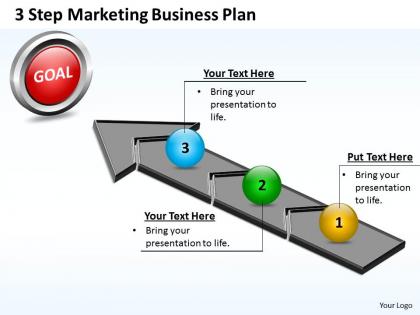
Business Powerpoint Templates 3 Step Marketing Plan Sales Ppt Slides




Try Before you Buy Download Free Sample Product
 Impress Your
 Audience
 100%
100% Editable
 Save Hours
 of Time


Illustrate your doctrine with our Business PowerPoint Templates 3 step marketing plan Sales PPT Slides. The word will spread far and wide.
People who downloaded this PowerPoint presentation also viewed the following :
Business Powerpoint Templates 3 Step Marketing Plan Sales Ppt Slides with all 5 slides:
Fearlessly bet on our Business PowerPoint Templates 3 step marketing plan Sales PPT Slides. Your ideas will triumph against all odds.

FAQs for Business Powerpoint Templates 3 Step Marketing Plan
You'll need the basics first: executive summary, target audience breakdown, and competitive analysis. Marketing objectives with actual measurable goals are crucial too. Budget and timeline sections - obvious but people skip them. Here's what trips everyone up though: metrics for tracking success. Most plans totally bomb on this part. Include positioning/messaging and your channel mix (social, email, paid stuff). Keep it specific enough to guide real decisions but flexible when things go sideways - which they will. Honestly, start simple and just adapt the template based on what actually moves the needle for your business.
Okay so basically you gotta rip out all that boring template stuff and put in how you actually talk. Like if you're chill and casual, don't use weird corporate language - it sounds terrible anyway. Swap their examples for your real selling points, use the social platforms where your people actually are (not just because the template says so), and change up that content calendar to match how often you actually post. Oh and honestly? Most of these templates are pretty robotic to begin with. Just keep the basic structure but make everything sound like you.
Look, research is what actually makes your marketing plan work instead of being a total shot in the dark. You need to figure out who's buying your stuff and why before you even think about templates. That data shows you if you need sections for different customer types or competitor breakdowns. Honestly, most people just grab some random template and wonder why their plan sucks. Do the research first - then you'll know which sections matter for YOUR business. Way better than copying what worked for someone else's completely different audience, you know?
Honestly, digital marketing templates are just way more numbers-focused than traditional ones. You've got sections for tracking CTR, conversions, social engagement - all that granular stuff you can't really measure with a TV ad, you know? Plus the timelines are completely different. Instead of being locked into some 6-month billboard contract, you can test something and pivot in like a week if it sucks. Budget-wise, you're splitting money between paid ads, content creation, and all these automation tools. Oh, and there's always sections for A/B testing different versions. Traditional marketing templates are more about planning one big campaign and hoping it works.
Don't just fill in the blanks like it's a worksheet - that's how you end up with boring copy that nobody cares about. Actually customize the messaging and goals to fit your specific situation. Budget assumptions in templates are usually way off too, so adjust for what you're actually working with. Here's the thing: competitive analysis seems tedious but it's where you find the best insights. I see people skip entire sections thinking they don't apply, which is a mistake. Oh, and don't launch with your first draft just because it looks "done." Take time to make it actually match your business reality.
Honestly, visuals save your butt in marketing presentations. Charts and graphs help people actually understand your data instead of zoning out during another text-heavy slideshow. I bombed my first pitch because everything was just paragraphs - never again! Timeline graphics work great for campaign schedules. Budget breakdowns look way cleaner as pie charts. Even basic color coding helps people track different projects without getting lost. The whole point is making it scannable so busy execs can grab the main ideas in like five minutes max. Trust me, they don't have patience for anything longer.
Look, you need both leading and lagging metrics - stuff like website traffic and social engagement to predict what's coming, plus conversion rates and customer lifetime value to see what actually happened. Cost per acquisition is huge too. I probably check my email open rates way too often but whatever, those early signals matter. Revenue by channel and marketing ROI will keep your boss happy since they show real business impact. Honestly though? Pick like 5-7 metrics tops or you'll go crazy analyzing everything. Monthly dashboard reviews work great for most teams.
Build those seasonal blocks right into your template from the start. Quarterly sections work great - you can drop in campaigns, product launches, budget shifts based on when your industry peaks. Christmas prep literally starts in October now, it's wild! Definitely pull in last year's data so you can actually see the patterns. Having that historical stuff makes planning way easier. Your template needs wiggle room to move resources around between busy and slow seasons. Trust me, you don't want to be figuring this out when Q4 chaos hits. Those seasonal placeholders will save you so much stress.
Tell a story with your data - connect tactics to goals and lead with ROI numbers. Visuals over text because reading slides is torture for everyone. Honestly, timing practice saved my ass more than once. Expect pushback on budget stuff. Executives want different metrics than your marketing team, so tailor accordingly. Oh and definitely bring backup slides with detailed breakdowns - there's always that one person who wants to dig into channel performance. The worst is when you're unprepared for those deep dives and just standing there like... yeah.
Honestly, just grab a free marketing template online - they're total lifesavers. Why reinvent the wheel when someone already mapped out competitor analysis, SWOT stuff, and campaign timelines? I've watched so many small biz owners burn hours on this when they could've just plugged their info into a proven framework. Don't use templates as-is though, that's rookie mistake territory. Customize the messaging for your actual customers and budget. Way better than paying some consultant hundreds of dollars for basically the same thing.
Honestly, templates are a lifesaver. You'll skip all that "staring at a blank page wondering where to start" nightmare. Without one, you're gonna forget stuff like competitive analysis or budget sections - happens every time. The structure just makes everything flow better, and if you're doing multiple campaigns, at least they'll look consistent. Sure, sometimes a template won't match your exact needs perfectly, but you can always mess with it. Way better than starting from zero. My old boss used to say blank documents are productivity killers, and she wasn't wrong. Just grab a decent template and make it yours.
Honestly, marketing templates are a game-changer for teams. No more of those awkward "wait, where are we with that campaign again?" meetings that drain everyone's soul. When you use the same template format, people actually know where to look for timelines, who's doing what, all that stuff. Plus everyone can see how their work connects to other people's tasks - which is huge. Oh and you won't have that nightmare scenario where someone's been working off last week's version while everyone else moved on. Just try it with your next campaign. The handoffs between teammates become so much cleaner, you'll wonder why you waited so long.
Okay so for your startup marketing plan, you'll want executive summary, target audience analysis, competitive landscape, and value proposition - the usual suspects. Marketing goals with KPIs are crucial, plus the 4 Ps breakdown and budget stuff. Timeline with milestones too. Digital marketing strategies are pretty much non-negotiable these days since that's where everyone lives online. Oh, and definitely throw in risk assessment because honestly? Nothing ever goes according to plan with startups. I learned that the hard way. Keep it simple at first, then tweak as you figure out what actually works for your industry.
Just throw social media into your promotional mix section - same place where you'd put advertising and PR stuff. Map each platform to your target audiences and connect them to actual goals like awareness or leads. Your timeline needs to include content calendars too (posting consistently is honestly half the battle). Most templates already have digital sections now, but if yours is old school, just beef up the communications part. Oh, and track ROI the same way you would for any other marketing channel - don't let it be this weird separate thing.
Honestly, I'd just start with HubSpot's free templates - they're built specifically for marketing stuff which is nice. Canva's another good free option if you want something prettier. Google Slides or even Google Docs work fine too (I've actually seen some really solid plans made in basic Docs, no joke). If your team needs more collaboration features, Monday.com and Asana are worth checking out. They're more interactive but might be overkill depending on what you need. Once you figure out what features actually matter to you, then maybe look at fancier tools like Smartsheet or Notion.
-
Top Quality presentations that are easily editable.
-
Best way of representation of the topic.