

Business Transition Inventory Management Dashboard Snapshot Ppt Infographic




Try Before you Buy Download Free Sample Product
 Impress Your
 Audience
 100%
100% Editable
 Save Hours
 of Time


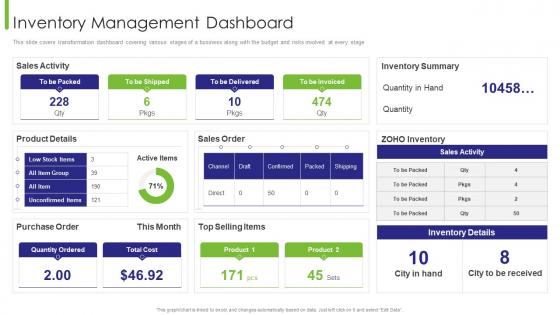
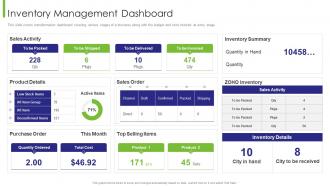
This slide covers transformation dashboard covering various stages of a business along with the budget and risks involved at every stage.
People who downloaded this PowerPoint presentation also viewed the following :
Business Transition Inventory Management Dashboard Snapshot Ppt Infographic with all 7 slides:
Use our Business Transition Inventory Management Dashboard Snapshot Ppt Infographic to effectively help you save your valuable time. They are readymade to fit into any presentation structure.





FAQs for Business Transition Inventory Management Dashboard
Honestly, start with the basics - inventory turnover, how often you're running out of stuff, and what it's costing to hold everything. Stock levels by category are obvious but still critical. Aging inventory reports will save your butt, plus reorder alerts and demand forecasting (though transitions always screw with normal patterns anyway). Don't forget supplier performance and unit cost trends since prices love to shift during transitions. The slow-moving inventory stuff is where you'll really feel the cash flow pain. These metrics should get you going, then you can add more detailed tracking once everything's humming along.
Dude, real-time data is a total lifesaver when everything's going sideways. You'll catch problems right when they happen instead of three weeks later when you're screwed. Transitions make people weird - they'll hoard toilet paper but completely ignore stuff they actually need. Live data lets you move inventory around fast and give customers real timelines instead of making stuff up. Oh, and pick your top three metrics to watch - you don't want to be that person refreshing dashboards every five minutes like it's social media. Trust me, it's way better than flying blind.
Look, the main thing is you actually get to interact with your data in real-time. Dashboards let you drill down into product lines and tweak reorder points instantly - way better than staring at some report from last month that tells you nothing useful. You'll get live alerts when stock hits critical levels, plus visual trends that actually help you decide stuff quickly. Oh and make sure it plays nice with whatever systems you're already using. Static reports are honestly just... meh. The good dashboards give you filters and even some predictive stuff, which is pretty sweet for transitions.
Dude, connecting supply chain data basically turns your dashboard into a crystal ball. You'll spot supplier delays and shipping issues way before they mess with your inventory. Honestly, it beats scrambling when you suddenly realize you're out of stock - been there, done that. The system can auto-adjust reorder points based on lead times and even recommend backup suppliers when your main ones are having issues. Real-time demand tracking helps too. I'd start with just your top 3 suppliers' data feeds. Trust me, your forecasting will get so much better almost immediately.
Think of user access control as your bouncer for the inventory system. Only certain people get to see sensitive stuff like pricing or supplier info, and you decide who can actually edit stock levels vs just browse around. Different permissions for different roles - kinda like how not everyone at work has keys to the supply closet, you know? Prevents people from accidentally screwing things up or seeing data they shouldn't. Oh, and don't forget to check who has access when people switch jobs or leave. That's when things usually get messy with permissions.
So basically you'd feed your dashboard historical sales data, seasonal stuff, maybe weather patterns if that affects your business. Machine learning algorithms will catch trends you probably missed. Here's the thing though - you need at least a year of clean data or it's pretty much useless. Garbage in, garbage out. Set up alerts when your forecasted demand doesn't match current stock levels. That way you can adjust orders before you end up drowning in inventory or scrambling to restock. Some systems get smarter over time which is cool. Just don't expect miracles right away.
Line charts are perfect for tracking inventory turnover over time - you'll catch seasonal patterns right away. Bar charts work well when you need to compare different product categories. But honestly? Heat maps are where it's at. They show everything at once - which products are flying off shelves versus collecting dust. The color coding makes it super obvious too. I'd start with a line chart to see your overall trends first, then dive deeper with bar charts for specific products. Oh, and don't forget to check if your data's clean before making any charts - learned that one the hard way.
Dude, mobile access is a game-changer during transitions when everyone's scattered. Your warehouse guy can update stock right from the floor instead of running back to a computer. Executives pull up reports while stuck in traffic (guilty as charged lol). Remote people don't get left out of the loop either. Just make sure the dashboard actually works on phones - not that garbage where you're zooming in constantly to read anything. Trust me, you'll get way faster decisions and fewer people saying "wait, what happened?" Short sentences hit different. Real-time updates keep everyone moving together.
Data migration is going to be a nightmare, honestly. Your team won't know what they're doing at first, and everything takes twice as long as planned. But seriously, get a dashboard running ASAP - it'll save your sanity. You can watch inventory levels across both systems and catch problems before they blow up. Makes training way easier too since people aren't constantly switching between platforms. I'd start tracking your key numbers daily from day one. Oh, and maybe stock up on coffee because the first few weeks are rough.
Honestly, skip the generic software demos - they're useless. Get your team working with actual scenarios they'll face daily, like updating stock counts or pulling reports. Have them practice on real data, not fake examples. Make some quick reference cards they can stick by their computers (trust me, people actually use those). Pick a couple tech-savvy people as your go-to troubleshooters when questions come up later. The trick is hands-on practice with their actual workflows. Oh, and schedule a check-in after a few weeks to fix whatever's still confusing people.
Honestly, get real-time data feeds hooked up if you can - manually updating stuff is a nightmare when things get crazy. Have someone do daily check-ins on the key numbers and flag anything weird. We totally screwed up once and missed a huge stock issue for three whole days! Set alerts for the critical stuff like low inventory or old stock sitting around. Your team needs to know who's responsible for what data and when it gets updated. Oh, and write down any changes you make - trust me on this one. Start simple with one good data source, then add more later.
Honestly, the trick is matching your dashboard to what actually matters in your industry. Retail folks need seasonal trends and turnover rates front and center. Manufacturing? They're all about real-time materials tracking and supply chain stuff. Healthcare's completely different - expiration dates, lot tracking, compliance headaches, you name it. Most platforms are pretty flexible - drag and drop widgets, set your own alerts, create different views for different people. I'd start simple though. Write down your biggest 5 inventory problems, then just build widgets that tackle those specific issues. Way easier than trying to track everything at once.
Dude, bad inventory data will absolutely wreck your business sale. You'll be making calls based on completely wrong numbers - like thinking you have way more stock than you actually do. The whole valuation gets messed up, and honestly? Buyers can smell that stuff from a mile away. They start getting suspicious during due diligence when things don't add up. Then you're stuck either overpromising what you can deliver or totally missing liabilities you didn't know about. Everything snowballs from there - pricing talks, timeline, the whole handover process. Run fresh reports weekly, trust me on this one.
So basically, inventory dashboards show you what's in stock right now and ping you when stuff hits your min/max levels. Super helpful during transitions when demand goes all over the place - honestly saved my butt more times than I can count. You can see trends building up over weeks too, which beats scrambling last minute. Set up alerts for your main products so you're not staring at spreadsheets all day. The visual charts make it way easier to spot problems before they blow up into actual issues.
Honestly, just go with Power BI or Tableau first - they're both solid for visualizations and play nice with most inventory systems. Your team more on the technical side? Grafana plus a good database setup works really well too. I've watched so many companies waste months building custom dashboards when off-the-shelf stuff would've worked fine. QuickBooks and NetSuite have decent built-in options if you're already using them anyway. Start with whatever connects easiest to your current setup. You can always get fancy later once you know what you actually need.
-
Unique design & color.
-
SlideTeam makes creating presentations easy. Unlimited products, premium quality designs and affordable.