


6173710 style cluster venn 2 piece powerpoint presentation diagram infographic slide





Try Before you Buy Download Free Sample Product
 Impress Your
 Audience
 100%
100% Editable
 Save Hours
 of Time


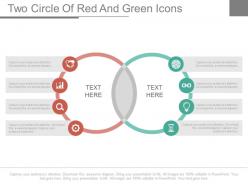
Are you looking for a PPT design to manage your revenue growth and monitor profit margins for profitability? So solve the same issue we present to you Venn diagram with Icons for Business PowerPoint Slides which can be used for checking the return on investment, increase the market share, to strengthen the financial resources and check the innovation, productivity plus physical resources for setting a good action plan. The PPT design helps to draft a good action plan, reduce the indecisiveness, set an energetic and optimistic approach to set short and long term common strategic objectives and improve service approach to customers and clients. The presentation layout helps to capitalize the physical facilities, follow deeply rooted financial and good marketing strategies for articulating the company’s goals and objectives so that actionable and disciplined approach is followed. If you are looking for a measurable, attainable, timely and specific, achieve mission and vision for strategic planning- then this PPT visual is the best for everyday use.Our Venn Diagram With Icons For Business Powerpoint Slides are designed for business conclaves. They develop good commercial bonds.
6173710 style cluster venn 2 piece powerpoint presentation diagram infographic slide with all 4 slides:
Out of ideas for your next presentation? With our thousands of Venn Diagram With Icons For Business Powerpoint Slides to choose from inspiration is at your fingertips.
FAQs for 6173710 style cluster venn 2 piece powerpoint presentation
Venn diagram icons are visual symbols representing overlapping circles that illustrate relationships, intersections, and shared characteristics between different business concepts, departments, or strategies. These icons enhance PowerPoint presentations by streamlining complex data visualization, improving audience comprehension through clear visual storytelling, and enabling professionals to demonstrate strategic alignments, market overlaps, and operational synergies, ultimately delivering more impactful presentations.
Venn diagrams showcase market segmentation by visually mapping overlapping customer characteristics, demographics, behaviors, and preferences across different target groups. Through strategic positioning of circles, businesses can identify niche opportunities, cross-selling potential, and underserved segments, with many retail and financial services companies finding that these visual representations streamline marketing strategy development and enhance stakeholder understanding.
Key elements include clear circle labels, strategic overlap zones, consistent color coding, readable fonts, and balanced proportions that highlight strategic intersections. These design components streamline complex business relationships by enhancing visual clarity, ensuring audience comprehension, and delivering professional credibility, with many corporate strategists finding that well-designed Venn diagrams significantly improve stakeholder engagement.
Venn diagram icons help visualize data overlap in competitive analysis by clearly displaying shared market segments, overlapping customer demographics, common product features, and intersecting strategic positions between competitors. These visual tools enable businesses to identify untapped market opportunities, assess competitive threats, and discover strategic partnerships, with many organizations finding that visual overlap analysis streamlines decision-making and reveals competitive advantages.
Microsoft PowerPoint's built-in SmartArt, Adobe Illustrator, Canva, Lucidchart, and Visio are optimal tools for creating custom Venn diagram icons. These platforms streamline icon development by offering vector-based editing, professional templates, and seamless PowerPoint integration, with many businesses finding that combining PowerPoint's native tools with external design software delivers enhanced visual consistency and scalable presentation assets.
Multiple Venn diagram icons prove more effective when comparing different market segments, analyzing various product portfolios, or presenting multi-departmental data simultaneously across organizations. This approach enables businesses to showcase parallel relationships, comparative analysis between different business units, and complex strategic overlaps, with many companies finding that separate diagrams enhance clarity while delivering comprehensive insights for stakeholder presentations.
Color schemes in Venn diagram icons significantly impact viewer engagement by enhancing visual hierarchy, improving information retention, and directing attention to key overlaps or distinctions. Strategic color combinations help audiences quickly identify relationships between business concepts, with many presenters finding that contrasting colors for separate circles and unified accent colors for intersections create clearer comprehension, while consistent brand-aligned palettes maintain professional credibility and strengthen message delivery.
Common mistakes include using overly complex designs, poor color contrast, cluttered text placement, inconsistent sizing, and misaligned circles that confuse relationships. These errors undermine clarity and professionalism, with many presenters finding that simplified icons, strategic white space, and consistent formatting across slides ultimately deliver stronger visual impact and enhanced audience comprehension.
Venn diagrams symbolize partnerships by visually representing overlapping areas where organizations share common goals, resources, capabilities, or market segments, while maintaining distinct individual strengths. In business presentations, these intersections effectively communicate strategic alliances, joint ventures, and collaborative frameworks, with companies like tech partnerships and healthcare coalitions using overlapping circles to demonstrate synergies, shared value creation, and competitive advantages that emerge from strategic collaboration.
Creative animation techniques for Venn diagram icons include sequential circle reveals, overlapping zone highlights, data-driven expansions, pulsing emphasis effects, and smooth transitional morphing between different states. These animations enhance audience engagement by guiding attention through complex relationships, emphasizing key intersections, and making abstract concepts more digestible, with many presenters finding that strategic timing ultimately delivers clearer comprehension and stronger retention.
Venn diagrams aid marketing presentations by visually illustrating where customer needs, market gaps, and product capabilities intersect, clearly highlighting unique value propositions and competitive advantages. Through overlapping circles, marketing teams can demonstrate differentiation strategies, identify untapped market segments, and showcase how their solutions address specific pain points that competitors cannot, ultimately delivering compelling narratives that resonate with stakeholders and drive strategic decision-making.
**INPUT**: What design principles should be followed to ensure Venn diagram icons remain clear and impactful? **OUTPUT**: Effective Venn diagram icons require consistent sizing, high contrast colors, readable typography, logical overlap positioning, and strategic whitespace management. These design principles enhance comprehension by minimizing visual clutter, emphasizing key intersections, and maintaining professional aesthetics, with many organizations finding that simplified color schemes and clear labeling ultimately deliver stronger audience engagement and message retention. [Word count: 54 words]
Tailoring Venn diagram presentations involves adjusting complexity, focus, and visual emphasis based on audience needs and decision-making roles. For executives, emphasize high-level strategic overlaps, simplified data points, and clear business implications, while team presentations can include detailed operational intersections, comprehensive datasets, and actionable implementation steps, with many organizations finding that audience-specific customization significantly enhances comprehension and engagement.
Simplicity enhances Venn diagram effectiveness by ensuring clear visual hierarchy, reducing cognitive load, and enabling quick comprehension of complex relationships between datasets or concepts. Through clean design elements and strategic color choices, organizations in sectors like consulting, financial services, and strategic planning streamline decision-making processes, ultimately delivering faster stakeholder alignment and more impactful presentations.
Venn diagram icons simplify complex relationships by visually organizing overlapping concepts, shared attributes, and distinct elements into clear, interconnected circles that audiences can instantly understand. These visual tools enhance presentations by transforming abstract business strategies, market analyses, and process workflows into digestible formats, with many organizations finding that stakeholders grasp multi-layered concepts significantly faster than traditional text-heavy explanations.
-
Excellent products for quick understanding.
-
It saves your time and decrease your efforts in half.