

Canvas for release train with vision statement




Try Before you Buy Download Free Sample Product
 Impress Your
Audience
 100%
Editable
 Save Hours
of Time


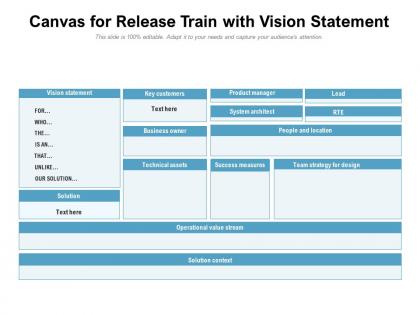
Launch your agile release train by employing Canvas For Release Train With Vision Statement slideshow. Give your audience information about the agile release train and its benefits with the help of our readily available ART PPT visual. You can also depict ways to foster accountability on agile release trains by utilizing this PPT template. Provide information on multiple agile trains by taking the advantage of agile rollouts PPT theme. Take the assistance of our professionally designed the scaled agile framework PPT theme to mention the steps in value stream mapping. Discuss the benefits of a cross-functional agile team with your teammates by using this easy-to-use PPT template. Describe the approach of aligning the vision, planning, and interdependencies of many teams by providing cross-team synchronization. Steps to launch an agile release train can also be depicted by downloading our visual attention-grabbing agile release train PPT infographic. Download and create a stunning presentation by incorporating this PPT slideshow.
People who downloaded this PowerPoint presentation also viewed the following :
Canvas for release train with vision statement with all 2 slides:
Use our Canvas For Release Train With Vision Statement to effectively help you save your valuable time. They are readymade to fit into any presentation structure.


FAQs for Canvas for release train
So the Release Train Canvas is basically your big picture planning tool for Agile Release Trains. It helps you map out what features you're shipping over the next few program increments while keeping multiple teams aligned on shared goals. Pretty much like a detailed project roadmap, but way more collaborative than those boring traditional planning docs. Dependencies become super visible, which honestly saves you from so many headaches later. During PI planning sessions, gather your key stakeholders and use it to connect how different teams' work fits together. Everyone stays on the same page about priorities and timelines - it's actually kind of magical when it clicks.
Okay so basically the Release Train Canvas puts everyone on the same page - literally. All your teams can see dependencies, timelines, and blockers in one spot instead of juggling scattered conversations across different tools. Product owners, devs, stakeholders - they're all looking at the same visual workspace. Makes it way easier to spot when Team A's delay screws up Team B's sprint. Honestly, pointing to something concrete beats talking in circles every time. Try it for your next PI planning - decisions happen so much faster when people actually see the big picture laid out.
So a Release Train Canvas basically covers your program vision and main objectives first. Then you map out stakeholders, major features/epics, and team dependencies. Timeline and milestones are obvious ones. Success metrics too - though honestly, good luck getting everyone to agree on what "success" even means lol. Don't skip the team structure and capacity stuff either. Start with vision, then work through everything else piece by piece. The whole thing's just about getting everyone on the same page about what you're building and when it'll actually ship.
Honestly, drawing out your Release Train is a game changer - it gets everyone looking at the same picture instead of arguing past each other. Those endless planning meetings where nobody's aligned? Visual boards cut through all that chaos. Your BA can actually see how their late requirements mess up the dev team's sprint later on. Can't really hide problems when they're staring at you from the wall either. I'd start small - just map your next release visually and see how much smoother your standups get. Makes abstract stuff suddenly click for people.
So the Release Train Canvas is basically this visual map that keeps everyone aligned - product owners, devs, business folks, all of them. Maps out your PI goals, features, dependencies, risks in one spot. Honestly, it's pretty clever since those planning meetings usually turn into chaos anyway. Use it when you're doing cross-team discussions to keep priorities straight. Next PI planning, build one with your stakeholders - I bet you'll catch misalignments way faster. Gets everyone moving in the same direction instead of... well, whatever direction they were going before.
Update it every PI planning cycle - so like every 8-12 weeks. Though honestly? Don't wait that long if major stuff changes. Scope shifts, new dependencies, priority changes - update it then. I've watched teams ignore theirs for months and then act shocked when nobody knows what's happening. Make someone the owner who actually keeps it current between the big planning sessions. Oh, and treat it like it's alive, not some dusty document you made once. Short version: keep it real or it becomes useless pretty fast.
Honestly, the two big headaches you'll hit are people freaking out about transparency and all those messy cross-team dependencies. When everyone can suddenly see your work, it makes folks nervous - which makes sense. I'd start with maybe 2-3 teams first to get your feet wet. Make sure your Product Owners actually agree on what matters before you even think about the canvas session. Dependencies are gonna pop up everywhere (terrifying but helpful!). Have someone ready to escalate issues and maybe throw together a dependency board. Oh, and your Release Train Engineer better be decent at running meetings. First few tries? Just learning experiences, not perfection.
So the Release Train Canvas basically gives you this visual map of your whole value stream - you can spot bottlenecks and dependencies super quickly instead of sitting through boring status meetings (which honestly nobody wants). During PI planning and retros, use it to find what's broken and track how things change over time. It's pretty great for seeing patterns across iterations too. Teams can coordinate their improvement stuff way easier when everyone's looking at the same canvas. Next retro, just map out what's actually killing your velocity - you'll be surprised what jumps out at you.
So the Release Train Canvas is basically a visual board where you map out milestones, dependencies, and what you're shipping. Way better than boring Gantt charts, trust me. Update it during sprint reviews or PI planning - makes spotting blockers super easy. Different colored stickers for achievements are clutch. When you hit big milestones, do little celebration ceremonies (sounds cheesy but works). The key is keeping it visible and making updates part of your regular routine. Stakeholders actually pay attention when they can see everything laid out visually instead of buried in some document.
You'll want to focus on delivery predictability first - hitting your planned dates and scope. Velocity trends across sprints matter too. Defect rates escaping to production are huge (honestly this one can make or break you). Feature adoption tells you if customers actually want what you're shipping, which sounds obvious but teams miss this all the time. Team health stuff like sprint goals met and how fast you clear blockers. Time from idea to customer hands is probably your best overall measure. Don't go crazy though - pick 3 or 4 that actually match what you're trying to achieve.
So the Release Train Canvas plays really nicely with whatever you're already using - Jira, Azure DevOps, all that stuff. Just pulls data straight from there. Works on top of SAFe, Scrum@Scale, or honestly even if you're just running regular Scrum teams that need to coordinate. What's cool is it surfaces all those dependencies and timelines that usually get buried in your backlog tools. You can actually see how your epics connect across teams and get everyone aligned on the same release targets. I'd start by hooking it up to your main planning tool first. Don't go crazy with integrations right away - let your teams get used to it, then add more connections later.
Definitely customize that thing - generic templates are pretty useless tbh. Your team probably has weird constraints that standard versions totally ignore, like hardware delays or compliance stuff. I'd start by figuring out what makes your delivery process different from everyone else's. Then tweak those specific sections first. People actually engage with tools that feel like they were made for them. Short sentences work. The customization helps you spot real blockers instead of just theoretical problems that may never happen. Way more relevant when it matches your actual work situation.
So here's the thing with Release Train Canvas - it's actually perfect for hybrid work. You can throw both your agile sprints and waterfall phases on one timeline, which honestly makes everything way clearer. I've seen teams struggle with this combo before. Plot your big waterfall gates first, then add your sprint cycles on top. The visual really helps you spot where things might crash into each other - like when your dev team's moving fast but there's some regulatory deadline that won't budge. Bird's eye view thing really works here.
First thing - grab your product owners, scrum masters, and main stakeholders from each team. Don't let these drag on forever though, cap it at 90 minutes or people's brains shut off. I always start with the "why" before jumping into features and timelines. Gets everyone actually aligned on what you're trying to accomplish. Make it visual with sticky notes so people can move stuff around - that's when teams suddenly spot dependencies they had no clue about. Honestly, that moment alone makes the whole session worth it. Just make sure you walk away with clear owners for each epic, otherwise you've just created really expensive wall decoration.
So the Release Train Canvas is basically this visual tool that helps when you've got multiple Agile teams that need to work together. Without it, teams just do their own thing and everything gets chaotic - dependencies become a nightmare. It maps out how all the teams connect and what they're actually delivering. Leadership loves it because they can see the whole picture instead of getting lost in every team's sprint details. Plus teams communicate way better about timelines. I'd say start by looking at your current setup and figure out where things are falling through the cracks. Makes coordination so much easier.
No Reviews