

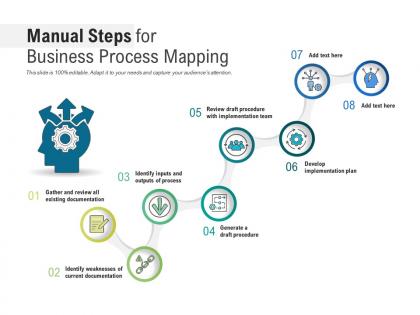
Manual steps for business process mapping




Try Before you Buy Download Free Sample Product
 Impress Your
 Audience
 100%
100% Editable
 Save Hours
 of Time


Our Manual Steps For Business Process Mapping are topically designed to provide an attractive backdrop to any subject. Use them to look like a presentation pro.
People who downloaded this PowerPoint presentation also viewed the following :
Manual steps for business process mapping with all 2 slides:
Use our Manual Steps For Business Process Mapping to effectively help you save your valuable time. They are readymade to fit into any presentation structure.
FAQs for Manual steps for
Honestly, process mapping is a game changer - you'll find so much waste you didn't even know existed. Bottlenecks become obvious. Same with redundant steps that nobody questioned before. New hires pick things up faster too since everything's actually written down somewhere (revolutionary concept, right?). Plus you can spot which tasks could be automated instead of done manually forever. The visual part helps people see how their role fits into everything else. Oh, and compliance gets way easier when processes are documented. Start with whatever's driving you crazy first - that's where you'll see results fastest.
Honestly, mapping out your processes is a game changer. You get to see your whole workflow laid out visually, and bottlenecks just jump out at you. Like, you'll finally spot where tasks are getting stuck or taking way too long. Those handoffs between departments that always felt clunky? Now you can actually see why they're broken. I swear, it's like putting on glasses for the first time - suddenly all those frustrating slowdowns make sense. You'll catch redundant steps, endless approval chains, or that one person who's accidentally become the hold-up for everything. Makes prioritizing fixes so much simpler.
Honestly, most people just go with Microsoft Visio, Lucidchart, or Draw.io for flowcharts. Lucidchart's probably your best bet if you're new to this - super easy to use and has decent templates. For team brainstorming sessions, Miro and Mural are solid choices. They're perfect when you need everyone throwing ideas around together. There's also Bizagi if you get into really complex stuff later, but that's probably overkill right now. My old manager was obsessed with Swimlane diagrams for some reason. But seriously, don't stress too much about which one - just pick something your team will actually stick with.
Honestly, process mapping is a game changer for team confusion. When everyone's arguing about workflows, having that visual stops the back-and-forth instantly. People can point to the exact spot where things break down instead of talking past each other. I've seen teams waste hours because Sarah thinks handoffs work one way while Mike's doing something completely different. Sketching it out together during kickoffs—even on a whiteboard—makes everything click. Those "oh wait, THAT'S what you meant" moments happen right away. It's like finally speaking the same language after months of miscommunication.
First thing - figure out what problem you're actually trying to solve with this map. Pick one process, not your whole business (learned that the hard way). The people doing the work every day? Talk to them. They'll tell you where things actually break down, not where you think they do. Stick with standard symbols so it's not some weird puzzle only you understand. Don't get crazy with details - major steps and key decisions are enough. Oh, and definitely run it by everyone involved before you call it done. You'll need to update it later when things inevitably change anyway.
Process mapping is honestly a game-changer for compliance stuff. You'll see exactly where things can go wrong before they actually do. Map out each step and you can spot where regulations need to fit in - plus it makes audits way less stressful since everything's documented. Think of it like having a cheat sheet for staying compliant. Oh, and everyone follows the same steps instead of doing their own thing. I'd start with whatever processes scare you most from a risk perspective. That's where you'll feel the difference right away.
You can't map processes accurately without talking to the people actually doing the work - trust me on this one. Leadership always thinks they know how things work, but they're usually way off. Interview everyone who touches that workflow: process owners, end users, the whole crew. They'll tell you about all the workarounds and pain points you'd never discover otherwise. Getting them involved early also means they won't fight your recommendations later. Honestly, it's like trying to write a recipe without tasting the food. Map out your key players first and schedule those conversations before you even think about opening any software.
Flowcharts are honestly a game-changer for making sense of messy processes. You can spot bottlenecks and weird redundancies way faster than digging through some boring manual. New team members get up to speed quicker too. The thing is, people's brains just process visuals differently - you'll notice problems that would totally fly under the radar in written docs. I always tell people to start super basic with boxes and arrows. Don't overthink it or get caught up in fancy tools. Even something sketched on a whiteboard beats trying to explain everything verbally.
Honestly, once a year is the absolute minimum - but that's cutting it close if you ask me. Growing fast or dealing with constant reg changes? Check them quarterly, maybe even after big team shakeups. I've watched so many people waste time following maps that are completely out of date. Super frustrating. Set calendar reminders and make someone actually own this stuff, otherwise it'll never happen. Oh, and start with your most critical processes first - don't try to update everything at once.
Honestly, the two biggest things I see teams mess up: going way too granular right off the bat, and only talking to managers about how stuff actually works. Don't document every tiny step initially - I've literally seen people spend months on this and accomplish nothing. Go high-level first, then zoom in where it matters. And definitely talk to the people actually doing the work, not just their bosses. Those frontline folks know all the weird workarounds and shortcuts that management has no clue about. Start simple, then fix it based on what people tell you. Way easier than trying to be perfect from day one.
Honestly, process maps are game-changers for new hires. You know how overwhelming those first weeks can be? These visual diagrams show exactly how work moves through your team instead of making people wade through boring manuals. New employees can actually see where they fit in and what depends on what. Way better than trying to explain everything verbally - I learned that the hard way with my last hire who kept getting lost in our approval process. They'll have fewer "okay but what's next?" moments too. Start with whatever processes you deal with most often.
So basically, mapping out your processes shows you exactly what's happening step-by-step, which makes all the problems super obvious. Bottlenecks just jump out at you. Same with redundant steps you didn't even realize were there. I always think it's wild how much clearer things get when you actually draw them out - like suddenly you can see why Sarah from accounting is always swamped while Tom sits around. After you make changes, update your maps so you'll know if the fixes actually helped or if you need to try again. Don't just make them once though, keep updating them regularly.
Lean works great with process mapping - you can spot waste and bottlenecks super easily. Six Sigma's another good one since you need those mapped processes to track where things go wrong. Honestly, even basic PDCA cycles help guide your improvements. Agile's solid too (yeah, I know it's usually for software teams, but whatever). The thing is, mapping gives you that visual baseline first. Then you just pick whichever method fits what you're trying to fix. I'd say start with the mapping, then worry about methodology later.
Think of process maps as your GPS for going digital. Map out how things actually work right now - not how they're supposed to work, but the messy reality. You'll spot so many bottlenecks and manual tasks that are just burning time (seriously, it's almost depressing how inefficient we all are). Once you see the problems clearly, that's when you know where to throw technology at it. Don't try to fix everything at once though. Pick whatever process is driving everyone crazy and start there.
So here's the deal - high-level maps are great for showing executives the big picture stuff without drowning them in every tiny detail. When you need to train someone or hunt down exactly where things get stuck though? That's when you go deep with the detailed versions. Honestly, I'd start high-level first to get everyone on board, then build out the nitty-gritty maps for your actual team. Way less back-and-forth that way. Oh, and those bottlenecks you're looking for? They're always hiding in the weeds somewhere.
-
Amazing product with appealing content and design.
-
Unique and attractive product design.
-
Innovative and attractive designs.
-
Great designs, Easily Editable.
-
Really like the color and design of the presentation.
-
The Designed Graphic are very professional and classic.
-
Graphics are very appealing to eyes.
-
Awesome presentation, really professional and easy to edit.
-
Visually stunning presentation, love the content.
-
Unique design & color.