

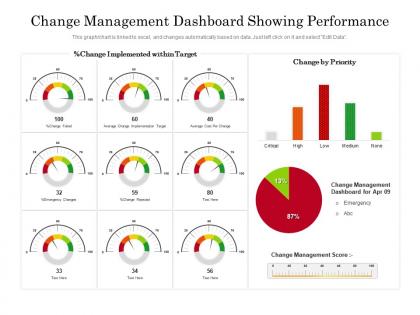
Change management dashboard showing performance




Try Before you Buy Download Free Sample Product
 Impress Your
 Audience
 100%
100% Editable
 Save Hours
 of Time


Our Change Management Dashboard Showing Performance are topically designed to provide an attractive backdrop to any subject. Use them to look like a presentation pro.
People who downloaded this PowerPoint presentation also viewed the following :
Change management dashboard showing performance with all 2 slides:
Use our Change Management Dashboard Showing Performance to effectively help you save your valuable time. They are readymade to fit into any presentation structure.
FAQs for Change management
Track adoption rates and resistance levels first - those are your bread and butter. Employee sentiment is honestly way more revealing than the numbers sometimes. You'll also want training completion rates and how well you're sticking to timelines. Communication engagement matters too (are people actually reading your updates?). Productivity dips during transitions are normal, just measure them. Oh, and do those red/yellow/green status things for each big initiative - super simple but executives love that stuff. Start with maybe 5-6 metrics max or you'll drown in data. Department readiness varies like crazy, so track that separately.
Dude, your brain just eats up visuals way faster than boring spreadsheet rows. Heat maps will show you exactly where all the chaos is happening. Timeline charts? They're clutch for seeing how everything connects. I swear, once stakeholders see a clean before/after comparison, they actually get it - no more endless explanations needed. The trick is matching your chart type to your audience though. Start simple with one chart that nails the main point, then you can always add more details if people want to dig deeper. Trust me, it beats death by PowerPoint bullet points.
Honestly, you've gotta talk to everyone who'll actually use this thing before you build it. Managers, team leads, executives - find out what numbers they care about and how they want to see them. I can't tell you how many dashboards I've seen that just sit there collecting digital dust because nobody bothered asking users what they needed. Interview people first about their pain points. What decisions are they trying to make? Then build it step by step with regular check-ins. The whole point is solving their real problems, not the ones you assume they have. Trust me on this one.
Honestly, automate everything you can - manual updates will kill you. Connect your dashboard straight to the source systems (project management, HR, whatever you're tracking) so data just flows in automatically. We learned this the hard way when our team was constantly behind on updates... such a mess. Set up validation rules too, plus alerts for when numbers seem weird or data stops refreshing. Short sentences work here. The biggest thing though? Make someone actually responsible for accuracy. Don't just cross your fingers and hope it works out.
Honestly, data integration is going to be your biggest pain. Different systems just don't talk to each other well - tons of API headaches and mapping issues. Legacy stuff is the worst for this. Teams will probably push back too since nobody likes changing their workflow. Oh, and dealing with different data formats is such a mess, especially when you need real-time syncing. Security gets tricky when you're connecting everything together. My advice? Start with just one or two key integrations first. Way easier to troubleshoot that way, then you can add more once you've figured out what works.
Honestly, just give each group what they actually care about. Execs want the big picture stuff - ROI numbers, overall progress percentages. Middle managers need the nitty-gritty like training stats and who's adopting what. Front-line people? They literally just want to know "what changes for me and when." Map out your stakeholders first and figure out their specific headaches. The more you tailor it, the better your chances people won't ignore it like every other corporate dashboard that gets rolled out. Nobody wants to dig through irrelevant metrics to find their two useful numbers, you know?
Honestly, I'd go with daily updates if things are moving fast, but weekly works too. Pull from sources you actually trust and double-check those numbers - nothing worse than wrong data floating around. Give specific people ownership over different pieces so stuff doesn't get forgotten. Clean visuals are your friend, and ditch old projects ASAP. Oh, and set up some kind of alert system for when things go sideways or deadlines get missed. The trick is making it routine instead of scrambling last minute. Maybe block out like 30 minutes Monday mornings? That usually works pretty well for most teams I've seen.
Track your past change data first - success rates, delays, which departments always push back. Then hook up some ML models to spot patterns and predict what's coming. Short bursts work better than long sentences here. Your dashboard can flag risky projects before they blow up the budget. I'd set alerts when risk scores get sketchy, maybe around 70%? The visual stuff matters too - show probability ranges so people actually trust the numbers. Honestly feels like cheating once you see which changes will tank before they even start.
Interactive stuff is where it's at - clickable charts, drill-downs, letting people customize what they see. Real-time notifications help too, those little pop-ups when milestones get hit. Progress bars sound stupid but honestly they work. People love seeing that completion percentage go up. Oh and make sure navigation doesn't suck because there's nothing worse than users getting lost trying to find their data. I'd probably start with interactive charts first since that's usually the easiest thing to implement and gives you the biggest bang for your buck.
Honestly, less is more here. Pick maybe 3-5 metrics that actually matter - change readiness, adoption rates, resistance levels. I've seen dashboards that look like airplane cockpits and they're completely useless. Keep your main view super clean, then let people drill down if they want details. Color-coding is clutch for quick scanning. Here's the real test though - can a busy executive look at it for 5 seconds and know if you're winning or losing? If they're confused or asking questions about what stuff means, you've overcomplicated it. Simple beats comprehensive every time.
Honestly, I'd start with Power BI or Tableau - they're super flexible for tracking adoption rates and resistance metrics. ServiceNow's solid too if you're already using it for IT stuff since the change workflows are built right in. Monday.com and Asana work well for basic tracking, though the analytics aren't as strong. We tried Smartsheet at my last job and it was decent. The real trick is picking something your team will actually open and use. Also make sure it plays nice with whatever data sources you've got. I'd definitely pilot a small dashboard first to figure out which metrics actually matter before committing to anything big.
Heat maps are honestly your best bet - way better than those boring spreadsheets everyone ignores. Color code departments from green to red based on impact levels. Risk matrices are solid too, plotting probability against how severe the impact might be. For stakeholders, chart out who's affected and how much influence they actually have (some people think they matter more than they do, lol). Timeline views help track changes as they roll out. Oh, and don't try to do everything at once - pick whatever's causing you the biggest headache first, then expand from there.
Honestly, the worst thing you can do is cram like 20 metrics on one screen. I've seen those dashboards - they're completely useless because nobody knows what actually matters. Don't fall for vanity metrics either - they look cool but won't help you make real decisions. Also make sure your data isn't garbage, obviously. Pick maybe 5-7 metrics max that actually connect to whether your change is working. Keep it super simple and test with real users first. Oh, and those fancy executive dashboards with every possible KPI? Total waste of time.
Honestly, mobile access is a game changer for change management. Your team can submit requests from literally anywhere instead of waiting to get back to their desks - cuts down on so much email back and forth. You'll catch urgent stuff that needs approval right away, even if you're stuck in meetings all day. The dashboard thing is pretty clutch too - you can quickly check what's happening during those weird 5-minute gaps between calls. Oh, and definitely set up alerts for the high-priority changes. Trust me, you don't want to be that person who missed something critical because you were traveling or whatever.
So basically you'll have one place where everyone can see what's going on during changes. Real-time progress tracking, spotting which teams aren't adapting well, catching communication issues early - all that good stuff. Honestly, managing different stakeholder groups is such a headache otherwise. Each group gets customized views too, so executives see their big picture numbers while managers get the nitty-gritty details they care about. Start by figuring out what info people keep bugging you for. That's your foundation right there.
-
Very unique and reliable designs.
-
Helpful product design for delivering presentation.