

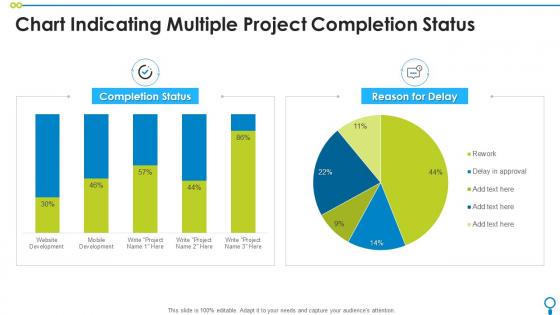
Chart Indicating Multiple Project Completion Status




Try Before you Buy Download Free Sample Product
 Impress Your
 Audience
 100%
100% Editable
 Save Hours
 of Time


Our Chart Indicating Multiple Project Completion Status are topically designed to provide an attractive backdrop to any subject. Use them to look like a presentation pro.
People who downloaded this PowerPoint presentation also viewed the following :
Chart Indicating Multiple Project Completion Status with all 7 slides:
Use our Chart Indicating Multiple Project Completion Status to effectively help you save your valuable time. They are readymade to fit into any presentation structure.





FAQs for Chart Indicating Multiple
Definitely include your project phase, key milestones with dates, and overall progress percentage. Budget status is huge too - stakeholders always want that. I'd add who's responsible for what because it keeps everyone honest. Color coding works great for showing timeline health at a glance. Oh, and don't go overboard with details - nobody has time for that. The best ones tell the whole story in like 30 seconds max. Update it weekly though, otherwise people stop trusting it. Trust me, consistency is what makes these actually useful for decisions.
Traffic light colors are your best friend here - green for on track, yellow for at risk, red for behind. Most people get it instantly. I always throw in little icons too, like checkmarks or warning triangles, because honestly they make everything so much clearer. Just stay consistent with whatever scheme you pick. Don't switch up colors halfway through or your team will get confused. Oh, and stick with the same system for future updates too - saves everyone from having to relearn your chart every time.
Honestly? I'd start with whatever your team already uses. Excel and Google Sheets are my go-to for quick status charts - everyone knows them and they're right there. Microsoft Project and Smartsheet are solid if you need the full project management thing built in. Asana, Monday.com, and Trello have decent reporting too, plus people actually like using them (unlike some tools I won't name). PowerBI or Tableau are overkill unless you're presenting to executives who care about fancy dashboards. Oh, and don't overthink it - a simple chart that gets updated beats a complex one that doesn't.
Honestly? I'd go with weekly updates as your baseline. Daily works too if things are moving super fast, but weekly hits that sweet spot where people stay in the loop without getting annoyed. Trust me, flood someone's inbox with constant pings and they'll start ignoring you entirely. Just pick whatever schedule makes sense and actually stick to it - that's the real trick. Oh, but if something big breaks or you hit a major milestone, don't wait around for your next scheduled update. Send that info right away so nobody gets caught off guard.
Track percentage complete AND actual deliverables finished - seriously, those numbers can be wildly different sometimes. Budget burn rate matters too, plus timeline variance (ahead or behind?). Don't miss blockers and risks that could torpedo everything. Stakeholder sign-offs are huge - I've watched projects hit 90% and then just... sit there waiting for approvals forever. Resource utilization is critical if you're sharing people across multiple projects. The big thing? Make sure your "percent complete" means work that's actually done and accepted, not just started. That's where people mess up.
Honestly, status charts are game-changers for keeping everyone on the same page without drowning people in massive email updates. You can show what's done, what's stuck, and what's next - super clean. Those endless "quick" status meetings? Way shorter now. Green/yellow/red dots for each piece work great to start with (I learned this the hard way after trying fancy charts nobody understood). People actually pay attention when they can see everything visually instead of listening to you ramble through a list. Plus you'll catch problems way earlier when it's all laid out like that.
Honestly, keep it stupid simple - too many colors and categories just make people's eyes glaze over. Skip the vague stuff like "in progress" because that tells you literally nothing useful. I'd go with specific statuses and throw in completion percentages or actual dates so people know where things really stand. Update it regularly too (I've seen way too many charts showing data from like March). Stick to maybe 3-5 key metrics tops. The whole point is giving stakeholders what they need without making them work for it, you know?
Honestly, just make different versions for different people. Executives want the big picture stuff - milestones, budget, timeline. Your team needs all the nitty-gritty details like task progress and what's blocking them. Stakeholders fall somewhere in the middle - they care about deliverables that actually impact them. I learned this the hard way after boring a room full of VPs with task-level details (whoops). Switch up your colors and timeframes too. Maybe create 2-3 versions and just pull out whichever one fits your audience. Trust me, one-size-fits-all charts don't work.
So basically, status charts are narrow - they track one thing like timeline or milestones. Dashboards pull everything together though. Way more comprehensive. Honestly? Dashboards win for meetings since stakeholders see the whole picture at once. Budget, timeline, risks - it's all there. But if you need to dig into specifics, charts are better for that focused view. Really depends on who you're presenting to and what they need to decide on. I've found execs love dashboards but project managers often prefer drilling down with individual charts.
Just throw in a risk column or use color coding next to your regular updates. Traffic light system works great - red, yellow, green for high, medium, low risk. Pretty straightforward. Add a quick note about what the risk actually is or how you're handling it. I've seen people go overboard with complicated risk matrices and stuff, but honestly? Simple visual stuff is way better for quick reviews. Oh, and make sure your team actually updates the risk levels when they update everything else - otherwise you're just staring at old info that won't help anyone.
Honestly, visual charts are a game changer for project updates. Colors, progress bars, those red/yellow/green lights - they make everything so much clearer than endless spreadsheet rows. People actually pay attention instead of glazing over during meetings (which happens way too often with boring status reports). Your team can spot issues instantly without hunting through data. Simple tip though - stick with consistent colors and add clear legends. Otherwise you'll spend half your time explaining what everything means. Visual storytelling beats text dumps every single time.
Dude, those old project charts are actually super useful for future planning. I used to be ridiculously optimistic with timelines - like, embarrassingly so. But now I dig through past projects to see where things always go sideways. Maybe your design phase consistently runs long, or Steve from accounting always creates bottlenecks (there's always a Steve, right?). External stuff derails projects too - client changes, vendor delays, whatever. Once you spot these patterns, you can build way more realistic budgets and timelines. Plus you'll know exactly where to plan backup options.
Honestly, just pick a couple charts that your team will actually use. Burndown charts are solid for tracking sprint progress - they show if you're behind super quickly. Kanban boards help with work limits too. I'd also throw in velocity trends since they're useful for planning future sprints. Update them during standups or sprint reviews, but don't go overboard creating some massive dashboard that nobody checks. We tried that once and it was a waste of time. Keep it simple - focus on what helps you make actual decisions about user stories and sprint goals.
Honestly, less is more with these things. Start with the big stuff right at the top - timeline, major milestones, anything that's totally screwed. People need to get it in 10 seconds before you lose them. I'd stick with simple colors like green/yellow/red and don't jam a novel onto each slide. Walk through where you're at now, what's next, then hit any roadblocks. Oh and here's the key part - always come with 2-3 actual questions you need answered. Nobody wants another status update just because it's Tuesday.
Your project charts are only as good as the feedback you get on them, honestly. Ask your team monthly what's actually helpful and what's just chart clutter. They'll spot stuff you'd never notice - like confusing colors or metrics that don't matter to anyone. Most people have solid ideas about better ways to show the data too. I learned this the hard way when I realized nobody understood my fancy traffic light system lol. Quick check-ins work best. Don't overthink it - just make the charts work for them, not against them.
-
Perfect template with attractive color combination.
-
Understandable and informative presentation.