

ChatGPT Integration Into Web Applications IT Powerpoint Presentation Slides





Try Before you Buy Download Free Sample Product
 Impress Your
Audience
 100%
Editable
 Save Hours
of Time


ChatGPT multitasks by picking up on and naturally expressing more than one aim at a time. Grab our professionally curated ChatGPT integration into web applications IT template. It includes an introduction, advantages, and features of OpenAIs ChatGPT model and discusses the price and availability of its enhanced version, called ChatGPT Pro. Our ChatGPT deck represents the working and architecture of ChatGPT technology, including a large language model and self-attention mechanism. Additionally, it demonstrates the various applications of ChatGPT in several domains, such as education, medicine, research, information technology, advertisement, banking, finance, etc. Our chatbot using GPT-3 PowerPoint presentation represents the three reinforcement learning from human feedback models supervised fine-tuning, reward, and reinforcement learning. Furthermore, it discusses integrating the ChatGPT model into web applications and best practices for successful deployment. Moreover, our ChatGPT integration into the web applications module contains sections about the impact of ChatGPT on social media and artificial intelligence tokens. Lastly, this chatbot using GPT-3 deck comprises a roadmap, a timeline, a 30-60-90 days plan, a checklist to integrate OpenAIs GPT-3 model into web applications and a case study on mental health and ChatGPT collaboration. Get access now.
People who downloaded this PowerPoint presentation also viewed the following :
Content of this Powerpoint Presentation
Slide 1: This slide introduces ChatGPT integration into web applications (IT). Commence by stating Your Company Name.
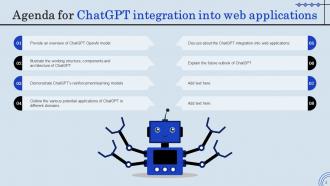
Slide 2: This slide depicts the Agenda of the presentation.
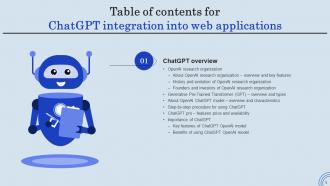
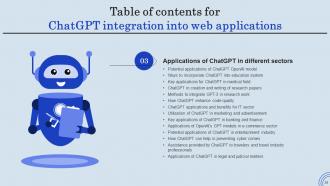
Slide 3: This slide incorporates the Table of contents.
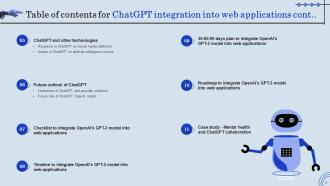
Slide 4: This is yet another slide continuing the Table of contents.
Slide 5: This slide highlights the Title for the Topics to be discussed further.
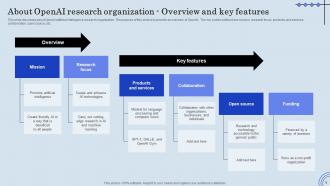
Slide 6: This slide discusses about OpenAI artificial intelligence research organization.
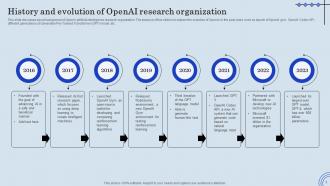
Slide 7: This slide showcases the History and evolution of OpenAI research organization.
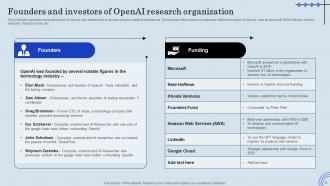
Slide 8: This slide talks about the several founders of OpenAI who initiated this to develop advance artificial intelligence.
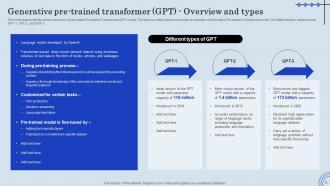
Slide 9: This slide represents the various versions of Generative Pre-trained Transformer(GPT) model.
Slide 10: This slide mentions the overview of OpenAI’s ChatGPT model.
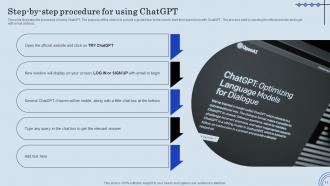
Slide 11: This slide illustrates the procedure of using ChatGPT.
Slide 12: This slide represents the overview of ChatGPT pro.
Slide 13: This slide outlines the various advantages of utilizing ChatGPT.
Slide 14: This slide indicates the Heading for the Components to be covered in the forth-coming template.
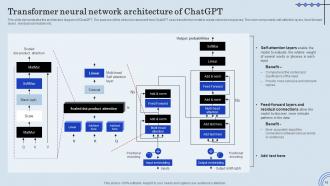
Slide 15: This slide demonstrates the architecture diagram of ChatGPT.
Slide 16: This slide highlights the Key components of ChatGPT OpenAI model.
Slide 17: This slide portrays the Working process of ChatGPT OpenAI model.
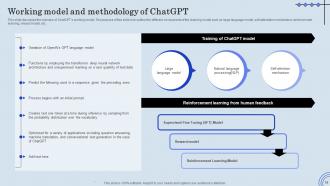
Slide 18: This slide discusses the overview of ChatGPT’s working model.
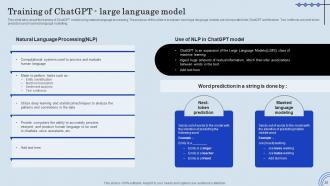
Slide 19: This slide talks about the training of ChatGPT model using natural language processing.
Slide 20: This slide demonstrates the working procedure of self-attention mechanism used by ChatGPT model to provide precise output to the user.
Slide 21: This slide represents the supervised fine tuning model of reinforcement learning.
Slide 22: This slide showcases the reward model of reinforcement learning using human feedback.
Slide 23: This slide highlights the reinforcement learning model using human feedback.
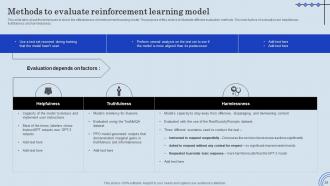
Slide 24: This slide talks about the techniques to check the effectiveness of reinforcement learning model.
Slide 25: This slide depicts the Title for the Ideas to be discussed further.
Slide 26: This slide discusses the several functions of ChatGPT.
Slide 27: This slide demonstrates the various methods of utilizing ChatGPT in classrooms.
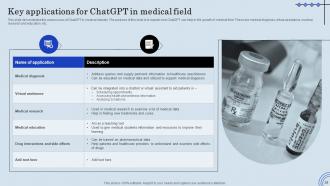
Slide 28: This slide showcases the various uses of ChatGPT in medical industry.
Slide 29: This slide represents the various applications of ChatGPT in creating research papers.
Slide 30: This slide discusses the ways of integrating GPT-3 into research.
Slide 31: This slide explains the characteristics of ChatGPT which helps to amplify the quality of code.
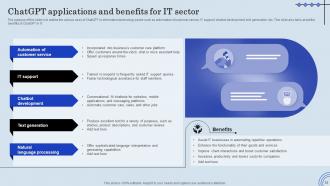
Slide 32: The purpose of this slide is to outline the various uses of ChatGPT in information technology sector.
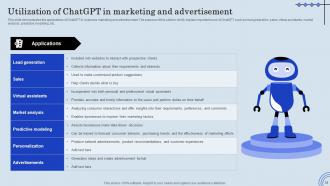
Slide 33: This slide elucidates the applications of ChatGPT in business marketing and advertisement.
Slide 34: This slide exhibits the Key applications of ChatGPT in banking and finance.
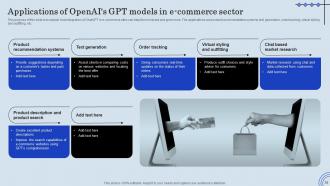
Slide 35: This slide deals with Applications of OpenAI's GPT models in e-commerce sector.
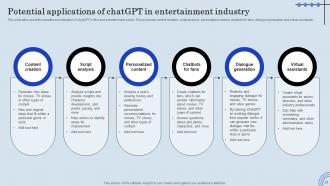
Slide 36: This slide talks about the benefits and utilization of chatGPT in film and entertainment sector.
Slide 37: This slide demonstrates the various applications of chatGPT in the field of cybersecurity.
Slide 38: This slide represents the ways in which chatGPT can help tourists and travel industry in planning trips and vacations.
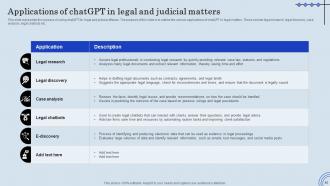
Slide 39: This slide highlights the Applications of chatGPT in legal and judicial matters.
Slide 40: This slide depicts the Heading for the Ideas to be covered further.
Slide 41: This slide discusses the reason behind integration of ChatGPT into various applications.
Slide 42: This slide demonstrates the procedure of implementing OpenAI’s GPT-3 model into various applications.
Slide 43: This slide states the Steps to create chatbot using GPT-3 model.
Slide 44: This slide talks about the advantages and working of GPT-3 based voice assistant.
Slide 45: This slide demonstrates the procedure of implementing ChatGPT into voice assistants.
Slide 46: This slide outlines the vital considerations for the implementation and deployment of ChatGPT model.
Slide 47: This slide portrays the Title for the Components to be discussed in the forth-coming template.
Slide 48: This slide talks about the response received by ChatGPT on social networking sites.
Slide 49: This slide depicts the change in the prices of five artificial intelligence tokens after the launch of OpenAI’s ChatGPT model.
Slide 50: This slide contains the Heading for the Topics to be covered in the upcoming template.
Slide 51: This slide demonstrates the various drawbacks of ChatGPT model and solutions to address those issues.
Slide 52: This slide outlines the Future role of ChatGPT OpenAI model.
Slide 53: This slide displays the Title for the Topics to be discussed next.
Slide 54: This slide represents the checklist to integrate OpenAI's GPT-3 model into web applications.
Slide 55: This slide mentions the Heading for the Components to be covered in the following template.
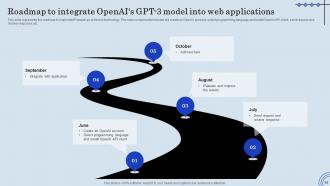
Slide 56: This slide reveals the timeline to integrate OpenAI's GPT-3 model into web applications.
Slide 57: This slide exhibits the Title for the Ideas to be further discussed.
Slide 58: This slide portrays 30-60-90 plan to integrate OpenAI's GPT-3 model into web applications.
Slide 59: This slide elucidates the Heading for the Ideas to be covered next.
Slide 60: This slide represents the roadmap to implement Firewall-as-a-Service technology.
Slide 61: This side indicates the Title for the Components to be discussed further.
Slide 62: This slide demonstrates a case study on the utilization of chatGPT while creating online therapy model.
Slide 63: This is the Icons slide containing all the Icons used in the plan.
Slide 64: This slide is used for showcasing some Additional information.
Slide 65: This slide contains the Post it notes for reminders and deadlines.
Slide 66: This is Meet our team slide. State your team-related information here.
Slide 67: This slide showcases the Timeline of the organization.
Slide 68: This slide elucidates the Venn Diagram.
Slide 69: This is the Puzzle slide with related iamgery.
Slide 70: This slide presents the Circular diagram.
Slide 71: This is Our Goal slide. State your firm's long-term goals here.
Slide 72: This is the Thank you slide for acknowledgement.
ChatGPT Integration Into Web Applications IT Powerpoint Presentation Slides with all 73 slides:
Use our ChatGPT Integration Into Web Applications IT Powerpoint Presentation Slides to effectively help you save your valuable time. They are readymade to fit into any presentation structure.





























FAQs for ChatGPT Integration Into Web Applications IT
ChatGPT integration into business presentations delivers enhanced content creation, real-time audience interaction, automated slide generation, personalized messaging, and streamlined research capabilities. These AI-powered features enable presenters to create more engaging experiences, respond dynamically to audience questions, and develop compelling narratives faster, with many organizations finding significantly improved presentation effectiveness and reduced preparation time.
ChatGPT enhances live presentation engagement by enabling real-time audience Q&A, generating instant polls and interactive content, providing multilingual translation, and offering personalized responses to participant queries. Through AI-powered interaction, presenters can facilitate dynamic discussions, address complex questions immediately, and adapt content based on audience feedback, ultimately delivering more responsive and memorable presentation experiences.
Industries with extensive client communication benefit most from ChatGPT integration in presentations, including financial services, healthcare, consulting, education, and marketing agencies. These sectors leverage AI to streamline content creation, personalize client pitches, and automate routine presentation updates, with many organizations finding that ChatGPT enhances productivity while delivering more engaging, tailored presentations.
ChatGPT assists in creating visually appealing presentation content by generating compelling headlines, crafting persuasive bullet points, and developing structured narrative flows that enhance slide readability. Through intelligent content optimization, organizations streamline their presentation development process, reduce design time, and create more engaging audience experiences, with many marketing teams and sales departments finding that AI-generated content significantly improves their presentation effectiveness.
ChatGPT streamlines presentation research by rapidly synthesizing information from diverse sources, generating relevant talking points, organizing content into logical structures, and creating preliminary outlines based on specific topics or audiences. Through conversational queries, researchers can quickly explore multiple angles, identify key statistics and trends, and develop comprehensive content frameworks, ultimately reducing research time from hours to minutes while ensuring thorough coverage of essential presentation elements.
ChatGPT enables real-time presentation feedback by analyzing audience engagement, suggesting content adjustments, and providing instant recommendations for pacing or clarity improvements. Through natural language processing, presenters can receive immediate insights on audience questions, content effectiveness, and delivery optimization, while educational institutions and corporate training departments find that this technology streamlines feedback loops, enhances presenter confidence, and ultimately delivers more impactful presentations.
ChatGPT streamlines presentation customization by analyzing audience demographics, adapting content tone and complexity, suggesting relevant examples and case studies, and recommending visual elements that resonate with specific groups. Through targeted prompting, presenters can transform technical content for C-suite executives, simplify complex data for general audiences, or tailor messaging for different industries, ultimately delivering more engaging and effective presentations.
Privacy and data security considerations significantly impact ChatGPT integration by requiring encrypted data transmission, compliance with regulations like GDPR, and careful content filtering protocols. Organizations, particularly in healthcare and financial services, must balance AI-enhanced presentations with stringent data protection measures, often implementing secure APIs and local hosting solutions to maintain competitive advantage while safeguarding sensitive information.
**INPUT**: What are some best practices for utilizing ChatGPT to ensure effective communication in presentations? **OUTPUT**: Best practices include crafting specific prompts for audience-tailored content, using ChatGPT to generate compelling opening hooks, structuring clear narrative flows, and refining technical language for accessibility. These approaches streamline presentation development by enhancing message clarity, ensuring consistent tone, and delivering audience-appropriate content, with many presenters finding that strategic AI integration significantly reduces preparation time while improving engagement outcomes. [Word count: 58 words]
Presenters can leverage ChatGPT to craft compelling narratives by generating story structures, developing character-driven scenarios, creating emotional hooks, and refining messaging flow for maximum audience engagement. Through strategic prompting, speakers enhance presentations with personalized anecdotes, industry-specific case studies, and persuasive frameworks, while streamlining content development processes, ultimately delivering more impactful storytelling that resonates with diverse audiences and drives stronger business outcomes.
ChatGPT helps mitigate presentation anxiety by providing practice conversation simulations, generating potential Q&A scenarios, creating structured talking points, and offering real-time feedback on content delivery. Through interactive rehearsal sessions, speakers can anticipate audience questions, refine their messaging, and build confidence in their material, with many professionals finding that this preparation significantly reduces nervousness and enhances overall presentation performance.
Presentation template providers should consider features like AI-powered content generation, automated slide structuring, intelligent design suggestions, real-time collaboration enhancements, and personalized template recommendations when incorporating ChatGPT functionality. These capabilities streamline workflow efficiency by reducing creation time, enhancing creative output, and delivering more targeted user experiences, with many design platforms finding that AI integration ultimately provides significant competitive advantage in an increasingly automated marketplace.
ChatGPT can generate interactive content like audience polls, Q&A segments, scenario-based discussions, and real-time brainstorming prompts that transform static presentations into engaging experiences. Through AI-powered suggestions, presenters can create dynamic elements such as live feedback mechanisms, adaptive content flows, and personalized audience interactions, ultimately delivering more memorable presentations and enhanced audience participation across corporate training, sales pitches, and educational seminars.
ChatGPT limitations in presentation development include occasional factual inaccuracies, lack of real-time data access, generic content generation, inconsistent formatting suggestions, and limited visual design capabilities. While these challenges require human oversight and verification, many organizations find that combining ChatGPT's efficiency with professional review processes streamlines content creation while maintaining quality standards and brand consistency.
Users can measure ChatGPT integration effectiveness through engagement metrics, audience feedback scores, presentation completion rates, time-to-creation measurements, and content quality assessments. Organizations across sectors like consulting, education, and sales increasingly track these KPIs, with many finding that AI-enhanced presentations deliver 40% faster creation times and significantly improved audience retention rates.
-
Like always a great experience with you guys. Always there on the drop of hat to help.
-
A perfect platform for all your presentation needs. Unlimited products at an affordable price.