

Diapositivas de presentación de Powerpoint de TI de ChatGPT




Try Before you Buy Download Free Sample Product
 Impress Your
 Audience
 100%
100% Editable
 Save Hours
 of Time


Chat GPT multitareas seleccionando y expresando naturalmente más de un objetivo a la vez. Tome nuestra plantilla de TI ChatGPT curada profesionalmente. Incluye una introducción, ventajas y características del modelo ChatGPT de OpenAI y analiza el precio y la disponibilidad de su versión mejorada, llamada ChatGPT Pro. Nuestra plataforma ChatGPT representa el funcionamiento y la arquitectura de la tecnología ChatGPT, incluido un modelo de lenguaje grande y un mecanismo de autoatención. Además, demuestra las diversas aplicaciones de ChatGPT en varios dominios, como la educación, la medicina, la investigación, la tecnología de la información, la publicidad, la banca, las finanzas, etc. aprendizaje de ajuste, recompensa y refuerzo. Además, analiza la integración del modelo ChatGPT en las aplicaciones web y las mejores prácticas para una implementación exitosa. Además, nuestra integración de ChatGPT en el módulo de aplicaciones web contiene secciones sobre el impacto de ChatGPT en las redes sociales y tokens de inteligencia artificial. Por último, este chatbot que usa GPT-3 incluye una hoja de ruta, un cronograma, un plan de 30-60-90 días, una lista de verificación para integrar el modelo GPT-3 de OpenAI en las aplicaciones web y un estudio de caso sobre salud mental y colaboración ChatGPT. Obtenga acceso ahora.
People who downloaded this PowerPoint presentation also viewed the following :
Contenido de esta presentación de Powerpoint
Diapositiva 1 : Esta diapositiva presenta ChatGPT (IT). Comience indicando el nombre de su empresa.
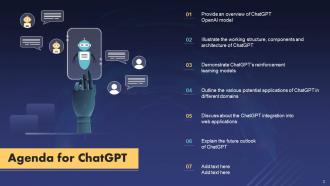
Diapositiva 2 : Esta diapositiva muestra la Agenda de la presentación.
Diapositiva 3 : Esta diapositiva incorpora la Tabla de contenido.
Diapositiva 4 : Esta es otra diapositiva que continúa con la Tabla de contenido.
Diapositiva 5 : esta diapositiva resalta el título de los temas que se discutirán más a fondo.
Diapositiva 6 : Esta diapositiva trata sobre la organización de investigación de inteligencia artificial OpenAI.
Diapositiva 7 : esta diapositiva muestra la historia y la evolución de la organización de investigación de OpenAI.
Diapositiva 8 : esta diapositiva habla sobre los varios fundadores de OpenAI que iniciaron esto para desarrollar inteligencia artificial avanzada.
Diapositiva 9 : esta diapositiva representa las diversas versiones del modelo de transformador preentrenado generativo (GPT).
Diapositiva 10 : esta diapositiva menciona la descripción general del modelo ChatGPT de OpenAI.
Diapositiva 11 : Esta diapositiva ilustra el procedimiento de uso de ChatGPT.
Diapositiva 12 : Esta diapositiva representa la descripción general de ChatGPT pro.
Diapositiva 13 : Esta diapositiva describe las diversas ventajas de utilizar ChatGPT.
Diapositiva 14 : esta diapositiva indica el encabezado de los componentes que se cubrirán en la próxima plantilla.
Diapositiva 15 : Esta diapositiva muestra el diagrama de arquitectura de ChatGPT.
Diapositiva 16 : esta diapositiva destaca los componentes clave del modelo ChatGPT OpenAI.
Diapositiva 17 : esta diapositiva muestra el proceso de trabajo del modelo ChatGPT OpenAI.
Diapositiva 18 : esta diapositiva analiza la descripción general del modelo de trabajo de ChatGPT.
Diapositiva 19 : esta diapositiva habla sobre el entrenamiento del modelo ChatGPT utilizando el procesamiento del lenguaje natural.
Diapositiva 20 : esta diapositiva demuestra el procedimiento de trabajo del mecanismo de autoatención utilizado por el modelo ChatGPT para proporcionar resultados precisos al usuario.
Diapositiva 21 : Esta diapositiva representa el modelo de ajuste fino supervisado del aprendizaje por refuerzo.
Diapositiva 22 : Esta diapositiva muestra el modelo de recompensa del aprendizaje por refuerzo utilizando retroalimentación humana.
Diapositiva 23 : Esta diapositiva destaca el modelo de aprendizaje por refuerzo utilizando retroalimentación humana.
Diapositiva 24 : esta diapositiva habla sobre las técnicas para verificar la efectividad del modelo de aprendizaje por refuerzo.
Diapositiva 25 : esta diapositiva muestra el título de las ideas que se discutirán más a fondo.
Diapositiva 26 : Esta diapositiva analiza las diversas funciones de ChatGPT.
Diapositiva 27 : Esta diapositiva demuestra los diversos métodos para utilizar ChatGPT en las aulas.
Diapositiva 28 : Esta diapositiva muestra los diversos usos de ChatGPT en la industria médica.
Diapositiva 29 : Esta diapositiva representa las diversas aplicaciones de ChatGPT en la creación de trabajos de investigación.
Diapositiva 30 : Esta diapositiva analiza las formas de integrar GPT-3 en la investigación.
Diapositiva 31 : esta diapositiva explica las características de ChatGPT que ayudan a amplificar la calidad del código.
Diapositiva 32 : El propósito de esta diapositiva es describir los diversos usos de ChatGPT en el sector de la tecnología de la información.
Diapositiva 33 : Esta diapositiva explica las aplicaciones de ChatGPT en el marketing y la publicidad empresarial.
Diapositiva 34 : esta diapositiva muestra las aplicaciones clave de ChatGPT en la banca y las finanzas.
Diapositiva 35 : esta diapositiva trata sobre las aplicaciones de los modelos GPT de OpenAI en el sector del comercio electrónico.
Diapositiva 36 : esta diapositiva habla sobre los beneficios y la utilización de chatGPT en el sector del cine y el entretenimiento.
Diapositiva 37 : Esta diapositiva muestra las diversas aplicaciones de chatGPT en el campo de la ciberseguridad.
Diapositiva 38 : Esta diapositiva representa las formas en que chatGPT puede ayudar a los turistas y a la industria de viajes a planificar viajes y vacaciones.
Diapositiva 39 : esta diapositiva destaca las aplicaciones de chatGPT en asuntos legales y judiciales.
Diapositiva 40 : Esta diapositiva muestra el encabezado de las ideas que se tratarán más adelante.
Diapositiva 41 : Esta diapositiva analiza la razón detrás de la integración de ChatGPT en varias aplicaciones.
Diapositiva 42 : Esta diapositiva demuestra el procedimiento de implementación del modelo GPT-3 de OpenAI en varias aplicaciones.
Diapositiva 43 : esta diapositiva indica los pasos para crear un chatbot usando el modelo GPT-3.
Diapositiva 44 : esta diapositiva habla sobre las ventajas y el funcionamiento del asistente de voz basado en GPT-3.
Diapositiva 45 : Esta diapositiva demuestra el procedimiento de implementación de ChatGPT en los asistentes de voz.
Diapositiva 46 : Esta diapositiva describe las consideraciones vitales para la implementación y el despliegue del modelo ChatGPT.
Diapositiva 47 : esta diapositiva muestra el título de los componentes que se discutirán en la próxima plantilla.
Diapositiva 48 : Esta diapositiva habla sobre la respuesta que recibió ChatGPT en los sitios de redes sociales.
Diapositiva 49 : esta diapositiva muestra el cambio en los precios de cinco tokens de inteligencia artificial después del lanzamiento del modelo ChatGPT de OpenAI.
Diapositiva 50 : esta diapositiva contiene el encabezado de los temas que se cubrirán en la próxima plantilla.
Diapositiva 51 : esta diapositiva demuestra los diversos inconvenientes del modelo ChatGPT y las soluciones para abordar esos problemas.
Diapositiva 52 : Esta diapositiva describe el rol futuro del modelo ChatGPT OpenAI.
Diapositiva 53 : esta diapositiva muestra el título de los temas que se discutirán a continuación.
Diapositiva 54 : esta diapositiva representa la lista de verificación para integrar el modelo GPT-3 de OpenAI en las aplicaciones web.
Diapositiva 55 : esta diapositiva menciona el encabezado de los componentes que se cubrirán en la siguiente plantilla.
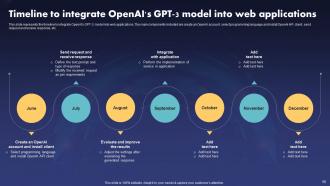
Diapositiva 56 : Esta diapositiva revela la línea de tiempo para integrar el modelo GPT-3 de OpenAI en las aplicaciones web.
Diapositiva 57 : esta diapositiva muestra el título de las ideas que se analizarán más a fondo.
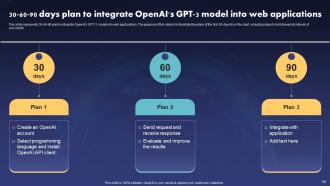
Diapositiva 58 : Esta diapositiva muestra el plan 30-60-90 para integrar el modelo GPT-3 de OpenAI en las aplicaciones web.
Diapositiva 59 : Esta diapositiva aclara el encabezado de las ideas que se tratarán a continuación.
Diapositiva 60 : esta diapositiva representa la hoja de ruta para implementar la tecnología de firewall como servicio.
Diapositiva 61 : este lado indica el título de los componentes que se discutirán más a fondo.
Diapositiva 62 : Esta diapositiva muestra un estudio de caso sobre la utilización de chatGPT al crear un modelo de terapia en línea.
Diapositiva 63 : esta es la diapositiva de iconos que contiene todos los iconos utilizados en el plan.
Diapositiva 64 : esta diapositiva se utiliza para mostrar información adicional.
Diapositiva 65 : esta diapositiva contiene las notas Post-it para recordatorios y fechas límite.
Diapositiva 66 : Esta es la diapositiva Conoce a nuestro equipo. Indique aquí la información relacionada con su equipo.
Diapositiva 67 : Esta diapositiva muestra la línea de tiempo de la organización.
Diapositiva 68 : Esta diapositiva aclara el Diagrama de Venn.
Diapositiva 69 : Esta es la diapositiva del rompecabezas con imágenes relacionadas.
Diapositiva 70 : Esta diapositiva presenta el diagrama circular.
Diapositiva 71 : Esta es la diapositiva Nuestro objetivo. Indique aquí los objetivos a largo plazo de su empresa.
Diapositiva 72 : Esta es la diapositiva de agradecimiento por el reconocimiento.
ChatGPT IT Diapositivas de presentación de Powerpoint con las 77 diapositivas:
Utilice nuestras diapositivas de presentación de Powerpoint de TI de ChatGPT para ayudarlo a ahorrar su valioso tiempo. Están listos para encajar en cualquier estructura de presentación.
-

ChatGPT IT
-
Agenda for ChatGPT
-
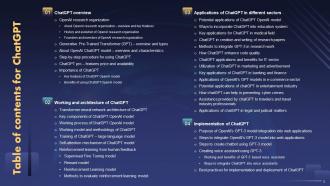
Table of contents for ChatGPT
-
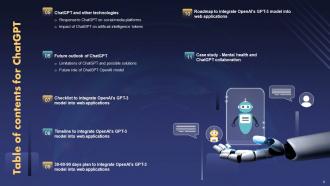
Table of contents for ChatGPT
-
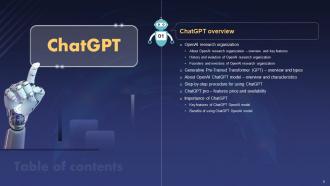
ChatGPT overview
-
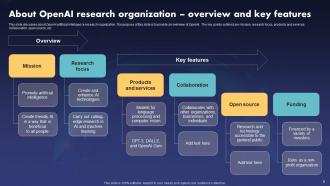
About OpenAI research organization overview and key features
-
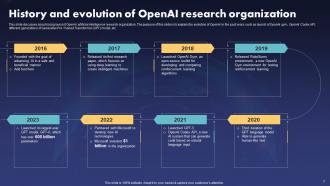
History and evolution of OpenAI research organization
-
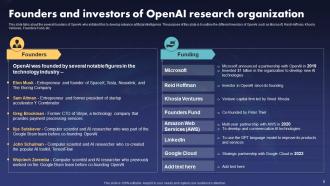
Founders and investors of OpenAI research organization
-
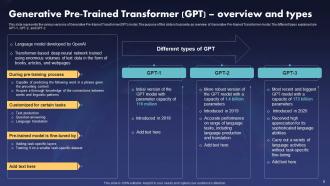
Generative Pre Trained Transformer GPT overview and types
-
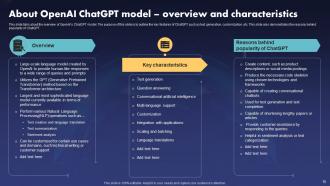
About OpenAI ChatGPT model overview and characteristics
-
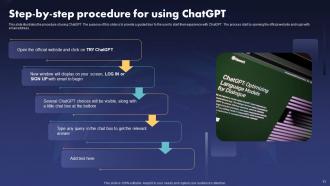
Step by step procedure for using ChatGPT
-
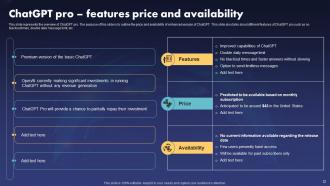
ChatGPT pro features price and availability
-
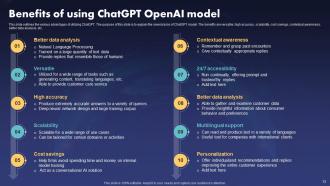
Benefits of using ChatGPT OpenAI model
-
ChatGPT Working and Architecture
-
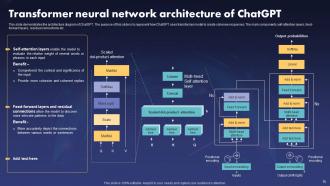
Transformer neural network architecture of ChatGPT
-
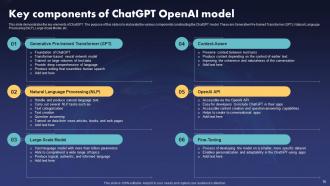
Key components of ChatGPT OpenAI model
-
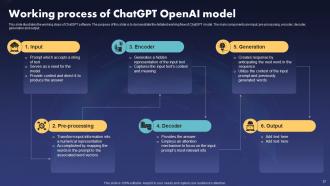
Working process of ChatGPT OpenAI model
-
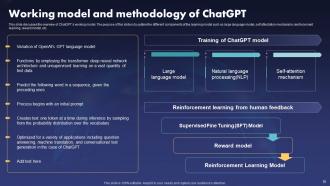
Working model and methodology of ChatGPT
-
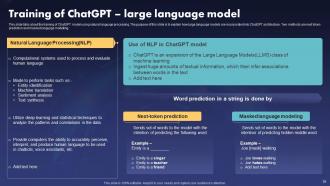
Training of ChatGPT large language model
-
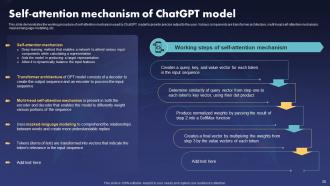
Self attention mechanism of ChatGPT model
-
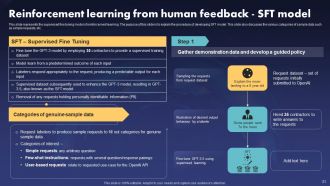
Reinforcement learning from human feedback SFT model
-
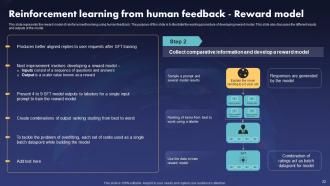
Reinforcement learning from human feedback Reward model
-
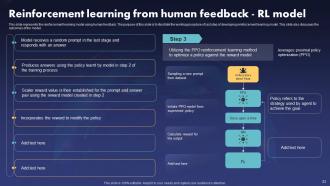
Reinforcement learning from human feedback RL model
-
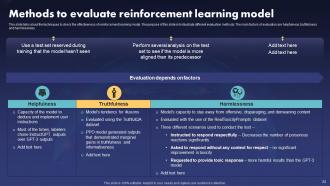
Methods to evaluate reinforcement learning model
-
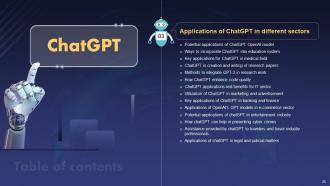
ChatGPT Applications in Different Sectors
-
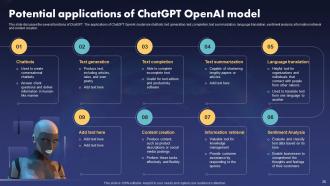
Potential applications of ChatGPT OpenAI model
-

Ways to incorporate ChatGPT into education system
-
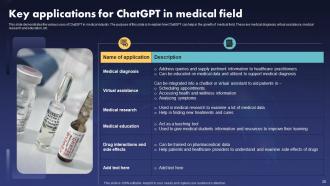
Key applications for ChatGPT in medical field
-
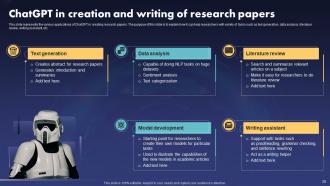
ChatGPT in creation and writing of research papers
-
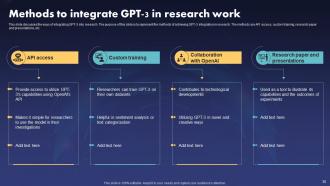
Methods to integrate GPT 3 in research work
-
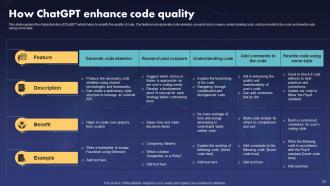
How ChatGPT enhances code quality
-
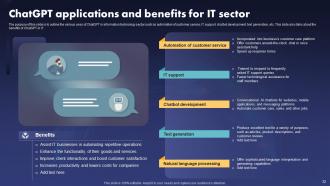
ChatGPT applications and benefits for IT sector
-
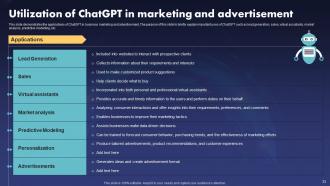
Utilization of ChatGPT in marketing and advertisement
-
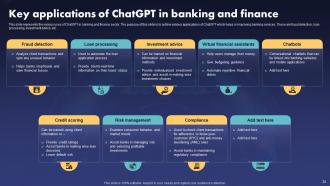
Key applications of ChatGPT in banking and finance
-
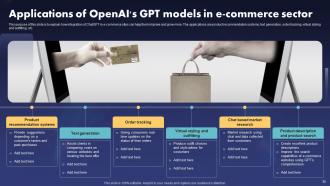
Applications of OpenAI s GPT models in e commerce sector
-
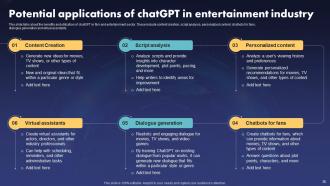
Potential applications of chatGPT in entertainment industry
-
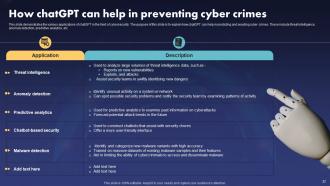
How chatGPT can help in preventing cyber crimes
-
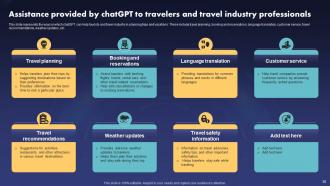
Assistance provided by chatGPT to travelers and travel industry professionals
-
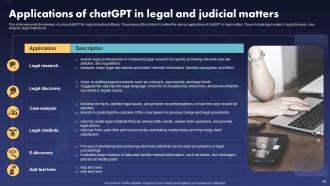
Applications of chatGPT in legal and judicial matters
-
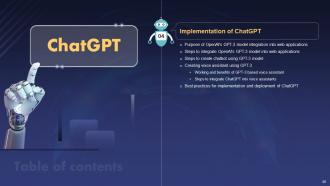
Implementation of ChatGPT
-
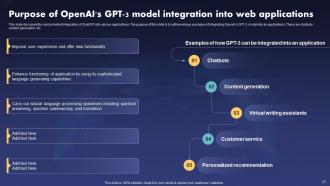
Purpose of OpenAI s GPT 3 model integration into web applications
-
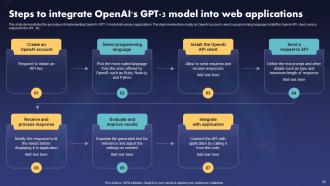
Steps to integrate OpenAI s GPT 3 model into web applications
-
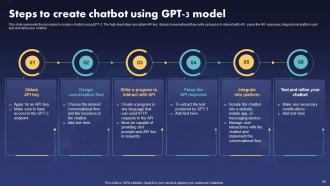
Steps to create chatbot using GPT 3 model
-

Working and benefits of GPT 3 based voice assistant
-
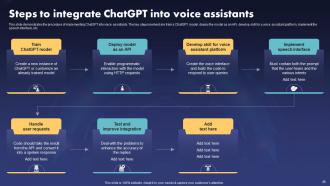
Steps to integrate ChatGPT into voice assistants
-
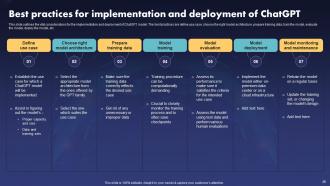
Best practices for implementation and deployment of ChatGPT
-
ChatGPT and other technologies
-
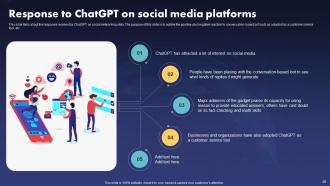
Response to ChatGPT on social media platforms
-
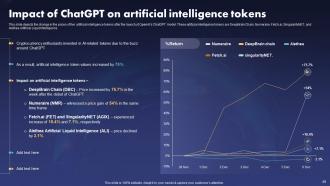
Impact of ChatGPT on artificial intelligence tokens
-
ChatGPT
-
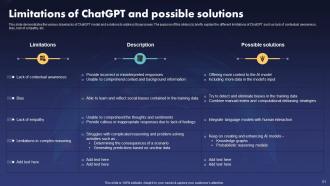
Limitations of ChatGPT and possible solutions
-
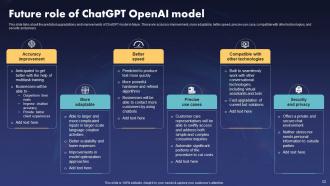
Future role of ChatGPT OpenAI model
-
Checklist to integrate OpenAI s GPT 3 model into web applications
-
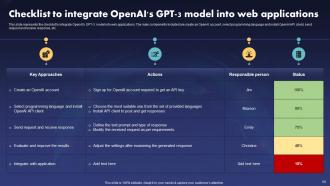
Checklist to integrate OpenAI s GPT 3 model into web applications
-
ChatGPT
-
Timeline to integrate OpenAI s GPT 3 model into web applications
-
ChatGPT
-
Chatgpt IT
-
ChatGPT Roadmap to Integrate OpenAI s GPT 3 Model into Web Applications
-

Roadmap to integrate OpenAI s GPT 3 model into web applications
-
ChatGPT
-

Case study mental health and chatGPT collaboration
-

Icons slide for ChatGPT
-
Additional slides
-
Post it notes
-

Meet our team
-
Timeline
-

Venn
-
Puzzle
-
Circular diagram
-

Our Goal
-
Thank you for watching
-

-

-

-

-

FAQs for ChatGPT IT
Honestly, the biggest game-changer is having something available 24/7 that actually knows what it's talking about. Your customers get instant help with password resets and basic troubleshooting instead of waiting around. It handles the repetitive stuff consistently too - no more Monday morning attitude from tired support reps, lol. Scales way better than hiring more people. What I'd do is pick your 10 most annoying repeat tickets and train it on those first. You'll see your ticket volume drop pretty quick, plus it gets better at sorting issues before they hit your team.
Dude, ChatGPT is honestly a game-changer for coding. I use it constantly for code reviews and generating all that boring boilerplate stuff. It's pretty solid at explaining messy functions to newer devs too. Perfect for drafting docs or when you're completely stuck on some weird bug - which happens to me way too often lol. The coolest part? It translates tech jargon into normal people language for clients. Just double-check its work though, sometimes it gets creative with solutions that don't actually exist. Try it on your next review, you'll wonder how you lived without it.
Honestly, it's been a game-changer for log analysis - just paste in weird network traffic and it'll catch stuff you'd probably miss at 2am when you're half-dead. Great for writing up incident response docs too, which is usually such a pain. Your junior folks will love how it breaks down complex vulnerabilities into normal English instead of security jargon. Oh, and it cranks out decent phishing training content way faster than doing it yourself. Just don't get lazy with verification - still run everything through your actual security tools first. And obviously never paste real sensitive data into it, but you knew that already.
Honestly, we've been using ChatGPT tons for training new people and it's been a game changer. Instead of the usual chaos of scattered wikis and bugging senior devs with basic stuff, people just ask it directly. Works great for explaining weird concepts or building custom learning plans based on what someone already knows. The documentation time savings alone is crazy - like probably 70% of routine questions get handled instantly. My advice? Start small with common support scenarios and see how it goes. I was skeptical at first but damn, it actually works way better than expected.
Yeah, ChatGPT's actually pretty solid for coding stuff. I use it all the time for writing functions, debugging weird errors, or just cranking out boilerplate when I'm feeling lazy. Works well across most languages too. Just don't trust it blindly - sometimes the code looks perfect but has sneaky bugs hiding in there. I learned that the hard way lol. Think of it more like having a really knowledgeable teammate who occasionally gets things wrong. Start small with it first, maybe some basic functions or algorithm explanations. Once you get a feel for where it trips up, you can throw bigger problems at it.
Dude, just throw your raw notes or ticket info at ChatGPT and it'll structure everything into proper technical docs, incident reports, runbooks - whatever you need. Those awful weekly status reports? Takes like 2 minutes now instead of an hour. It's pretty solid at keeping formatting consistent across your whole team too, plus it can turn technical specs into actual user guides people might read. Obviously you gotta review what it spits out since it doesn't know your specific context, but honestly it does most of the grunt work for you.
First things first - create clear rules about what people can and can't do with ChatGPT. Don't let anyone dump customer data or company secrets into it (learned that one the hard way). Train your team on AI bias because honestly, these tools aren't as neutral as they seem. Regular check-ins help you see if people are actually following the rules. Oh, and be upfront with everyone about when you're using AI - transparency matters. Start with a small pilot group first. Way easier to fix problems before the whole company's involved.
Yeah, ChatGPT's got some gaps when it comes to IT stuff. Can't pull real-time data, so don't expect live system updates or current troubleshooting. The training cutoff means newer tech and recent security holes just aren't there. Obviously it can't run actual commands either - probably smart tbh. Sometimes it'll make up technical details or suggest outdated fixes too. I'd use it for brainstorming ideas and general direction, but definitely double-check everything against current docs. And test in dev environments first, not production!
Honestly, ChatGPT's been a game-changer for my support work. I use it for drafting responses to customers - saves me probably an hour daily just on emails. Works great for turning technical stuff into normal people language too. Password resets and basic software problems are perfect starting points. You can dump error logs into it and get decent diagnostic suggestions, plus it'll help write up KB articles from tickets you've already solved. Just double-check everything first though - sometimes it makes up fixes that sound legit but aren't. My boss would kill me if I sent out bogus solutions.
Dude, don't put customer data, passwords, or any company code into ChatGPT - that stuff can get stored or used for training. Make some rules for your team because honestly, people are terrible at remembering this. Strip out identifying details when you can, or use fake data for testing. For really sensitive stuff, maybe look into local AI models instead? I learned this the hard way lol. Just think of ChatGPT like posting on Reddit - would you share that info publicly? If not, keep it out.
Honestly, it's like having a coding buddy who never gets tired of your dumb questions. I use it to debug messy code and break down frameworks I don't get yet. The error message explanations alone are worth it - way better than googling random Stack Overflow threads. You can practice coding challenges or even mock interviews without the pressure. What I love is exploring new tech at my own speed. Maybe try asking it for beginner tutorials on something you've been curious about? Oh, and it won't judge you for asking the same concept three different ways until it clicks.
Microsoft saw their dev teams get 55% more productive after adding it to their tools. GitHub Copilot helped millions of devs code 40% faster too. Stack Overflow had to change their whole policy because ChatGPT was answering questions so well - kinda wild when you think about it. Shopify and Duolingo use it for debugging and documentation stuff. Honestly, I'd just try a small pilot with your team first. See what happens before going all-in.
Honestly, I've been using ChatGPT for project stuff and it's pretty solid. Break down big projects into smaller chunks, set up timelines that actually make sense. It's weirdly good at catching bottlenecks I totally miss - like when I'm too close to see the obvious problems. Feed it your current status and ask what could go wrong or what to tackle next. Also helps write those awkward emails to your boss about why things are delayed (we've all been there). Just be super specific when you ask it stuff. Vague prompts = useless answers. The more details you throw at it, the better.
Honestly, you're gonna run into three big headaches. First off, your security folks will lose their minds over data handling - and they should, since you're basically shipping company info to OpenAI. Rate limits are annoying too, plus the API goes down sometimes at the worst moments. Costs are sneaky though - that's what'll bite you if you're not watching. Oh, and response times are all over the place, which screws with performance. I'd definitely test it out on something small first. Way better to find the weird bugs in a sandbox than when everyone's watching.
Honestly, I use ChatGPT all the time for breaking down confusing tech stuff - like when I was trying to figure out edge computing last month, it was a mess until I asked it to explain it like I'm 5. You can get it to compare new trends to things you already know, or brainstorm how something might work in your setup. It's solid for keeping up with AI/ML developments and security frameworks too. Obviously double-check anything important through real sources, but it's perfect for getting your bearings first. Way better than drowning in white papers right off the bat.
-
Wonderful presentations! This chatgpt PowerPoint templates are a secret gem that gives us a competitive advantage.
-
The acme of professionalism! These IT presentations demonstrate the specialists' dedication to quality and accuracy.
-
A pleasure templates that improved my IT presentation. Extremely pleased!
-
The most beneficial investment for professional presentations. Thank you very much, Slideteam!
-
Aesthetically Pleasing! The ChatGPT PowerPoint presentation is brilliantly crafted, fascinating, and engaging.
-
The presentation highlights ChatGPT's AI magic, which is altering our interactions with technology.
-
Kudos to slides! They saved me hours of work and made my presentations look professional and polished thanks to the pre-designed templates.
-
The ChatGPT slides are fantastic! They made it easier for me to express hard topics, and the audience appreciated the visual appeal.
-
Insightful and empowering! The 'ChatGPT IT' PPT is extremely empowering for IT enthusiasts in my opinion. It's an essential tool for anybody.
-
A fantastic learning tool! The PowerPoint slides 'ChatGPT ' provide a well-organized and systematic introduction to ChatGpt fundamentals. I strongly recommend it for self-paced learning or as a team training resource.
