

Circular flow chart with icons





Try Before you Buy Download Free Sample Product
 Impress Your
 Audience
 100%
100% Editable
 Save Hours
 of Time


Hand folks all the data they desire with our Circular Flow Chart With Icons. It helps brief them on the agenda.
People who downloaded this PowerPoint presentation also viewed the following :
Content of this Powerpoint Presentation
Description:
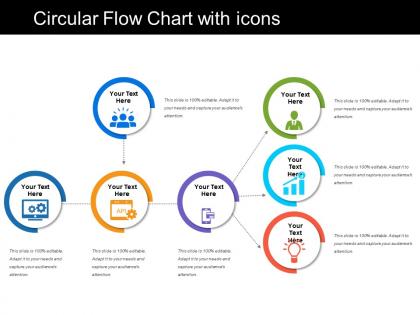
The image shows a PowerPoint slide titled "Circular Flow Chart with icons," which features a circular arrangement of six colored circles, each containing an icon and a placeholder text "Your Text Here." The icons include a group of people, a gear, an API symbol, a graph, a globe, and a heart, suggesting different aspects or functions within a process or system. The circles are interconnected with arrows, indicating a flow or sequence. The note accompanying each circle states that the slide is "100% editable," implying that the content can be customized to fit the presenter’s needs.
Use Cases:
This type of circular flow chart is adaptable for various industries to represent processes, workflows, or systems:
1. Technology:
Use: Illustrating software development lifecycle
Presenter: Software Engineering Manager
Audience: Developers, Project Stakeholders
2. Healthcare:
Use: Showing patient care process
Presenter: Healthcare Administrator
Audience: Medical Professionals, Hospital Staff
3. Education:
Use: Describing the educational curriculum development cycle
Presenter: Academic Coordinator
Audience: Teachers, Educational Planners
4. Marketing:
Use: Outlining a marketing campaign process
Presenter: Marketing Strategist
Audience: Marketing Team, Advertisers
5. Non-Profit:
Use: Demonstrating program development and delivery
Presenter: Program Director
Audience: Donors, Volunteers
6. Human Resources:
Use: Depicting employee lifecycle from hiring to retention
Presenter: HR Manager
Audience: HR Staff, Management
7. Environmental Services:
Use: Mapping out sustainable practices and their impact
Presenter: Environmental Consultant
Audience: Policy Makers, Community Leaders
Circular flow chart with icons with all 5 slides:
Jokes have the desired effect due to our Circular Flow Chart With Icons. Humor gets everyone to feel at ease.

FAQs for Circular flow
Okay so basically you've got your process steps, decision points, and arrows connecting everything in a loop. Start with your beginning point, then add action boxes and those diamond decision things. The whole point is outputs from later steps feed back into earlier ones - that's what makes it cyclical. Honestly, I always map out the linear process first because it's way easier to see the big picture. Then figure out where your loop-back connections actually make sense. Think of it like a recipe that keeps going until you nail the result you want. The arrows are super important since they show how everything flows together.
Dude, circular flowcharts are honestly a game-changer for complex stuff. Everything connects back to itself, so there's no weird dead ends that confuse people. Your audience can actually see the whole cycle instead of trying to piece together scattered steps. They look way better too - I mean, who doesn't prefer a clean circle over some messy linear thing? Perfect for customer journeys or project lifecycles where you want to show it's ongoing, not just a one-time deal. Oh, and here's the cool part: you can start explaining from literally any point on the circle. Makes Q&A sessions so much smoother.
Honestly, go with circular flowcharts when your process keeps looping back on itself. Like continuous improvement stuff or development cycles where you finish one round and jump right back to step one. Linear charts just look messy with feedback arrows zigzagging everywhere - kinda defeats the purpose, you know? They're also great for showing how different steps connect to each other instead of just following a straight line. I learned this the hard way after drawing way too many confusing linear charts. If you catch yourself adding loop-back arrows, that's your cue to switch to circular.
Manufacturing companies absolutely crush it with circular flowcharts - makes total sense since they're tracking how stuff moves through production cycles. Healthcare orgs are obsessed with them for patient care pathways. Tech teams can't get enough either, especially for user flows and software processes. Marketing jumped on this train too for customer journeys (though honestly, sometimes they overcomplicate things). If you're dealing with processes that loop back or connect in weird ways, circular charts beat the hell out of those boring linear ones. Way easier to follow what's actually happening.
Honestly, color schemes can totally make or break your circular flowchart. Pick one main color for your process flow, then maybe add 2-3 accent colors for decision points or weird exceptions. Don't go crazy with the rainbow thing - it'll just look messy. Make sure there's good contrast between your text and background because nobody wants to squint at work documents. Size differences help too. Use arrows or subtle gradients to guide people's eyes around the circle naturally. Oh, and group similar steps with the same colors so it actually makes sense to follow.
Honestly, Lucidchart and Visio are your best bet if you don't mind paying - their templates are solid and everything snaps into place automatically. But Canva's gotten surprisingly good for basic stuff lately. Draw.io is free and works great with Google Drive if you're going that route. PowerPoint's SmartArt can actually handle simple circular flows pretty well too, which most people don't realize. I'd mess around with whatever you already have first though - might save you some cash and you could end up with something decent.
Honestly, circular flowcharts are great for stuff that loops back - like how customers move through your business or feedback cycles. I started using them because regular flowcharts miss those connections where decisions ripple through and eventually circle back to mess with earlier steps. It's wild how much clearer things get when you can actually see the whole cycle. Much easier to catch where things break down or speed up. Just pick one main process you deal with (maybe start simple?) and map how each piece connects to the next. Your team will probably have those lightbulb moments once they visualize it.
Keep your text short and stick to consistent colors for grouping steps. Clockwise arrow flow feels most natural - trust me on this one. Skip the paragraphs and go with bullet points instead. I made a circular disaster once that confused everyone! Different shapes can show which steps matter most. Oh, and test it on someone first. If they're squinting or looking lost, you need to simplify more. Don't pack too much into each section either.
So I've been using circular flowcharts with my kids and they're actually pretty great for showing processes that loop back on themselves. Water cycle, life cycles, that sort of thing. The circular shape really clicks for them - way better than linear ones for these topics. What I do is start simple on the whiteboard, then have them make their own with sticky notes or whatever drawing app they like. They get into creating ones for their morning routines or how recycling works (though honestly, half of them just want to draw the arrows). The key thing is they start seeing how some processes don't really have a "start" or "finish."
Don't cram everything into your flowchart - it'll look like a mess. Make sure your arrows are big enough to actually see where things flow. If some steps are more important than others, size the segments differently. White space is your friend here, seriously. Without it, everything looks super cramped. Also, stick to consistent colors so it doesn't look like a rainbow exploded. One thing I always do is have someone else look at it first - you'd be surprised what doesn't make sense to fresh eyes. Keep it clean and simple.
Honestly, circular flowcharts are game-changers for team communication. You can literally point to where you are in the process instead of writing those painful recap emails nobody reads. Sarah sees exactly how her work connects to Mike's part - no guessing. When stuff breaks down (and it always does), spotting the problem is so much faster. We just huddle around the chart and boom, there's your bottleneck. Way better than digging through random project docs. Stick one on your wall or pull it up during meetings. Trust me on this one.
Circular flowcharts work really well when you're showing stuff that loops back on itself. Customer journeys, project cycles, feedback processes - that kind of thing. Way more interesting than those straight-line diagrams that just go left to right. People's eyes naturally follow the circle, so it feels like a complete story instead of random steps thrown together. Oh, and put your main step at the top if you can. That's where people look first and it'll stick better when they see everything cycling back to it. Honestly makes the whole process feel more... I dunno, intentional?
So basically, put all your players in a circle - suppliers, manufacturers, distributors, retailers, customers. Draw arrows showing data flow between them. Purchase orders go one direction, inventory updates come back, demand forecasts bounce around to different partners. Way better than those confusing linear charts that make everything look one-directional, honestly. The circle thing really shows how info loops back - like customer demand eventually hitting your raw material guys. I'd sketch out your current touchpoints first, then spot where data's getting stuck. Makes the whole mess way easier to visualize.
Dude, those animated circular flowcharts are actually perfect for stuff that repeats - customer journeys, project cycles, whatever. People stay way more focused when things move step by step instead of trying to process everything at once. Also they genuinely look so much better than boring static ones (sorry not sorry). You can control how fast info comes at people, which helps with complicated workflows where timing matters. Great for showing continuous improvement stuff too. Just don't make the animation crazy fast or you'll give people motion sickness lol.
Honestly, getting feedback on your flowchart is clutch. People will straight up tell you where they're getting confused or lost. Maybe your arrows are weird, or you skipped a step entirely. I can't tell you how many times I've seen flowcharts that totally made sense to whoever made them, but everyone else was just... confused? Listen for stuff like "wait, what comes next?" or "how do I loop back?" Those comments show you exactly what's broken. Oh, and definitely test it with coworkers first - saves you from looking dumb later.
-
Colors used are bright and distinctive.
-
Easily Understandable slides.