

Cloud Computing Services Powerpoint Ppt Template Bundles




Try Before you Buy Download Free Sample Product
 Impress Your
 Audience
 100%
100% Editable
 Save Hours
 of Time


Our Cloud Computing Services Powerpoint Ppt Template Bundles are topically designed to provide an attractive backdrop to any subject. Use them to look like a presentation pro.
People who downloaded this PowerPoint presentation also viewed the following :
Cloud Computing Services Powerpoint Ppt Template Bundles with all 17 slides:
Use our Cloud Computing Services Powerpoint Ppt Template Bundles to effectively help you save your valuable time. They are readymade to fit into any presentation structure.







FAQs for Cloud Computing Services Powerpoint
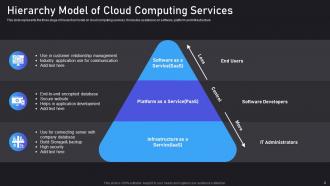
So IaaS gives you raw servers and storage - you handle everything from the OS up. PaaS is more like a dev platform where you just focus on your code, they deal with the underlying stuff. SaaS? That's your Gmail, Slack, whatever - just log in and use it. Think of it like cooking, honestly. IaaS is buying all the ingredients yourself. PaaS is those meal kits (which I actually love btw). SaaS is straight up ordering DoorDash. Really depends on whether your team wants full control or just needs to ship something fast. Most startups I know go PaaS route.
Honestly, just figure out what you're actually trying to do first. Got the tech skills and want total control? IaaS is your thing. PaaS is clutch for dev work - you can focus on building apps instead of dealing with server headaches. SaaS is obvious when you just need something that works right away. Budget matters too, obviously. My take? Don't overthink it. Pick one thing to start with and see how it goes. You can always add more later once you know what you're doing.
So the biggest things to worry about are data breaches and losing control over your stuff once it's on their servers. Account hijacking happens too, plus you're sharing infrastructure with other companies which can get messy. Compliance is another headache - especially if you're in a regulated industry. But honestly? Most cloud providers have way better security than what most small businesses could afford on their own. Just make sure you check their certifications first and don't slack on setting up proper access controls. Oh, and watch out for sketchy APIs.
First figure out what regulations hit your industry - GDPR, HIPAA, SOC 2, whatever applies. AWS, Azure, and Google Cloud already have most certifications built in, which saves you tons of headaches. Honestly, the paperwork part is brutal at first. But focus on the basics: classify your data properly, encrypt everything (in transit and at rest), and set up audit trails. Oh, and don't forget about data residency rules - that one trips people up. Access controls need regular reviews too. My advice? Grab an industry-specific compliance checklist and just work backwards from there.
Honestly, cloud computing is what makes remote work actually work. No more "oops, that file's on my office computer" situations since everything's accessible from anywhere with internet. The best part? Real-time collaboration where you can all edit docs together, hop on video calls without downloading random software, and share huge files instantly. Everything syncs automatically too, so nobody's stuck working on old versions. I mean, my team would be completely lost without it. If your company hasn't jumped on Google Workspace or Microsoft 365 yet, that's definitely where I'd start.
Honestly, cloud computing is perfect for this. Instead of buying a bunch of servers upfront (and probably guessing wrong), you just add capacity with a few clicks when you need it. No waiting around for hardware to show up or dealing with IT setup drama. The billing works like a utility - you pay for what you use, nothing more. When business slows down, you're not stuck with expensive equipment collecting dust. I've seen too many companies blow their budget on servers they barely touch. Start small and grow as needed - way smarter approach.
honestly it really depends what you're working with now, but yeah you'll probably spend less upfront since no hardware purchases. monthly fees though? they get crazy fast if you're not watching usage closely - found that out the hard way lol. you save on maintenance and power bills which is nice. but data transfer costs are sneaky expensive. over-provisioning is another trap. i'd definitely run the numbers comparing your current setup to cloud costs over like 3 years before jumping in. worth doing the math first.
Security and uptime should be your top priorities - don't settle for anything under 99.9% uptime guarantees. Make sure they've got proper encryption and whatever compliance stuff your industry needs. Hidden fees are the worst, so dig into their pricing structure early. Good customer support matters more than you think (seriously, server issues don't wait for business hours). Check if they play nice with your current tools and what their backup situation looks like. Oh, and see how painful it would be to move your data elsewhere if things go south. Just make a list of deal-breakers versus nice extras first.
So hybrid clouds basically use VPN tunnels or direct connections to link your local stuff with cloud resources. Makes everything feel like one network. You'll want to start with the networking layer, then tackle identity management - though that part's honestly a pain if you don't plan it right. APIs help you manage workloads across both sides. My advice? Map out what data absolutely has to stay on-premises first. Then you can figure out what's safe to move cloud-side. The whole setup sounds complex but it's pretty straightforward once you get the basics down.
Honestly, cloud computing is a total game-changer for disaster recovery. You don't need those crazy expensive backup data centers anymore - just replicate everything to different cloud regions with a few clicks. The automation stuff is wild too; failover happens automatically when things break. Only paying for what you actually use instead of keeping dead infrastructure running constantly? That's where the real savings hit. Oh, and definitely start small - pick your most critical systems first and test some cloud backup solutions on those. Way less stressful than trying to migrate everything at once.
Honestly, cloud is amazing for big data stuff. You get crazy compute power without buying a bunch of expensive servers upfront. Need to crunch terabytes? Spin up a cluster in minutes, do your thing, then kill it. Only pay for what you used. AWS EMR and Google BigQuery handle all the messy setup - your data people can actually focus on finding cool patterns instead of babysitting infrastructure. Though I'd definitely start with something small first, maybe a pilot project? Test it out before you go all-in on migrating everything. Way less risky that way.
Look, cloud providers crush traditional servers when it comes to energy efficiency - we're talking like 80% better. Makes sense when you think about it. Instead of your company having dedicated hardware that sits there doing nothing half the time, you're sharing massive optimized resources with tons of other users. Amazon and Google are also throwing serious money at renewable energy (Amazon's climate thing is actually legit). Your carbon footprint per workload drops big time. Honestly? If you want an easy environmental win for your company, cloud migration is probably the lowest-hanging fruit out there.
So basically, SLAs make cloud providers put their money where their mouth is with uptime guarantees - like 99.9% or better. If they screw up and don't hit those numbers, they have to give you credits back. Nobody wants to do that, so they actually invest in backup systems and better monitoring to avoid it. You get more reliable service and compensation when stuff breaks. Oh, and definitely read through the details first - some SLAs are pretty useless depending on what you're running. Make sure it actually covers the things that matter for your setup.
Dude, start by auditing what you're actually running and kill any zombie resources - that'll save you immediately. Right-size your instances and set up auto-scaling for the stuff that fluctuates. Reserved instances are solid for predictable workloads. Honestly, monitoring is everything because costs can get out of hand so fast it's scary. Tag everything so you know which teams are spending what. Oh, and schedule your dev/test environments to shut down at night - why pay for servers nobody's using? Spot instances work great for non-critical tasks too since they're dirt cheap.
Dude, don't get locked into just one cloud provider - I've watched so many companies get totally screwed by this. Use open standards and APIs that work everywhere, not just Amazon or Google's weird proprietary stuff. Your data needs to be exportable without jumping through hoops. Multi-cloud setups are worth considering early on, even if they seem like overkill now. Oh and hybrid approaches work too if that fits better. The whole point is keeping your options open so you're not stuck rebuilding everything if you need to bail.
-
Unique research projects to present in meeting.
-
Easily Understandable slides.