

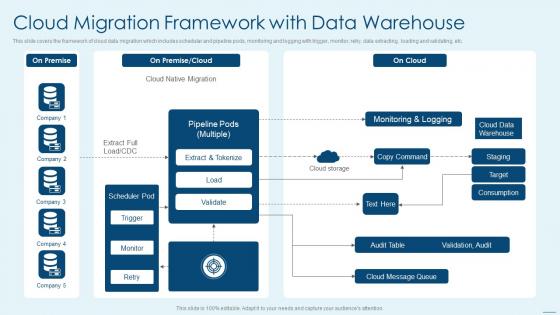
Cloud Migration Framework With Data Warehouse




Try Before you Buy Download Free Sample Product
 Impress Your
 Audience
 100%
100% Editable
 Save Hours
 of Time


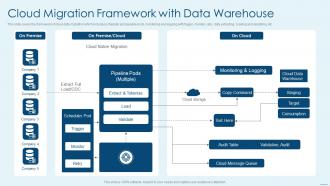
This slide covers the framework of cloud data migration which includes schedular and pipeline pods, monitoring and logging with trigger, monitor, retry, data extracting, loading and validating, etc.
People who downloaded this PowerPoint presentation also viewed the following :
Cloud Migration Framework With Data Warehouse with all 6 slides:
Use our Cloud Migration Framework With Data Warehouse to effectively help you save your valuable time. They are readymade to fit into any presentation structure.





FAQs for Cloud Migration Framework
So there's basically four parts to a decent cloud migration setup. Start with assessment - figure out what infrastructure and dependencies you're actually working with (this part's more tedious than hard). Planning comes next where you map out strategy and timelines. Then the migration itself, which honestly makes everyone nervous. Post-migration you'll need monitoring and optimization to keep things running right. Definitely do a pilot project first though - I've seen too many people jump straight into migrating critical systems and it gets messy fast. Test your approach on something smaller.
First thing - get automated discovery tools running to map everything out. Document all your apps, databases, servers, and how they connect. I guarantee you'll find some random server nobody remembers that's somehow running payroll or something equally critical. Check your performance metrics over time too - CPU, storage, bandwidth usage. Security configs and compliance stuff can't be skipped either. Once you've got this baseline mapped out, you'll actually know what's worth migrating vs. what needs to be put out of its misery. Trust me, half the battle is just knowing what you're dealing with.
So there are 6 cloud migration strategies - the "6 Rs" thing everyone talks about. Rehost is just lift-and-shift, moving stuff as-is. Quick but kinda lazy tbh. Replatform adds small tweaks for better cloud perks. Then there's Refactor where you rebuild everything to be properly cloud-native. Most folks only worry about those three since they're used like 90% of the time. You've also got Repurchase, Retain, and Retire but honestly? Don't stress about memorizing all six right now. Pick based on your timeline and how much chaos your team can handle. I'd start by sorting your apps by how critical they are.
Dude, encrypt everything first - data sitting around AND stuff moving between systems. Use SFTP or HTTPS APIs for transfers. Set up access controls and multi-factor auth before you touch anything (this is where everyone screws up because they get impatient). Test your backup plan ahead of time - trust me, you don't want to discover issues halfway through. Oh, and definitely do a small test run with non-critical data first. Having a solid rollback plan saved my butt once. Better to catch security holes early than deal with a nightmare later.
Dude, automation saves your butt during cloud migrations. It takes care of all the tedious stuff - infrastructure setup, data transfers, testing. Manual migrations are honestly brutal, especially large ones. You'll cut way down on time and screw-ups. The really useful areas? Configuration management, security checks, rollback procedures. Oh, and deployment processes too. Start with whatever's eating up most of your time manually - that's where you'll see the biggest payoff right away. Trust me, your sanity will thank you later.
Definitely go with a phased approach - don't try moving everything at once, that's asking for trouble. Test with your less critical stuff first, then hit the main applications during quiet hours. Blue-green deployment is honestly a lifesaver because you can run both systems side by side until you're sure the new one's solid. Oh, and have rollback plans ready because things go sideways sometimes. Plan your migration windows super carefully and give everyone a heads up about timelines. I've watched teams rush this and it never ends well!
Honestly, costs are probably gonna bite you the hardest - they always spiral way beyond what you expect. Data security keeps everyone up at night too. Your old systems? They'll probably throw a fit when you try connecting them to cloud stuff. Plus your team's gonna push back hard if they're used to doing things a certain way. Downtime's inevitable during the switch, and if you're in a regulated industry, compliance gets messy fast. I'd say map out your current setup first and figure out where you're most vulnerable. That way you're not putting out fires left and right once you actually start moving things over.
Definitely start with the basics - response times, throughput, and whether everything's actually running. Cost tracking is critical too since that's probably why you migrated in the first place. Page load times and error rates matter way more than people think. Users will absolutely roast you if things are slower than before, trust me on that one. Security incidents and compliance stuff should be monitored constantly. Get automated alerts set up immediately after you migrate, then check everything weekly for at least a month. Oh, and compare your new cloud bills to old infrastructure costs - that's always fun.
Honestly, picking your cloud provider is huge - it shapes everything about how you'll migrate and when. AWS has a million tools but it's kind of a maze. Azure's solid if you're already deep in Microsoft land. GCP kills it for anything data-heavy, though I feel like people sleep on it sometimes. Really depends on your current tech stack and budget situation. Do you want them managing everything or prefer staying hands-on? I'd say audit what you've got first before getting distracted by all the cool new features they're pushing.
Discovery tools like CloudScape or Movere are your starting point - you need to map what you're actually working with first. Then grab migration platforms: AWS Migration Hub, Azure Migrate, or Google's Migrate for Compute Engine for the main move. Data migration's where it gets tricky though - AWS DMS and Azure Database Migration Service will save your sanity. Terraform's clutch for infrastructure as code stuff. Oh, and monitoring is huge - most people totally whiff on this part. Set up CloudWatch or Azure Monitor right away, not after things go sideways. Just make sure whatever you pick plays nice with your target platform.
Look, figure out your regulations first - GDPR, HIPAA, whatever applies to your stuff. Then pick cloud regions that actually comply with those rules. Some data just can't go to certain clouds, especially if you're dealing with super regulated finance data (learned that the hard way). Don't save this for later - map it all out before you start moving anything. I'd audit what data you have and what rules it follows. That tells you exactly which services you can use and where your data can actually live. Trust me, doing compliance homework upfront beats scrambling to fix it later.
So you'll definitely need training on cloud basics, security stuff, and whatever tools you're moving to. AWS, Azure, Google Cloud - they all have free cert programs that are actually pretty solid. I'd start there since they won't drain your budget. Hands-on workshops for your specific migration tools are crucial too. Oh, and don't overlook the non-tech people - they need change management training or they'll freak out when everything's different. Honestly, kick this off 2-3 months before launch. Nobody wants to be learning everything while stuff's breaking.
Start by figuring out what could go wrong - data loss, downtime, security stuff, compliance headaches. Yeah, it's a lot to think about. Build specific plans for each problem and make sure someone owns each piece. Your rollback procedures better work when everything's on fire, trust me on that one. Test your backups NOW, not when you desperately need them. Get alerts set up so you catch problems early instead of finding out from angry users. Most important thing? Write down your response plans and make sure your team actually knows them.
So basically a pilot test is like doing a practice round before the real deal. Pick some small, non-critical system and migrate that first - you'll catch issues early when it doesn't matter as much. Your team gets actual hands-on experience, plus stakeholders see you know what you're doing. Honestly, I've seen too many companies skip this step and regret it later. The lessons you learn from that first small migration? Pure gold for planning the bigger stuff. It's way smarter than jumping straight into moving your core systems and crossing your fingers.
So you've got three options with legacy apps: rehost, refactor, or just replace the whole thing. Look, rehosting is super tempting since it's quick - but you're literally just moving your mess to the cloud. Not fixing anything. I'd start by figuring out which apps actually matter to your business. The critical, complex ones? Maybe refactor pieces bit by bit or slowly add cloud features. Apps that are already falling apart anyway should probably get replaced. First though, just make a list of what you've got. Then rank everything by how much risk it poses and how much the business cares about it.
-
A perfect platform for all your presentation needs. Unlimited products at an affordable price.
-
Unique research projects to present in meeting.