

Colored happy sad templates





Try Before you Buy Download Free Sample Product
 Impress Your
 Audience
 100%
100% Editable
 Save Hours
 of Time


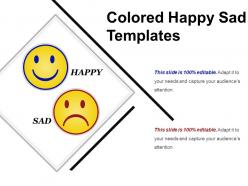
Introducing this Colored Happy Sad Templates that can be used by the business professionals, educators and students to prepare quality rich presentations without any hassle. You can incorporate the slide to depict the pros and cons related to any topic. Also, the concepts explained in such an interesting manner will be remembered by your audience for an extended period. Showcase the benefits and risks associated with a particular project and make a sound decision after proper evaluation. You can also highlight the names of the employees who worked hard this year that will act as a positive motivation for them. On the other side highlight the names of the employees who didn’t perform well which will act as a negative motivation for them and will inspire them to work efficiently for the organization. Our designers have curated this professionally designed PPT slide after thorough research so download the slide now and express your emotions and feelings effortlessly.
People who downloaded this PowerPoint presentation also viewed the following :
Colored happy sad templates with all 5 slides:
Our Colored Happy Sad Templates help make it easy. They ensure they get the difficult aspects.
FAQs for Colored
Colors totally mess with people's heads in presentations. Red screams urgency but can come off super aggressive. Blue? Every boring corporate deck uses it because it screams "trust me, I'm professional." Green feels calming and suggests growth, yellow's energizing but honestly hurts your eyes after a while. Orange comes across friendly, purple says luxury or innovation, black looks sleek but maybe too heavy sometimes. Pick one main color that fits your vibe first. Then throw in some neutrals so you don't blind anyone. Match it to what you're trying to say and who you're talking to - that's really what matters.
Colors are basically mood controllers for your presentations. Warm ones like red and orange get people hyped up and feeling urgent. Blues and greens? Total opposite - they make everyone chill and trust you more. Your brain actually processes colors way faster than reading text, so people remember colorful stuff better. Match your palette to what you're going for. Quarterly results? Blue screams confidence. New product launch? Orange and yellow are your best friends - though honestly, don't go too crazy or you'll blind everyone. It's like having an emotion remote control for your audience.
Color harmony is like your cheat code for making people feel things. Complementary colors (blue and orange) create tension - great for those "buy now" buttons. Analogous ones like blues flowing into greens? Super calming, which is why every doctor's website looks the same lol. I honestly thought this was BS until I tested it myself and saw the difference! Pick your emotion first, then let that guide your colors. Short version: want trust? Go analogous. Need urgency? Complementary all the way. Build everything else around that vibe.
Colors hit so differently across cultures - it's wild how much this matters for templates. Red means passion here but can signal danger OR luck in Asia (confusing much?). Americans see blue as trustworthy while some Latin cultures find it cold. Green's tricky too - nature everywhere, but jealousy vs. prosperity depending on location. Honestly, I'd test your designs with people from whatever culture you're targeting first. Way better than guessing and getting it wrong. Or just play it safe with color combos that work pretty much everywhere.
Honestly, gradients are perfect for this! Map your emotional beats to colors first - angry red fading to calm blue works great. Start slides with dark, intense colors for problems, then gradually warm things up as you get to solutions. The gradient literally shows that emotional journey happening, which I think is brilliant. Even on single slides, subtle gradients hint at complexity or show progression. Oh, and don't overthink the color theory part - trust your gut on what feels right for each transition.
Contrast is your best friend for making stuff pop on colorful templates. Dark text on light backgrounds, bright accents against softer colors - that's how you make people look where you want them to. Your eye just goes there automatically. But here's the thing - you can't go crazy with it everywhere or it gets messy. Save the high contrast for what actually matters. Headlines, buttons, important data. I always do this squint test (sounds weird but works) - squint at your design and see what still stands out. Those are your winners.
Oh man, stick to like 2-3 colors tops! I made this horrific rainbow presentation once and it was... yikes. Bold colors should be for your most important stuff only. Everything else? Keep it neutral. Also test the contrast by squinting at your slides - sounds weird but if text disappears, nobody's gonna be able to read it from the back row. Trust me on this one. Your colors should guide people's eyes, not make them fight each other for attention. Way better than giving everyone a migraine!
Honestly, just pick colors that match the vibe you're going for. Warm ones like red and orange get people pumped, blues and greens are more chill and trustworthy. I'm obsessed with browsing Pinterest for inspo - there's so much good stuff there from actual pros. Don't go crazy though, stick to 2-3 main colors plus some neutrals. Make sure you've got enough contrast or people won't be able to read anything. Oh, and definitely check how it looks on different screens because colors can be super weird depending on the device. Coolors is clutch for generating palettes that actually work together.
Check your color contrast first - you need at least 4.5:1 between text and background. WebAIM has a good contrast checker for this. But here's the thing: don't just use color for emotions. Add icons or text labels too. I made this mistake once and my colorblind coworker couldn't tell "calm" from "anxious" at all - awkward! Test with screen readers and see how it looks in grayscale. Basically you want multiple ways to show the same info, not just relying on color. That way everyone can actually use your templates.
Okay so basically red makes people feel urgent and passionate, blue's all about trust and being chill. Green screams growth and health vibes. Pick what emotion you're going for first, then match your colors to that. Financial stuff? Blue backgrounds work amazing. Want people to click something NOW? Red buttons are clutch. Yellow's super attention-grabbing but honestly can be way too much - I overdid it on this one project and it looked terrible lol. Purple usually feels fancy or creative. Don't overthink it though. Just choose one main feeling you want and build from there. Works every time.
Color can totally guide people through your story's emotional journey. Warm reds and oranges? Perfect for tension and conflict scenes. Cool blues and greens work better when you want that calm, resolution vibe. I've watched too many presentations where people randomly switch colors - it's so distracting honestly. Map your colors to match the emotional beats instead. Creates this subconscious flow that just works. Pick maybe 3-4 colors that fit your story's mood and stick with them for each section. Oh, and don't overthink it too much.
Honestly, Canva's probably your best bet to start - it's crazy easy and has tons of templates you can mess with. PowerPoint actually has some solid color tools too that people totally sleep on. Adobe Express is another good beginner option. Once you get the hang of it, Figma's really nice since you can work on stuff anywhere in your browser. Adobe Creative Suite is obviously the gold standard if you want to go full designer mode, but that's like... a lot. Oh, and Illustrator can be kind of a pain to learn at first. I'd mess around with Canva first, see what kind of vibe you're going for, then maybe upgrade later.
Start with your brand colors - that's where everything should begin. Pull those hex codes first, then think about what emotions you want to hit. Say your brand is deep blue... maybe throw in some warm orange for energy or soft green when you're talking growth. Honestly, I think most people overthink this part. Just pick 2-3 colors that complement your brand without looking totally random. The whole point is keeping that brand recognition while still using color psychology to actually connect with your audience. Don't go crazy - you're not redesigning your entire identity here.
So there's this cool thing happening with emotional color mapping - basically assigning specific colors to different feelings. Like warm corals for urgency instead of those jarring reds, or sage greens for trust stuff. I'm honestly surprised it took this long to catch on. Accessibility-first palettes are huge too. High-contrast combos that colorblind users can actually see? About time. Then there's gradient psychology - subtle transitions that pull your eye through slides naturally. My advice? Find templates with both vibrant and muted versions of the same palette. You can amp up the intensity for energetic crowds or tone it down for more serious presentations.
Warm colors like red and orange are perfect for grabbing attention on your key points. For the complex stuff, stick with cool blues and greens - they keep people chill and focused. I swear, nothing kills a presentation faster than boring gray slides everywhere. Yellow's your friend for highlighting takeaways since it makes people more alert. Purple works when you're doing brainstorming sessions or pitching creative ideas. Just don't go overboard - pick maybe 2-3 colors tops and use them consistently. Creates these visual anchors that help people actually remember what you said later.
-
Awesomely designed templates, Easy to understand.
-
Excellent template with unique design.