

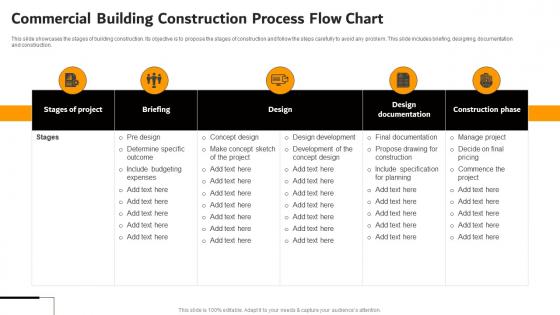
Commercial Building Construction Process Flow Chart




Try Before you Buy Download Free Sample Product
 Impress Your
 Audience
 100%
100% Editable
 Save Hours
 of Time


This slide showcases the stages of building construction. Its objective is to propose the stages of construction and follow the steps carefully to avoid any problem. This slide includes briefing, designing, documentation and construction.
People who downloaded this PowerPoint presentation also viewed the following :
Commercial Building Construction Process Flow Chart with all 9 slides:
Use our Commercial Building Construction Process Flow Chart to effectively help you save your valuable time. They are readymade to fit into any presentation structure.








FAQs for Commercial Building Construction
So basically you've got three main chunks - pre-construction, the actual building part, and wrapping everything up. First part is all the boring paperwork stuff like permits, designs, feasibility studies. Then comes the fun part - site prep, pouring foundation, framing, all your MEP systems, finishing touches. Final phase is inspections, commissioning, handing over keys. TBH the flowcharts look crazy complicated when you first see them! Each section branches out into tons of smaller steps and decision points. You should probably find one that matches your project type since residential vs commercial vs infrastructure are pretty different beasts.
So basically, a construction flowchart is like having a bird's eye view of your entire project. You can see which tasks depend on what, spot scheduling conflicts before they bite you, and figure out when different teams need to work together. Honestly, it's a lifesaver when clients start asking why things are running behind - you just show them exactly where the holdup is. Resource planning gets so much easier too since you're not trying to keep track of everything in your head. My advice? Map out the major phases of whatever project you're working on right now. You'll probably catch a bunch of inefficiencies you didn't even realize were there.
So construction flowcharts are pretty straightforward - you've got rectangles for actual tasks, diamonds for decision points, and circles for start/stop. Arrows show which way things flow. Most of the time that's all you need, though some teams go overboard with fancy symbols (honestly kind of annoying when you're just trying to follow the process). I'd stick with the basics since your whole crew needs to read these things quickly. The simpler the better - nobody wants to decode some complicated diagram when there's work to do.
So basically you want the longest chain of tasks that can't be delayed without screwing up your whole timeline. Map out all the different routes through your project, then add up how long each path takes. Whichever one has the highest total - that's your critical path. Honestly, doing this by hand is kind of a pain, but any decent project software will calculate it for you automatically. Those are the tasks you really need to babysit because if they slip, your entire deadline slips with them. Everything else has some wiggle room.
Dude, visuals are a game changer for construction projects. Most people just can't wrap their heads around dense technical docs - but show them a flowchart? Boom, they get it instantly. Clients, subs, everyone can see how things connect and when stuff needs to happen. I always make color-coded diagrams for each phase now. Honestly saves me so many headaches later when people ask "wait, who's doing what?" Your meetings will actually be useful instead of just... confusing rambling. Plus most of us learn better visually anyway, so you're working with human nature instead of against it.
Just make your flowchart match what you're actually building. Residential stuff is way more straightforward - foundation, framing, utilities, then finishing touches. Commercial projects? Total different beast with zoning headaches, ADA requirements, and fire inspections everywhere. I've watched people mess this up by using cookie-cutter templates for everything. Don't do that. Residential lets you skip a lot of the regulatory nonsense that commercial deals with. Figure out what approvals you actually need first, then build your workflow around those pain points. Way easier than trying to force some generic process.
Honestly, I'd go with Lucidchart first. Way easier to share with your team and the collaboration features actually work well. Microsoft Visio is solid too, especially if you're already stuck in the Microsoft ecosystem - but it's pricier. Both have construction templates that'll save you tons of time vs starting from scratch. There's also draw.io if budget's tight, though you'll be building everything manually. My buddy used Lucidchart for his last project and swears by it. I'd just grab their free trial and see if it clicks - worst case you're out like 20 minutes of setup time.
Dude, construction flowcharts are honestly a lifesaver. You can see where everything connects and catch problems way before they screw you over. The best part? When something goes wrong, you don't have to fumble around explaining it to the boss - just point at the chart. I learned this the hard way on my first big project. These things help you spot scheduling conflicts and bottlenecks that'll kill your timeline. Plus your crew won't skip safety stuff when deadlines get crazy. Just start simple - map out the main phases first, then mark where decisions could go either way.
You really need everyone on board, or your flowchart just becomes another file nobody looks at. Get your project managers, contractors, engineers - even clients if possible - involved from the start. They'll spot stuff you'd totally miss sitting at your desk. Plus people actually follow processes when they helped build them, which honestly makes sense if you think about it. The different viewpoints help catch bottlenecks before they bite you later. I'd say identify your key people early and do some collaborative workshops to map everything out together. Way easier than trying to fix problems after the fact.
Don't just stick safety stuff at the start - scatter checkpoints throughout as decision points. I always use red for those so they jump out (plus it looks way better). Before any risky steps, throw in mandatory briefings and PPE checks. Each safety protocol needs clear yes/no paths where "no" sends you back to fix whatever's wrong, not forward. Honestly, the biggest mistake is treating safety like an afterthought instead of building it into the actual workflow. Start with your sketchiest processes first - that's where you'll catch the most problems anyway.
Honestly, scope creep is gonna be your biggest nightmare - the second you finish that flowchart, someone's adding another approval step. Stakeholder buy-in is tough too. Construction crews want all the nitty-gritty details while execs just want the high-level view, so you're constantly trying to hit that sweet spot. Getting everyone's input is exhausting - architects, contractors, PMs all have different ideas about how things should work. Oh, and definitely map out what you're currently doing first. Way easier to tweak something that exists than start from scratch. Trust me on that one!
So flowcharts basically show you when you'll need stuff and where - super helpful for catching conflicts before they bite you. Like if two crews need the same crane at once, you'll see it coming. Dependencies become obvious too, so delays don't blindside you with resource crunches later. Way better than juggling it all mentally (trust me on this one). The visual aspect makes sharing equipment between phases actually doable to spot. I'd map your critical path first, then add resource needs on top. You'll immediately see the messy spots that need fixing.
So there's actually tons of useful stuff you can pull from those flow charts. Cycle times between phases are huge - shows you where things drag. Resource utilization rates too. Honestly, critical path analysis is probably the most valuable thing you'll get out of it since it shows exactly which delays will screw your whole timeline. Also track task dependencies and workforce allocation. Oh, and look for spots where you can run work parallel instead of sequential - saves tons of time. I'd start with your longest sequences first, then work backwards through the shorter ones.
Honestly, construction flowcharts are game-changers because they get everyone on the same page visually. Instead of your electrical crew showing up when the framers are still working, everyone can see exactly when their part starts. Architects, engineers, contractors - they're all looking at one roadmap instead of making assumptions. The handoffs become super clear, and you avoid those expensive "oh crap, we weren't ready for you yet" moments. I learned this the hard way on a bathroom reno last year. Get your team leads together to review it before anything starts - trust me on this one.
Dude, flowcharts are honestly a game-changer for training new hires. Visual learners pick this stuff up way faster than trying to wade through boring manuals. I use them in safety meetings to map out task sequences and flag where hazards might show up. Perfect for complex stuff like concrete pours or when multiple trades need to coordinate. Post simple versions around work areas as quick references. For toolbox talks, the detailed ones work great when you're walking through procedures step-by-step. Oh, and definitely laminate copies if they're going outside - learned that one the hard way!
-
SlideTeam is my one-stop solution for all the presentation needs. Their templates have beautiful designs that are worth every penny!
-
The team is highly dedicated and professional. They deliver their work on time and with perfection.